Solved Contacts Missing From Navigation Pane

jsquareg

New member
Power User
Local time
11:44 PM
Messages
400
I don't need to access my Contacts list in Office 2010 very often. I just noticed today that the text entry for Contacts was missing from the Navigation pane. Instead, there was a small icon in the lower right corner of the pane for Contacts. On all my other machines the text entry is present. I've no idea when the text was replace by the icon or why -- it could have been weeks ago.

Will someone please tell me how to get the text entry back?

Thank you very much
 
Last edited:

My Computer

Computer type
PC/Desktop
Computer Manufacturer/Model Number
Dell XPS-8500
OS
Windows 7 Home Premium (Retail) Full version - With SP1
CPU
3.10 Gig Intel Core i5-3350P
Motherboard
Dell 0NW73C A00
Memory
8192 Megabytes Usable Installed Memory
Monitor(s) Displays
Samsung SyncMaster [Monitor] (19.1"vis, s/n HVELA10194, Octo
Screen Resolution
1024 X 768
Hard Drives
INTEL SSDSA2CW120G3 ATA Device [Hard drive] (120.03 GB)
INTEL SSDSA2CW080G3 ATA Device [Hard drive] (80.02 GB)
Keyboard
HID Keyboard Device (HP)
Mouse
Dell (came with computer)
Internet Speed
cox high speed
Other Info
The above taken with Bel Arc Advisor
Hi.

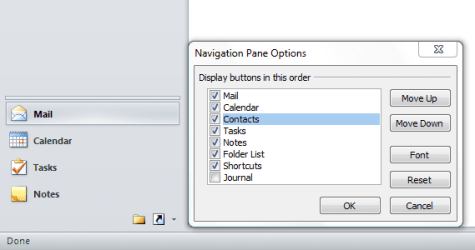
Could you try clicking that small arrow which says Configure buttons and check if contacts is tick marked?

Attachment as reference.

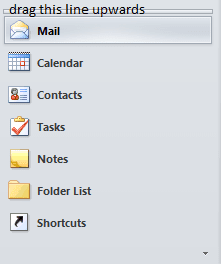
Another thing could be the height was pushed downwards. Drag it up and see if the text comes back.
 

Attachments

  • Capture.PNG
    Capture.PNG
    12.7 KB · Views: 3

My Computer

Computer type
PC/Desktop
Computer Manufacturer/Model Number
Self assembled
OS
Windows 10 Home 64Bit
CPU
Intel Core i5 10400 @ 2.90GHz
Motherboard
Intel Corporation DG41WV (PROCESSOR)
Memory
8.00GB Single-Channel Unknown @ 1329MHz (16-20-20-38)
Sound Card
Realtek High Definition Audio
Monitor(s) Displays
DELL E170S
Screen Resolution
1280x1024 pixels
Hard Drives
931GB TOSHIBA DT01ACA100 (SATA)
238GB TEAM TM8PS7256G (SATA SSD)
Case
Nothing Fancy
Cooling
Fans
Keyboard
A4 Tech Co LTD
Mouse
A4 Tech Co Ltd/Logitech
Internet Speed
25 Mbps
Hi.

Could you try clicking that small arrow which says Configure buttons and check if contacts is tick marked?

Attachment as reference.

Another thing could be the height was pushed downwards. Drag it up and see if the text comes back.

Thank you.

Sure, I did that straight away and it was clicked. Removed the click but still no text so I re-clicked it.
 

My Computer

Computer type
PC/Desktop
Computer Manufacturer/Model Number
Dell XPS-8500
OS
Windows 7 Home Premium (Retail) Full version - With SP1
CPU
3.10 Gig Intel Core i5-3350P
Motherboard
Dell 0NW73C A00
Memory
8192 Megabytes Usable Installed Memory
Monitor(s) Displays
Samsung SyncMaster [Monitor] (19.1"vis, s/n HVELA10194, Octo
Screen Resolution
1024 X 768
Hard Drives
INTEL SSDSA2CW120G3 ATA Device [Hard drive] (120.03 GB)
INTEL SSDSA2CW080G3 ATA Device [Hard drive] (80.02 GB)
Keyboard
HID Keyboard Device (HP)
Mouse
Dell (came with computer)
Internet Speed
cox high speed
Other Info
The above taken with Bel Arc Advisor
Tried dragging the dash upwards?
 

Attachments

  • Capture2.PNG
    Capture2.PNG
    4.6 KB · Views: 77

My Computer

Computer type
PC/Desktop
Computer Manufacturer/Model Number
Self assembled
OS
Windows 10 Home 64Bit
CPU
Intel Core i5 10400 @ 2.90GHz
Motherboard
Intel Corporation DG41WV (PROCESSOR)
Memory
8.00GB Single-Channel Unknown @ 1329MHz (16-20-20-38)
Sound Card
Realtek High Definition Audio
Monitor(s) Displays
DELL E170S
Screen Resolution
1280x1024 pixels
Hard Drives
931GB TOSHIBA DT01ACA100 (SATA)
238GB TEAM TM8PS7256G (SATA SSD)
Case
Nothing Fancy
Cooling
Fans
Keyboard
A4 Tech Co LTD
Mouse
A4 Tech Co Ltd/Logitech
Internet Speed
25 Mbps
Thanks KoolKat77.

Neither of your suggestions did the trick but using 'show more buttons' in Navigation pane options' did.

Thanks for prodding me in the right directions.
 

My Computer

Computer type
PC/Desktop
Computer Manufacturer/Model Number
Dell XPS-8500
OS
Windows 7 Home Premium (Retail) Full version - With SP1
CPU
3.10 Gig Intel Core i5-3350P
Motherboard
Dell 0NW73C A00
Memory
8192 Megabytes Usable Installed Memory
Monitor(s) Displays
Samsung SyncMaster [Monitor] (19.1"vis, s/n HVELA10194, Octo
Screen Resolution
1024 X 768
Hard Drives
INTEL SSDSA2CW120G3 ATA Device [Hard drive] (120.03 GB)
INTEL SSDSA2CW080G3 ATA Device [Hard drive] (80.02 GB)
Keyboard
HID Keyboard Device (HP)
Mouse
Dell (came with computer)
Internet Speed
cox high speed
Other Info
The above taken with Bel Arc Advisor
Alright.

Thanks for posting your fix. :)
 

My Computer

Computer type
PC/Desktop
Computer Manufacturer/Model Number
Self assembled
OS
Windows 10 Home 64Bit
CPU
Intel Core i5 10400 @ 2.90GHz
Motherboard
Intel Corporation DG41WV (PROCESSOR)
Memory
8.00GB Single-Channel Unknown @ 1329MHz (16-20-20-38)
Sound Card
Realtek High Definition Audio
Monitor(s) Displays
DELL E170S
Screen Resolution
1280x1024 pixels
Hard Drives
931GB TOSHIBA DT01ACA100 (SATA)
238GB TEAM TM8PS7256G (SATA SSD)
Case
Nothing Fancy
Cooling
Fans
Keyboard
A4 Tech Co LTD
Mouse
A4 Tech Co Ltd/Logitech
Internet Speed
25 Mbps
Back
Top