Favorites - Add or Remove from Navigation Pane

How to Add or Remove Favorites from Navigation Pane in Windows 7


   Information
This tutorial will show you how to add or remove the Favorites folder in the Windows Explorer Navigation Pane in Windows 7.

   Tip
The default folder for Favorites is the Links folder located at the location below.

C:\Users\(user-name)\Links


   Warning

  • You can only do this while logged into an administrator account.
  • This will affect all user account's on the computer.
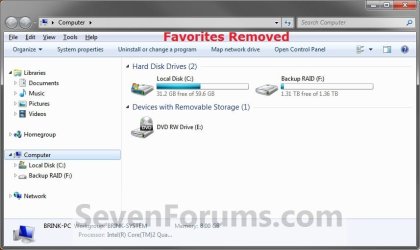
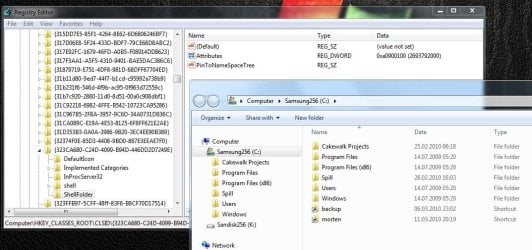
EXAMPLE: Favorites in Navigation Pane
NOTE: This is the Favorites group added (default) (left screenshot below) and removed (right screenshot below) from the Navigation Pane.
Default.jpg

Removed.jpg

Here's How:
1. Open the Start Menu and type regedit.exe in the search line, then press enter.

2. If prompted by UAC, then click on Yes.

3. In Regedit, go to the location below: (See screenshot below step 4)
Code:
HKEY\CLASSES_ROOT\CLSID\{323CA680-C24D-4099-B94D-446DD2D7249E}\ShellFolder
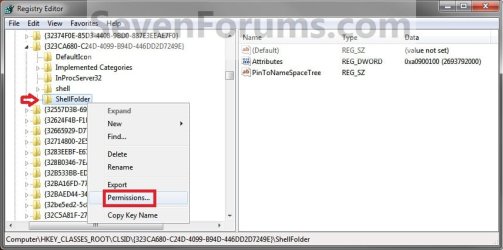
4. In the left pane of regedit, right click on the ShellFolder key and click on Permissions. (See screenshot below)
Step1.jpg
5. At the top, select the Administrators group. At the bottom, check the Allow box to the right of Full Control and click on OK. (See screenshot below)
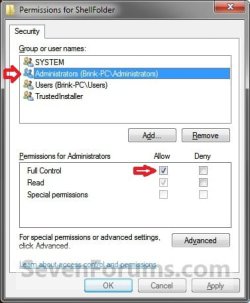
Step2.jpg
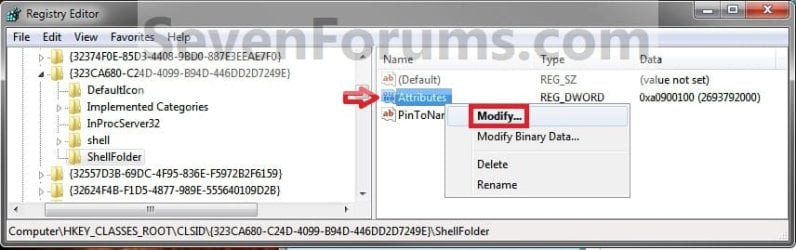
6. In the right pane of regedit, right click on Attributes and click on Modify. (See screenshot below)
Step3.jpg
7. To Add Favorites to the Navigation Pane
NOTE: This is the default setting.
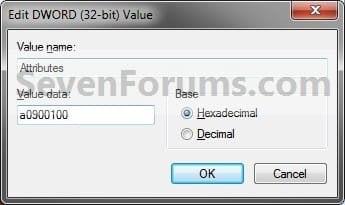
A) Type in a0900100 and click on OK. (see screenshot below)
Step4.jpg
B) Go to step 9.
8. To Remove Favorites from the Navigation Pane
A) Type in a9400100 and click on OK. (see screenshot below)
Step5.jpg
9. If you have 64-bit Windows 7 Installed
   Note
CREDIT TO: Kookster for this addition.

To also add or remove Favorites from the "Open" and "Save as" type windows as well in 64-bit Windows 7, you will also need to do this step.

If you have a 32-bit Windows 7 installed, then skip this step since doing steps 1 to 7/8 will add or remove Favorites from the "Open" and "Save as" type windows as well.

A) In Regedit, go to the location below:
Code:
HKEY_LOCAL_MACHINE\SOFTWARE\Wow6432Node\Classes\CLSID\{323CA680-C24D-4099-B94D-446DD2D7249E}\ShellFolder
B) Repeat steps 4 to 7/8 above.
10. Close regedit.

11. Restart the computer to fully apply.
That's it,
Shawn


Last edited:
screenshot.jpg
here is the screenshot

by the way, removing the "Favorites" makes Firefox and internet Explorer crash when trying to save webpages.
are you able to go 'file-->save as' in internet explorer 10 on windows 7 64bit?
 

My Computer My Computer

At a glance

windows 7
OS
windows 7
I don't have that issue with IE10 or Firefox.

Everything looks fine there. Did you have any luck using Find and Find Next from my previous post to see if you had a stray setting?
 

My Computer My Computer

At a glance

64-bit Windows 11 Pro for WorkstationsIntel i7-8700K OC'd to 5 GHz64 GB (4x16GB) G.SKILL TridentZ RGB DDR4 3600...ASUS ROG-STRIX-GTX1080TI-O11G-GAMING
Computer type
PC/Desktop
Computer Manufacturer/Model Number
Self built custom
OS
64-bit Windows 11 Pro for Workstations
CPU
Intel i7-8700K OC'd to 5 GHz
Motherboard
ASUS ROG Maximus XI Formula Z390
Memory
64 GB (4x16GB) G.SKILL TridentZ RGB DDR4 3600 MHz
Graphics Card(s)
ASUS ROG-STRIX-GTX1080TI-O11G-GAMING
Sound Card
Integrated
Monitor(s) Displays
2 x Samsung Odyssey G7 27"
Screen Resolution
2560x1440
Hard Drives
1TB Samsung 990 PRO M.2,
4TB Samsung 990 PRO PRO M.2,
TerraMaster F8 SSD Plus NAS
PSU
Seasonic Prime Titanium 850W
Case
Thermaltake Core P3
Cooling
Corsair Hydro H115i
Keyboard
Logitech wireless K800
Mouse
Logitech MX Master 4
Internet Speed
2 Gb/s Download and 100 Mb/s Upload
Antivirus
Malwarebyte Anti-Malware Premium
Browser
Google Chrome
Other Info
Logitech Z625 speaker system,
Logitech BRIO 4K Pro webcam,
HP Color LaserJet Pro MFP M477fdn,
APC SMART-UPS RT 1000 XL - SURT1000XLI,
Galaxy S23 Plus phone
they were all at a0900100, but the favorites wont come back...
I guess something is corrupted somewhere ..very odd
 

My Computer My Computer

At a glance

windows 7
OS
windows 7
Well, if you have a restore point dated before Favorites was removed available, then you could do a system restore using that restore point to hopefully restore it.
 

My Computer My Computer

At a glance

64-bit Windows 11 Pro for WorkstationsIntel i7-8700K OC'd to 5 GHz64 GB (4x16GB) G.SKILL TridentZ RGB DDR4 3600...ASUS ROG-STRIX-GTX1080TI-O11G-GAMING
Computer type
PC/Desktop
Computer Manufacturer/Model Number
Self built custom
OS
64-bit Windows 11 Pro for Workstations
CPU
Intel i7-8700K OC'd to 5 GHz
Motherboard
ASUS ROG Maximus XI Formula Z390
Memory
64 GB (4x16GB) G.SKILL TridentZ RGB DDR4 3600 MHz
Graphics Card(s)
ASUS ROG-STRIX-GTX1080TI-O11G-GAMING
Sound Card
Integrated
Monitor(s) Displays
2 x Samsung Odyssey G7 27"
Screen Resolution
2560x1440
Hard Drives
1TB Samsung 990 PRO M.2,
4TB Samsung 990 PRO PRO M.2,
TerraMaster F8 SSD Plus NAS
PSU
Seasonic Prime Titanium 850W
Case
Thermaltake Core P3
Cooling
Corsair Hydro H115i
Keyboard
Logitech wireless K800
Mouse
Logitech MX Master 4
Internet Speed
2 Gb/s Download and 100 Mb/s Upload
Antivirus
Malwarebyte Anti-Malware Premium
Browser
Google Chrome
Other Info
Logitech Z625 speaker system,
Logitech BRIO 4K Pro webcam,
HP Color LaserJet Pro MFP M477fdn,
APC SMART-UPS RT 1000 XL - SURT1000XLI,
Galaxy S23 Plus phone
I finally fixed it, the mistake was that I started regedit.exe from a program called Launchy, apparently it starts the wrong version of regedit (32 bit).
 

My Computer My Computer

At a glance

windows 7
OS
windows 7
Glad to hear that you got it sorted. :)
 

My Computer My Computer

At a glance

64-bit Windows 11 Pro for WorkstationsIntel i7-8700K OC'd to 5 GHz64 GB (4x16GB) G.SKILL TridentZ RGB DDR4 3600...ASUS ROG-STRIX-GTX1080TI-O11G-GAMING
Computer type
PC/Desktop
Computer Manufacturer/Model Number
Self built custom
OS
64-bit Windows 11 Pro for Workstations
CPU
Intel i7-8700K OC'd to 5 GHz
Motherboard
ASUS ROG Maximus XI Formula Z390
Memory
64 GB (4x16GB) G.SKILL TridentZ RGB DDR4 3600 MHz
Graphics Card(s)
ASUS ROG-STRIX-GTX1080TI-O11G-GAMING
Sound Card
Integrated
Monitor(s) Displays
2 x Samsung Odyssey G7 27"
Screen Resolution
2560x1440
Hard Drives
1TB Samsung 990 PRO M.2,
4TB Samsung 990 PRO PRO M.2,
TerraMaster F8 SSD Plus NAS
PSU
Seasonic Prime Titanium 850W
Case
Thermaltake Core P3
Cooling
Corsair Hydro H115i
Keyboard
Logitech wireless K800
Mouse
Logitech MX Master 4
Internet Speed
2 Gb/s Download and 100 Mb/s Upload
Antivirus
Malwarebyte Anti-Malware Premium
Browser
Google Chrome
Other Info
Logitech Z625 speaker system,
Logitech BRIO 4K Pro webcam,
HP Color LaserJet Pro MFP M477fdn,
APC SMART-UPS RT 1000 XL - SURT1000XLI,
Galaxy S23 Plus phone
thank

I just want to thank you very much for your great website you have developed here. It can be full of useful tips for those who are really interested in this specific subject, primarily this very post.
 

My Computer My Computer

At a glance

Windows 7 Ultimate x64
Computer type
PC/Desktop
OS
Windows 7 Ultimate x64
Regedt32 and regedit (=16)

Hi,
just wanted to confirm that your tutorial works, ... if and when you use regedt32 (for WIN 64) and not regedit !
I didn't work for me after a fresh install. This drove me crazy, because it had worked before.
I didn't fall on the evident, as I had read somewhere on the internet that for 64 bit, I had to take the regedit from %/Windows/SysWOW64; ... but this is completly wrong. regedit is 16 bit even if it is found in SysWOW64; there is not 64 bit regedit; regedt32 is more advanced than regedit, it thus also works for 64 bit.
Ouff !

Many thanks; also to fnukguy !
 

My Computer My Computer

At a glance

WIN 7 Home 64 bit
Computer type
PC/Desktop
OS
WIN 7 Home 64 bit
Hello Rodger, and welcome to Seven Forums.

The tutorial works perfectly fine using regedit. In fact, in XP and newer Windows, the two programs have been merged. All regedit32 does is run regedit. You can check in Task Manager to see that it's actually the regedit.exe process running when you run regedit32 or regedit.

In older systems (before XP) there were real differences, full details of which can be found in this MS article: Differences between Regedit.exe and Regedt32.exe

It sounds like you may have had a stray {323CA680-C24D-4099-B94D-446DD2D7249E} key that needed it's Attributes DWORD set properly. Using the Find and Find Next feature in regedit to search for the key should help find it to verify what the DWORD value is set to.
 

My Computer My Computer

At a glance

64-bit Windows 11 Pro for WorkstationsIntel i7-8700K OC'd to 5 GHz64 GB (4x16GB) G.SKILL TridentZ RGB DDR4 3600...ASUS ROG-STRIX-GTX1080TI-O11G-GAMING
Computer type
PC/Desktop
Computer Manufacturer/Model Number
Self built custom
OS
64-bit Windows 11 Pro for Workstations
CPU
Intel i7-8700K OC'd to 5 GHz
Motherboard
ASUS ROG Maximus XI Formula Z390
Memory
64 GB (4x16GB) G.SKILL TridentZ RGB DDR4 3600 MHz
Graphics Card(s)
ASUS ROG-STRIX-GTX1080TI-O11G-GAMING
Sound Card
Integrated
Monitor(s) Displays
2 x Samsung Odyssey G7 27"
Screen Resolution
2560x1440
Hard Drives
1TB Samsung 990 PRO M.2,
4TB Samsung 990 PRO PRO M.2,
TerraMaster F8 SSD Plus NAS
PSU
Seasonic Prime Titanium 850W
Case
Thermaltake Core P3
Cooling
Corsair Hydro H115i
Keyboard
Logitech wireless K800
Mouse
Logitech MX Master 4
Internet Speed
2 Gb/s Download and 100 Mb/s Upload
Antivirus
Malwarebyte Anti-Malware Premium
Browser
Google Chrome
Other Info
Logitech Z625 speaker system,
Logitech BRIO 4K Pro webcam,
HP Color LaserJet Pro MFP M477fdn,
APC SMART-UPS RT 1000 XL - SURT1000XLI,
Galaxy S23 Plus phone
Hi Brink,

thanks a lot for your reply !
(It looks as if I were always one step behind in time, when reading the internet. :huh:
But this is not a wonder, as I am nearly 60 years old ;), but a complete nope in computer science).
I followed your advice. I hope the stray is gone now.

When retinking "the situation" (which nearly drove me crazy), I remember another strange thing. When I went (after multiple tries) into %/windows/SysWOW to find the right (wrong?) regedit, I saw that there was no icon (the green one) on regedit; ... to be correct, there was a grey icon (don't recall which one, but it was a -grey - icon I know from the windows system. I then looked into ystem32, and there the icon was green.

It was this situation, which gave me the idea to use regedt32 (by the way, are you talking about regedit32 or regedt32 ?; just verified, I have regedt 32 without an "i"), which is situated side by side with regedit. Strangely enough, after having tried regedt, the icon was back !

So I am wondering, whether it might not be a good idea to clear the icon cache first, if your tutorial does not work ?

---

May I finally ask you another question. After that, I will leave you alone. .... promised.
I am really a computer nope. Ok?
As I told you in my first contribution, I am coming from a fresh install. At the end of the installation process (I had deleted all the partitions, I had before), windows told me that "windows is now updating the registry". (I have a French compter it said "mettre à jour", which means "to update"). I am astonished about the use of this terminologie, as I made a completly new install.
Why didn't it say "creating" or something similar. Is it possible, that the old registry "survives" in some way in a fresh install? Could this explain "the stray" (which I don't understand).

Kind regards and thank you !
 

My Computer My Computer

At a glance

WIN 7 Home 64 bit
Computer type
PC/Desktop
OS
WIN 7 Home 64 bit
Anytime Rodger. :)

Sorry, I was referring to C:\Windows\regedit.exe when saying regedit.

The icon cache would not have any affect on this.

The other question would be best posted as a new thread instead to keep this tutorial from going off topic. I'll be happy to help there when posted though.
 

My Computer My Computer

At a glance

64-bit Windows 11 Pro for WorkstationsIntel i7-8700K OC'd to 5 GHz64 GB (4x16GB) G.SKILL TridentZ RGB DDR4 3600...ASUS ROG-STRIX-GTX1080TI-O11G-GAMING
Computer type
PC/Desktop
Computer Manufacturer/Model Number
Self built custom
OS
64-bit Windows 11 Pro for Workstations
CPU
Intel i7-8700K OC'd to 5 GHz
Motherboard
ASUS ROG Maximus XI Formula Z390
Memory
64 GB (4x16GB) G.SKILL TridentZ RGB DDR4 3600 MHz
Graphics Card(s)
ASUS ROG-STRIX-GTX1080TI-O11G-GAMING
Sound Card
Integrated
Monitor(s) Displays
2 x Samsung Odyssey G7 27"
Screen Resolution
2560x1440
Hard Drives
1TB Samsung 990 PRO M.2,
4TB Samsung 990 PRO PRO M.2,
TerraMaster F8 SSD Plus NAS
PSU
Seasonic Prime Titanium 850W
Case
Thermaltake Core P3
Cooling
Corsair Hydro H115i
Keyboard
Logitech wireless K800
Mouse
Logitech MX Master 4
Internet Speed
2 Gb/s Download and 100 Mb/s Upload
Antivirus
Malwarebyte Anti-Malware Premium
Browser
Google Chrome
Other Info
Logitech Z625 speaker system,
Logitech BRIO 4K Pro webcam,
HP Color LaserJet Pro MFP M477fdn,
APC SMART-UPS RT 1000 XL - SURT1000XLI,
Galaxy S23 Plus phone
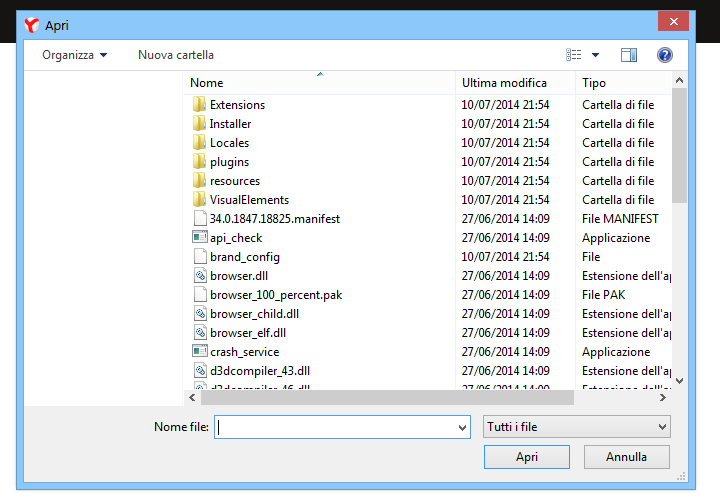
Hi all,
Thanks for the guide. Now I have this problem (see the screenshot below), and I don't know how to fix it. Can you help me?
9l3M85S.png

Thanks in advance

P.S. I have Windows 7 (I use a theme)
 

My Computer My Computer

At a glance

Windows 7 Home Premium 64bit
Computer type
PC/Desktop
OS
Windows 7 Home Premium 64bit
Antivirus
Avast! Internet Security
Browser
Yandex Browser
Hello itacoop, and welcome to Seven Forums.

That wouldn't be related to this tutorial.

If you like, you should be able to do a system restore using a restore point dated before this happened to undo and fix it. :)
 

My Computer My Computer

At a glance

64-bit Windows 11 Pro for WorkstationsIntel i7-8700K OC'd to 5 GHz64 GB (4x16GB) G.SKILL TridentZ RGB DDR4 3600...ASUS ROG-STRIX-GTX1080TI-O11G-GAMING
Computer type
PC/Desktop
Computer Manufacturer/Model Number
Self built custom
OS
64-bit Windows 11 Pro for Workstations
CPU
Intel i7-8700K OC'd to 5 GHz
Motherboard
ASUS ROG Maximus XI Formula Z390
Memory
64 GB (4x16GB) G.SKILL TridentZ RGB DDR4 3600 MHz
Graphics Card(s)
ASUS ROG-STRIX-GTX1080TI-O11G-GAMING
Sound Card
Integrated
Monitor(s) Displays
2 x Samsung Odyssey G7 27"
Screen Resolution
2560x1440
Hard Drives
1TB Samsung 990 PRO M.2,
4TB Samsung 990 PRO PRO M.2,
TerraMaster F8 SSD Plus NAS
PSU
Seasonic Prime Titanium 850W
Case
Thermaltake Core P3
Cooling
Corsair Hydro H115i
Keyboard
Logitech wireless K800
Mouse
Logitech MX Master 4
Internet Speed
2 Gb/s Download and 100 Mb/s Upload
Antivirus
Malwarebyte Anti-Malware Premium
Browser
Google Chrome
Other Info
Logitech Z625 speaker system,
Logitech BRIO 4K Pro webcam,
HP Color LaserJet Pro MFP M477fdn,
APC SMART-UPS RT 1000 XL - SURT1000XLI,
Galaxy S23 Plus phone
Hi, is there a way to remove the favorites-> Downloads folder only ? i dont want it for my users and i only found the option the disable the whole favorites pane. I want t o have Desktop & Recent locations available there but i want to remove Downloads folder. Is that possible?

Cheers, Tyle
 

My Computer My Computer

At a glance

windows 7 pro x64
Computer type
PC/Desktop
OS
windows 7 pro x64
Hello Tyle, and welcome to Seven Forums. :)

You should be able to manually delete the folder in Favorites, but they will be able to add it back though.
 

My Computer My Computer

At a glance

64-bit Windows 11 Pro for WorkstationsIntel i7-8700K OC'd to 5 GHz64 GB (4x16GB) G.SKILL TridentZ RGB DDR4 3600...ASUS ROG-STRIX-GTX1080TI-O11G-GAMING
Computer type
PC/Desktop
Computer Manufacturer/Model Number
Self built custom
OS
64-bit Windows 11 Pro for Workstations
CPU
Intel i7-8700K OC'd to 5 GHz
Motherboard
ASUS ROG Maximus XI Formula Z390
Memory
64 GB (4x16GB) G.SKILL TridentZ RGB DDR4 3600 MHz
Graphics Card(s)
ASUS ROG-STRIX-GTX1080TI-O11G-GAMING
Sound Card
Integrated
Monitor(s) Displays
2 x Samsung Odyssey G7 27"
Screen Resolution
2560x1440
Hard Drives
1TB Samsung 990 PRO M.2,
4TB Samsung 990 PRO PRO M.2,
TerraMaster F8 SSD Plus NAS
PSU
Seasonic Prime Titanium 850W
Case
Thermaltake Core P3
Cooling
Corsair Hydro H115i
Keyboard
Logitech wireless K800
Mouse
Logitech MX Master 4
Internet Speed
2 Gb/s Download and 100 Mb/s Upload
Antivirus
Malwarebyte Anti-Malware Premium
Browser
Google Chrome
Other Info
Logitech Z625 speaker system,
Logitech BRIO 4K Pro webcam,
HP Color LaserJet Pro MFP M477fdn,
APC SMART-UPS RT 1000 XL - SURT1000XLI,
Galaxy S23 Plus phone
Thanks ☺,
true, but we have ~2000 users, is there a way with a command prompt, powershell or vbs script to delete it? Thanks for your time.
 

My Computer My Computer

At a glance

windows 7 pro x64
Computer type
PC/Desktop
OS
windows 7 pro x64
You could use the command below in an elevated command prompt per account, but I'm not sure how to apply to all at once.

RD /S /Q "%UserProfile%\Links\Downloads"
 

My Computer My Computer

At a glance

64-bit Windows 11 Pro for WorkstationsIntel i7-8700K OC'd to 5 GHz64 GB (4x16GB) G.SKILL TridentZ RGB DDR4 3600...ASUS ROG-STRIX-GTX1080TI-O11G-GAMING
Computer type
PC/Desktop
Computer Manufacturer/Model Number
Self built custom
OS
64-bit Windows 11 Pro for Workstations
CPU
Intel i7-8700K OC'd to 5 GHz
Motherboard
ASUS ROG Maximus XI Formula Z390
Memory
64 GB (4x16GB) G.SKILL TridentZ RGB DDR4 3600 MHz
Graphics Card(s)
ASUS ROG-STRIX-GTX1080TI-O11G-GAMING
Sound Card
Integrated
Monitor(s) Displays
2 x Samsung Odyssey G7 27"
Screen Resolution
2560x1440
Hard Drives
1TB Samsung 990 PRO M.2,
4TB Samsung 990 PRO PRO M.2,
TerraMaster F8 SSD Plus NAS
PSU
Seasonic Prime Titanium 850W
Case
Thermaltake Core P3
Cooling
Corsair Hydro H115i
Keyboard
Logitech wireless K800
Mouse
Logitech MX Master 4
Internet Speed
2 Gb/s Download and 100 Mb/s Upload
Antivirus
Malwarebyte Anti-Malware Premium
Browser
Google Chrome
Other Info
Logitech Z625 speaker system,
Logitech BRIO 4K Pro webcam,
HP Color LaserJet Pro MFP M477fdn,
APC SMART-UPS RT 1000 XL - SURT1000XLI,
Galaxy S23 Plus phone
Awesome thanks so much, i have a central management tool to deploy it , thanks again
 

My Computer My Computer

At a glance

windows 7 pro x64
Computer type
PC/Desktop
OS
windows 7 pro x64
You're most welcome. :)
 

My Computer My Computer

At a glance

64-bit Windows 11 Pro for WorkstationsIntel i7-8700K OC'd to 5 GHz64 GB (4x16GB) G.SKILL TridentZ RGB DDR4 3600...ASUS ROG-STRIX-GTX1080TI-O11G-GAMING
Computer type
PC/Desktop
Computer Manufacturer/Model Number
Self built custom
OS
64-bit Windows 11 Pro for Workstations
CPU
Intel i7-8700K OC'd to 5 GHz
Motherboard
ASUS ROG Maximus XI Formula Z390
Memory
64 GB (4x16GB) G.SKILL TridentZ RGB DDR4 3600 MHz
Graphics Card(s)
ASUS ROG-STRIX-GTX1080TI-O11G-GAMING
Sound Card
Integrated
Monitor(s) Displays
2 x Samsung Odyssey G7 27"
Screen Resolution
2560x1440
Hard Drives
1TB Samsung 990 PRO M.2,
4TB Samsung 990 PRO PRO M.2,
TerraMaster F8 SSD Plus NAS
PSU
Seasonic Prime Titanium 850W
Case
Thermaltake Core P3
Cooling
Corsair Hydro H115i
Keyboard
Logitech wireless K800
Mouse
Logitech MX Master 4
Internet Speed
2 Gb/s Download and 100 Mb/s Upload
Antivirus
Malwarebyte Anti-Malware Premium
Browser
Google Chrome
Other Info
Logitech Z625 speaker system,
Logitech BRIO 4K Pro webcam,
HP Color LaserJet Pro MFP M477fdn,
APC SMART-UPS RT 1000 XL - SURT1000XLI,
Galaxy S23 Plus phone
This didn't work, checked all values to make sure they were entered:

Code:
Windows Registry Editor Version 5.00

[HKEY\CLASSES_ROOT\CLSID\{323CA680-C24D-4099-B94D-446DD2D7249E}\ShellFolder]
"Attributes"=dword:a9400100
"PinToNameSpaceTree"=""

[HKEY_CLASSES_ROOT\Wow6432Node\CLSID\{323CA680-C24D-4099-B94D-446DD2D7249E}\ShellFolder]
"Attributes"=dword:a9400100
"PinToNameSpaceTree"=""

[HKEY_LOCAL_MACHINE\SOFTWARE\Wow6432Node\Classes\CLSID\{323CA680-C24D-4099-B94D-446DD2D7249E}\ShellFolder]
"Attributes"=dword:a9400100
"PinToNameSpaceTree"=""
 
Last edited:

My Computer My Computer

At a glance

Windows 7 Home Premium 64Pentium Duo 2.544GB
Computer Manufacturer/Model Number
Dell 17-1750 Laptop
OS
Windows 7 Home Premium 64
CPU
Pentium Duo 2.54
Memory
4GB
Screen Resolution
1920 x 1080
Hard Drives
1 500GB
Mouse
Dell Optical
Internet Speed
768KB
Back
Top