"
When you drag folders, they'll get moved to whatever folder you drop them on instead. It doesn't actually change the order of the folders."
We were talking about the Favorites list as accessed via IE's Menu bar > Favorites. If
your statement is talking about that interface, then I'm not seeing what you are. I can change the order of the folders, but I can not move the folders to into another folder. Please see the videos in
this post.
If
your statement is talking about the Favorites Center interface, then we still see different things. The video at the bottom of
this post shows the order of the folders being change via the Favorites Center.
The only user interface for which
your statement is true for me - is Windows (file) Explorer.
I'm confused then. In your video below, is shows the dragged folder being moved into the folder it was dropped on. :huh:
http://www.sevenforums.com/browsers...-primary-folders-post3115268.html#post3115268
Thanks for your patience. Let's see if we can find were we are not connecting.
The post that you linked to is #14. Those videos dealt with the Favorites Center.
In post #15, the OP shows a screenshot. I was not positive of the steps that the OP took to get to that screen, so my post #16 stuck with pointing the OP back to my post #14.
In post #19, you quote the OP's post #15 and state. "
The folders cannot be rearranged in Favorites menu bar. They are arranged alphabetically together with any other folders, and the only way to change their order is to rename them." To me, this indicated that you thought the screenshot in post #15 came from clicking on "Favorites" from IE's Menu bar and then working with that interface. Looking back, I was probably wrong to think that that is what you thought. The screenshot is most likely from the window that you get when you click on "Favorites" from IE's Menu bar and then click on "
Organize favorites...". Also, in context, you seemed to be using the term rearranged to mean the sort order (as opposed to rearranging the folder levels/nesting).
You can change the sort order of folders (without
renaming them) using
1) Menu bar > Favorites (see post #20 - 1st video)
2) Menu bar > Favorites > Organize favorites...
3) Favorites Center (see post #14)
You can not change the folder level/nesting using
1) Menu bar > Favorites (see post #20 - 2nd video)
You can change the folder level/nesting using
2) Menu bar > Favorites > Organize favorites...
3) Favorites Center (see post #14)
Again, my first video in post #20 shows that you can arrange (sort) folders into a different order via the Favorites list as accessed via IE's Menu bar > Favorites. My second video in post #20 shows that you can not move folders into other folders via that interface - you will get an error.
In post #21, you seem to state the exact opposite of what is shown in my two videos in post #20.
"
When you drag folders, they'll get moved to whatever folder you drop them on instead."
This contradicts the 2nd video in post #20. you will get an error.
"
It doesn't actually change the order of the folders."
This contradicts the 1st video in post #20.
Perhaps post #21 was not meant to reference the info in post #20.
If post #21 was referencing post #14, then "
It doesn't actually change the order of the folders." contradicts the video in post #14. Look at the first few seconds where the folders are in alphabetical order. I then drag/drop two folders inside of one folder (to get them into the state that the OP has). When I drag them back out, I drop them in an order that is not alphabetical (25 second mark). The rest of the video shows putting them back in alphabetical order.
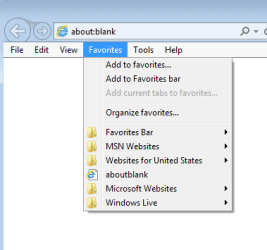
Here is a screenshot of them out of alphabetical order...

...this was done by drag/drop via
1) Menu bar > Favorites
That order survives a computer restart.
You can even have URL shortcuts/favorites out of alphabetical order.
...and then is Windows (file) Explorer.
Let's blame the confusion on Microsoft for making so many different ways to work with Favorites




