Solved Favorites problem after win7 reinstall

errolflynn

New member
Local time
12:45 AM
Messages
17
Reinstalled windows 7. I saved my internet bookmarks to dvd to put back in computer once Windows 7 reinstalled. My bookmark files are showing up as shortcuts with none of the individual sites in the folders. When i send 'Favorites" folder to my documents i can see the individual sites going there, but once I move them to say documents or desktop or favorites in IE they are not there - just empty shortcut folders! Shows I have over 1700 sites in IE Favorites - but only emtpy shortcut folders. I saved them to DVD by highliting my entire favorites list just to make sure they would be intact. I know they are still there somehow because when I "send to" documents from the DVD - I can see the names of individual sites/bookmarks transferring quickly. Please advise.
 

My Computer My Computer

Computer Manufacturer/Model Number
dell studio
OS
windows 7 home premium 64 bit

My Computer My Computer

Computer Manufacturer/Model Number
Custom/DIY
OS
Windows 7 Ultimate x64
CPU
Intel C2D E8400@4Ghz OC
Motherboard
ASUS P5Q-E, bios 2101
Memory
4x2GB Kingston HyperX 8500@1066Mhz
Graphics Card(s)
Nvidia GTS450 OC
Sound Card
Onboard SoundMax
Monitor(s) Displays
Samsung Syncmaster 17"
Screen Resolution
1280x1024
Hard Drives
WD6402AAEX-640GB(system), WD10EALX-1TB(storage), other external disks & docking stations
PSU
Corsair TX-750 V2
Case
Custom Tower
Cooling
Air: Arctic Cooling 2xF8 & F12; Akasa AK-968, 2xAK-HD-BL
Mouse
Gigabyte M6900
Internet Speed
10M/1M
yes, but that's not my problem. I understand how to transfer favorites. My problem is my file folders in favorites are showing up as empty shortcuts. When I did "send to" documents from the dvd I could see it sending over 1700 websites i have saved in my favorites. When it is in documents it shows up as just shortcut favorite folders. Is it an extension problem? When I send favorites from DVD to harddrive i can see the individual bookmarks flying by - when favorite folders are sent they appear only as empty shortcuts. So, when imported to favorites in IE they are just shortcut files.
 

My Computer My Computer

Computer Manufacturer/Model Number
dell studio
OS
windows 7 home premium 64 bit
When I right click on favorites saved on dvd and go to properties it shows i have 1732 files in 30 folders, 5.2 mb. When I open favorites it's just empty shortcut files.
 
Last edited:

My Computer My Computer

Computer Manufacturer/Model Number
dell studio
OS
windows 7 home premium 64 bit
IE favorites are stored in your C:\Users\(user-name)\Favorites folder. You could try to just copy them from the DVD to that location & take ownership.
 

My Computer My Computer

Computer Manufacturer/Model Number
Custom/DIY
OS
Windows 7 Ultimate x64
CPU
Intel C2D E8400@4Ghz OC
Motherboard
ASUS P5Q-E, bios 2101
Memory
4x2GB Kingston HyperX 8500@1066Mhz
Graphics Card(s)
Nvidia GTS450 OC
Sound Card
Onboard SoundMax
Monitor(s) Displays
Samsung Syncmaster 17"
Screen Resolution
1280x1024
Hard Drives
WD6402AAEX-640GB(system), WD10EALX-1TB(storage), other external disks & docking stations
PSU
Corsair TX-750 V2
Case
Custom Tower
Cooling
Air: Arctic Cooling 2xF8 & F12; Akasa AK-968, 2xAK-HD-BL
Mouse
Gigabyte M6900
Internet Speed
10M/1M
Hi errolflynn. Welcome. :)

Could you please define 'empty shortcuts'?

James
 

My Computer My Computer

OS
Win7U 64 RTM
CPU
Q9550
Motherboard
GA-EP45-UD3R
Memory
8GB Gskill
Graphics Card(s)
ASUS|EAH4850/HTDI/1GD3/A
Sound Card
xfi Plat
Monitor(s) Displays
Dell 2405fpw
Screen Resolution
1920x1200
Hard Drives
Seagate & WD sata Drives
PSU
Antec
Case
Antec
Keyboard
MS Natural Ergonomic 4000
Mouse
Logitech MX610 USB Cordless
Thanks for responses guys; i'm sorry if i'm not being clear. I had a crash so I had to reinstall win. 7. To save my favorites from IE i highlighted and sent to dvd. Ok, now on the DVD my favorites are just shortcuts with the arrow beside them. They are small 2kb and are empty. But, when you right click favorites it shows that it's 5.2mb with 1732 files stored in there. When you open up it's just my favorite folders with the arrow shortcut beside them and they are emtpy. So i have nothing to import but empty folders that are just shortcuts from when i sent them to dvd.

I do know that my 1732 saved favorites are there because when i right click favorites it says they are. Am i more clear now? thanks
 

My Computer My Computer

Computer Manufacturer/Model Number
dell studio
OS
windows 7 home premium 64 bit
So, of course, it looks like somehow they were just sent as shortcuts to DVD. Well now my old win. 7 is gone - so i can't access the original favorites folder. Key, is as I stated, when i right click favorites on dvd it says there are 1732 files in there, and when i "send to" anywhere on computer i can see the names of files as it is sending. But when you go into favorites just empty folders that have a dash and shortcut by them.
 

My Computer My Computer

Computer Manufacturer/Model Number
dell studio
OS
windows 7 home premium 64 bit
Have you tried clicking on one of the 'shortcuts' on the DVD (rather than after it has been copied to the HD)? Does it open to the site?

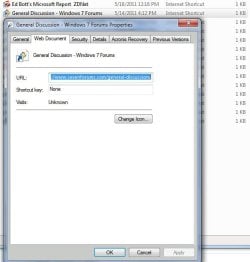
Here is a screenshot of a internet link (Favorites shortcut) properties here, along with a few listed in the folder (all 1kb, as should be). Any help?:

Favorites Link Properties.JPG
 

My Computer My Computer

OS
Win7U 64 RTM
CPU
Q9550
Motherboard
GA-EP45-UD3R
Memory
8GB Gskill
Graphics Card(s)
ASUS|EAH4850/HTDI/1GD3/A
Sound Card
xfi Plat
Monitor(s) Displays
Dell 2405fpw
Screen Resolution
1920x1200
Hard Drives
Seagate & WD sata Drives
PSU
Antec
Case
Antec
Keyboard
MS Natural Ergonomic 4000
Mouse
Logitech MX610 USB Cordless
Yes, i know what your getting at, but the folders in my favorites on the dvd are just shortcuts. I have 30 folders with names that have all my favorites/bookmarks in them. If you click on your favorites in IE you see they just have a name and maybe a symbol of the site. Mine are just shortcuts - arrow on the left -- name of the folder and says shortcut after it. I have folders remember with the files/favorites/bookmarks (whatever you want to call them) inside these. So, maybe the problem is my favorites were all stored in folders that i named. I.E. when i clicked on my favorites in previous Win7 I had folders with names like "music". I would click on that folder and there were perhaps 100 sites/bookmarks.

I only have shortcuts to my favorite folders but no links inside them. I guess i'm asking is there a way to get them back with just these shortcut folders now. I believe there could be because as i stated, I can see individual names of sites i had saved in favorites fly by when i "send to" my computer from dvd.
 

My Computer My Computer

Computer Manufacturer/Model Number
dell studio
OS
windows 7 home premium 64 bit
If what you are saying is that the folder itself (that contained the original internet shortcuts) has a shortcut arrow next to it, then, instead of copying the folder as a full backup, you may have just created a shortcut to the folder. And, if this is what happened, the folder shortcuts are pointing to actual folders that no longer exist.

If this is the case, and you have reinstalled windows over the partition that contained the original folders, then you will not be able to recover them unless you have a backup containing the actual folders. Of course, this reply hinges on the presumption that I am understanding you correctly.

James
 

My Computer My Computer

OS
Win7U 64 RTM
CPU
Q9550
Motherboard
GA-EP45-UD3R
Memory
8GB Gskill
Graphics Card(s)
ASUS|EAH4850/HTDI/1GD3/A
Sound Card
xfi Plat
Monitor(s) Displays
Dell 2405fpw
Screen Resolution
1920x1200
Hard Drives
Seagate & WD sata Drives
PSU
Antec
Case
Antec
Keyboard
MS Natural Ergonomic 4000
Mouse
Logitech MX610 USB Cordless
Thanks james, and that probably is the case. Why is it that my favorites still say they have 1732 files in them? Is that just a read-me that sticks? Why is it that when i "send to" I can see the names of my favorites - even though folders are empty when done. Is that just some memory still attached to the favorites folder?

Still if I can see the names of favorites being "sent" to another location then I have a feeling there's a way to get my favorites back.
Also, i backed up all my files by "sending to" dvd and the rest saved just fine. Why did my favorites get "shortcut"?
 

My Computer My Computer

Computer Manufacturer/Model Number
dell studio
OS
windows 7 home premium 64 bit
TI had a crash so I had to reinstall win. 7. To save my favorites from IE i highlighted and sent to dvd. Ok, now on the DVD my favorites are just shortcuts with the arrow beside them. They are small 2kb and are empty.
I'm pretty sure that right-click -> Send to... is a method of creating a shortcut, not copying the file.

If you wanted to actually copy the Favorites folder (containing all of its HTML links, contents, whatever) so that you could then just copy-back the Favorites folder, you should have used COPY on the folder, and then PASTE to the DVD.

I believe that as you've now seen, you simply wrote shortcuts to DVD for the contents that was still on your existing hard drive Favorites folder items.

You accomplish the very same thing if you right-click on anything on your current hard drive and select "Send to... desktop (create shortcut)". That's what "Send to..." does. It is NOT "copy" of the data/program itself. It creates a shortcut to the data/program wherever you "send it".
 

My Computer My Computer

Computer type
PC/Desktop
Computer Manufacturer/Model Number
Home-built, two systems (1) and (2)
OS
Windows 7 Pro x64 (1), Win7 Pro X64 (2)
CPU
i5-3350p 3.1Ghz/6MB-cache (1); E8400 3.0Ghz/6MB-cache (2)
Motherboard
ASUS P8Z77-V Pro (1); ASUS P5Q3 (2)
Memory
8GB PC3-12800 DDR3 (1); 4GB PC3-10600 DDR3 (2)
Graphics Card(s)
ATI HD7750 (1), (see TV cards); ATI R7 250 (2)
Sound Card
Realtek ALC892 HD Audio (1); Realtek ALC1200 HD Audio (2)
Monitor(s) Displays
Eizo HD2441W LCD, Eizo S2433W (1); Eizo 24" S2433W (2)
Screen Resolution
1920x1200, 1920x1200 (1); 1920x1200 (2)
Hard Drives
(1) 1TB SATA-II (7200RPM), 2x2TB SATA-III (7200RPM), 250GB SATA-III (10000RPM) for OS; 2x2TB external USB 3.0

(2) 320GB SATA-II (7200RPM), 750GB SATA-II (7200RPM), 150GB SATA-II (10000RPM) for OS; 2TB external USB 3.0
PSU
Nesteq ECS-6001 600W (1); Nesteq ECS-5001 500W (2)
Case
Acousti-Case 360 (1) and (2)
Cooling
Noctua NH-U12P SE2 for CPU, 2x120mm case fans (1) and (2)
Keyboard
IBM PS/2 (1) and (2)
Mouse
Logitech MX Revolution wireless (1); Microsoft wired (2)
Internet Speed
100mbps down / 10mbps up
Antivirus
Microsoft Security Essentials; Malwarebyte Anti-Malware Pro
Browser
Firefox
Other Info
Ceton InfiniTV 4-tuner cablecard-enabled TV card as well as Hauppauge HVR-2250 OTA/ATSC 2-tuner TV card in (1), running under Win7 WMC
Right, Im aware that when you send to desktop you get shortcut. I did the same thing for all my music and photos and they saved just fine to dvd. Highlight - send to d: drive. I guess you can't do that with favorites apparently. Why is it then that when I right click Favorites folder it says it has 5.2mb and 1732 files? And why can i see my bookmarks when i do "send to"?? That's strange, as if there is some memory of what was there even though just empty shortcut folders now?
 

My Computer My Computer

Computer Manufacturer/Model Number
dell studio
OS
windows 7 home premium 64 bit
Right, Im aware that when you send to desktop you get shortcut. I did the same thing for all my music and photos and they saved just fine to dvd. Highlight - send to d: drive. I guess you can't do that with favorites apparently.

I would think that Send to DVD drive should send the complete file, since it's unlikely that one would wish to send shortcuts and not the original to DVD.

However, right-clicking the files on DVD and choosing Send to>destination may well result in shortcuts to the files on DVD rather than copying the complete file.

Why is it then that when I right click Favorites folder it says it has 5.2mb and 1732 files?

Are you referring to the favorites folder on your HD or DVD?

Also, on the chance that the files on DVD (and/or HD) were somehow marked as Hidden:

http://www.sevenforums.com/tutorials/394-hidden-files-folders-show-hide.html

It also might be helpful if you posted some screenshots of an explorer view of the DVD with a folder open and on the HD. Also the properties:

http://www.sevenforums.com/tutorials/9733-screenshots-files-upload-post-seven-forums.html

James
 

My Computer My Computer

OS
Win7U 64 RTM
CPU
Q9550
Motherboard
GA-EP45-UD3R
Memory
8GB Gskill
Graphics Card(s)
ASUS|EAH4850/HTDI/1GD3/A
Sound Card
xfi Plat
Monitor(s) Displays
Dell 2405fpw
Screen Resolution
1920x1200
Hard Drives
Seagate & WD sata Drives
PSU
Antec
Case
Antec
Keyboard
MS Natural Ergonomic 4000
Mouse
Logitech MX610 USB Cordless
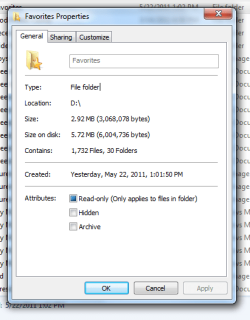
screen.png

This is my properties of favorites - looks as though full of files/bookmarks, but isn't.
 

My Computer My Computer

Computer Manufacturer/Model Number
dell studio
OS
windows 7 home premium 64 bit
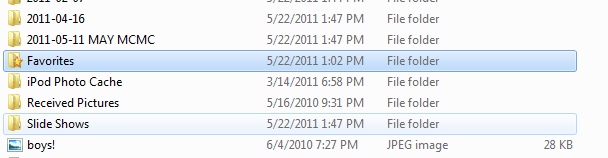
screen.png

And here's the favorites folder on the dvd. Notice that it's saved as a file - not a shortcut. If It was saved to dvd as shortcut (right click - send) then it should say shortcut. Only when you open it is it full of shortcuts.
 

My Computer My Computer

Computer Manufacturer/Model Number
dell studio
OS
windows 7 home premium 64 bit

My Computer My Computer

OS
Win7U 64 RTM
CPU
Q9550
Motherboard
GA-EP45-UD3R
Memory
8GB Gskill
Graphics Card(s)
ASUS|EAH4850/HTDI/1GD3/A
Sound Card
xfi Plat
Monitor(s) Displays
Dell 2405fpw
Screen Resolution
1920x1200
Hard Drives
Seagate & WD sata Drives
PSU
Antec
Case
Antec
Keyboard
MS Natural Ergonomic 4000
Mouse
Logitech MX610 USB Cordless
this is from the dvd.
 

My Computer My Computer

Computer Manufacturer/Model Number
dell studio
OS
windows 7 home premium 64 bit
Are the properties the same for files you copied to the HD?
 

My Computer My Computer

OS
Win7U 64 RTM
CPU
Q9550
Motherboard
GA-EP45-UD3R
Memory
8GB Gskill
Graphics Card(s)
ASUS|EAH4850/HTDI/1GD3/A
Sound Card
xfi Plat
Monitor(s) Displays
Dell 2405fpw
Screen Resolution
1920x1200
Hard Drives
Seagate & WD sata Drives
PSU
Antec
Case
Antec
Keyboard
MS Natural Ergonomic 4000
Mouse
Logitech MX610 USB Cordless
Back
Top