Feeling Nostalgic...

R3dF1v3

New member
Local time
12:56 AM
Messages
6
Location
West Midlands, UK
I don't know if this is even possible on Windows 7, but I'm feeling a little nostalgic, and would like to run MSDOS 6.22 and Windows 3.11 in a virtual machine.

I have disk images (and can create the floppies if needed), but I'm wondering how to get Virtual PC to use a floppy drive (or even just the images).

Any advice would be great, guys...
 

My Computer

Computer Manufacturer/Model Number
Self-built
OS
Windows 7 Ultimate x64
CPU
Intel Core 2 Duo E8500
Motherboard
Asus P5Q Pro
Memory
8Gb
Graphics Card(s)
nVidia GeForce 7950 GX2
Sound Card
On-board
Monitor(s) Displays
2x Samsung B2330 TFT panels
Screen Resolution
2x 1920x1080
Hard Drives
2x200GB SATA RAID, 2x1TB SATA RAID, 1x1TB eSATA/USB2
PSU
700W
Case
Full tower
Keyboard
Logitech Internet Navigator
Mouse
Logitech Performance MX
Internet Speed
20Mbit
Other Info
Also use an MSI Wind U100 netbook upgraded to 2Gb RAM, and running Windows 7 Ultimate (x86).
I haven't tried it with Virtual PC but I have DOS 6.22 and Win 95 running in a VM in VMWarePlayer.
 
Last edited:

My Computer

Computer type
PC/Desktop
Computer Manufacturer/Model Number
Home Built desktop, Dell G15 5511 Gaming laptop,MS Surface Pro 7 tablet
OS
W10 Pro desktop, W11 laptop, W11 Pro tablet (all 64-bit)
CPU
3.7Ghz 8700K i7, i7-11800H, i7-1065G7
Motherboard
ASUS TUF Z370-Pro Gaming in desktop
Memory
16G desktop, 16G laptop, 4G tablet
Graphics Card(s)
AMD Radeon RX580, RTX 3060, Intel Iris Plus
Sound Card
High Definition Audio (Built-in to mobo)
Monitor(s) Displays
Samsung U32J59 32" (2x), 15.6", 12"
Screen Resolution
3840x2160, 3840x2160, 1920x1080, 2160x1440
Hard Drives
500G SSD for OS; 2T, 10T & 15T HDDs for Data on Desktop, 1TB SSD laptop, 128G SSD tablet.
PSU
Corsair CX 750M
Case
Antec 100
Cooling
CM 212+
Keyboard
IBM Model M - used continuously since 1986
Mouse
Microsoft Pro IntelliMouse
Internet Speed
400M down 8M up
Antivirus
Windows Defender
Browser
FireFox
Other Info
Built my first computer (8Mhz 8088cpu, 640K RAM, 20MB HDD, 2 360K floppy drives) in 1985 and have been building them for myself, relatives and friends ever since.
Microsoft Virtual PC 2007 would be able to do this. Also VMware Player should be able to accomplish this. As far as getting it to use a floppy drive, just add it to the virtual machine's hardware and then you an specify whether to use a physical drive or an .img file to represent the floppy.
 

My Computer

OS
Windows 7 Ultimate x64 SP1
CPU
Intel Core i3 530 2.93 Ghz Clarkdale
Motherboard
ASRock P55 PRO/USB3 LGA 1156
Memory
4 GB OCZ DDR3 1600 (PC12800) Low Voltage Desktop Memory
Graphics Card(s)
Nvidia GeForce GTX 550 Ti with 1 GB of RAM
Sound Card
Realtek HD ALC892
Monitor(s) Displays
20'' eMachines E202HDbmd Glare Panel Widescreen
Screen Resolution
1600 x 900
Hard Drives
Western Digital 1 TB Caviar Black Edition (7200 RPM) SATA
Hitachi Deskstar 500 GB (7200 RPM) SATA
Samsung SpinPoint 400 GB (7200 RPM) SATA
PSU
Rosewill Xtreme Series RX750-D-B ATX12V v2.2 & EPS12V (750W)
Case
Cooler Master Centurion 534 RC-534-KKN2-GP Mid-Tower
Cooling
Standard Case Fans and Stock CPU Heatsink
Keyboard
Microsoft Wireless Optical Desktop Elite
Mouse
Microsoft Wireless Optical Desktop Elite
Internet Speed
7.1 Mbps Verizon DSL
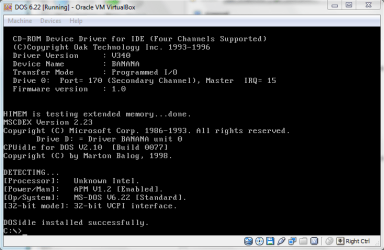
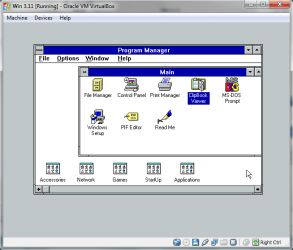
i have DOS6.22 and WIN3.11 (Windows for Workgroups) running in VirtualBox.
 

Attachments

  • dos622.PNG
    dos622.PNG
    16.9 KB · Views: 13
  • wiin311.PNG
    wiin311.PNG
    14.6 KB · Views: 12

My Computer

Computer Manufacturer/Model Number
HP dv6519tx
OS
Windows 7 Ultimate x64
CPU
1.80 GHz Intel Core 2 Duo processor T7100
Memory
3 gig ddr2
Graphics Card(s)
NVIDIA GeForce 8400M GS
Sound Card
Realtek High Definition Audio
Monitor(s) Displays
15.4” WXGA High Definition BrightView Widescreen
Screen Resolution
1280 x 800
Hard Drives
Hitachi 320 GB (5400 rpm)
PSU
90 W AC Power Adapter
Cooling
Kitchen plate under the lappy
Keyboard
101 key compatible
Mouse
Touch Pad with On/Off button and dedicated vertical Scroll
Internet Speed
Three Wireless internet prepaid using E160G USB dongle
Don't forget DOSBox.
 

My Computer

Computer Manufacturer/Model Number
Custom Build
OS
Windows 7 Home Premium X64
CPU
Core 2 Duo [email protected]
Motherboard
Asus P5Q SE
Memory
OCZ Revision 2, 6GB, PC2-6400
Graphics Card(s)
Asus GTX260
Sound Card
Onboard
Monitor(s) Displays
19" Samsung Syncmaster
Screen Resolution
1680x1050
Hard Drives
Crucial RealSSD 64GB
Western Digital Black 500Gb
PSU
Corsair 550W
Case
Hiper Anubis
Cooling
Scythe Infinity
Keyboard
Microsoft Comfort Curve
Mouse
Logitech MX Laser
Internet Speed
8Mb ish :)
Other Info
DVD Writer - Pioneer DVR-212
Speakers - Logitech Z4
I guess I'm feeling a lot more nostalgic than you.

59994d1268280685-post-your-virtual-machines-vmware-virtual.jpg

You can always use VMWare player to run any number of virtual machines (as long as you have enough RAM)
 

My Computer

Computer type
Laptop
Computer Manufacturer/Model Number
HP EliteBook 8530w Mobile Workstation
OS
Windows 7 Ultimate x64 (XP, 98SE, 95, 3.11, DOS 7.10 on VM) + Ubuntu 10.04 LTS Lucid Lynx
CPU
Intel Core 2 Duo Processor P8600 (2.40 GHz, 3 MB L2 cache)
Motherboard
Mobile Intel PM45 Express Chipset ICH9M-Enhanced
Memory
4GB 800 MHz DDR2 SDRAM
Graphics Card(s)
ATI Mobility FireGL V5700 with 256 MB
Sound Card
SoundMAX Integrated Digital HD Audio
Monitor(s) Displays
15.4-inch WXGA anti-glare (1280 x 800 resolution)
Screen Resolution
1280 x 800
Hard Drives
500GB + 1TB
Mouse
Synaptics PS/2 Port Touchpad, USB Mouse
Internet Speed
4 Mbps
Antivirus
MSE
Browser
Firefox, Chrome, IE
Other Info
Authentec AES2810 Fingerprint Reader
Back
Top