
LuxAeterna
New member
So I have a 64 bit of windows 7, and since yesterday I started having the default gateway problem. My computer will connect to my wireless for about a minute or two, and then fall to limited network access. I can troubleshoot the problems, and it will come up with several different responses after fixing the issue. The repairs will last about a minute or two before falling again. I have read on other threads about very similar problems, but I don't understand how to fix the issue. I have a shared CISCO DPC3825 DOCSIS 3.0 router serviced by Cox broadband internet. I do not have AVG or McAfee (I heard those were common issues here,) and I had just restored my computer to factory settings today, hoping to fix the problem, to no avail. The problem persisted before and after the factory reset. (though it has only been an issue, as far as I've noticed, since yesterday.) I had been connected to this internet with no problems for weeks now previously.
I looked on another thread about this and they said that wifi miniports and tunnel adapters aren't helpful, both of which I have, but I don't know how to get rid of them, or which ones to get rid of.
I am able to connect to the internet on this computer via tethering from my phone so I'm not sure whether it's the router or my wireless adapter.
I don't know much at all about the deep inner workings of wifi so if you could make responses as simple as possible, I would appreciate it alot. (sorry in advance, haha.)
Okay so here's (hopefully) all the information you need.
ipconfig/all code:
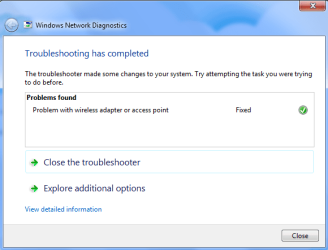
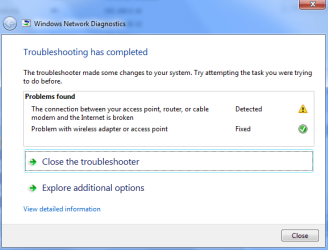
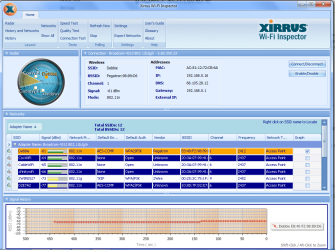
Speedtests, what troubleshooting says, and Xirrus: *uploaded as attachments*
Alright that's all the data I collected, I hope that helps (makes NO sense to me!) Thank you and I'm sorry if I did anything wrong!!! D:
I looked on another thread about this and they said that wifi miniports and tunnel adapters aren't helpful, both of which I have, but I don't know how to get rid of them, or which ones to get rid of.
I am able to connect to the internet on this computer via tethering from my phone so I'm not sure whether it's the router or my wireless adapter.
I don't know much at all about the deep inner workings of wifi so if you could make responses as simple as possible, I would appreciate it alot. (sorry in advance, haha.)
Okay so here's (hopefully) all the information you need.
ipconfig/all code:
Code:
Microsoft Windows [Version 6.1.7600]
Copyright (c) 2009 Microsoft Corporation.  All rights reserved.

C:\Users\Bianca>ipconfig/all

Windows IP Configuration

   Host Name . . . . . . . . . . . . : Bianca-HP
   Primary Dns Suffix  . . . . . . . :
   Node Type . . . . . . . . . . . . : Hybrid
   IP Routing Enabled. . . . . . . . : No
   WINS Proxy Enabled. . . . . . . . : No

Ethernet adapter Local Area Connection 2:

   Media State . . . . . . . . . . . : Media disconnected
   Connection-specific DNS Suffix  . :
   Description . . . . . . . . . . . : PdaNet Broadband Adapter
   Physical Address. . . . . . . . . : 00-26-37-BD-39-42
   DHCP Enabled. . . . . . . . . . . : Yes
   Autoconfiguration Enabled . . . . : Yes

Wireless LAN adapter Wireless Network Connection:

   Connection-specific DNS Suffix  . :
   Description . . . . . . . . . . . : Broadcom 4313 802.11b/g/n
   Physical Address. . . . . . . . . : AC-81-12-72-CB-6A
   DHCP Enabled. . . . . . . . . . . : Yes
   Autoconfiguration Enabled . . . . : Yes
   Link-local IPv6 Address . . . . . : fe80::2d91:b992:8c05:371e%13(Preferred)
   IPv4 Address. . . . . . . . . . . : 192.168.0.16(Preferred)
   Subnet Mask . . . . . . . . . . . : 255.255.255.0
   Lease Obtained. . . . . . . . . . : Sunday, July 06, 2014 9:37:58 PM
   Lease Expires . . . . . . . . . . : Sunday, July 06, 2014 11:57:07 PM
   Default Gateway . . . . . . . . . : 192.168.0.1
   DHCP Server . . . . . . . . . . . : 192.168.0.1
   DHCPv6 IAID . . . . . . . . . . . : 330072338
   DHCPv6 Client DUID. . . . . . . . : 00-01-00-01-15-48-4F-E9-2C-27-D7-CD-85-30

   DNS Servers . . . . . . . . . . . : 68.105.28.12
                                       68.105.29.12
                                       68.105.28.11
   NetBIOS over Tcpip. . . . . . . . : Enabled

Ethernet adapter Local Area Connection:

   Media State . . . . . . . . . . . : Media disconnected
   Connection-specific DNS Suffix  . :
   Description . . . . . . . . . . . : Realtek PCIe FE Family Controller
   Physical Address. . . . . . . . . : 2C-27-D7-CD-85-30
   DHCP Enabled. . . . . . . . . . . : Yes
   Autoconfiguration Enabled . . . . : Yes

Tunnel adapter isatap.{151B27E0-57AA-4FC0-941D-7A9CB0440D3C}:

   Media State . . . . . . . . . . . : Media disconnected
   Connection-specific DNS Suffix  . :
   Description . . . . . . . . . . . : Microsoft ISATAP Adapter
   Physical Address. . . . . . . . . : 00-00-00-00-00-00-00-E0
   DHCP Enabled. . . . . . . . . . . : No
   Autoconfiguration Enabled . . . . : Yes

Tunnel adapter isatap.{C187DC02-7EB0-44D6-B44E-D3EA358E204F}:

   Media State . . . . . . . . . . . : Media disconnected
   Connection-specific DNS Suffix  . :
   Description . . . . . . . . . . . : Microsoft ISATAP Adapter #2
   Physical Address. . . . . . . . . : 00-00-00-00-00-00-00-E0
   DHCP Enabled. . . . . . . . . . . : No
   Autoconfiguration Enabled . . . . : Yes

Tunnel adapter Teredo Tunneling Pseudo-Interface:

   Connection-specific DNS Suffix  . :
   Description . . . . . . . . . . . : Teredo Tunneling Pseudo-Interface
   Physical Address. . . . . . . . . : 00-00-00-00-00-00-00-E0
   DHCP Enabled. . . . . . . . . . . : No
   Autoconfiguration Enabled . . . . : Yes
   IPv6 Address. . . . . . . . . . . : 2001:0:9d38:90d7:30e9:d89:3f57:ffef(Prefe
rred)
   Link-local IPv6 Address . . . . . : fe80::30e9:d89:3f57:ffef%14(Preferred)
   Default Gateway . . . . . . . . . : ::
   NetBIOS over Tcpip. . . . . . . . : Disabled

C:\Users\Bianca>
Speedtests, what troubleshooting says, and Xirrus: *uploaded as attachments*
Alright that's all the data I collected, I hope that helps (makes NO sense to me!) Thank you and I'm sorry if I did anything wrong!!! D:
Attachments


My Computer
- Computer type
- Laptop
- Computer Manufacturer/Model Number
- HP
- OS
- Windows 7, 64 bit
- Antivirus
- Adaware, Malware Bytes
- Browser
- Chrome


