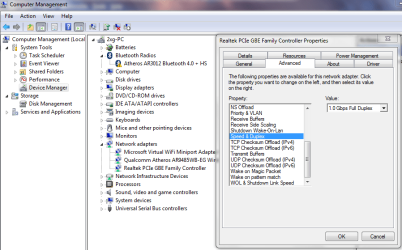
I have a Win7 (64-bit) desktop machine on which I keep most of my data. I access files and folders from my XP(32) laptop. This has been working quite well for a year or more. A couple of days ago I re-ran setup on the Win7 machine. All seems to be back up and running again except for file access from the XP machine. I can see the shares and open the files but the applications accessing them (Windows Explorer, text editors etc.) will periodically seem to freeze for tens of seconds at a time.
Despite file access being "stalled" in this way there appears to be no interruption to other kinds of access between the two machines: http access to a web server on the Win7 machine seems unaffected, as does a Remote Desktop connection. If I try to execute ipconfig on the XP machine while this is happening, that "hangs" as well, producing results at the same time as other applications start responding again.
I'm assuming I have failed to set something up properly on the Win7 machine but I haven't ruled out the possibility of a problem with the XP machine. My wife's laptop (Vista) doesn't seem to be having any problems at all. I have a bit of a blind spot when it comes to network protocols etc. so I may be missing something glaringly obvious.
Any suggestions?
========================================
Output from ipconfig on both computers:
Windows IP Configuration
Host Name . . . . . . . . . . . . : XPmachine
Primary Dns Suffix . . . . . . . :
Node Type . . . . . . . . . . . . : Hybrid
IP Routing Enabled. . . . . . . . : No
WINS Proxy Enabled. . . . . . . . : No
DNS Suffix Search List. . . . . . : Belkin
Ethernet adapter Local Area Connection:
Connection-specific DNS Suffix . : Belkin
Description . . . . . . . . . . . : Intel(R) 82566MM Gigabit Network Con
nection
Physical Address. . . . . . . . . : 00-A0-D1-A2-2D-61
Dhcp Enabled. . . . . . . . . . . : Yes
Autoconfiguration Enabled . . . . : Yes
IP Address. . . . . . . . . . . . : 192.168.0.26
Subnet Mask . . . . . . . . . . . : 255.255.255.0
Default Gateway . . . . . . . . . : 192.168.0.1
DHCP Server . . . . . . . . . . . : 192.168.0.1
DNS Servers . . . . . . . . . . . : 192.168.0.1
Primary WINS Server . . . . . . . : 192.168.0.1
Lease Obtained. . . . . . . . . . : Monday 21 January 2013 15:43:00
Lease Expires . . . . . . . . . . : Tuesday 19 January 2038 03:14:07
-----------------
Windows IP Configuration
Host Name . . . . . . . . . . . . : Win7machine
Primary Dns Suffix . . . . . . . :
Node Type . . . . . . . . . . . . : Hybrid
IP Routing Enabled. . . . . . . . : No
WINS Proxy Enabled. . . . . . . . : No
Ethernet adapter Local Area Connection:
Connection-specific DNS Suffix . :
Description . . . . . . . . . . . : Realtek PCIe GBE Family Controller
Physical Address. . . . . . . . . : BC-AE-C5-AB-33-5E
DHCP Enabled. . . . . . . . . . . : No
Autoconfiguration Enabled . . . . : Yes
IPv4 Address. . . . . . . . . . . : 192.168.0.10(Preferred)
Subnet Mask . . . . . . . . . . . : 255.255.255.0
Default Gateway . . . . . . . . . : 192.168.0.1
DNS Servers . . . . . . . . . . . : 192.168.0.1
NetBIOS over Tcpip. . . . . . . . : Enabled
Tunnel adapter isatap.{66CD51DA-C435-4F46-820B-338B527EF255}:
Media State . . . . . . . . . . . : Media disconnected
Connection-specific DNS Suffix . :
Description . . . . . . . . . . . : Microsoft ISATAP Adapter
Physical Address. . . . . . . . . : 00-00-00-00-00-00-00-E0
DHCP Enabled. . . . . . . . . . . : No
Autoconfiguration Enabled . . . . : Yes
Tunnel adapter Teredo Tunneling Pseudo-Interface:
Connection-specific DNS Suffix . :
Description . . . . . . . . . . . : Teredo Tunneling Pseudo-Interface
Physical Address. . . . . . . . . : 00-00-00-00-00-00-00-E0
DHCP Enabled. . . . . . . . . . . : No
Autoconfiguration Enabled . . . . : Yes
IPv6 Address. . . . . . . . . . . : 2001:0:9d38:953c:2883:3291:3f57:fff5(Pref
erred)
Link-local IPv6 Address . . . . . : fe80::2883:3291:3f57:fff5%12(Preferred)
Default Gateway . . . . . . . . . : ::
NetBIOS over Tcpip. . . . . . . . : Disabled
Despite file access being "stalled" in this way there appears to be no interruption to other kinds of access between the two machines: http access to a web server on the Win7 machine seems unaffected, as does a Remote Desktop connection. If I try to execute ipconfig on the XP machine while this is happening, that "hangs" as well, producing results at the same time as other applications start responding again.
I'm assuming I have failed to set something up properly on the Win7 machine but I haven't ruled out the possibility of a problem with the XP machine. My wife's laptop (Vista) doesn't seem to be having any problems at all. I have a bit of a blind spot when it comes to network protocols etc. so I may be missing something glaringly obvious.
Any suggestions?
========================================
Output from ipconfig on both computers:
Windows IP Configuration
Host Name . . . . . . . . . . . . : XPmachine
Primary Dns Suffix . . . . . . . :
Node Type . . . . . . . . . . . . : Hybrid
IP Routing Enabled. . . . . . . . : No
WINS Proxy Enabled. . . . . . . . : No
DNS Suffix Search List. . . . . . : Belkin
Ethernet adapter Local Area Connection:
Connection-specific DNS Suffix . : Belkin
Description . . . . . . . . . . . : Intel(R) 82566MM Gigabit Network Con
nection
Physical Address. . . . . . . . . : 00-A0-D1-A2-2D-61
Dhcp Enabled. . . . . . . . . . . : Yes
Autoconfiguration Enabled . . . . : Yes
IP Address. . . . . . . . . . . . : 192.168.0.26
Subnet Mask . . . . . . . . . . . : 255.255.255.0
Default Gateway . . . . . . . . . : 192.168.0.1
DHCP Server . . . . . . . . . . . : 192.168.0.1
DNS Servers . . . . . . . . . . . : 192.168.0.1
Primary WINS Server . . . . . . . : 192.168.0.1
Lease Obtained. . . . . . . . . . : Monday 21 January 2013 15:43:00
Lease Expires . . . . . . . . . . : Tuesday 19 January 2038 03:14:07
-----------------
Windows IP Configuration
Host Name . . . . . . . . . . . . : Win7machine
Primary Dns Suffix . . . . . . . :
Node Type . . . . . . . . . . . . : Hybrid
IP Routing Enabled. . . . . . . . : No
WINS Proxy Enabled. . . . . . . . : No
Ethernet adapter Local Area Connection:
Connection-specific DNS Suffix . :
Description . . . . . . . . . . . : Realtek PCIe GBE Family Controller
Physical Address. . . . . . . . . : BC-AE-C5-AB-33-5E
DHCP Enabled. . . . . . . . . . . : No
Autoconfiguration Enabled . . . . : Yes
IPv4 Address. . . . . . . . . . . : 192.168.0.10(Preferred)
Subnet Mask . . . . . . . . . . . : 255.255.255.0
Default Gateway . . . . . . . . . : 192.168.0.1
DNS Servers . . . . . . . . . . . : 192.168.0.1
NetBIOS over Tcpip. . . . . . . . : Enabled
Tunnel adapter isatap.{66CD51DA-C435-4F46-820B-338B527EF255}:
Media State . . . . . . . . . . . : Media disconnected
Connection-specific DNS Suffix . :
Description . . . . . . . . . . . : Microsoft ISATAP Adapter
Physical Address. . . . . . . . . : 00-00-00-00-00-00-00-E0
DHCP Enabled. . . . . . . . . . . : No
Autoconfiguration Enabled . . . . : Yes
Tunnel adapter Teredo Tunneling Pseudo-Interface:
Connection-specific DNS Suffix . :
Description . . . . . . . . . . . : Teredo Tunneling Pseudo-Interface
Physical Address. . . . . . . . . : 00-00-00-00-00-00-00-E0
DHCP Enabled. . . . . . . . . . . : No
Autoconfiguration Enabled . . . . : Yes
IPv6 Address. . . . . . . . . . . : 2001:0:9d38:953c:2883:3291:3f57:fff5(Pref
erred)
Link-local IPv6 Address . . . . . : fe80::2883:3291:3f57:fff5%12(Preferred)
Default Gateway . . . . . . . . . : ::
NetBIOS over Tcpip. . . . . . . . : Disabled
My Computer
- OS
- 7 Pro 64; XP Pro 32