Solved File associations help!

Coastalwave

New member
Local time
4:00 PM
Messages
13
My friend was messing around on my laptop and when I got it back everything was changed to iTunes. Although it says google chrome it shows an iTunes logo and will launch iTunes if clicked. This happened about six months ago. I tried for months to get it fixed but I ended up uninstalling iTunes so they would go back to normal. However if I want to update my music I need to instal iTunes and go through the proccess of it takin over. I'm in desperate need of help! Any advice is better than no advice at all. If you need a screenshot let me know.


Thanks,
CoastalWave
 

My Computer

Computer type
Laptop
Computer Manufacturer/Model Number
Toshiba satellite
OS
Windows 7 home I think?
Browser
Chorme
Have you tried re-installing Itunes? Does it "take over" the same file associations as before? If all it did wrong was take over as the default browser, did you try going into google chromes settings and choosing to set it as the default browser?
 

My Computer

Computer type
PC/Desktop
Computer Manufacturer/Model Number
Dell
OS
Win 7 x64
CPU
Core I5
Hello CoastalWave, and welcome to Seven Forums.

Is this happening only with shortcuts (.lnk files) and/or .exe files?

For now, you might see if downloading and merging the .reg file for the listed .lnk (LNK) and .exe options in the tutorial below may be able to help. They will restore the default associations for these file types.

http://www.sevenforums.com/tutorials/19449-default-file-type-associations-restore.html

Hope this helps, :)
Shawn
 

My Computer

Computer type
PC/Desktop
Computer Manufacturer/Model Number
Self built custom
OS
64-bit Windows 11 Pro for Workstations
CPU
Intel i7-8700K OC'd to 5 GHz
Motherboard
ASUS ROG Maximus XI Formula Z390
Memory
64 GB (4x16GB) G.SKILL TridentZ RGB DDR4 3600 MHz
Graphics Card(s)
ASUS ROG-STRIX-GTX1080TI-O11G-GAMING
Sound Card
Integrated
Monitor(s) Displays
2 x Samsung Odyssey G7 27"
Screen Resolution
2560x1440
Hard Drives
1TB Samsung 990 PRO M.2,
4TB Samsung 990 PRO PRO M.2,
TerraMaster F8 SSD Plus NAS
PSU
Seasonic Prime Titanium 850W
Case
Thermaltake Core P3
Cooling
Corsair Hydro H115i
Keyboard
Logitech wireless K800
Mouse
Logitech MX Master 4
Internet Speed
2 Gb/s Download and 100 Mb/s Upload
Antivirus
Malwarebyte Anti-Malware Premium
Browser
Google Chrome
Other Info
Logitech Z625 speaker system,
Logitech BRIO 4K Pro webcam,
HP Color LaserJet Pro MFP M477fdn,
APC SMART-UPS RT 1000 XL - SURT1000XLI,
Galaxy S23 Plus phone
Xunile, it happens every time I redownload it :/.
Shawn, I saw your post about the .reg files on someone else's post and went through all the steps. After restarting my laptop it still was there idk what else to do.
 

My Computer

Computer type
Laptop
Computer Manufacturer/Model Number
Toshiba satellite
OS
Windows 7 home I think?
Browser
Chorme
Xunile, it happens every time I redownload it :/.
Shawn, I saw your post about the .reg files on someone else's post and went through all the steps. After restarting my laptop it still was there idk what else to do.

What associations does it take over? Just web related or other ones as well?
 

My Computer

Computer type
PC/Desktop
Computer Manufacturer/Model Number
Dell
OS
Win 7 x64
CPU
Core I5
It seams to be all media associations. Google chrome all photo and video editors. It pretty much took over everything.
 

My Computer

Computer type
Laptop
Computer Manufacturer/Model Number
Toshiba satellite
OS
Windows 7 home I think?
Browser
Chorme
It seams to be all media associations. Google chrome all photo and video editors. It pretty much took over everything.

So if you install Itunes, follow Shawn's tutorial, and restart your PC, what doesn't work correctly? Do you have another application you want for your media files? If you open a run dialog box by hitting the 'windows+r" keys and type "chrome" after installing Itunes, does chrome start?

You could try installing vlc after itunes and tell it to manage all of your media files, just to see if that works.
 

My Computer

Computer type
PC/Desktop
Computer Manufacturer/Model Number
Dell
OS
Win 7 x64
CPU
Core I5
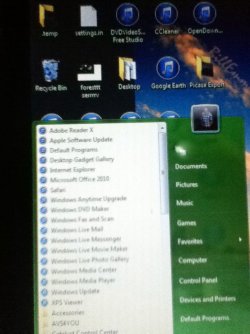
Ill try to get a picture of what it does. All my media files show and open iTunes. When I did what Shawn said nothing changed.
I just want them all back to normal, if possible. When I run chrome it opens chrome but when I click on chrome it opens iTunes.
 

My Computer

Computer type
Laptop
Computer Manufacturer/Model Number
Toshiba satellite
OS
Windows 7 home I think?
Browser
Chorme

My Computer

Computer type
PC/Desktop
Computer Manufacturer/Model Number
Self built custom
OS
64-bit Windows 11 Pro for Workstations
CPU
Intel i7-8700K OC'd to 5 GHz
Motherboard
ASUS ROG Maximus XI Formula Z390
Memory
64 GB (4x16GB) G.SKILL TridentZ RGB DDR4 3600 MHz
Graphics Card(s)
ASUS ROG-STRIX-GTX1080TI-O11G-GAMING
Sound Card
Integrated
Monitor(s) Displays
2 x Samsung Odyssey G7 27"
Screen Resolution
2560x1440
Hard Drives
1TB Samsung 990 PRO M.2,
4TB Samsung 990 PRO PRO M.2,
TerraMaster F8 SSD Plus NAS
PSU
Seasonic Prime Titanium 850W
Case
Thermaltake Core P3
Cooling
Corsair Hydro H115i
Keyboard
Logitech wireless K800
Mouse
Logitech MX Master 4
Internet Speed
2 Gb/s Download and 100 Mb/s Upload
Antivirus
Malwarebyte Anti-Malware Premium
Browser
Google Chrome
Other Info
Logitech Z625 speaker system,
Logitech BRIO 4K Pro webcam,
HP Color LaserJet Pro MFP M477fdn,
APC SMART-UPS RT 1000 XL - SURT1000XLI,
Galaxy S23 Plus phone
photo (1).JPG
 

My Computer

Computer type
Laptop
Computer Manufacturer/Model Number
Toshiba satellite
OS
Windows 7 home I think?
Browser
Chorme
Brink,

Does that photo help?
 

My Computer

Computer type
Laptop
Computer Manufacturer/Model Number
Toshiba satellite
OS
Windows 7 home I think?
Browser
Chorme
Ill try to get a picture of what it does. All my media files show and open iTunes. When I did what Shawn said nothing changed.
I just want them all back to normal, if possible. When I run chrome it opens chrome but when I click on chrome it opens iTunes.

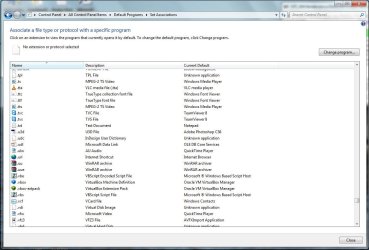
If you goto the files associations in control panel, what does it show for the type .url ?
 

Attachments

  • file associations.jpg
    file associations.jpg
    89.7 KB · Views: 3

My Computer

Computer type
PC/Desktop
Computer Manufacturer/Model Number
Dell
OS
Win 7 x64
CPU
Core I5
Have you tried to create another user and see what happens with Itunes then. Your profile might be corrupted and you might need to create a new user and then copy all of your documents over to the new one and use it instead of your current user account.
 

My Computer

Computer type
PC/Desktop
Computer Manufacturer/Model Number
Dell
OS
Win 7 x64
CPU
Core I5
ill try to get a picture of what it does. All my media files show and open itunes. When i did what shawn said nothing changed.
I just want them all back to normal, if possible. When i run chrome it opens chrome but when i click on chrome it opens itunes.

if you goto the files associations in control panel, what does it show for the type .url ?


image.jpg
 

My Computer

Computer type
Laptop
Computer Manufacturer/Model Number
Toshiba satellite
OS
Windows 7 home I think?
Browser
Chorme
You have me scratching my head. The only thing I can think of is a corrupt profile.
 

My Computer

Computer type
PC/Desktop
Computer Manufacturer/Model Number
Dell
OS
Win 7 x64
CPU
Core I5

My Computer

Computer type
PC/Desktop
Computer Manufacturer/Model Number
Self built custom
OS
64-bit Windows 11 Pro for Workstations
CPU
Intel i7-8700K OC'd to 5 GHz
Motherboard
ASUS ROG Maximus XI Formula Z390
Memory
64 GB (4x16GB) G.SKILL TridentZ RGB DDR4 3600 MHz
Graphics Card(s)
ASUS ROG-STRIX-GTX1080TI-O11G-GAMING
Sound Card
Integrated
Monitor(s) Displays
2 x Samsung Odyssey G7 27"
Screen Resolution
2560x1440
Hard Drives
1TB Samsung 990 PRO M.2,
4TB Samsung 990 PRO PRO M.2,
TerraMaster F8 SSD Plus NAS
PSU
Seasonic Prime Titanium 850W
Case
Thermaltake Core P3
Cooling
Corsair Hydro H115i
Keyboard
Logitech wireless K800
Mouse
Logitech MX Master 4
Internet Speed
2 Gb/s Download and 100 Mb/s Upload
Antivirus
Malwarebyte Anti-Malware Premium
Browser
Google Chrome
Other Info
Logitech Z625 speaker system,
Logitech BRIO 4K Pro webcam,
HP Color LaserJet Pro MFP M477fdn,
APC SMART-UPS RT 1000 XL - SURT1000XLI,
Galaxy S23 Plus phone

The affected ones in your Start Menu and desktop are for shortcuts.

When you downloaded the .reg file for the listed lnk (LNK) option in the tutorial below, make sure that you approve all the prompts in step 4 (miss one, and it'll not work), and restart the PC afterwards to apply.

http://www.sevenforums.com/tutorials/19449-default-file-type-associations-restore.html


It's restarting right now I followed it step by step. Everything went how it should in step 4.
 

My Computer

Computer type
Laptop
Computer Manufacturer/Model Number
Toshiba satellite
OS
Windows 7 home I think?
Browser
Chorme
It still didn't work :confused: can you remotely go into the computer and try?
 

My Computer

Computer type
Laptop
Computer Manufacturer/Model Number
Toshiba satellite
OS
Windows 7 home I think?
Browser
Chorme
Sorry, but all help is done here in the forum.

Just to verify, is it only shortcuts that have this issue?
 

My Computer

Computer type
PC/Desktop
Computer Manufacturer/Model Number
Self built custom
OS
64-bit Windows 11 Pro for Workstations
CPU
Intel i7-8700K OC'd to 5 GHz
Motherboard
ASUS ROG Maximus XI Formula Z390
Memory
64 GB (4x16GB) G.SKILL TridentZ RGB DDR4 3600 MHz
Graphics Card(s)
ASUS ROG-STRIX-GTX1080TI-O11G-GAMING
Sound Card
Integrated
Monitor(s) Displays
2 x Samsung Odyssey G7 27"
Screen Resolution
2560x1440
Hard Drives
1TB Samsung 990 PRO M.2,
4TB Samsung 990 PRO PRO M.2,
TerraMaster F8 SSD Plus NAS
PSU
Seasonic Prime Titanium 850W
Case
Thermaltake Core P3
Cooling
Corsair Hydro H115i
Keyboard
Logitech wireless K800
Mouse
Logitech MX Master 4
Internet Speed
2 Gb/s Download and 100 Mb/s Upload
Antivirus
Malwarebyte Anti-Malware Premium
Browser
Google Chrome
Other Info
Logitech Z625 speaker system,
Logitech BRIO 4K Pro webcam,
HP Color LaserJet Pro MFP M477fdn,
APC SMART-UPS RT 1000 XL - SURT1000XLI,
Galaxy S23 Plus phone
If you see the photo I posted its every application on my laptop from the calculator to things I've downloaded such as photo editors.
 

My Computer

Computer type
Laptop
Computer Manufacturer/Model Number
Toshiba satellite
OS
Windows 7 home I think?
Browser
Chorme
Back
Top