
File "BOOTMGR" & folder "BOOT" appear on TWO partitions...why?
OK. This is complicated; please be patient. Some months ago my PC (Win7 Ultimate x64) suddenly came up with the dreaded "BOOTMGR missing...press CTRL+ALT+DEL to continue..." error message. No idea what caused this; the OS had been operating flawlessly for almost a year. Anyway, I tried using a "Windows 7 Recovery Disc" which I had burned from an .iso file downloaded ages ago. After several unsuccessful attempts to fix the problem with the Recovery Disc, I gave up in frustration and rebooted from the Win7 installation DVD. It of course told me there was an existing Win7 OS on the machine; did I wish to update/overwrite that or install a NEW copy of the OS? I chose "new copy" and installed it. This fixed the problem, of course. Once I was certain all was working (several days later), I used Win7's "BOOTMGR" utility to DELETE this second, unnecessary version of the OS. All still worked fine, but it "shrunk" drive D: and left an "UNUSED" area on the drive (according to the DISKMGR tool). I don't remember the drive letter the install routine created. Anyway, I could not "extend" D: or get back the wasted HD space no matter what I tried. Naturally, in the process I stupidly screwed up something and was back to the "BOOTMGR missing..." situation. Arrgghh!! I used another PC to search for help on the 'net, and found a lot of praise for a utility called "EasyBCD" (using "Ubuntu," which I assume is another OS that, like Linux, can "read" and fix problems on NTSF-formatted drives). Worked like a charm AND I HAVE NOT SCREWED WITH *ANYTHING* once all was working.
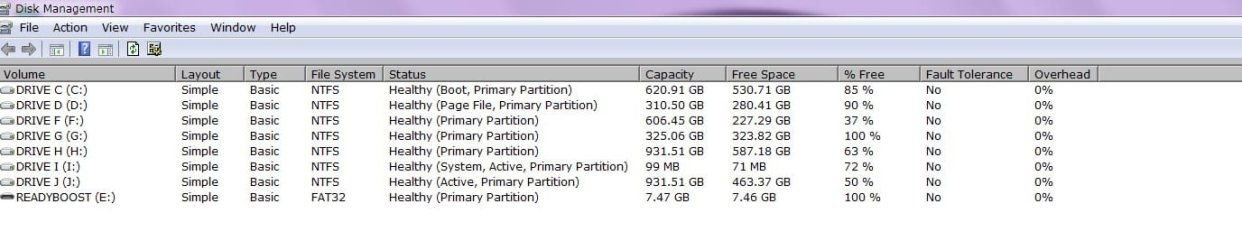
Now, however, I have a BOOTMGR file in the root of both my D: and I: partitions (both on the primary HD). They have different dates; also, both partitions now have a folder named "boot" as well. The folder on I: is obviously needed and in use, as numerous files (bootstat.dat, etc.) and logs seem to be recreated or updated on most every reboot of the machine. The "boot" folder on D: contains none of this and doesn't appear to have been accessed or changed since the date of the ORIGINAL problem (11-20-2011). Why is it there? What are the consequences of say, renaming it, rebooting, and if all goes well DELETING it? Shouldn't there only be ONE partition with BOOTMGR on it? There is also a file on C: called "bootsqm.dat" which always has the date/time of my last reboot? What is THIS?
I'm probably too curious for my own good:sarc:, but would at least like SOME idea of what's going on...and why!
Any assistance or external references would be GREATLY appreciated . Thanks.
kakite
OK. This is complicated; please be patient. Some months ago my PC (Win7 Ultimate x64) suddenly came up with the dreaded "BOOTMGR missing...press CTRL+ALT+DEL to continue..." error message. No idea what caused this; the OS had been operating flawlessly for almost a year. Anyway, I tried using a "Windows 7 Recovery Disc" which I had burned from an .iso file downloaded ages ago. After several unsuccessful attempts to fix the problem with the Recovery Disc, I gave up in frustration and rebooted from the Win7 installation DVD. It of course told me there was an existing Win7 OS on the machine; did I wish to update/overwrite that or install a NEW copy of the OS? I chose "new copy" and installed it. This fixed the problem, of course. Once I was certain all was working (several days later), I used Win7's "BOOTMGR" utility to DELETE this second, unnecessary version of the OS. All still worked fine, but it "shrunk" drive D: and left an "UNUSED" area on the drive (according to the DISKMGR tool). I don't remember the drive letter the install routine created. Anyway, I could not "extend" D: or get back the wasted HD space no matter what I tried. Naturally, in the process I stupidly screwed up something and was back to the "BOOTMGR missing..." situation. Arrgghh!! I used another PC to search for help on the 'net, and found a lot of praise for a utility called "EasyBCD" (using "Ubuntu," which I assume is another OS that, like Linux, can "read" and fix problems on NTSF-formatted drives). Worked like a charm AND I HAVE NOT SCREWED WITH *ANYTHING* once all was working.
Now, however, I have a BOOTMGR file in the root of both my D: and I: partitions (both on the primary HD). They have different dates; also, both partitions now have a folder named "boot" as well. The folder on I: is obviously needed and in use, as numerous files (bootstat.dat, etc.) and logs seem to be recreated or updated on most every reboot of the machine. The "boot" folder on D: contains none of this and doesn't appear to have been accessed or changed since the date of the ORIGINAL problem (11-20-2011). Why is it there? What are the consequences of say, renaming it, rebooting, and if all goes well DELETING it? Shouldn't there only be ONE partition with BOOTMGR on it? There is also a file on C: called "bootsqm.dat" which always has the date/time of my last reboot? What is THIS?
I'm probably too curious for my own good:sarc:, but would at least like SOME idea of what's going on...and why!
Any assistance or external references would be GREATLY appreciated
. Thanks.kakite
My Computer
- Computer Manufacturer/Model Number
- Self-built
- OS
- Windows 7 Ultimate x64 Sp1
- CPU
- Intel Core i7-3770, 3.90 GHz
- Motherboard
- Asus P8277-V (Premium)
- Memory
- 12GB Triple-channel DDR3 @ 2400MHz
- Sound Card
- Realtek ALC898
- Monitor(s) Displays
- 42" HD Widescreen (TV/monitor combo); 4 HDMI video ports
- Hard Drives
- 4; 2 SATA internal, 1TB each
2 eSATA external, 1TB each
- Case
- Antec
- Keyboard
- Logitech wireless kboard/mouse combo
- Internet Speed
- 50Mbps DL; 10Mbps UL
- Other Info
- Very, very quiet. From OFF to full OS availability is
34 secs. average
 !
!

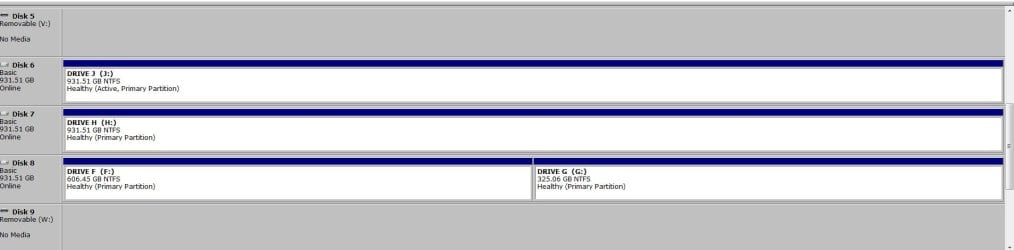

 ; when the batch file comes to I: a warning appears, roughly "CHKSK can't run, vol in use by another process. Will run if dismounted but all opened handles to volume...invalid, yada yada. Asks do I wish to dismount the volume, I type Y and chkdsk runs (very quickly as it's so small). Does this make any sense to you? SOMETHING critical is using the volume! Using task manager, I see no processes or services that are called anything similar to "bootmgr," "bootstat," etc.
