File Extension Type - Unassociate

How to Unassociate File Extension Types in Vista, Windows 7, and Windows 8

   Information
This tutorial will show you how to unassociate a file extension to no longer have a default program to open it with afterwards in Vista, Windows 7, and Windows 8.

You must be logged in as an administrator to be able to unassociate file types.

   Note
These are free standalone EXE program that run without installing anything on your computer.


CONTENTS:
  • Option One: Unassociate File Type using "FileTypesMan" Program
  • Option Two: Unassociate File Type using "Unassociate File Types" Program
  • Option Three: Unassociate File Type using "Unassociate" BAT file


OPTION ONE

Unassociate File Type using "FileTypesMan" Program


NOTE: This program supports running in XP, Vista, Windows 7, and Windows 8.
1. Download the ZIP file for the same 32-bit or 64-bit FileTypesMan at the bottom of the site below as your 32-bit or 64-bit Windows.
FileTypesMan - Alternative to 'File Types' manager of Windows
2. Open the downloaded filetypesman.zip or filetypesman-x64.zip, and extract (drag and drop) all files to the desktop.

3. Run the extracted FileTypesMan.exe file.

4. If prompted by UAC, click/tap on Yes (Windows 7/8) or Continue (Vista).

5. In the top pane, select one or more "extensions" (ex: .txt) that you wish to unassociate. (see screenshot below)

   Note
To select random multiple file extensions:
Press and hold the Ctrl key while clicking on extensions to select them, then release the Ctrl key when finished.

To Select everything inbetween two selected file extensions including the selected file extension:
Select an extension, press and hold the Shift key, click on another extension to select them and everything inbetween them, then release the Shift key.

FileTypesMan-1.jpg
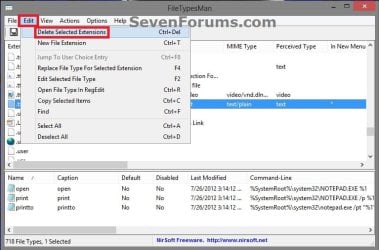
6. When finished with step 5, click/tap on Edit (menu bar) and Delete Selected Extensions. (see screenshot below)
FileTypesMan-2.jpg
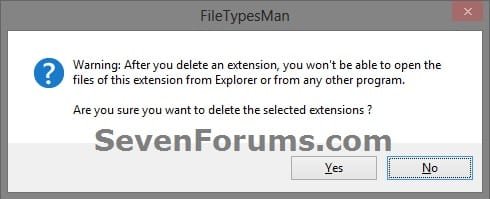
7. Click/tap on Yes to confirm. (see screenshot below)

8. When finished, you can close FileTypesMan if you like.


OPTION TWO

Unassociate File Type using "Unassociate File Types" Program


NOTE: This program only supports running in Windows 7 and Vista. Windows 8 is not supported.
1. Download the ZIP file for the free Unassociate File Types program under Attachements towards the bottom of the site at the link, and save it to your desktop.

2. Open the downloaded unassoc.zip, and extract (drag and drop) all files to the desktop. (see screenshot below)

Zip_Contents.jpg
3. Run the extracted Unassoc.exe file.

4. If prompted by UAC, click/tap on Yes (Windows 7) or Continue (Vista).

5. To Unassociate a File Extension Type
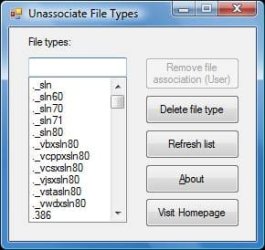
A) Click/tap on a file extension type from the list in the left pane to select it. (see screenshot below step 7)

B) Click/tap on Remove file association (User). (see screenshot below step 7)
6. To Delete a File Extension Type
A) Click/tap on a file extension type from the list in the left pane to select it. (see screenshot below step 7)

B) Click/tap on Delete file type. (see screenshot below step 7)
7. When finished, close the program.
Unassociate.jpg


OPTION THREE

Unassociate File Type using "Unassociate" BAT file


   Note
Thank you to our member Pyprohly for creating the Unassociate.bat file in this option.


1. Click/tap on the Download button below to download the Unassociate.bat v2.2.1 file.

Download


2. Save the .bat file to your desktop, and unblock it.

3. Do step 4 or step 5 below for how you want to unassociate a file type with the Unassociate.bat file.

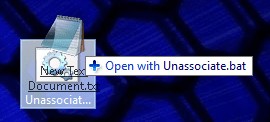
4. Drag and drop the file you want to unassociate on to the Unassociate.bat file, and go to step 7 below. (see screenshot below)
Unassociate_drag.png
5. Right click on the Unassociate.bat file, and click on Run as administrator.

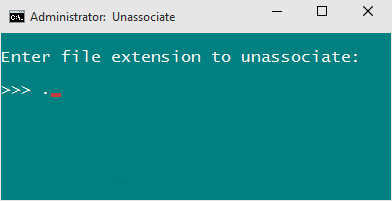
6. Enter the file extension that you want to unassociate, and press Enter. (see screenshot below)
Unassociate-1.png
7. Type Y to confirm. (see screenshot below)
Unassociate-2.png
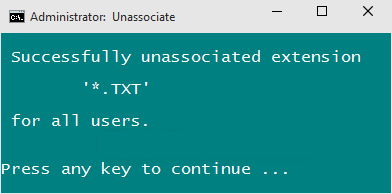
8. The entered file extension is now unassociated for all users. (see screenshot below)
Unassociate-3.png
That's it,
Shawn


Attachments

Last edited:
I can't seem to unassociate .BAK files. Do I use the delete feature?
 

My Computer

Computer type
PC/Desktop
Computer Manufacturer/Model Number
Custom Build
OS
Microsoft Windows 7 64-bit Service Pack 1
CPU
Intel Core i7-4790K Devil's Canyon Quad-Core 4.0 GHz
Motherboard
GIGABYTE GA-Z97X-SLI LGA 1150
Memory
16.00 GB
Graphics Card(s)
NVIDIA GeForce GTX 950
Monitor(s) Displays
AOC 2050W
Screen Resolution
1920 x 1080
Hard Drives
ST1000DL002-9TT153 ATA Device
Seagate 2TB FireCuda Gaming SSHD (Solid State Hybrid Drive) - 7200 RPM SATA 6Gb/s 64MB Cache 3.5-Inch Hard Drive
Samsung 850 EVO - 250GB - 2.5-Inch SATA III Internal SSD
PSU
CORSAIR CX-M Series CX750M 750W ATX12V & EPS12V Semi-modular
Case
Lian Li PC-7H
Browser
Firefox

My Computer

Computer type
PC/Desktop
Computer Manufacturer/Model Number
Self built custom
OS
64-bit Windows 11 Pro for Workstations
CPU
Intel i7-8700K OC'd to 5 GHz
Motherboard
ASUS ROG Maximus XI Formula Z390
Memory
64 GB (4x16GB) G.SKILL TridentZ RGB DDR4 3600 MHz
Graphics Card(s)
ASUS ROG-STRIX-GTX1080TI-O11G-GAMING
Sound Card
Integrated
Monitor(s) Displays
2 x Samsung Odyssey G7 27"
Screen Resolution
2560x1440
Hard Drives
1TB Samsung 990 PRO M.2,
4TB Samsung 990 PRO PRO M.2,
TerraMaster F8 SSD Plus NAS
PSU
Seasonic Prime Titanium 850W
Case
Thermaltake Core P3
Cooling
Corsair Hydro H115i
Keyboard
Logitech wireless K800
Mouse
Logitech MX Master 4
Internet Speed
2 Gb/s Download and 100 Mb/s Upload
Antivirus
Malwarebyte Anti-Malware Premium
Browser
Google Chrome
Other Info
Logitech Z625 speaker system,
Logitech BRIO 4K Pro webcam,
HP Color LaserJet Pro MFP M477fdn,
APC SMART-UPS RT 1000 XL - SURT1000XLI,
Galaxy S23 Plus phone
You're most welcome Ghost. :)
 

My Computer

Computer type
PC/Desktop
Computer Manufacturer/Model Number
Self built custom
OS
64-bit Windows 11 Pro for Workstations
CPU
Intel i7-8700K OC'd to 5 GHz
Motherboard
ASUS ROG Maximus XI Formula Z390
Memory
64 GB (4x16GB) G.SKILL TridentZ RGB DDR4 3600 MHz
Graphics Card(s)
ASUS ROG-STRIX-GTX1080TI-O11G-GAMING
Sound Card
Integrated
Monitor(s) Displays
2 x Samsung Odyssey G7 27"
Screen Resolution
2560x1440
Hard Drives
1TB Samsung 990 PRO M.2,
4TB Samsung 990 PRO PRO M.2,
TerraMaster F8 SSD Plus NAS
PSU
Seasonic Prime Titanium 850W
Case
Thermaltake Core P3
Cooling
Corsair Hydro H115i
Keyboard
Logitech wireless K800
Mouse
Logitech MX Master 4
Internet Speed
2 Gb/s Download and 100 Mb/s Upload
Antivirus
Malwarebyte Anti-Malware Premium
Browser
Google Chrome
Other Info
Logitech Z625 speaker system,
Logitech BRIO 4K Pro webcam,
HP Color LaserJet Pro MFP M477fdn,
APC SMART-UPS RT 1000 XL - SURT1000XLI,
Galaxy S23 Plus phone
Do you have a .dm file extension listed instead? That would be the actual file extension instead of .sis.dm. Only the letters after the the last dot is the file extension.
 

My Computer

Computer type
PC/Desktop
Computer Manufacturer/Model Number
Self built custom
OS
64-bit Windows 11 Pro for Workstations
CPU
Intel i7-8700K OC'd to 5 GHz
Motherboard
ASUS ROG Maximus XI Formula Z390
Memory
64 GB (4x16GB) G.SKILL TridentZ RGB DDR4 3600 MHz
Graphics Card(s)
ASUS ROG-STRIX-GTX1080TI-O11G-GAMING
Sound Card
Integrated
Monitor(s) Displays
2 x Samsung Odyssey G7 27"
Screen Resolution
2560x1440
Hard Drives
1TB Samsung 990 PRO M.2,
4TB Samsung 990 PRO PRO M.2,
TerraMaster F8 SSD Plus NAS
PSU
Seasonic Prime Titanium 850W
Case
Thermaltake Core P3
Cooling
Corsair Hydro H115i
Keyboard
Logitech wireless K800
Mouse
Logitech MX Master 4
Internet Speed
2 Gb/s Download and 100 Mb/s Upload
Antivirus
Malwarebyte Anti-Malware Premium
Browser
Google Chrome
Other Info
Logitech Z625 speaker system,
Logitech BRIO 4K Pro webcam,
HP Color LaserJet Pro MFP M477fdn,
APC SMART-UPS RT 1000 XL - SURT1000XLI,
Galaxy S23 Plus phone
Do you have a .dm file extension listed instead? That would be the actual file extension instead of .sis.dm. Only the letters after the the last dot is the file extension.


uh i got it
there is a .dm extension listed, but when i selected the remove file associations (user) button is inactive :S
 

My Computer

OS
Windows 7 Ultimate
I attached a REG file below that will remove the .dm file extension from the usual locations in the registry that should also unassociate it. After merging the REG file, restart the computer to fully apply.
 

Attachments

My Computer

Computer type
PC/Desktop
Computer Manufacturer/Model Number
Self built custom
OS
64-bit Windows 11 Pro for Workstations
CPU
Intel i7-8700K OC'd to 5 GHz
Motherboard
ASUS ROG Maximus XI Formula Z390
Memory
64 GB (4x16GB) G.SKILL TridentZ RGB DDR4 3600 MHz
Graphics Card(s)
ASUS ROG-STRIX-GTX1080TI-O11G-GAMING
Sound Card
Integrated
Monitor(s) Displays
2 x Samsung Odyssey G7 27"
Screen Resolution
2560x1440
Hard Drives
1TB Samsung 990 PRO M.2,
4TB Samsung 990 PRO PRO M.2,
TerraMaster F8 SSD Plus NAS
PSU
Seasonic Prime Titanium 850W
Case
Thermaltake Core P3
Cooling
Corsair Hydro H115i
Keyboard
Logitech wireless K800
Mouse
Logitech MX Master 4
Internet Speed
2 Gb/s Download and 100 Mb/s Upload
Antivirus
Malwarebyte Anti-Malware Premium
Browser
Google Chrome
Other Info
Logitech Z625 speaker system,
Logitech BRIO 4K Pro webcam,
HP Color LaserJet Pro MFP M477fdn,
APC SMART-UPS RT 1000 XL - SURT1000XLI,
Galaxy S23 Plus phone
You're most welcome Ghost. :)
 

My Computer

Computer type
PC/Desktop
Computer Manufacturer/Model Number
Self built custom
OS
64-bit Windows 11 Pro for Workstations
CPU
Intel i7-8700K OC'd to 5 GHz
Motherboard
ASUS ROG Maximus XI Formula Z390
Memory
64 GB (4x16GB) G.SKILL TridentZ RGB DDR4 3600 MHz
Graphics Card(s)
ASUS ROG-STRIX-GTX1080TI-O11G-GAMING
Sound Card
Integrated
Monitor(s) Displays
2 x Samsung Odyssey G7 27"
Screen Resolution
2560x1440
Hard Drives
1TB Samsung 990 PRO M.2,
4TB Samsung 990 PRO PRO M.2,
TerraMaster F8 SSD Plus NAS
PSU
Seasonic Prime Titanium 850W
Case
Thermaltake Core P3
Cooling
Corsair Hydro H115i
Keyboard
Logitech wireless K800
Mouse
Logitech MX Master 4
Internet Speed
2 Gb/s Download and 100 Mb/s Upload
Antivirus
Malwarebyte Anti-Malware Premium
Browser
Google Chrome
Other Info
Logitech Z625 speaker system,
Logitech BRIO 4K Pro webcam,
HP Color LaserJet Pro MFP M477fdn,
APC SMART-UPS RT 1000 XL - SURT1000XLI,
Galaxy S23 Plus phone
Unassociate a file type in Windows 7

I found the easiest way to unassociate a file type is to perform these steps:
1. Click start then all programs then accessories.
2. Right click command prompt and select run as administrator. If prompted for username/password, enter it.
3. In the command prompt type the following command:
assoc .pml= none
Note: .pml is the file you are trying to unassociate.
4. Press enter.
Voila, hope it helps!!
 

My Computer

Computer Manufacturer/Model Number
HP 6455
OS
Windows 7
CPU
See quickspecs
Motherboard
See quickspecs
Memory
8GB
Graphics Card(s)
See quickspecs
Sound Card
See quickspecs
Monitor(s) Displays
See quickspecs
Hard Drives
See quickspecs
PSU
See quickspecs
Case
See quickspecs
Cooling
See quickspecs
I need to unassociate .crc files; tried both methods suggested above in vain.
The Unassoc.exe ran and said the file type is unassociated now, but it stayed associated.
Nor did the command prompt do the trick.
What could the cause be and more importantly, how to solve this?
Thanks a lot.
 

My Computer

OS
Windows 7 Ultimate x64
Hello Georgey,

Did you also try deleting the file extension using the program in the tutorial? That will also unassociate it. :)

Hope this helps for now,
Shawn
 

My Computer

Computer type
PC/Desktop
Computer Manufacturer/Model Number
Self built custom
OS
64-bit Windows 11 Pro for Workstations
CPU
Intel i7-8700K OC'd to 5 GHz
Motherboard
ASUS ROG Maximus XI Formula Z390
Memory
64 GB (4x16GB) G.SKILL TridentZ RGB DDR4 3600 MHz
Graphics Card(s)
ASUS ROG-STRIX-GTX1080TI-O11G-GAMING
Sound Card
Integrated
Monitor(s) Displays
2 x Samsung Odyssey G7 27"
Screen Resolution
2560x1440
Hard Drives
1TB Samsung 990 PRO M.2,
4TB Samsung 990 PRO PRO M.2,
TerraMaster F8 SSD Plus NAS
PSU
Seasonic Prime Titanium 850W
Case
Thermaltake Core P3
Cooling
Corsair Hydro H115i
Keyboard
Logitech wireless K800
Mouse
Logitech MX Master 4
Internet Speed
2 Gb/s Download and 100 Mb/s Upload
Antivirus
Malwarebyte Anti-Malware Premium
Browser
Google Chrome
Other Info
Logitech Z625 speaker system,
Logitech BRIO 4K Pro webcam,
HP Color LaserJet Pro MFP M477fdn,
APC SMART-UPS RT 1000 XL - SURT1000XLI,
Galaxy S23 Plus phone
Thanks Shawn,
I didn't find that program, please give me directions.
Georgey
 

My Computer

OS
Windows 7 Ultimate x64
It's the same Unassoc.exe program at the link in step 1 of the tutorial on the first page. :)
 

My Computer

Computer type
PC/Desktop
Computer Manufacturer/Model Number
Self built custom
OS
64-bit Windows 11 Pro for Workstations
CPU
Intel i7-8700K OC'd to 5 GHz
Motherboard
ASUS ROG Maximus XI Formula Z390
Memory
64 GB (4x16GB) G.SKILL TridentZ RGB DDR4 3600 MHz
Graphics Card(s)
ASUS ROG-STRIX-GTX1080TI-O11G-GAMING
Sound Card
Integrated
Monitor(s) Displays
2 x Samsung Odyssey G7 27"
Screen Resolution
2560x1440
Hard Drives
1TB Samsung 990 PRO M.2,
4TB Samsung 990 PRO PRO M.2,
TerraMaster F8 SSD Plus NAS
PSU
Seasonic Prime Titanium 850W
Case
Thermaltake Core P3
Cooling
Corsair Hydro H115i
Keyboard
Logitech wireless K800
Mouse
Logitech MX Master 4
Internet Speed
2 Gb/s Download and 100 Mb/s Upload
Antivirus
Malwarebyte Anti-Malware Premium
Browser
Google Chrome
Other Info
Logitech Z625 speaker system,
Logitech BRIO 4K Pro webcam,
HP Color LaserJet Pro MFP M477fdn,
APC SMART-UPS RT 1000 XL - SURT1000XLI,
Galaxy S23 Plus phone
Oh thanks I found and tried that before asking for help.
As I mentioned in my first post, it ran, said the file type was unassociated, but in fact it is still associated.
Anything else that might solve this problem?
 

My Computer

OS
Windows 7 Ultimate x64
Dont Work in indos seven ultimate.

Hi
This tool is exactly what I was looking for, but refuse to work on Wndow Seven ultimate French, SP" (clean install)

The error message is that
"This program run in Windows 7 & Windows Vista Only"... and I am in Windows Seven

Is that a way I can force it to do.

Thank you
Marie :confused:
 

My Computer

Computer Manufacturer/Model Number
HP Pavilion a6200n desktop
OS
Window 7 ultimate 32 bit (french) SP1
CPU
AMD Athlon II X3 445 Technologie Rana
Motherboard
FOXCONN 2A92 (CPU 1)
Memory
4,00*Go Canal-Double DDR3 @ 666 MHz
Graphics Card(s)
ATI Radeon HD 4200 (HP)
Sound Card
Realtek High Definition Audio
Monitor(s) Displays
HP w2007
Screen Resolution
1680x1050@59Hz
Hard Drives
932 Go Hitachi Hitachi HDS721010CLA332 SCSI Disk Device (RAID)
Case
HP
Keyboard
hp.com/ergo
Mouse
roller-mouse pro
Internet Speed
ADLS
Other Info
I internal hard drive.
externald hardrives (on USB ports)
1segate,
1 WD,
1smard disk
and 1kingston flash drive
I just see how to proceed with the command ligne, as suggeste by Georgy, thank you...

But if ever it is a way to use the Unass.exe, that would be fantastic.

Thank you.
 

My Computer

Computer Manufacturer/Model Number
HP Pavilion a6200n desktop
OS
Window 7 ultimate 32 bit (french) SP1
CPU
AMD Athlon II X3 445 Technologie Rana
Motherboard
FOXCONN 2A92 (CPU 1)
Memory
4,00*Go Canal-Double DDR3 @ 666 MHz
Graphics Card(s)
ATI Radeon HD 4200 (HP)
Sound Card
Realtek High Definition Audio
Monitor(s) Displays
HP w2007
Screen Resolution
1680x1050@59Hz
Hard Drives
932 Go Hitachi Hitachi HDS721010CLA332 SCSI Disk Device (RAID)
Case
HP
Keyboard
hp.com/ergo
Mouse
roller-mouse pro
Internet Speed
ADLS
Other Info
I internal hard drive.
externald hardrives (on USB ports)
1segate,
1 WD,
1smard disk
and 1kingston flash drive
Hello Marie,

It may have been an issue with your Windows not in English for the program.

I'm happy to hear that you got it sorted using the command line though. :)
 

My Computer

Computer type
PC/Desktop
Computer Manufacturer/Model Number
Self built custom
OS
64-bit Windows 11 Pro for Workstations
CPU
Intel i7-8700K OC'd to 5 GHz
Motherboard
ASUS ROG Maximus XI Formula Z390
Memory
64 GB (4x16GB) G.SKILL TridentZ RGB DDR4 3600 MHz
Graphics Card(s)
ASUS ROG-STRIX-GTX1080TI-O11G-GAMING
Sound Card
Integrated
Monitor(s) Displays
2 x Samsung Odyssey G7 27"
Screen Resolution
2560x1440
Hard Drives
1TB Samsung 990 PRO M.2,
4TB Samsung 990 PRO PRO M.2,
TerraMaster F8 SSD Plus NAS
PSU
Seasonic Prime Titanium 850W
Case
Thermaltake Core P3
Cooling
Corsair Hydro H115i
Keyboard
Logitech wireless K800
Mouse
Logitech MX Master 4
Internet Speed
2 Gb/s Download and 100 Mb/s Upload
Antivirus
Malwarebyte Anti-Malware Premium
Browser
Google Chrome
Other Info
Logitech Z625 speaker system,
Logitech BRIO 4K Pro webcam,
HP Color LaserJet Pro MFP M477fdn,
APC SMART-UPS RT 1000 XL - SURT1000XLI,
Galaxy S23 Plus phone
Back
Top