Solved File management issues

Jack C

New member
Local time
6:25 PM
Messages
43
Hello again,
I hesitate to beat this flogged horse any more, but I am really, really having a hard time with file management in Windows 7. I have learned that I can install a third party program which will behave more like former versions of Windows Explorer, and I am close to trying it. But I would like to have just a bit more understanding of just what the "new" Windows Explorer configuration is up to in Windows 7. (I will only mention that it's even more frustrating having constant "Windows Explorer has stopped working" events as I work.)
I have been informed by helpful contributers to this forum about the "libraries" and "pointers" which, although meant to be helpful, are actually confusing to me.
Here's my latest query:
Starting at the top of the Tree in Windows Explorer, there is a folder with my user name, say "Jack". Under that folder there are two "my documents folders. One of them is apparently a "pointer" for legacy programs, and the other is "real" and contains a number of files. When I right click on the "real" my documents folder and open properties, it says there are zero bytes. But there are a number of files.
Now, further down in the tree, under
computer\computer name (C:)users\jack
which I am told is the "real" user folder, there is only the inaccessable "my documents" folder with the little arrow on the side of it. The my documents in the higher up in the tree folder with my user name has lots of files in it.

I am trying to set up a tree I can live with and work with my files the way I want to. It seems that Win 7 is making this impossible for me.
I am I nuts? Or is there some rhyme or reason for this situation? Am I alone in finding this very frustrating?

I am really trying to be patient and learn what is going on, what is the structure of the "new" Windows Explorer and how I can learn to co-exist with it.

Any advice or references or links would be greatly appreciated.

Many thanks.

Jack
 

My Computer

Computer Manufacturer/Model Number
Toshiba Tecra R850
OS
Windows 7 Professsional 64 bit
CPU
Intel i7-2620M
Motherboard
n/a Laptop
Memory
8 GB
Graphics Card(s)
AMD Radeon™ HD 6450M w/1GB DDR3
Sound Card
n/a
Monitor(s) Displays
n/a
Screen Resolution
1366 X768
Hard Drives
500GB HDD (7200rpm, Serial-ATA)
PSU
n/a
Case
n/a
Cooling
n/a
Keyboard
n/a
Mouse
Toshiba Nano Wireless PA3844U-1ETB
Internet Speed
Download 35.9 Mbps Upload 1.89 Mbps
Other Info
Laptop
Hi Jack (don't say that on an airplane)
I know what you mean about Libraries, confusing. What I did was to got to the library (each one) and it showed 2 or more locations. I deleted all but the "real" folder, ie, Documents, and I simply use the Start menu to access it and other default folders. No library opening, just the selected folder.
 

My Computer

Computer type
PC/Desktop
Computer Manufacturer/Model Number
Home Built Desktop By DataTech
OS
Windows 7 Ultimate X64 SP1
CPU
Intel i5-2550K, Differing ~4.4-4.8GHz No built in GPU
Motherboard
ASUS P8Z68-V PRO/GEN3
Memory
16GB G.Skill Sniper 1866MHz @ 2133MHz 2x8GB
Graphics Card(s)
ASUS GTX650TIB-DC2OC-2GD5, (650TI Boost)
Sound Card
Onboard Realtek 5-1
Monitor(s) Displays
Samsung P2570HD
Screen Resolution
1920x1080
Hard Drives
Samsung 840 Pro 256GB SSD for OS, 500GB Seagate Constellation (Enterprise drive) for Data
PSU
Corsair HX650W
Case
Inwin Dragon Rider
Cooling
Hyper 212 EVO w/two Noctua fans, push-pull, @1300 RPM
Keyboard
E-Z Eyes, bright yellow keys with large characters
Mouse
steelseries SENSEI Laser Pro Gaming
Internet Speed
48-51Mbs Mbs down, 11 Mbs up Xfinity Cable
Antivirus
Norton Internet Security 2013
Browser
IE 10, Opera, Pale Moon if needed
Other Info
4 case fans, LG BluRay-RE, ASUS DVD-RW, Mr. Fusion power supply, 1.21 gigawatts.
Hi Jack (don't say that on an airplane)
What I did was to got to the library (each one) and it showed 2 or more locations. I deleted all but the "real" folder, ie, Documents, and I simply use the Start menu to access it and other default folders.
I can certainly try to do that. I'm not sure about accessing Windows Explorer from the start menu. (My win 7 computer is tied up now running chkdsk so I can't test it.)
Is there any way to have a logical tree starting at the root folder c:\ and going down from there? Just like (sigh) in earlier versions (although in fact they did add some out of logic folders, which I learned to ignore.)

The logic of that file structure tree just seems so clean. I'm having a real problem wrapping my simple mind around the "new" structure, and having some dummy folders doesn't help.
Furthermore, the Windows 7 Windows explorer jumps around to parent folders as I try to work in subfolders, but I've already complained about that in this forum.)
Thanks for the reply.


Jack
 

My Computer

Computer Manufacturer/Model Number
Toshiba Tecra R850
OS
Windows 7 Professsional 64 bit
CPU
Intel i7-2620M
Motherboard
n/a Laptop
Memory
8 GB
Graphics Card(s)
AMD Radeon™ HD 6450M w/1GB DDR3
Sound Card
n/a
Monitor(s) Displays
n/a
Screen Resolution
1366 X768
Hard Drives
500GB HDD (7200rpm, Serial-ATA)
PSU
n/a
Case
n/a
Cooling
n/a
Keyboard
n/a
Mouse
Toshiba Nano Wireless PA3844U-1ETB
Internet Speed
Download 35.9 Mbps Upload 1.89 Mbps
Other Info
Laptop
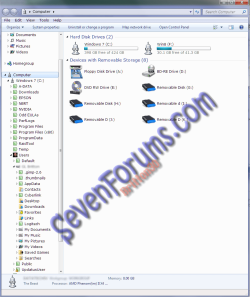
Here is my layout with my C\ expanded a couple of times.
Tree.png
If I click any of the Library entries near the top, that particular folder opens. If it's expanded it shows a folder with "My" on it and also opens the same folder. Maybe I'm not fully understanding what you want to do. :confused:
Sometimes it takes a few explanations to "get" it. :)
 

My Computer

Computer type
PC/Desktop
Computer Manufacturer/Model Number
Home Built Desktop By DataTech
OS
Windows 7 Ultimate X64 SP1
CPU
Intel i5-2550K, Differing ~4.4-4.8GHz No built in GPU
Motherboard
ASUS P8Z68-V PRO/GEN3
Memory
16GB G.Skill Sniper 1866MHz @ 2133MHz 2x8GB
Graphics Card(s)
ASUS GTX650TIB-DC2OC-2GD5, (650TI Boost)
Sound Card
Onboard Realtek 5-1
Monitor(s) Displays
Samsung P2570HD
Screen Resolution
1920x1080
Hard Drives
Samsung 840 Pro 256GB SSD for OS, 500GB Seagate Constellation (Enterprise drive) for Data
PSU
Corsair HX650W
Case
Inwin Dragon Rider
Cooling
Hyper 212 EVO w/two Noctua fans, push-pull, @1300 RPM
Keyboard
E-Z Eyes, bright yellow keys with large characters
Mouse
steelseries SENSEI Laser Pro Gaming
Internet Speed
48-51Mbs Mbs down, 11 Mbs up Xfinity Cable
Antivirus
Norton Internet Security 2013
Browser
IE 10, Opera, Pale Moon if needed
Other Info
4 case fans, LG BluRay-RE, ASUS DVD-RW, Mr. Fusion power supply, 1.21 gigawatts.
Watching racing on TNT, will check back tomorrow buddy.
 

My Computer

Computer type
PC/Desktop
Computer Manufacturer/Model Number
Home Built Desktop By DataTech
OS
Windows 7 Ultimate X64 SP1
CPU
Intel i5-2550K, Differing ~4.4-4.8GHz No built in GPU
Motherboard
ASUS P8Z68-V PRO/GEN3
Memory
16GB G.Skill Sniper 1866MHz @ 2133MHz 2x8GB
Graphics Card(s)
ASUS GTX650TIB-DC2OC-2GD5, (650TI Boost)
Sound Card
Onboard Realtek 5-1
Monitor(s) Displays
Samsung P2570HD
Screen Resolution
1920x1080
Hard Drives
Samsung 840 Pro 256GB SSD for OS, 500GB Seagate Constellation (Enterprise drive) for Data
PSU
Corsair HX650W
Case
Inwin Dragon Rider
Cooling
Hyper 212 EVO w/two Noctua fans, push-pull, @1300 RPM
Keyboard
E-Z Eyes, bright yellow keys with large characters
Mouse
steelseries SENSEI Laser Pro Gaming
Internet Speed
48-51Mbs Mbs down, 11 Mbs up Xfinity Cable
Antivirus
Norton Internet Security 2013
Browser
IE 10, Opera, Pale Moon if needed
Other Info
4 case fans, LG BluRay-RE, ASUS DVD-RW, Mr. Fusion power supply, 1.21 gigawatts.
Here is my layout with my C\ expanded a couple of times.
Nice! Now I could work with that. I've copied it and will see about getting my messy Windows Explorer to morph into that sort of form.
I'll attach a screenshot of my own layout when I can get to the machine.
Enjoy the races, and thanks.

Jack
 

My Computer

Computer Manufacturer/Model Number
Toshiba Tecra R850
OS
Windows 7 Professsional 64 bit
CPU
Intel i7-2620M
Motherboard
n/a Laptop
Memory
8 GB
Graphics Card(s)
AMD Radeon™ HD 6450M w/1GB DDR3
Sound Card
n/a
Monitor(s) Displays
n/a
Screen Resolution
1366 X768
Hard Drives
500GB HDD (7200rpm, Serial-ATA)
PSU
n/a
Case
n/a
Cooling
n/a
Keyboard
n/a
Mouse
Toshiba Nano Wireless PA3844U-1ETB
Internet Speed
Download 35.9 Mbps Upload 1.89 Mbps
Other Info
Laptop
Hi Jack (don't say that on an airplane)
I know what you mean about Libraries, confusing. What I did was to got to the library (each one) and it showed 2 or more locations. I deleted all but the "real" folder, ie, Documents, and I simply use the Start menu to access it and other default folders. No library opening, just the selected folder.

Then you essentially defeated the purpose of Libraries.
 

My Computer

Computer Manufacturer/Model Number
Custom
OS
Windows 7 Ultimate RTM (Technet)
CPU
3.00 gigahertz Intel Core2 Duo E8400
Motherboard
ASUSTeK Computer INC. P5K/EPU Rev 1.xx
Memory
4GB
Graphics Card(s)
ATI Radeon X1950 Pro
Sound Card
Built in HD Audio
Monitor(s) Displays
22" Gateway LCD
Screen Resolution
1920 x 1200
Hard Drives
ST3160023A [Hard drive] (160.04 GB) -- drive 0, rev 8.01, ST3500630AS [Hard drive] (500.11 GB) -- drive 2, rev 3.AAK
ST3500630AS [Hard drive] (500.11 GB) -- drive 1, rev 3.AAK
Keyboard
Logitech G11
Mouse
Microsoft Wireless Laser Mouse 5000
Internet Speed
13.44 Mbps
Hi Jack (don't say that on an airplane)
What I did was to got to the library (each one) and it showed 2 or more locations. I deleted all but the "real" folder, ie, Documents, and I simply use the Start menu to access it and other default folders.
I can certainly try to do that. I'm not sure about accessing Windows Explorer from the start menu. (My win 7 computer is tied up now running chkdsk so I can't test it.)
Is there any way to have a logical tree starting at the root folder c:\ and going down from there? Just like (sigh) in earlier versions (although in fact they did add some out of logic folders, which I learned to ignore.)

The logic of that file structure tree just seems so clean. I'm having a real problem wrapping my simple mind around the "new" structure, and having some dummy folders doesn't help.
Furthermore, the Windows 7 Windows explorer jumps around to parent folders as I try to work in subfolders, but I've already complained about that in this forum.)
Thanks for the reply.


Jack

It takes one click to get to drive C:....what is the issue? The file structure HAS NOT changed at all.
 

My Computer

Computer Manufacturer/Model Number
Custom
OS
Windows 7 Ultimate RTM (Technet)
CPU
3.00 gigahertz Intel Core2 Duo E8400
Motherboard
ASUSTeK Computer INC. P5K/EPU Rev 1.xx
Memory
4GB
Graphics Card(s)
ATI Radeon X1950 Pro
Sound Card
Built in HD Audio
Monitor(s) Displays
22" Gateway LCD
Screen Resolution
1920 x 1200
Hard Drives
ST3160023A [Hard drive] (160.04 GB) -- drive 0, rev 8.01, ST3500630AS [Hard drive] (500.11 GB) -- drive 2, rev 3.AAK
ST3500630AS [Hard drive] (500.11 GB) -- drive 1, rev 3.AAK
Keyboard
Logitech G11
Mouse
Microsoft Wireless Laser Mouse 5000
Internet Speed
13.44 Mbps
Yup, don't need libraries with my setup. It's much easier.New isn't always better, but I can see where some users may find multiple clicking to open a folder may be attractive.
 

My Computer

Computer type
PC/Desktop
Computer Manufacturer/Model Number
Home Built Desktop By DataTech
OS
Windows 7 Ultimate X64 SP1
CPU
Intel i5-2550K, Differing ~4.4-4.8GHz No built in GPU
Motherboard
ASUS P8Z68-V PRO/GEN3
Memory
16GB G.Skill Sniper 1866MHz @ 2133MHz 2x8GB
Graphics Card(s)
ASUS GTX650TIB-DC2OC-2GD5, (650TI Boost)
Sound Card
Onboard Realtek 5-1
Monitor(s) Displays
Samsung P2570HD
Screen Resolution
1920x1080
Hard Drives
Samsung 840 Pro 256GB SSD for OS, 500GB Seagate Constellation (Enterprise drive) for Data
PSU
Corsair HX650W
Case
Inwin Dragon Rider
Cooling
Hyper 212 EVO w/two Noctua fans, push-pull, @1300 RPM
Keyboard
E-Z Eyes, bright yellow keys with large characters
Mouse
steelseries SENSEI Laser Pro Gaming
Internet Speed
48-51Mbs Mbs down, 11 Mbs up Xfinity Cable
Antivirus
Norton Internet Security 2013
Browser
IE 10, Opera, Pale Moon if needed
Other Info
4 case fans, LG BluRay-RE, ASUS DVD-RW, Mr. Fusion power supply, 1.21 gigawatts.
Here is my layout with my C\ expanded a couple of times.
View attachment 164166
If I click any of the Library entries near the top, that particular folder opens. If it's expanded it shows a folder with "My" on it and also opens the same folder. Maybe I'm not fully understanding what you want to do. :confused:
Sometimes it takes a few explanations to "get" it. :)
I hope I don't seem ungrateful, and I really do appreciate your and everyone else's attempts to educate me about what I find a quirky and hard-to-use Windows Explorer in Windows 7 .... But, I installed Explorer++ ... and so far I love it. I had been recommended to get Free Commander which is also nice, but a little more complicated than I had hoped for. So I'm still very early with the freeware Explorer++ (Explorer++ - A small and fast file manager for Windows) ... but it looks great to me. I sent the writer a donation as soon as I installed and opened the program! So I'm hoping my file management problems are solved. Many thanks again.

Jack
 

My Computer

Computer Manufacturer/Model Number
Toshiba Tecra R850
OS
Windows 7 Professsional 64 bit
CPU
Intel i7-2620M
Motherboard
n/a Laptop
Memory
8 GB
Graphics Card(s)
AMD Radeon™ HD 6450M w/1GB DDR3
Sound Card
n/a
Monitor(s) Displays
n/a
Screen Resolution
1366 X768
Hard Drives
500GB HDD (7200rpm, Serial-ATA)
PSU
n/a
Case
n/a
Cooling
n/a
Keyboard
n/a
Mouse
Toshiba Nano Wireless PA3844U-1ETB
Internet Speed
Download 35.9 Mbps Upload 1.89 Mbps
Other Info
Laptop
Cool to hear Jack! Just because Windows has a new "feature", doesn't mean it useful to everyone.
 

My Computer

Computer type
PC/Desktop
Computer Manufacturer/Model Number
Home Built Desktop By DataTech
OS
Windows 7 Ultimate X64 SP1
CPU
Intel i5-2550K, Differing ~4.4-4.8GHz No built in GPU
Motherboard
ASUS P8Z68-V PRO/GEN3
Memory
16GB G.Skill Sniper 1866MHz @ 2133MHz 2x8GB
Graphics Card(s)
ASUS GTX650TIB-DC2OC-2GD5, (650TI Boost)
Sound Card
Onboard Realtek 5-1
Monitor(s) Displays
Samsung P2570HD
Screen Resolution
1920x1080
Hard Drives
Samsung 840 Pro 256GB SSD for OS, 500GB Seagate Constellation (Enterprise drive) for Data
PSU
Corsair HX650W
Case
Inwin Dragon Rider
Cooling
Hyper 212 EVO w/two Noctua fans, push-pull, @1300 RPM
Keyboard
E-Z Eyes, bright yellow keys with large characters
Mouse
steelseries SENSEI Laser Pro Gaming
Internet Speed
48-51Mbs Mbs down, 11 Mbs up Xfinity Cable
Antivirus
Norton Internet Security 2013
Browser
IE 10, Opera, Pale Moon if needed
Other Info
4 case fans, LG BluRay-RE, ASUS DVD-RW, Mr. Fusion power supply, 1.21 gigawatts.
Cool to hear Jack! Just because Windows has a new "feature", doesn't mean it useful to everyone.
I think it's going to take a lot of manipulation to get it to where I have a Windows Explorer I can be comfortable with. The Explorer++ program seems to give me a simple tree, so I'll work with that a while. I appreciate very much everyone's help.

Jack
 

My Computer

Computer Manufacturer/Model Number
Toshiba Tecra R850
OS
Windows 7 Professsional 64 bit
CPU
Intel i7-2620M
Motherboard
n/a Laptop
Memory
8 GB
Graphics Card(s)
AMD Radeon™ HD 6450M w/1GB DDR3
Sound Card
n/a
Monitor(s) Displays
n/a
Screen Resolution
1366 X768
Hard Drives
500GB HDD (7200rpm, Serial-ATA)
PSU
n/a
Case
n/a
Cooling
n/a
Keyboard
n/a
Mouse
Toshiba Nano Wireless PA3844U-1ETB
Internet Speed
Download 35.9 Mbps Upload 1.89 Mbps
Other Info
Laptop
Back
Top