File|Open & File|Save As does not work

miguelmateoJP

New member
Local time
8:54 AM
Messages
2
Hi there,

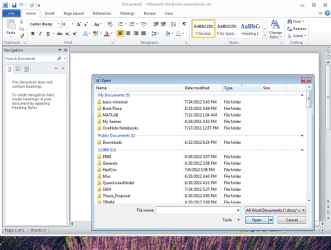
Have you ever seen that File|Open and File|Save As does not work at all for any application? Basically nothing happens, the dialog never opens. I have tried in several browsers, Word, Visual Studio ... nothing. The common dialog to handle files never opens and as a result I can not do more "complex" things like choosing a file to upload, adding a reference in a Visual Studio project.

I have googled the web with no results. Any clues? I have a fairly new laptop running Windows 7 Ultimate x64bits. Antivirus (Microsoft Security Essentials) says the system is clean. I have rebooted several times with no luck either.

Any help will be appreciated. Thanks!
Miguel
 

My Computer

Computer Manufacturer/Model Number
Dell Inspiron 1545
OS
Windows 7 Ultimate 64bits
CPU
Processor Intel(R) Core(TM)2 Duo CPU P8400 @ 2.26GHz
Motherboard
BIOS Version/Date Dell Inc. A08, 6/3/2009
Memory
Installed Physical Memory (RAM) 4.00 GB
It works in all our computer...

Try this:
Open an elevated CMD
and type sfc/scannow and hit enter. If there is a corrupted system file that is causing the problem the sfc/scannow utility will fix it..
 

My Computer

Computer Manufacturer/Model Number
Custom made
OS
Window 7 build 7600, Xp pro(VM)
CPU
Amd Athlon 2000 xp+
Motherboard
Asus x series
Memory
kingstone(1gb+256MB)
Graphics Card(s)
Nvdia 6200(256 mb+255mb(shared))
Sound Card
soundmax
Monitor(s) Displays
Lg Flatron w1943
Screen Resolution
1360x768
Hard Drives
segate 80GB
Case
i-ball
Keyboard
i-ball
Mouse
i-ball
Internet Speed
256kbps up and 256 kbps down
You are a genius!

It took a few minutes but well worth the wait ... once it finished this message was shown:

Windows Resource Protection found corrupt files and successfully repaired
them. Details are included in the CBS.Log windir\Logs\CBS\CBS.log. For
example C:\Windows\Logs\CBS\CBS.log

The log clearly says fixing a problem with common dialog resources. Now the question will be "who changed that dll?"

Anyway, I could not wait, went to Visual Studio, added a reference ... voala! It worked!

Thanks a lot,
Miguel

Ps. I am new in this forum, is there anything I need to do to get you some sort of credits for your answer?
 

My Computer

Computer Manufacturer/Model Number
Dell Inspiron 1545
OS
Windows 7 Ultimate 64bits
CPU
Processor Intel(R) Core(TM)2 Duo CPU P8400 @ 2.26GHz
Motherboard
BIOS Version/Date Dell Inc. A08, 6/3/2009
Memory
Installed Physical Memory (RAM) 4.00 GB
It took a few minutes but well worth the wait ... once it finished this message was shown:

Windows Resource Protection found corrupt files and successfully repaired
them. Details are included in the CBS.Log windir\Logs\CBS\CBS.log. For
example C:\Windows\Logs\CBS\CBS.log

The log clearly says fixing a problem with common dialog resources. Now the question will be "who changed that dll?"

Anyway, I could not wait, went to Visual Studio, added a reference ... voala! It worked!

Thanks a lot,
Miguel

Ps. I am new in this forum, is there anything I need to do to get you some sort of credits for your answer?
Just click the scale in the upper middle-right of septprince's post to award him some rep...

You have already contributed back by posting the solution that worked...this also helps folks greatly
 

My Computer

Computer Manufacturer/Model Number
Compal JFT02 (Custom Build Laptop)
OS
Windows 7 Home Premium x64 - Mac OS X 10.6.4 x64
CPU
Intel Core 2 Duo T9300 2.5 GHz
Motherboard
JFT02
Memory
4GB Kingston DDR2-800
Graphics Card(s)
NVIDIA Geforce 8600M GT (512MB Model)
Sound Card
Realtek HD Audio
Monitor(s) Displays
WUXGA Standard Laptop Display
Screen Resolution
1680*1050
Hard Drives
Toshiba 320GB 5400RPM Laptop HD
PSU
Standard Laptop Power Supply
Case
Standard Laptop Case
Cooling
Standard Laptop Cooling
Keyboard
Standard Laptop 105 Key-Keyboard
Mouse
Synaptics Touchpad
Internet Speed
Verizion Online DSL 3360/864 kbs (dl/up)
It took a few minutes but well worth the wait ... once it finished this message was shown:

Windows Resource Protection found corrupt files and successfully repaired
them. Details are included in the CBS.Log windir\Logs\CBS\CBS.log. For
example C:\Windows\Logs\CBS\CBS.log

The log clearly says fixing a problem with common dialog resources. Now the question will be "who changed that dll?"

Anyway, I could not wait, went to Visual Studio, added a reference ... voala! It worked!

Thanks a lot,
Miguel

Ps. I am new in this forum, is there anything I need to do to get you some sort of credits for your answer?


Good to see that your problem is fixed..
And thanks for the rep.....:)
 

My Computer

Computer Manufacturer/Model Number
Custom made
OS
Window 7 build 7600, Xp pro(VM)
CPU
Amd Athlon 2000 xp+
Motherboard
Asus x series
Memory
kingstone(1gb+256MB)
Graphics Card(s)
Nvdia 6200(256 mb+255mb(shared))
Sound Card
soundmax
Monitor(s) Displays
Lg Flatron w1943
Screen Resolution
1360x768
Hard Drives
segate 80GB
Case
i-ball
Keyboard
i-ball
Mouse
i-ball
Internet Speed
256kbps up and 256 kbps down
I am having the same problem. It happens only with 32-bit programs, like office, when I want to save or open a file the dialog box takes many minutes to respond. Notepad, which is 64-bit, works fine.
I tried the sfc/scannow command with no success.
Can someone help me please?
 

My Computer

OS
Windows 7 Ultimate x64
I had the exact same problem so I installed all the current Windows 7 updates. This fixed the problem.
 

My Computer

OS
United States of America (USA)
I am having the exact same problem as harlock15: 32-bit applications hang ("Not responding," but task manager shows that ample system resources are free) for about 75 seconds before a file|open or file|save as dialog box comes up. Furthermore, when the dialog box finally opens, it is "crippled" and I cannot fully navigate within it -- see the attached image. File|* dialog boxes within 64-bit applications still work fine.

I have tried CHKDSK and it returned no errors, but I cannot successfully run sfc /scannow -- it gets to "Verification 77% complete", and then returns the seemingly common "Windows Resource Protection could not perform the requested operation." It doesn't get any further if I boot into safe mode with command prompt, and the CBS.log file does not contain any obvious errors -- ieach scan just ends at the line, e.g:
2012-07-25 14:55:58, Info CSI 0000023c [SR] Beginning Verify and Repair transaction

Any thoughts about workarounds to reduce the amount of "not responding" time? Or is there some way to customize the file dialog box global settings specifically for 32-bit applications that might break me out of this rut?
 

Attachments

  • 32Bit_OpenFileDialog.png
    32Bit_OpenFileDialog.png
    34.1 KB · Views: 84

My Computer

Computer Manufacturer/Model Number
Toshiba Satellite A660
OS
Windows 7 Home Premium 64-bit
CPU
Intel Core i7-2630QM
Memory
8 GB
i have tried everything given above but the problem persists. find attached a jpeg image of sfc/scannow result. please, help.
 

Attachments

  • Capture.PNG
    Capture.PNG
    15.2 KB · Views: 17

My Computer

Computer type
PC/Desktop
OS
Windows 7 Ultimate SP1 64 Bit
still not fixed

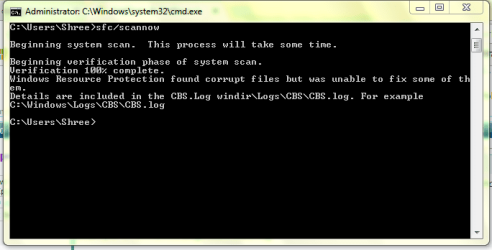
Still not fixed. After running sfc/scannow (100%), i received the following message: "Windows Resource Protection found corrupt files but was unable to fix some of them".

Please anybody suggest how to fix it.
 

My Computer

Computer type
Laptop
Computer Manufacturer/Model Number
compaq
OS
windows 7
CPU
core 2 duo
Motherboard
t5870
Memory
2GB
Graphics Card(s)
No
Hard Drives
256GB
Antivirus
None
Browser
Chrome
Hi sdhanush,

Welcome to SevenForums!

Still not fixed. After running sfc/scannow (100%), i received the following message: "Windows Resource Protection found corrupt files but was unable to fix some of them".

Please anybody suggest how to fix it.

The scan results are shown after the SFC [System File Checker] process has finished. If any errors are reported [as you have stated in your post], then run it again two or three more times, re-booting in between. For some reason, this can make a difference. I think it has to do with the settings.ini file sometimes showing false positives! If after that, you get a message saying Windows Resource Protection found corrupt files but was unable to fix some of them, then post the CBS.log in C:\Windows\Logs\CBS\CBS.log. I am sure that someone here will be able to look at the log file and give you an answer or advice.

I hope this helps!
 

My Computer

Computer type
Laptop
Computer Manufacturer/Model Number
Fujitsu LIFEBOOK
OS
Win 7 HP SP1 64-bit Vista HB SP2 32-bit Linux Mint 18.3
CPU
Intel(R) Pentium(R) CPU P6200 @ 2.13GHz
Motherboard
FUJITSU FJNBB06
Memory
4.00 GB
Graphics Card(s)
Intel(R) Graphics Media Accelerator HD
Sound Card
[1] Realtek High Definition Audio [2] Intel(R) Display Audio
Screen Resolution
1366 x 768 x 32 bits (4294967296 colors) @ 59 Hz
Hard Drives
TOSHIBA MK5076GSX
Antivirus
AVG FREE
Hi sdhanush,

If after running the SFC [System File Checker] scan two or three more times you still get the message saying Windows Resource Protection found corrupt files but was unable to fix some of them, then post the CBS.log in C:\Windows\Logs\CBS\CBS.log.

ALSO, run the below command to only show the files that could not be fixed. This needs to be run from an elevated command prompt:

(1) Click Start.
(2) In the search box type cmd.
(3) Right-click the cmd icon from the search results under Programs and select Run as administrator.
(4) The elevated command prompt window will now open.

Copy findstr /c:"[SR]" %windir%\Logs\CBS\CBS.log >"%userprofile%\Desktop\sfcdetails.txt" [yes there are three spaces in there] and Paste it [you need to use the mouse right-click and paste for this as CTRL+V doesn’t work] into the elevated command prompt window and press Enter.

When this has finished running, it places a sfcdetails.txt file on the desktop with only the SFC scan result details from the CBS.log in it. Please upload the log file. I am sure that someone here will be able to look at the log file and give you an answer or advice.

I hope this helps!
 

My Computer

Computer type
Laptop
Computer Manufacturer/Model Number
Fujitsu LIFEBOOK
OS
Win 7 HP SP1 64-bit Vista HB SP2 32-bit Linux Mint 18.3
CPU
Intel(R) Pentium(R) CPU P6200 @ 2.13GHz
Motherboard
FUJITSU FJNBB06
Memory
4.00 GB
Graphics Card(s)
Intel(R) Graphics Media Accelerator HD
Sound Card
[1] Realtek High Definition Audio [2] Intel(R) Display Audio
Screen Resolution
1366 x 768 x 32 bits (4294967296 colors) @ 59 Hz
Hard Drives
TOSHIBA MK5076GSX
Antivirus
AVG FREE
I have generated cbs.log file but unable to upload the same since the none of the dialog box is opening in my system.

Please suggest.
 

My Computer

Computer type
Laptop
Computer Manufacturer/Model Number
compaq
OS
windows 7
CPU
core 2 duo
Motherboard
t5870
Memory
2GB
Graphics Card(s)
No
Hard Drives
256GB
Antivirus
None
Browser
Chrome
Back
Top