file permissions

dsimmers3

New member
Local time
5:30 PM
Messages
5
good day to all, I have a 3 tb external hard drive that seems to alter itself. the problem is that most of my music files [49705 files] have had the permissions changed and I have to take ownership of the file one by one before I can move or play it. I can not ''load'' into windows media player either......does anyone know how I can ''batch file'' this change????? all the other files, movies and pictures remain unaffected...seems that only mp3 files are affected, not wma. the restore function will not work because it does not back up external drives. I use this drive for media only storage. I am set up on a 4 cpu home network and I do have a vpn in use. all scans of the drive come up negative for any virus, Trojan, etc. it has taken me 10 years to amass this collection of music. I do not know exactly how or when this took place. my best guess is sometime this month based on the last played date in the media player. sorry for the lengthy request, more detail = better results. thank you....in less than 24 hrs, ALL the files are now ''access denied''....I have sent an email to western digital for help...any one going to respond???????
 
Last edited:

My Computer

Computer type
PC/Desktop
Computer Manufacturer/Model Number
hp
OS
win 7 ultra 64 bit
CPU
dual core 3.0 intel
Motherboard
?????
Memory
3 gb ddr2
Graphics Card(s)
?????
Hard Drives
500 gb internal
3 tb external
Antivirus
avast
Browser
ie 10
Welcome to Seven Forums dsimmers3. Have you tried taking ownership of the entire drive? See Option Three in this tutorial

Take Ownership of file

A Guy
 

My Computer

Computer type
PC/Desktop
OS
Windows 10 Home x64
CPU
INTEL Core i5-750 Quad-Core 3.37GHz
Motherboard
ASUS P7P55D
Memory
HyperX Fury Black Series 8GB (2 x 4GB) 1866Mhz
Graphics Card(s)
EVGA GeForce GTX 750 Superclocked 1GB 128-Bit GDDR5
Monitor(s) Displays
LG 32MA68HY 32" IPS
Screen Resolution
1920 x 1080
Hard Drives
Samsung 840 Evo 120GB, SEAGATE 500GB Barracuda® 7200.12, SATA 3 Gb/s, 7200 RPM, 16MB cache
PSU
ANTEC TruePower New TP-550, 80 PLUS, 550W
Case
ANTEC Three Hundred Illusion
Cooling
COOLER MASTER Hyper 212 Plus, 4 x 120mm 1 x 140mm Noctua's
Internet Speed
85 + Mbps
Antivirus
Avast
Browser
Vivaldi
thank you for your response....the things I have tried so far: tried at first to allow permissions on some files randomly, some were okay, others no [ mp3 only] I still had access to movies and pictures, that later changed and locked me out completely ...tried most of the remedies in a tutorial by brink [permissions-allow or deny by brink 11-04-2010] + security tab removal [brink 04-30-2010] both to no avail, I tried to use your solution when I could not access anything on the drive 2 days ago. I also tried plugging into another cpu off of my network, again same result. command prompt from dos shows all the files are intact?? just not accessible through dos. I have spent 3 days reading every help and tutorial I could find, nothing seems to work. sorry to burden this site with such a problem. again, thanks for your response.....dave
 

My Computer

Computer type
PC/Desktop
Computer Manufacturer/Model Number
hp
OS
win 7 ultra 64 bit
CPU
dual core 3.0 intel
Motherboard
?????
Memory
3 gb ddr2
Graphics Card(s)
?????
Hard Drives
500 gb internal
3 tb external
Antivirus
avast
Browser
ie 10
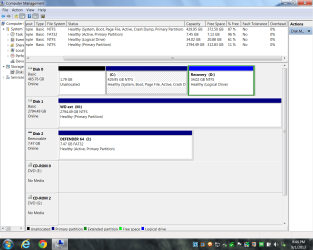
OK, so it isn't an easy fix. First, let's have you post a screenshot of your Disk management, when the external drive is plugged in of course.

http://www.sevenforums.com/tutorials/274797-disk-management-post-screen-capture-image.html

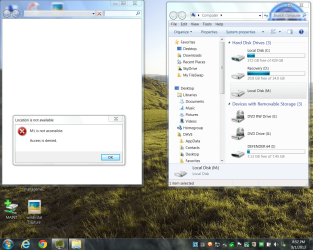
Also, if you can post a screenshot of the error that you get when trying to access these files

http://www.sevenforums.com/tutorials/9733-screenshots-files-upload-post-seven-forums.html

Was there anything you can think of that could explain the change? Power outage, the drive was physically knocked about, etc.?

A Guy
 

My Computer

Computer type
PC/Desktop
OS
Windows 10 Home x64
CPU
INTEL Core i5-750 Quad-Core 3.37GHz
Motherboard
ASUS P7P55D
Memory
HyperX Fury Black Series 8GB (2 x 4GB) 1866Mhz
Graphics Card(s)
EVGA GeForce GTX 750 Superclocked 1GB 128-Bit GDDR5
Monitor(s) Displays
LG 32MA68HY 32" IPS
Screen Resolution
1920 x 1080
Hard Drives
Samsung 840 Evo 120GB, SEAGATE 500GB Barracuda® 7200.12, SATA 3 Gb/s, 7200 RPM, 16MB cache
PSU
ANTEC TruePower New TP-550, 80 PLUS, 550W
Case
ANTEC Three Hundred Illusion
Cooling
COOLER MASTER Hyper 212 Plus, 4 x 120mm 1 x 140mm Noctua's
Internet Speed
85 + Mbps
Antivirus
Avast
Browser
Vivaldi
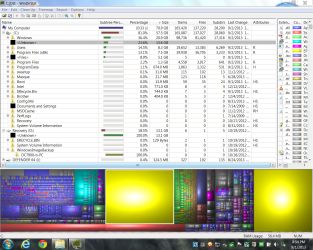
good evening, I have attached 4 screen shots, 3 you requested and 1 so maybe it will make some sense to you. the extra screen is of windirstat and that may be the root of the problem. a little history, I noticed a problem when my back-up failed on 8-27-2013 [I use ''s''] a 64 gb flash which is not shown due to space limitation for screen shot. my normal back up is 31-32 gb so I always have 2 on the drive by design. that's why all media is on the 3 tb. I used july back up to restore with no changes to the problem I am having. that is when all the research started. on the windirstat shot , you can see 2 large yellow area's that just appeared and they are associated with the unknown files, one on ''c'' below windows at 13.6 gb and the other on ''d'' at 13.1 gb...that's why back up failed, and you know the rest. I spent the last 15 hours transferring folders that can not be replaced to the other cpu's till they were at 95 % capacity. [ I ran Linux Ubuntu from the dvd drive which allowed me access]...so I know the files are there... even tried to change file permissions there , again to no avail, but I was able to move the real important stuff off the external in case .....digital wants it back under there warranty. sad part is I loose all the music and movies at last count was 2.4 tb....just glad there were no football games today....I do hope this additional info helps....again thank you for your time...dave
 

Attachments

  • cpu management Capture.PNG
    cpu management Capture.PNG
    59.7 KB · Views: 1
  • partition Capture.PNG
    partition Capture.PNG
    65.2 KB · Views: 1
  • access error Capture.PNG
    access error Capture.PNG
    352.3 KB · Views: 1
  • windirstat Capture.PNG
    windirstat Capture.PNG
    199.2 KB · Views: 2

My Computer

Computer type
PC/Desktop
Computer Manufacturer/Model Number
hp
OS
win 7 ultra 64 bit
CPU
dual core 3.0 intel
Motherboard
?????
Memory
3 gb ddr2
Graphics Card(s)
?????
Hard Drives
500 gb internal
3 tb external
Antivirus
avast
Browser
ie 10
sorry for the second post, but I did check my network monitor stats to see if there was any unusual activity to account for the sudden appearance of 27 gb of data?? not any one application or service or process downloaded more than 300 mb's during august total and I did not plug in any other devices to the system. biggest downloads were streaming movies from a trusted source and secure connection and saved directly to external storage, never written to the operating cpu. thanks again...dave
 

My Computer

Computer type
PC/Desktop
Computer Manufacturer/Model Number
hp
OS
win 7 ultra 64 bit
CPU
dual core 3.0 intel
Motherboard
?????
Memory
3 gb ddr2
Graphics Card(s)
?????
Hard Drives
500 gb internal
3 tb external
Antivirus
avast
Browser
ie 10
We may be working on 2 different things, but right click the listing for that unknown, and choose Copy path, you can then paste in notepad, or in a reply here. Let's see what the path is. Then you can navigate to the source, and right click, Properties, see if any clue. You might also try Space Sniffer and see if it finds anything more on it.

http://www.uderzo.it/main_products/space_sniffer/

A Guy
 

My Computer

Computer type
PC/Desktop
OS
Windows 10 Home x64
CPU
INTEL Core i5-750 Quad-Core 3.37GHz
Motherboard
ASUS P7P55D
Memory
HyperX Fury Black Series 8GB (2 x 4GB) 1866Mhz
Graphics Card(s)
EVGA GeForce GTX 750 Superclocked 1GB 128-Bit GDDR5
Monitor(s) Displays
LG 32MA68HY 32" IPS
Screen Resolution
1920 x 1080
Hard Drives
Samsung 840 Evo 120GB, SEAGATE 500GB Barracuda® 7200.12, SATA 3 Gb/s, 7200 RPM, 16MB cache
PSU
ANTEC TruePower New TP-550, 80 PLUS, 550W
Case
ANTEC Three Hundred Illusion
Cooling
COOLER MASTER Hyper 212 Plus, 4 x 120mm 1 x 140mm Noctua's
Internet Speed
85 + Mbps
Antivirus
Avast
Browser
Vivaldi
good evening, all the options on right click are dimmed and of no use in windirstat for that section. something interesting, that yellow section has increased by .2 gb. I am in the process of trying sniffer. been at this for too long, I will post tomorrow some time the results of sniffer. looks like it is going to take awhile. I am only scanning c right now. it continues to say ''unable to examine'' in the log console for a lot of the files. I guess I will have an answer in the morning..... then I will start on the problem access drive.....good night and thank you.....dave p.s. that section is now at 12.9 gb, looks like it is growing. the only thing it can affect is that cpu, I isolated it from the rest of the system. no network or internet available to it and it only has application on it, no data what so ever. removed it all earlier when the problem was detected.
 

My Computer

Computer type
PC/Desktop
Computer Manufacturer/Model Number
hp
OS
win 7 ultra 64 bit
CPU
dual core 3.0 intel
Motherboard
?????
Memory
3 gb ddr2
Graphics Card(s)
?????
Hard Drives
500 gb internal
3 tb external
Antivirus
avast
Browser
ie 10
Back
Top