File Sharing - Between XP and W7 (and vice versa)

   Information
This is a simple tutorial on how to create a share folder on windows XP/W7 and how to map to them from one machine to the other.

   Note
It is assumed that the two machines can ping one another over the network. "File and Printer sharing" on W7 to be turned ON. How you set up your machines to be able to ping one another is up to you.


Steps:

W7 to XP

1) On XP, select the folder you wish to share, right-click > Sharing and Security. Then tick the boxes as shown (Here i have elected the test folder under C:\ to be my shared folder). Then click Apply and OK.
   Note
After the folder is shared, you will see the hand under the folder.
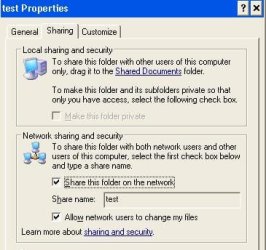
Noname.jpg
2) On W7, mapping to this test shared folder can be done in many ways. One way is typing in the search box under the Start menu as shown. Then hit Enter make sure the cursor is inside the box otherwise you will engage the shutdown box lol).
   Note
I have set manual IP to my XP machine, it's IP is 192.168.1.9
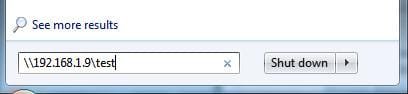
Noname1.jpg
Should you be prompted with logon credentials. Use the username and password with appropriate rights. Here I used the ID I log onto the XP machine with. You may need to put computername\username as the userid should the username alone doesn't work.

That's it, the explorer window will pop up and you now ready to share files. Just put any files in the folder from XP and it'll show up in the share.

XP to W7

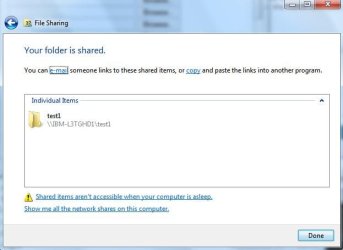
3) On W7, select the folder you wish to share, right-click > Sharing With. Then select Specific People (here i have elected the test1 folder under D:\ to be my shared folder). You will need to select who you want to share the folder to (here i have elected the userid with which i log onto W7 with. Highlight the name and Click the Share button. Then Done at the next screen.
Noname2.jpg
Noname3.jpg
4) As with point 2, Start > Run and type as shown. Then hit OK.
   Note
My IP to me W7 is 192.168.1.100

Noname4.jpg
Should you be prompted with logon credentials. Use the username and password with appropriate rights. Here I used the ID I log onto the W7 machine with. You may need to put computername\username as the userid should the username alone doesn't work.

That's it, the explorer window will pop up and you now ready to share files. Just put any files in the folder from W7 and it'll show up in the share.
Noname5.jpg

 
Last edited by a moderator:
Ty for the response.

Actually I'm wanting the PC Desktop(XP) be where i'm creating the Network.

For example heres a scenerio or how I see it in my head.

Create somekind of wireless connection that has nothing to do with Internet, INTERNET access would not be needed whatsoever for the computers to access the shared files that are being shared on the PC Desktop(XP). All that is being used is a Wireless USB Adapter and PC Desktop running WinXP.

To connect to this network all someone would have to do is click their Adapter on the bottom right hand side of their screen(Notfication area) click the name of the network then click connect, they will now be able to see the shared Folders and the Computer name on their Device wether it's a PSP PC Laptop Smarth phone, anything that has wifi. They would NOT need to have an account on the computer, they would not need to mess around with their settings, It would be like connecting to a Hotspot to access the internet that has no encryption or security key. I want to be the Hot-Spot. Would this be possible over an Ad-Hoc connection? Anyone can acces it, even if I don't know who it is. All they would need to do is Click the name Of network, Click connect and presto they can view the shared files and computer. The tutorial u showed me would need to have to type in the IP address and watnot. I would like whoever is connection to be able to access the PC Desktop(XP) without needing to do all that, just click and connect.

FRom wikipedia site:
WAP: a wireless access point (WAP) is a device that allows wired communication devices to connect to a wireless network using Wi-Fi, Bluetooth or related standards......
All I have is a Wireless USB Adapter would this be considered a WAP device?

AD-HOC: An Ad-Hoc network uses a connection between two or more devices without using a wireless access point: the devices communicate directly when in range. An Ad-Hoc network is used in situations such as a quick data exchange or a multiplayer LAN game because setup is easy and does not require an access point.

This is what I would like to do.

I've done this, well I think I've created an Ad-Hoc network correctly on the PC Dekstop(XP) since i've played a Multiplater LAN game (Counter-Strike) and it works. But when I try to access the shared folders/files I cannot see them from neither computer. The XP(DESKTOP) doesnt see the laptop nor does the Laptop(Win7) see the desktop.

Maybe referring the PC Desktop(XP) as a "Hot Spot" was not a goood example since Internet will not be used AT ALL, but something like it where all u do is click on the network and click connect and thats all, sorryif i confused you.

TY for your time. and PLS help
 
Last edited:

My Computer My Computer

At a glance

se7en
OS
se7en
It's been a week now and im aggrivatged by this so must you.

Well I made a New ad-hoc connection from the PC Desktop running WinXP and it succesfully connects, and I am able to play multiplayer LAN game Counter Strike but still cant access files on either Computer to or from.
I typed in the IP address of both to both computers and tried to connect that way and A Web Browser page popped up saying the page wasnt found or something like that. Why did a web browser page pop up since im not trying to access the internet.
 

My Computer My Computer

At a glance

se7en
OS
se7en
Tried all online manuals but still can't connect W7 to XP

I’ve found countless descriptions of how to connect W7 with XP SP3, but none of them work for me.


Here’s what I’ve done so far:


1) Set both machines to the same work group. To be safe, chose the name “WORKGROUP”.
2) Set the network on W7 to be a Home network.
3) On W7: turned on file and printer sharing, turned on network discovery, turned on sharing so anyone with network access can read and write files in the public folders, turned OFF password protected sharing, enabled file sharing for devices that use 40- or 56- bit encryption.
4) Turned off all firewalls
5) Made sure both machines are in 192.168.1.x range and subnet masks match.
6) Created shares on both machines and tried to connect both ways.
7) Tried it all again with the W7 network set to Work instead of Home.


I haven’t even gotten to the point to connecting with the shares, the machines simply don’t seem to ‘see’ each other in the network. Also can’t map any drives directly to \\machinename\sharename


Here’s the results of my efforts:

1) Both machines see network activity on IPV4.
2) Machines can Ping each other!!
3) After booting, sometimes (but not always!) the W7 machine will ‘see’ the XP machine-name in the network. When I click on it, however, W7 complains about the network path to the XP machine somehow not being available. It suggests that the machine may be switched off. When I try to ask it how it came by the machine’s name in that case, it refuses to go into details.
4) After running the network setup wizard on the XP machine, it will ‘see’ the W7 machine-name in the network. If I click on that name, however, XP complains that the path does not exist. The W7 machine-name then disappears from the list until I run the wizard again. (Repeat ad-infinitum)

Lastly, I tried switching from window managed grouping (recommended) to usernames and passwords, but nothing seems to happen. (rebooted all machines after each step, just to be pendantic.)
 

My Computer My Computer

At a glance

Windows 7 Professional, XP professional SP3
OS
Windows 7 Professional, XP professional SP3
Giving UP!!

I have been trying to network between my Windows 7 and XP computers. Both are connected through my Linksys WRT54G router, my Windows 7 PC wired and my XP PC wireless.

Having used windows from 3.1 to XP SP3, networking continually got much better, especially with XP SP2. However, Windows 7 has digressed back to Windows 95, as far as I am concerned, unless of course, you have the bucks to buy Windows 7 on all machines and replace all older machines with new ones that will take Win7 to use homegroup. I just do not have the thousands of $$'s to do that..

Anyway, I followed the tutorial above by severedsolo, and still nothing. Prior to that, I actually had the network map on Win 7, showing my Win 7 PC, router, wireless printer and my XP machine. My XP machine had all of Windows 7 shared folders and allowed access to them. However on my Win7 machine, even though I had the XP machine showing, when opening it, I get a 0x80070035 error, advising no network found.

Then, I get a message to download IE9 which I did and restarted. Now on the W7 map, I don't even get my Win7 machine to show, no less my XP machine. All I get now is my router and wireless printer. But I did somehow get a download for my SoundMax integrated sound system, which I spent a week online and unable to find.

Anyway, as per the tutorial above, I can ping my XP machine from my W7 machine. But I am at a total loss on getting the 2 to network. Thankfully, I have a dual boot with Win7 and XP on my machine, so I just boot into XP to network with my other XP computer. Some upgrade, Windows 7???
 

My Computer My Computer

At a glance

XP Home 32bit, XP Home(2) 32bit, Ubuntu Meerk...Intel Pentium 4, 2.8ghz, 478 SocketKingston DDR400 (2 GB)Gforce 6200, AGP, 512mb DDR2
Computer Manufacturer/Model Number
Self Built
OS
XP Home 32bit, XP Home(2) 32bit, Ubuntu Meerkat 32bit
CPU
Intel Pentium 4, 2.8ghz, 478 Socket
Motherboard
Asus, P4P800SE
Memory
Kingston DDR400 (2 GB)
Graphics Card(s)
Gforce 6200, AGP, 512mb DDR2
Sound Card
SoundMax Integrated on MB
Monitor(s) Displays
NEC MultiSync 1940CX
Screen Resolution
1024x768
Hard Drives
Master (1) - Western Digital 500GB
Slave (2) - Western Digital 120GB
Hi Coastalguy,

Is Windows 7 set to read your router as a WORK network, and not a Home? Although the two SHOULD work together, often they don't.

Also, check that the Workgroup name is the same on both Machines. The fact that your XP boot can talk to it suggests to me that you have it incorrectly set up.

On Windows 7, the default Workgroup name is Workgroup, wheras on XP it is MSHOME
 

My Computer My Computer

At a glance

Windows 10 Pro x64Intel Core i5 7400 @ 3.00GHz8GB 2133Mhz DDR4 (OEM supplied)Gygabyte Windforce GTX 1050Ti (Factory Overcl...
Computer type
PC/Desktop
Computer Manufacturer/Model Number
Medion Erazer (note to self: insert model number) - with custom additions
OS
Windows 10 Pro x64
CPU
Intel Core i5 7400 @ 3.00GHz
Motherboard
OEM supllied with PC
Memory
8GB 2133Mhz DDR4 (OEM supplied)
Graphics Card(s)
Gygabyte Windforce GTX 1050Ti (Factory Overclocked)
Sound Card
Realtek
Monitor(s) Displays
Acer Al1980 + HKC
Screen Resolution
1360*768(HKC) / 1280*1024(Acer)
Hard Drives
1TB Toshiba
1TB WD Caviar Green
120GB Samsung Evo 840
PSU
OEM supplied (no power rating on case)
Case
OEM Supplied
Cooling
Stock
Keyboard
Logitech Wireless
Mouse
Logitect Wireless
Internet Speed
40Mb/s Down 10Mb/s Up
Antivirus
Defender
Browser
Firefox
Everything looks ok.

I followed the tutorial, which I believe was posted by you. I had the workgroup named otherwise, but they were both identical. To be safe, per your tutorial, I renamed them both 'WORKGROUP'. Initially on Win7, I had set it up as a homegroup, until my research advised this was used only between Win7 networks. In this research, they also advised to set up a "work" and not a "home" for networks between Win7 and XP, which is what I did.

On my seeing Win7's shared folders on XP, I just found that these were mapped shared folders on my XP (dual booted with Win7), so they weren't active. So I just set up another shared folder on Win7, and it immediately appeared on my XP PC, allowing me to display, copy etc. the files in it.

Still on my Win7, initially when clicking the network icon, I only get my router. Turning on my wireless printer, it immediately appears. However, I still do not even get the Win7 PC, nor the XP PC to display. The only time the Win7 pc displays on the Network and Sharing Center showing the Win7 pc conntected to the router and then to the internet. The full map however, again only shows the router and printer.

Thanks again,
Dave
 

My Computer My Computer

At a glance

XP Home 32bit, XP Home(2) 32bit, Ubuntu Meerk...Intel Pentium 4, 2.8ghz, 478 SocketKingston DDR400 (2 GB)Gforce 6200, AGP, 512mb DDR2
Computer Manufacturer/Model Number
Self Built
OS
XP Home 32bit, XP Home(2) 32bit, Ubuntu Meerkat 32bit
CPU
Intel Pentium 4, 2.8ghz, 478 Socket
Motherboard
Asus, P4P800SE
Memory
Kingston DDR400 (2 GB)
Graphics Card(s)
Gforce 6200, AGP, 512mb DDR2
Sound Card
SoundMax Integrated on MB
Monitor(s) Displays
NEC MultiSync 1940CX
Screen Resolution
1024x768
Hard Drives
Master (1) - Western Digital 500GB
Slave (2) - Western Digital 120GB
I assume that you have folders shared on the XP machine?

What happens if you type \\<IP address of XP Machine>\<shared folder name> into the address bar of explorer on the Win 7 machine? does the folder appear?
 

My Computer My Computer

At a glance

Windows 10 Pro x64Intel Core i5 7400 @ 3.00GHz8GB 2133Mhz DDR4 (OEM supplied)Gygabyte Windforce GTX 1050Ti (Factory Overcl...
Computer type
PC/Desktop
Computer Manufacturer/Model Number
Medion Erazer (note to self: insert model number) - with custom additions
OS
Windows 10 Pro x64
CPU
Intel Core i5 7400 @ 3.00GHz
Motherboard
OEM supllied with PC
Memory
8GB 2133Mhz DDR4 (OEM supplied)
Graphics Card(s)
Gygabyte Windforce GTX 1050Ti (Factory Overclocked)
Sound Card
Realtek
Monitor(s) Displays
Acer Al1980 + HKC
Screen Resolution
1360*768(HKC) / 1280*1024(Acer)
Hard Drives
1TB Toshiba
1TB WD Caviar Green
120GB Samsung Evo 840
PSU
OEM supplied (no power rating on case)
Case
OEM Supplied
Cooling
Stock
Keyboard
Logitech Wireless
Mouse
Logitect Wireless
Internet Speed
40Mb/s Down 10Mb/s Up
Antivirus
Defender
Browser
Firefox
Address bar

On IE, I entered \\xp_ip_address\filename\, but nothing happens. I tried http:\\xp_ip_address\filename, and get a not found. Tried it also on Google Chrome with the same results. I tried pinging it again >ping xp_ip_address and get 4 successful readings.

On the XP machine, this folder does appear under it's network \\xp_computername\filename.

Thanks again,:cry:
 

My Computer My Computer

At a glance

XP Home 32bit, XP Home(2) 32bit, Ubuntu Meerk...Intel Pentium 4, 2.8ghz, 478 SocketKingston DDR400 (2 GB)Gforce 6200, AGP, 512mb DDR2
Computer Manufacturer/Model Number
Self Built
OS
XP Home 32bit, XP Home(2) 32bit, Ubuntu Meerkat 32bit
CPU
Intel Pentium 4, 2.8ghz, 478 Socket
Motherboard
Asus, P4P800SE
Memory
Kingston DDR400 (2 GB)
Graphics Card(s)
Gforce 6200, AGP, 512mb DDR2
Sound Card
SoundMax Integrated on MB
Monitor(s) Displays
NEC MultiSync 1940CX
Screen Resolution
1024x768
Hard Drives
Master (1) - Western Digital 500GB
Slave (2) - Western Digital 120GB
Sorry, I mean Windows Explorer, not IE.

That is, The Windows File manager, as in the screenshot. The address bar is highlighted.

Also... may have been a typo on your part. but it is \\<Ip address>\<Shared folder name> NOT the file name :)
 

Attachments

  • Capture.JPG
    Capture.JPG
    48.4 KB · Views: 330

My Computer My Computer

At a glance

Windows 10 Pro x64Intel Core i5 7400 @ 3.00GHz8GB 2133Mhz DDR4 (OEM supplied)Gygabyte Windforce GTX 1050Ti (Factory Overcl...
Computer type
PC/Desktop
Computer Manufacturer/Model Number
Medion Erazer (note to self: insert model number) - with custom additions
OS
Windows 10 Pro x64
CPU
Intel Core i5 7400 @ 3.00GHz
Motherboard
OEM supllied with PC
Memory
8GB 2133Mhz DDR4 (OEM supplied)
Graphics Card(s)
Gygabyte Windforce GTX 1050Ti (Factory Overclocked)
Sound Card
Realtek
Monitor(s) Displays
Acer Al1980 + HKC
Screen Resolution
1360*768(HKC) / 1280*1024(Acer)
Hard Drives
1TB Toshiba
1TB WD Caviar Green
120GB Samsung Evo 840
PSU
OEM supplied (no power rating on case)
Case
OEM Supplied
Cooling
Stock
Keyboard
Logitech Wireless
Mouse
Logitect Wireless
Internet Speed
40Mb/s Down 10Mb/s Up
Antivirus
Defender
Browser
Firefox
Networking

Yes I did mean the shared folder name, not file name, sorry. New to Win7, so I didn't realize windows explorer had an address bar. Tried it and received "could not find".

I did get back to where I was before the IE9 download messed me up. I reconnected to homegroup, and then reconnected back to work group, and got back my Win7 and XP PC's displaying again on the network map. In fact, an addition was added to the map, Windows Media Player which I didn't realize was in the network?

However, trying to open my XP folder icon, I get the error, 0x80070035, Network path not found.

Tried to set up a map drive letter of the XP shared folder and again received the error that the XP computer network not found.

Still getting the Win7 shared folder on my XP Network, which opens fine.

Dave
 

My Computer My Computer

At a glance

XP Home 32bit, XP Home(2) 32bit, Ubuntu Meerk...Intel Pentium 4, 2.8ghz, 478 SocketKingston DDR400 (2 GB)Gforce 6200, AGP, 512mb DDR2
Computer Manufacturer/Model Number
Self Built
OS
XP Home 32bit, XP Home(2) 32bit, Ubuntu Meerkat 32bit
CPU
Intel Pentium 4, 2.8ghz, 478 Socket
Motherboard
Asus, P4P800SE
Memory
Kingston DDR400 (2 GB)
Graphics Card(s)
Gforce 6200, AGP, 512mb DDR2
Sound Card
SoundMax Integrated on MB
Monitor(s) Displays
NEC MultiSync 1940CX
Screen Resolution
1024x768
Hard Drives
Master (1) - Western Digital 500GB
Slave (2) - Western Digital 120GB
:huh: So the question is, why can Windows 7 not see the XP share.

As the XP boot on the same machine can see XP, I have to conclude that it is not a network problem. What AV/Firewall are you running?

Also... I'm fairly certain that Media Player should not be showing over a Workgroup. Did you leave the Homegroup properly?
 

My Computer My Computer

At a glance

Windows 10 Pro x64Intel Core i5 7400 @ 3.00GHz8GB 2133Mhz DDR4 (OEM supplied)Gygabyte Windforce GTX 1050Ti (Factory Overcl...
Computer type
PC/Desktop
Computer Manufacturer/Model Number
Medion Erazer (note to self: insert model number) - with custom additions
OS
Windows 10 Pro x64
CPU
Intel Core i5 7400 @ 3.00GHz
Motherboard
OEM supllied with PC
Memory
8GB 2133Mhz DDR4 (OEM supplied)
Graphics Card(s)
Gygabyte Windforce GTX 1050Ti (Factory Overclocked)
Sound Card
Realtek
Monitor(s) Displays
Acer Al1980 + HKC
Screen Resolution
1360*768(HKC) / 1280*1024(Acer)
Hard Drives
1TB Toshiba
1TB WD Caviar Green
120GB Samsung Evo 840
PSU
OEM supplied (no power rating on case)
Case
OEM Supplied
Cooling
Stock
Keyboard
Logitech Wireless
Mouse
Logitect Wireless
Internet Speed
40Mb/s Down 10Mb/s Up
Antivirus
Defender
Browser
Firefox
Firewall

I am running Norton 360 firewall. I disabled it on both computers with the same results. Note that with the identical Norton settings on my dual boot XP (on my Win7 machine), again networks work fine between both XP's).

On Win7, I clicked on the homegroup link and was taken to a screen that advised that homegroup was not active. I clicked on it anyway and then clicked on turn off homegroup. After this reset, it went back to my network map and found that the Windows Media Icon had disappeared. Apparently this is connected somehow with homegroup, which must have had some connection still active???

Anyway, still the same problem. On my XP, shared folders work fine. On Win7, trying to connect to my XP machine (icon displayed) provides the 0x80070035 error "Network path not found".
 

My Computer My Computer

At a glance

XP Home 32bit, XP Home(2) 32bit, Ubuntu Meerk...Intel Pentium 4, 2.8ghz, 478 SocketKingston DDR400 (2 GB)Gforce 6200, AGP, 512mb DDR2
Computer Manufacturer/Model Number
Self Built
OS
XP Home 32bit, XP Home(2) 32bit, Ubuntu Meerkat 32bit
CPU
Intel Pentium 4, 2.8ghz, 478 Socket
Motherboard
Asus, P4P800SE
Memory
Kingston DDR400 (2 GB)
Graphics Card(s)
Gforce 6200, AGP, 512mb DDR2
Sound Card
SoundMax Integrated on MB
Monitor(s) Displays
NEC MultiSync 1940CX
Screen Resolution
1024x768
Hard Drives
Master (1) - Western Digital 500GB
Slave (2) - Western Digital 120GB

My Computer My Computer

At a glance

Windows 10 Pro x64Intel Core i5 7400 @ 3.00GHz8GB 2133Mhz DDR4 (OEM supplied)Gygabyte Windforce GTX 1050Ti (Factory Overcl...
Computer type
PC/Desktop
Computer Manufacturer/Model Number
Medion Erazer (note to self: insert model number) - with custom additions
OS
Windows 10 Pro x64
CPU
Intel Core i5 7400 @ 3.00GHz
Motherboard
OEM supllied with PC
Memory
8GB 2133Mhz DDR4 (OEM supplied)
Graphics Card(s)
Gygabyte Windforce GTX 1050Ti (Factory Overclocked)
Sound Card
Realtek
Monitor(s) Displays
Acer Al1980 + HKC
Screen Resolution
1360*768(HKC) / 1280*1024(Acer)
Hard Drives
1TB Toshiba
1TB WD Caviar Green
120GB Samsung Evo 840
PSU
OEM supplied (no power rating on case)
Case
OEM Supplied
Cooling
Stock
Keyboard
Logitech Wireless
Mouse
Logitect Wireless
Internet Speed
40Mb/s Down 10Mb/s Up
Antivirus
Defender
Browser
Firefox
Norton

Would it be the Norton on the XP Machine, or do you think I would need to uninstall it on both? Considering that I can see the Win7 Folders on XP, I would not think that it is blocking anything on the Win7 machine?
 

My Computer My Computer

At a glance

XP Home 32bit, XP Home(2) 32bit, Ubuntu Meerk...Intel Pentium 4, 2.8ghz, 478 SocketKingston DDR400 (2 GB)Gforce 6200, AGP, 512mb DDR2
Computer Manufacturer/Model Number
Self Built
OS
XP Home 32bit, XP Home(2) 32bit, Ubuntu Meerkat 32bit
CPU
Intel Pentium 4, 2.8ghz, 478 Socket
Motherboard
Asus, P4P800SE
Memory
Kingston DDR400 (2 GB)
Graphics Card(s)
Gforce 6200, AGP, 512mb DDR2
Sound Card
SoundMax Integrated on MB
Monitor(s) Displays
NEC MultiSync 1940CX
Screen Resolution
1024x768
Hard Drives
Master (1) - Western Digital 500GB
Slave (2) - Western Digital 120GB
You'd be surprised. I would uninstall it on all machines for now, at least until you have everything set up. Norton is... odd like that. SOmetimes it will block it, sometimes it won't.

It's not even just Norton tbf, most 3rd party firewalls do the same. They are usually fine once everything is set up though.

Also, apparently Windows 7 was mixing Homegroup and Work group together, which doesn't surprise me. I figured that's why Media Player was showing. Media Player streaming is a feature of Homegroups
 

My Computer My Computer

At a glance

Windows 10 Pro x64Intel Core i5 7400 @ 3.00GHz8GB 2133Mhz DDR4 (OEM supplied)Gygabyte Windforce GTX 1050Ti (Factory Overcl...
Computer type
PC/Desktop
Computer Manufacturer/Model Number
Medion Erazer (note to self: insert model number) - with custom additions
OS
Windows 10 Pro x64
CPU
Intel Core i5 7400 @ 3.00GHz
Motherboard
OEM supllied with PC
Memory
8GB 2133Mhz DDR4 (OEM supplied)
Graphics Card(s)
Gygabyte Windforce GTX 1050Ti (Factory Overclocked)
Sound Card
Realtek
Monitor(s) Displays
Acer Al1980 + HKC
Screen Resolution
1360*768(HKC) / 1280*1024(Acer)
Hard Drives
1TB Toshiba
1TB WD Caviar Green
120GB Samsung Evo 840
PSU
OEM supplied (no power rating on case)
Case
OEM Supplied
Cooling
Stock
Keyboard
Logitech Wireless
Mouse
Logitect Wireless
Internet Speed
40Mb/s Down 10Mb/s Up
Antivirus
Defender
Browser
Firefox
Norton 360

1. Uninstalled Norton 360 on XP machine with no difference on either network.

2. Uninstalled Norton 360 on W7 machine with no difference on either network, except that I lost the XP machine icon on the w7 network map.

3. On both, after uninstalling, received the [x] security error that no firewalls were running, so I assume Windows firewall remained closed.

4. Reinstalled Norton 360 on both machines, XP and then W7, and everything back the way it was, on XP machine, all shares show and are active, on W7 machine, XP machine still shows but cannot connect.

While Norton was uninstalled on both machines, I shut off modem to prevent internet access for security. Reset and tried all diagnosis links to see if I could get XP shares on W7 network, but no luck.

As an aside, on the XP machine, all shares from either XP or W7 on the dual boot machine show under My Network, depending on which I boot into.

However, on the machine with XP/W7 dual boot, XP does NOT show shares under My network, however I can map the XP machine shared folders to a drive letter, which displays folder items fine. Under W7, I cannot even map the shares on the xp machine.

Again, the XP/W7 machine is wired to the router, with the XP machine Wireless (in case this might make a difference).
 

My Computer My Computer

At a glance

XP Home 32bit, XP Home(2) 32bit, Ubuntu Meerk...Intel Pentium 4, 2.8ghz, 478 SocketKingston DDR400 (2 GB)Gforce 6200, AGP, 512mb DDR2
Computer Manufacturer/Model Number
Self Built
OS
XP Home 32bit, XP Home(2) 32bit, Ubuntu Meerkat 32bit
CPU
Intel Pentium 4, 2.8ghz, 478 Socket
Motherboard
Asus, P4P800SE
Memory
Kingston DDR400 (2 GB)
Graphics Card(s)
Gforce 6200, AGP, 512mb DDR2
Sound Card
SoundMax Integrated on MB
Monitor(s) Displays
NEC MultiSync 1940CX
Screen Resolution
1024x768
Hard Drives
Master (1) - Western Digital 500GB
Slave (2) - Western Digital 120GB
I followed the tutorial to share folders between my Windows 7 Home 64-bit desktop pc and Windows XP Pro SP3 32-bit laptop, both of which are connected to my home router through wireless connections. I can access the shared folders on the WinXP machine from my Win7 pc without a problem. When I try to access the shared folders on the Win7 pc from my WinXP machine, I can see all the shared folders, but on double-clicking any of those folders I get the message saying \\computername\foldername is not accessible. You might not have permission .... Access is denied.

Please help.
 

My Computer My Computer

At a glance

Windows 7 Home Premium 64bit
OS
Windows 7 Home Premium 64bit
Is there a way to print a tutorial? Thanks.
 

My Computer My Computer

At a glance

Windows 7 Home Premium 64bit
OS
Windows 7 Home Premium 64bit
I promised that I wouldnt bother you guys any more but I'm trying to send some stuff from my Win7 system to my wifes XP system to print and I dont understand any of this..:confused: How do you you hook the cable up?If you want to help me fine if not thats fine also....
 

My Computer My Computer

At a glance

Windows 7 Ultimate x64Intel Core i5 3570K 3.40 GHz (Unlocked CPU) (...16GB DDR3 1600MHzNVIDIA GeForce GTX 680 2GB
Computer type
PC/Desktop
Computer Manufacturer/Model Number
Custom/Digital Storm
OS
Windows 7 Ultimate x64
CPU
Intel Core i5 3570K 3.40 GHz (Unlocked CPU) (Quad Core)
Motherboard
ASUS SABERTOOTH Z77 (Intel Z77
Memory
16GB DDR3 1600MHz
Graphics Card(s)
NVIDIA GeForce GTX 680 2GB
Sound Card
Creative Labs X-Fi Titanium HD 24-bit
Monitor(s) Displays
SyncMaster 245 24"
Screen Resolution
1920X1200
PSU
1050W Corsair Pro Silver 1050HX
Case
Cooler Master
Cooling
Air
Internet Speed
High-Speed Cable / DSL / Network Connections)
Antivirus
Avast
Browser
IE 10
Other Info
OS Boost: Yes, Disable and tweak all of the non-crucial services on the operating system
Windows OS: Microsoft Windows 7 Ultimate (64-Bit Edition)
I promised that I wouldnt bother you guys any more but I'm trying to send some stuff from my Win7 system to my wifes XP system to print and I dont understand any of this..:confused: How do you you hook the cable up?If you want to help me fine if not thats fine also....

I guess not...:confused:
 

My Computer My Computer

At a glance

Windows 7 Ultimate x64Intel Core i5 3570K 3.40 GHz (Unlocked CPU) (...16GB DDR3 1600MHzNVIDIA GeForce GTX 680 2GB
Computer type
PC/Desktop
Computer Manufacturer/Model Number
Custom/Digital Storm
OS
Windows 7 Ultimate x64
CPU
Intel Core i5 3570K 3.40 GHz (Unlocked CPU) (Quad Core)
Motherboard
ASUS SABERTOOTH Z77 (Intel Z77
Memory
16GB DDR3 1600MHz
Graphics Card(s)
NVIDIA GeForce GTX 680 2GB
Sound Card
Creative Labs X-Fi Titanium HD 24-bit
Monitor(s) Displays
SyncMaster 245 24"
Screen Resolution
1920X1200
PSU
1050W Corsair Pro Silver 1050HX
Case
Cooler Master
Cooling
Air
Internet Speed
High-Speed Cable / DSL / Network Connections)
Antivirus
Avast
Browser
IE 10
Other Info
OS Boost: Yes, Disable and tweak all of the non-crucial services on the operating system
Windows OS: Microsoft Windows 7 Ultimate (64-Bit Edition)
Back
Top