File Sorting Problem

jambooger

New member
Local time
12:52 AM
Messages
17
Location
Atlanta, Georgia
Ive just discovered a new problem. In Win XP All my Movie file clips were sorted by Name ie: Dandy, Dandy (1), Dandy (2). Now this dang Win 7 is sorting them Dandy (1), Dandy (2), Dandy. NOW the first clip is Last. How the heck could MS change sorting after years the first way. AHHHH!
 

My Computer

Computer Manufacturer/Model Number
Custom Made
OS
Windows 7 Home Premiere x64
CPU
I7-950, 3.07Ghz
Motherboard
Asus P6X58D
Memory
6 GB DDR3 OCZ
Graphics Card(s)
ATI 5870
Sound Card
Creative Soundblaster Audigy 2 ZS
Screen Resolution
1920x1200
Hard Drives
WD 1 TB Cavier Black and WD 500 GB Cavier
PSU
Coolermax 950W
Case
Cooler Master Wave
Cooling
8 Fans
Internet Speed
Cable, whooosh
Well, simple solution is to add a 0 to the first one...

Other than that, I believe it has always been this way...

~Lordbob
 

My Computer

Computer Manufacturer/Model Number
Hera
OS
Windows 7 Ultimate x64, Mint 9
CPU
Intel i5-2500k
Motherboard
ASUS P8P67 Pro
Memory
2x 4Gb Corsair VENGEANCE DDR3-1600
Graphics Card(s)
NVidia GeForce N260GTX Twin Frozr
Sound Card
Realtek HD OnBoard Audio
Monitor(s) Displays
ASUS 24" Monitor
Screen Resolution
1920x1080
Hard Drives
G.SKILL Phoenix Series 60GB SATA II MLC Internal Solid State Drive (SSD)
SAMSUNG Spinpoint F3R 1TB 7200 RPM 32MB Cache SATA II
PSU
Cooler Master Real Power Pro 750W
Case
Cooler Master Haf 932
Cooling
Fans
Keyboard
Razer Tarantula
Mouse
Razer Lachesis
Internet Speed
not fast enough
Ive just discovered a new problem. In Win XP All my Movie file clips were sorted by Name ie: Dandy, Dandy (1), Dandy (2). Now this dang Win 7 is sorting them Dandy (1), Dandy (2), Dandy. NOW the first clip is Last. How the heck could MS change sorting after years the first way. AHHHH!

My experience has been that XP sorted files incorrectly:

file1
file10
file11
file2
file3
file4
file5
file6
file7
file8
file9

Windows Vista and Windows 7 has fixed that, and now file sort properly, because it now also recognizes number in filenames as numbers, not just another character in the ASCII chart:

file1
file2
file3
file4
file5
file6
file7
file8
file9
file10
file11
 

My Computer

Computer type
PC/Desktop
Computer Manufacturer/Model Number
Virtual Machine
OS
Windows 7 Professional 32-bit SP1
CPU
AMD A4/A6
Motherboard
Intel Corporation 440BX Desktop Reference Platform
Memory
3.00GB EDO
Graphics Card(s)
VMware SVGA 3D
Sound Card
High Definition Audio Device
Monitor(s) Displays
Generic Non-PnP Monitor on VMware SVGA 3D
Screen Resolution
1440x900
Hard Drives
1 x 60GB VMware Virtual SATA Hard Drive ATA Device
Antivirus
Kaspersky Total Security
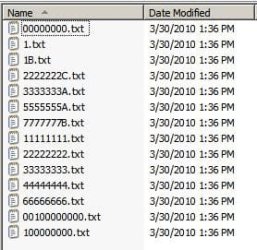
AFAIK there is simply a bug in Windows 7 sorting file names, and I'm astonished that it hasn't been brought to light before now. Here's a list of files in Windows 7;

C:\windowsbug\00000000.txt
C:\windowsbug\1.txt
C:\windowsbug\1B.txt
C:\windowsbug\2222222C.txt
C:\windowsbug\3333333A.txt
C:\windowsbug\5555555A.txt
C:\windowsbug\7777777B.txt
C:\windowsbug\11111111.txt
C:\windowsbug\22222222.txt
C:\windowsbug\33333333.txt
C:\windowsbug\44444444.txt
C:\windowsbug\66666666.txt
C:\windowsbug\00100000000.txt
C:\windowsbug\100000000.txt

Is there anyone who believes this is a correct or acceptable sort order? I can certify that I've worked on dozens of different systems over the past 50 years and never saw anything like this.
 

My Computer

OS
Windows 7
AFAIK there is simply a bug in Windows 7 sorting file names, and I'm astonished that it hasn't been brought to light before now. Here's a list of files in Windows 7;

C:\windowsbug\00000000.txt
C:\windowsbug\1.txt
C:\windowsbug\1B.txt
C:\windowsbug\2222222C.txt
C:\windowsbug\3333333A.txt
C:\windowsbug\5555555A.txt
C:\windowsbug\7777777B.txt
C:\windowsbug\11111111.txt
C:\windowsbug\22222222.txt
C:\windowsbug\33333333.txt
C:\windowsbug\44444444.txt
C:\windowsbug\66666666.txt
C:\windowsbug\00100000000.txt
C:\windowsbug\100000000.txt

Is there anyone who believes this is a correct or acceptable sort order? I can certify that I've worked on dozens of different systems over the past 50 years and never saw anything like this.

That is not a bug in Windows 7. The order is the same in Windows XP also.

File Order.JPG

EDIT: I'm not in my 7 machine right now. Will have to check it in the evening
 

My Computer

Computer type
Laptop
Computer Manufacturer/Model Number
HP EliteBook 8530w Mobile Workstation
OS
Windows 7 Ultimate x64 (XP, 98SE, 95, 3.11, DOS 7.10 on VM) + Ubuntu 10.04 LTS Lucid Lynx
CPU
Intel Core 2 Duo Processor P8600 (2.40 GHz, 3 MB L2 cache)
Motherboard
Mobile Intel PM45 Express Chipset ICH9M-Enhanced
Memory
4GB 800 MHz DDR2 SDRAM
Graphics Card(s)
ATI Mobility FireGL V5700 with 256 MB
Sound Card
SoundMAX Integrated Digital HD Audio
Monitor(s) Displays
15.4-inch WXGA anti-glare (1280 x 800 resolution)
Screen Resolution
1280 x 800
Hard Drives
500GB + 1TB
Mouse
Synaptics PS/2 Port Touchpad, USB Mouse
Internet Speed
4 Mbps
Antivirus
MSE
Browser
Firefox, Chrome, IE
Other Info
Authentec AES2810 Fingerprint Reader
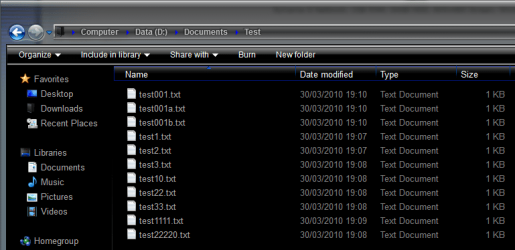
Just did a test and you can see mine sorts perfectly...
 

Attachments

  • test.PNG
    test.PNG
    15.9 KB · Views: 146

My Computer

Computer Manufacturer/Model Number
tw33k
OS
Windows 7 Ultimate (x64) SP1
CPU
Intel 3770k 4.6GHz
Motherboard
ASUS Maximus V Formula
Memory
8GB (2x 4GB) Crucial Ballistix
Graphics Card(s)
Sapphire 7950 (1060/1600)
Sound Card
On Board Realtek HD Audio
Monitor(s) Displays
27" Acer B273HU (via HDMI)
Screen Resolution
2048 x 1152
Hard Drives
Crucial M4 128GB
2TB WD Black
1TB Samsung F3 SATA
1TB WD Elite External
2TB WD USB 3.0
PSU
Corsair AX750 Gold
Case
Corsair Obsidian 800DW
Cooling
Corsair H100 (2x AP-121/2x UK-3000 push/pull)
Keyboard
Microsoft Wireless 5000
Mouse
Microsoft Wireless 5000
Internet Speed
5mb/s
Other Info
Logitech z-2300 2.1 speakers
Lamptron FC-5 v2
In the heat of the moment I certainly did not make myself clear. It's not a bug, it's wrong in Windows 7, Vista and XP *by design*. Microsoft feels they wanted to try to make the sort intelligent, and everyone in the computer field feels they're dead wrong. There were some "not so trivial" registry changes one could make in prior releases to correct this, but I haven't seen anything so definitive in Windows 7 for correcting this design error. I have thousands of files with names similar to the ones I listed, and I simply can't find my files anymore since the order is so jumbled. More importantly, anyone who feels Windows is doing this correctly please examine my list of files above. Microsoft simply did not consider the horrendous ramifications of their sort - I repeat my question, does ANYONE feel the sorted list above is acceptable? Let me also note that there's not a single other computer system that would sort files in this manner - so is Microsoft saying they're right and every other operating system since the beginning of time is wrong? It simply boggles the mind that Microsoft would do this - and not provide an easy or (at least) properly documented way to undo this.
Renaming my files is not an option; software and scripts logically relate the files using the current naming conventions.
 

My Computer

OS
Windows 7
In case you didn't notice, everyone else's files are sorted correctly.... Therefore you calling this deliberate is false.

~Lordbob
 

My Computer

Computer Manufacturer/Model Number
Hera
OS
Windows 7 Ultimate x64, Mint 9
CPU
Intel i5-2500k
Motherboard
ASUS P8P67 Pro
Memory
2x 4Gb Corsair VENGEANCE DDR3-1600
Graphics Card(s)
NVidia GeForce N260GTX Twin Frozr
Sound Card
Realtek HD OnBoard Audio
Monitor(s) Displays
ASUS 24" Monitor
Screen Resolution
1920x1080
Hard Drives
G.SKILL Phoenix Series 60GB SATA II MLC Internal Solid State Drive (SSD)
SAMSUNG Spinpoint F3R 1TB 7200 RPM 32MB Cache SATA II
PSU
Cooler Master Real Power Pro 750W
Case
Cooler Master Haf 932
Cooling
Fans
Keyboard
Razer Tarantula
Mouse
Razer Lachesis
Internet Speed
not fast enough
I think a very simple solution is, just rename your file with same long character.
eg : file01, file02, file03 .. file99 or file0001, file0002, ... file9999
that's what I do ...

:party:
 

My Computer

OS
win7
The is noting wrong with the way Windows 7 is sorting the files. Allow me to explain, and perhaps you can stop making claims that are untrue. First, I want you to examine the following screenshot:

sorting_problem.jpg

I recreated the files you are using to make your claim, and this is what I've discovered:

Windows Explorer will attempt to sort filenames using correct alphabetical sorting, and also attempts to extrapolate numbers in the file names. In other words, it uses correct Alpha/Numeric sorting. If you look closely at your filenames as displayed in Windows Explorer, you will see that they are sorted in numerical order.

However, if you look at the same listing of files within the command prompt (sorted by name), then the listing is different. That is because the command line, and indeed older operating systems, don't correctly sort alphanumerically, they sort using the ASCII codes of the characters in the filenames. In ASCII, the numbers "0 - 9" are represented using the codes 48 - 57, while "a - z" is represented using 97 - 122, and "A - Z" are 65 - 90. This is why in the command line sort (using your example filenames) the file "22222222.txt" is listed before "222222C.txt".

I believe the sorting mechanisms of the Windows Explorer GUI are correct, as it distinguishes correctly between letters and numbers.
 

My Computer

Computer type
PC/Desktop
Computer Manufacturer/Model Number
Virtual Machine
OS
Windows 7 Professional 32-bit SP1
CPU
AMD A4/A6
Motherboard
Intel Corporation 440BX Desktop Reference Platform
Memory
3.00GB EDO
Graphics Card(s)
VMware SVGA 3D
Sound Card
High Definition Audio Device
Monitor(s) Displays
Generic Non-PnP Monitor on VMware SVGA 3D
Screen Resolution
1440x900
Hard Drives
1 x 60GB VMware Virtual SATA Hard Drive ATA Device
Antivirus
Kaspersky Total Security
Windows Incorrect File Sort

Thank you very much everyone for taking the time to respond. I may disagree, but I respect your responses. Nonetheless, do you really believe that this is the correct way to sort the files? Windows has it right and every other system has it wrong, including older Windows systems? Yes, I really do understand, Microsoft feels their way is better, and they are doing it intentionally, and hence, yes, THEY feel it's correct. Yes, I know how it works. Well, software I have depends on the order being the OTHER way it works on *every* other system. I haven't had anyone tell me that the list I sent with the new sort makes any sense. I also gave a similar lists to dozens of technical computer professionals (all 20+ years experience, all six figure salaries, all UNIX SA's, Windows SAs, systems programmers, DBAs) and none of them have been able to sort it like Microsoft sorts it - in fact most don't even believe me until they try it (I was even thrice accused of pulling an April Fool's joke on them). I have tens of thousands of files with this naming convention. Most of the files have numeric names, and some have the eighth character replaced by an alphabetic. I need the original order. Microsoft should provide a way to sort it as they always have, and as every other operating system sorts it, and not pretend they have a better way. For my list of files the Microsoft sort clearly makes no sense. If Microsoft has the audacity to insist on this new default, they should at least have the decency to provide a way to undo this mess. I've seen ways to update the registry with some versions of Windows to undo this sort methodology, but nothing definitive for Windows 7. So... that is simply what I seek; a way to update Windows 7 to return to a normal ASCII sort on file names, like every other system does it. Thanks!
 

My Computer

OS
Windows 7
I AGREE. I couldnt have stated it better myself.
 

My Computer

Computer Manufacturer/Model Number
Custom Made
OS
Windows 7 Home Premiere x64
CPU
I7-950, 3.07Ghz
Motherboard
Asus P6X58D
Memory
6 GB DDR3 OCZ
Graphics Card(s)
ATI 5870
Sound Card
Creative Soundblaster Audigy 2 ZS
Screen Resolution
1920x1200
Hard Drives
WD 1 TB Cavier Black and WD 500 GB Cavier
PSU
Coolermax 950W
Case
Cooler Master Wave
Cooling
8 Fans
Internet Speed
Cable, whooosh
Did you not read what Dzomlija said?

Windows sorts it by ASCII code number.....

Also, why does it matter what order the files are SORTED in? (admittedly I am not a programmer, this is a real question) Theoretically, you just call the file name in the program, and file path, why does sorting matter?

~Lordbob
 

My Computer

Computer Manufacturer/Model Number
Hera
OS
Windows 7 Ultimate x64, Mint 9
CPU
Intel i5-2500k
Motherboard
ASUS P8P67 Pro
Memory
2x 4Gb Corsair VENGEANCE DDR3-1600
Graphics Card(s)
NVidia GeForce N260GTX Twin Frozr
Sound Card
Realtek HD OnBoard Audio
Monitor(s) Displays
ASUS 24" Monitor
Screen Resolution
1920x1080
Hard Drives
G.SKILL Phoenix Series 60GB SATA II MLC Internal Solid State Drive (SSD)
SAMSUNG Spinpoint F3R 1TB 7200 RPM 32MB Cache SATA II
PSU
Cooler Master Real Power Pro 750W
Case
Cooler Master Haf 932
Cooling
Fans
Keyboard
Razer Tarantula
Mouse
Razer Lachesis
Internet Speed
not fast enough
Interesting someone brought this up.

W7 sorts:

jl0327a2010.csv
jl0327b2010.csv
jl01012010.csv
.
.
.
.
.
jl03272010.csv
.
.
.

Why are the jl0327a/b files at the top when they should be next to the jl03272010 below?
 

My Computer

Computer type
PC/Desktop
Computer Manufacturer/Model Number
Custom
OS
Windows 7
CPU
AMD Phenom II X2 (dual-core)
Motherboard
GA-MA785GM-US2H
Memory
4G
Graphics Card(s)
integrated ATI HD 4200
Sound Card
integrated
Monitor(s) Displays
Samsung 24"
Screen Resolution
1920x1080
Hard Drives
1 SSD - Samsung 840 - 500 GB - OS and DATA partitions
1 SSD - Intel 320 - 120 GB (used for backups) - Misc/BACKUP
1 SATA HD - WD, 500 GB - BACKUP
PSU
Ultra X4 500W
Case
Ultra X-blaster
Keyboard
Microsoft Digital Media Pro
Mouse
Logitech WIRED!
Internet Speed
15 Mbps FIOS
@Bruce Gomes: I think the sorting in you files is OK, cause "C:\windowsbug\00100000000.txt" (number value = 100.000.000) is grater than "C:\windowsbug\66666666.txt" (number value = 66.666.666)

But, can someone try to explain me why my files are sorted this way:
My folder of Images:


in this case, the sorting sistem "think" that number 2 is grater than 2.3... kinda shit.
in Windows XP and in my Ubuntu 10.04 its sorted like this:
img
img1
img2
img2.1
img2.2
img2.3
img3
img3.1
img3.1.1
img3.2
img4
img5
I think the sorting sistem read the first dot as the end of the file name, and then sort by the suffix, in this case ".1" is less then ".jpg".
This sorting sistem is the oly thing I don't like in Seven. Micro$$oft must fix that nonsense fail.
 

My Computer

OS
Windows Seven
CPU
AMD Athlon 64 x2 5200+
Motherboard
Asus M2N-X Plus
Memory
MarkVision DDR-II 800Mhz 2Gb
Graphics Card(s)
ATI Radeon HD2600PRO Sapphire 512Mb
Sound Card
Realtek On-Board
Monitor(s) Displays
LG W2043S LCD 20" widescreen
Screen Resolution
1600x900
Hard Drives
Seagate Barracuda 7200.11 320Gb
PSU
3R System iCEAGE IA450HP80 450 W
Case
generic Full-ATX
Cooling
AMD Box
Internet Speed
2M
Interesting someone brought this up.

W7 sorts:

jl0327a2010.csv
jl0327b2010.csv
jl01012010.csv
.
.
.
.
.
jl03272010.csv
.
.
.

Why are the jl0327a/b files at the top when they should be next to the jl03272010 below?

Seven try to order by the number instead of ASCII code of each character, so 3.272.010 is Much higher than 327

it's part of the solution to resolve number sorting in this:
1
10
11
12
13
2
20
21
3
4
5
51
.
.
.


My Computer

OS
Windows Seven
CPU
AMD Athlon 64 x2 5200+
Motherboard
Asus M2N-X Plus
Memory
MarkVision DDR-II 800Mhz 2Gb
Graphics Card(s)
ATI Radeon HD2600PRO Sapphire 512Mb
Sound Card
Realtek On-Board
Monitor(s) Displays
LG W2043S LCD 20" widescreen
Screen Resolution
1600x900
Hard Drives
Seagate Barracuda 7200.11 320Gb
PSU
3R System iCEAGE IA450HP80 450 W
Case
generic Full-ATX
Cooling
AMD Box
Internet Speed
2M
Importance of Files Sorted in ASCII Sequence

Lordbob inquired;

Also, why does it matter what order the files are SORTED in? (admittedly I am not a programmer, this is a real question) Theoretically, you just call the file name in the program, and file path, why does sorting matter?

Two reasons;
1) Programatically, many programs read through thousands of files, not just one file, and you supply the file system that contains them. Programs will often assume they can access the files in ASCII name order (or EBCDIC order on other systems!) or more importantly requires the operating system to supply them in ASCII order when the call a function to supply a list of file names or simply when they read the list of files. This is the way some utilities worked, and it's the way some older "pre-relational" database systems worked. Think of each file as one record in the database.
2) From a non-programming perspective, my files under ASCII sort are in perfect order, and logically I often need to access multiple files that would normally be adjacent. If they are not adjacent I have no way of knowing if the other files even exist to know to look for them (they don't have to exist, the files are all logically related and all optional) If a file system has ten files this doesn't matter much, if it has ten thousand files it's simply a catastrophe.
 

My Computer

OS
Windows 7
Lordbob inquired;

Also, why does it matter what order the files are SORTED in? (admittedly I am not a programmer, this is a real question) Theoretically, you just call the file name in the program, and file path, why does sorting matter?

Two reasons;
1) Programatically, many programs read through thousands of files, not just one file, and you supply the file system that contains them. Programs will often assume they can access the files in ASCII name order (or EBCDIC order on other systems!) or more importantly requires the operating system to supply them in ASCII order when the call a function to supply a list of file names or simply when they read the list of files. This is the way some utilities worked, and it's the way some older "pre-relational" database systems worked. Think of each file as one record in the database.
2) From a non-programming perspective, my files under ASCII sort are in perfect order, and logically I often need to access multiple files that would normally be adjacent. If they are not adjacent I have no way of knowing if the other files even exist to know to look for them (they don't have to exist, the files are all logically related and all optional) If a file system has ten files this doesn't matter much, if it has ten thousand files it's simply a catastrophe.
That makes sense.

I was just curious.

~Lordbob
 

My Computer

Computer Manufacturer/Model Number
Hera
OS
Windows 7 Ultimate x64, Mint 9
CPU
Intel i5-2500k
Motherboard
ASUS P8P67 Pro
Memory
2x 4Gb Corsair VENGEANCE DDR3-1600
Graphics Card(s)
NVidia GeForce N260GTX Twin Frozr
Sound Card
Realtek HD OnBoard Audio
Monitor(s) Displays
ASUS 24" Monitor
Screen Resolution
1920x1080
Hard Drives
G.SKILL Phoenix Series 60GB SATA II MLC Internal Solid State Drive (SSD)
SAMSUNG Spinpoint F3R 1TB 7200 RPM 32MB Cache SATA II
PSU
Cooler Master Real Power Pro 750W
Case
Cooler Master Haf 932
Cooling
Fans
Keyboard
Razer Tarantula
Mouse
Razer Lachesis
Internet Speed
not fast enough
Windows File Sort Out of Step

Did you not read what Dzomlija said?

Windows sorts it by ASCII code number.....

Also, why does it matter what order the files are SORTED in? (admittedly I am not a programmer, this is a real question) Theoretically, you just call the file name in the program, and file path, why does sorting matter?

~Lordbob
You asked "Why Does Sorting matter?"

This reply (I hope) will give you a working example why.

When working as a group which expects to exchange files there has to be agreement on a filenaming convention. That convention has to cater for a host of requirements (All well covered elswhere on the web and assumed knowledge as far this reply is concerned).

The files that are "exchanged" also serve as an "Audit Trail". Therefore the use of PDFs provide a reasonable choice of "that which was sent".

I first produce the document in Word and then I "Save and Send" / "Create PDF/XPS Document. This produces two files on my drive with identical file names differing only by their .xxx extnsions.

The Word version is no longer required ~ the PDF is "the record to keep" . . . . Before win7 "new improved" sorting both files fell together on the screen. Now they are widely separated which makes it difficult easily to spot which one to delete when conducting a "clean-up".

Furthermore, the recipient(s) save the files and they appear in an appropriate order on their machines too. (Except if they have the misfortune to have win7)

(Please see the edited screen shot ~ as you may gather, the documents relate to a Club activity and we use various "Forms" to pass information.)

Red Herring warning ~ Please do not suggest that we rename our files . . . . What we have works across a number of platforms.

(The hidden request is "How can this perverse sort be "unwound" in win7?")

Thank You
Sid
 

Attachments

  • DirectoryList.jpg
    DirectoryList.jpg
    30.3 KB · Views: 15

My Computer

Computer Manufacturer/Model Number
Bespoke Build
OS
Windows 7 Home Premium 64bit.
CPU
Intel(R) Core(TM) i5-2310 CPU @ 2.90Ghz 3.10 Ghz
Memory
16.0 GB
Monitor(s) Displays
2 X View Sonic 24" HDMI (VX2453)
Hard Drives
1 X 160 Gb Internal
2 X 1Tb Internal
1 X 60 Gb Internal and a selection of NAS drives
(I am a data store junkie)
Case
From an old machine
I may well have found an answer to this perverse issue.

Many thanks are owed to:

Windows 7 Explorer Sort order

Which is a link to:
alliancegroup . co . uk technical help pages

Red Herrings:

There are a number of fixes available through the group policy editor (!) In my case (Win 7 Home premium 64bit) I am not allowed to use it! . . . therefore I have tried the "Registry fix" at the above link.

Again, (presumably because I only have Home Premium) the Dword "NoStrCmpLogical" did not exist!
I created it and gave it the value of 1.

For the very busy reader, the relevant part of the above link is:
Alternatively you can change the setting in the Registry database:

To turn off numerical sorting:
In [HKEY_CURRENT_USER\Software\Microsoft\Windows\CurrentVersion\Policies\Explorer]
Set NoStrCmpLogical to 1 - that is: "NoStrCmpLogical"=dword:00000001

It seems to work! :)
 

My Computer

Computer Manufacturer/Model Number
Bespoke Build
OS
Windows 7 Home Premium 64bit.
CPU
Intel(R) Core(TM) i5-2310 CPU @ 2.90Ghz 3.10 Ghz
Memory
16.0 GB
Monitor(s) Displays
2 X View Sonic 24" HDMI (VX2453)
Hard Drives
1 X 160 Gb Internal
2 X 1Tb Internal
1 X 60 Gb Internal and a selection of NAS drives
(I am a data store junkie)
Case
From an old machine
Back
Top