Solved File Transfer speed slows down over time.

Has your reallocated sector count increased?

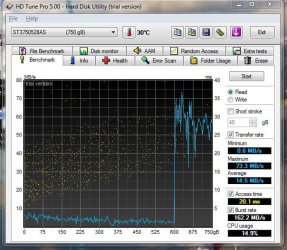
You might try your disk read rate with HDTune (free version). It will test the rate from one end of the platter to the other.

Cheers

No the same.

Here's the pic.

Does it matter if i ran the benchmark while steaming video?
 

Attachments

  • Capture.JPG
    Capture.JPG
    73.2 KB · Views: 30

My Computer My Computer

Computer type
PC/Desktop
Computer Manufacturer/Model Number
Acer M802
OS
Win 7 & 10 x64
CPU
Intel(R) Core(TM)2 Quad CPU Q8400 @ 2.66GHz (4 CPUs), ~2.7GH
Motherboard
MB.SCQ07.002 MB KIT G43 ICH10R HMII EUPLOT6 ECS R
Memory
8GB DDR2
Graphics Card(s)
HD 6970 2 GB
Sound Card
Realtek ALC 888s
Monitor(s) Displays
AOC
Screen Resolution
1920x1080 60hz
Hard Drives
WD Black 1 TB

WD My Book Essential 1 TB external HDD
PSU
Corsair TX650m
Case
CM 690 II Advanced mid tower
Cooling
fan
Has your reallocated sector count increased?

You might try your disk read rate with HDTune (free version). It will test the rate from one end of the platter to the other.

Cheers

No the same.

Here's the pic.

Does it matter if i ran the benchmark while steaming video?

Maybe, but that doesn't look good. Try again without the video.

Cheers
 

My Computer My Computer

Computer type
PC/Desktop
Computer Manufacturer/Model Number
Home built (GeneO industries)/Model 4
OS
Windows 10 Pro. EFI boot partition, full EFI boot
CPU
i7 4770k 4.4GHz (44-44-43-43 turbo) @ 1.248V
Motherboard
ASUS Maximus VI Hero
Memory
16GB (8GBx2) @2200 MHz G.skill Sniper 10-11-10-30-1, 1.6V
Graphics Card(s)
MSI GTX 970 Gaming 4G
Sound Card
Onboard SupremeFX Audio
Monitor(s) Displays
NEC Spectraview 2490WUXi-SV
Screen Resolution
1920 x 1200
Hard Drives
Samsung 850 Pro 256GB (OS), Samsung 2x 128GB 840 Pro SSD in RAID0, 3x WD Blue 6Gb/s 1TB RAID0, WD 2TB Black external USB 3.0, 2TB WD20EARS Green external USB 3.0, 2x 500GB Seagate and 1 750 GB external USB, 1x 350GB external USB3
PSU
Seasonic X-850 (2012 KM3 model)
Case
Fractal Design Define R4
Cooling
NH-D14, NF-F12, NF-A15; NF-P14, NF-P12,NF-A14, S12A PWM
Keyboard
Cooler Master Storm Quickfire Rapid - Brown
Mouse
Logitech G602
Internet Speed
126.4 Mb/s down, 24.3 Mb/s up
Other Info
USB 3.0 x8 , SATA III x8, eSATA, USB 2.0 x6. Samsung DVD R/W drive.

WEI: CPU 7.8, Memory 7.9, Graphics 7.9, Disk 7.9
Has your reallocated sector count increased?

You might try your disk read rate with HDTune (free version). It will test the rate from one end of the platter to the other.

Cheers

No the same.

Here's the pic.

Does it matter if i ran the benchmark while steaming video?

Maybe, but that doesn't look good. Try again without the video.

Cheers

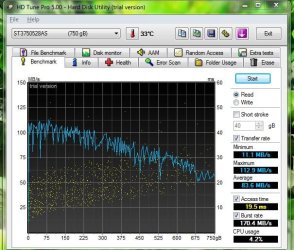
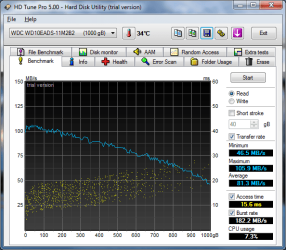
ok ye, it was the videos's fault. I will also provide the screenie for my external HDD for the heck of it.
 

Attachments

  • internal.JPG
    internal.JPG
    72.4 KB · Views: 30
  • 05-September-2012_18-04.png
    05-September-2012_18-04.png
    28.1 KB · Views: 30

My Computer My Computer

Computer type
PC/Desktop
Computer Manufacturer/Model Number
Acer M802
OS
Win 7 & 10 x64
CPU
Intel(R) Core(TM)2 Quad CPU Q8400 @ 2.66GHz (4 CPUs), ~2.7GH
Motherboard
MB.SCQ07.002 MB KIT G43 ICH10R HMII EUPLOT6 ECS R
Memory
8GB DDR2
Graphics Card(s)
HD 6970 2 GB
Sound Card
Realtek ALC 888s
Monitor(s) Displays
AOC
Screen Resolution
1920x1080 60hz
Hard Drives
WD Black 1 TB

WD My Book Essential 1 TB external HDD
PSU
Corsair TX650m
Case
CM 690 II Advanced mid tower
Cooling
fan
OK. So there is nothing wrong with your drive rates. The file transfer rate seems normal to me considering these drive rates.

That is a pretty high reallocated sector count though. Personally I would replace it, but at least keep an eye on it and back it up.

Cheers
 

My Computer My Computer

Computer type
PC/Desktop
Computer Manufacturer/Model Number
Home built (GeneO industries)/Model 4
OS
Windows 10 Pro. EFI boot partition, full EFI boot
CPU
i7 4770k 4.4GHz (44-44-43-43 turbo) @ 1.248V
Motherboard
ASUS Maximus VI Hero
Memory
16GB (8GBx2) @2200 MHz G.skill Sniper 10-11-10-30-1, 1.6V
Graphics Card(s)
MSI GTX 970 Gaming 4G
Sound Card
Onboard SupremeFX Audio
Monitor(s) Displays
NEC Spectraview 2490WUXi-SV
Screen Resolution
1920 x 1200
Hard Drives
Samsung 850 Pro 256GB (OS), Samsung 2x 128GB 840 Pro SSD in RAID0, 3x WD Blue 6Gb/s 1TB RAID0, WD 2TB Black external USB 3.0, 2TB WD20EARS Green external USB 3.0, 2x 500GB Seagate and 1 750 GB external USB, 1x 350GB external USB3
PSU
Seasonic X-850 (2012 KM3 model)
Case
Fractal Design Define R4
Cooling
NH-D14, NF-F12, NF-A15; NF-P14, NF-P12,NF-A14, S12A PWM
Keyboard
Cooler Master Storm Quickfire Rapid - Brown
Mouse
Logitech G602
Internet Speed
126.4 Mb/s down, 24.3 Mb/s up
Other Info
USB 3.0 x8 , SATA III x8, eSATA, USB 2.0 x6. Samsung DVD R/W drive.

WEI: CPU 7.8, Memory 7.9, Graphics 7.9, Disk 7.9
Dear users. I know that last post in this thread was 1550 days ago, but I was looking today answer for similar question and found this thread. I even registered on this forum, because I'm sick of that type of "help" I can found on many forums, including this one. Some guy have problem with transfer drop, and none of you have any experience with that type of problem (obviously), so you asked guy for more test, including S.M.A.R.T. And here you are - you see some screenshot with yellow mark instead of green and it's like victory to you - "here is your problem, man! reallocation value is too high! horray". Sorry guys, but this is b***t. You still don't know why that happens and I get no answer too when I was looking for it.

At least I have SOME experience and can check not stupid S.M.A.R.T. only (which in my case says that everything is good, green and nothing bad happens), but also diskmon and procmon for example. And I saw, in my case, that after copying lot of files, speed is going down for few minutes. If I abort transfer, I still see HDD activity for files I already copied (and it's not buffer flush, because it happens also when I copying files without buffering), so first I suspect indexing (which I turned off), then updating MFT. And because drive is old, this takes long time and can slow down other processess. But it's still my guessing, nothing solid. And nothing more I can get becuse on internet I can read thousand of useless requests for S.M.A.R.T. or other tests like that instead of some personal experience and knowledge. Its a shame.

 

My Computer My Computer

Computer type
PC/Desktop
Computer Manufacturer/Model Number
custom build
OS
Windows 7 64bit
Back
Top