file transfer

padyboy

Banned
Local time
5:33 PM
Messages
61
I wish to transfer large files from my main hd to a usb storage drive.
With Win 7, I must use the copy function which takes much longer than I expected. I have a SATA II hd.
Do I require a RAID setup for faster file transfers? How about an Easy Data Cable?
I am considering the purchase of an internal storage drive of 500-750GB.
Any comments would be appreciated.

:confused:
 

My Computer

Computer Manufacturer/Model Number
HP Pavilion a4310f, 3.0GHz dual core processor,4GB ram, dual core
OS
win 7 home premium 64 bit
CPU
processor AMD Athlon(tm) II x2 250 processor 3.00GHz
Motherboard
M2N68-LA (Narra6)
Memory
4.00GB RAM
Graphics Card(s)
Integrated graphics using nVidea GeForce615SE
Sound Card
Integrated RealtekALC888S
Monitor(s) Displays
Dell 17" LCD
Hard Drives
-640GB SATA, 3.0GB/s, 7200rpm
-Lacie Rugged XL backup drive, 1TB
-SuperMulti DVD burner
Keyboard
HP USB heyboard
Mouse
USB optical mouse
USB storage is typically pretty slow. You don't mention whether you are copying to a flash drive, or an external HDD.

Flash drives have very poor write performance in most cases, typically 10MB/s or less. If you are writing a single file, it will take less time than writing a lot of small files. I've found that lots of small files makes the amount of time go up considerably.

If you're using a cable to connect your drive, the length of the cable can cause performance slowdowns. Also, connecting to the front USB connectors is often significantly slower than connecting to the back ones, since the cables used internally are often not of very good quality.
 

My Computer

Computer Manufacturer/Model Number
Self-Built
OS
Windows 7 64 bit SP1
CPU
Core i7 920
Motherboard
Gigabyte GA-X58A-UD3R
Memory
12 GB (6x2GB Corsair)
Graphics Card(s)
nVidia 250GTS
Sound Card
Built-in
Monitor(s) Displays
2x Samsung SyncMaster 2343 (23" Widescreen)
Keyboard
Microsoft Natural Keyboard
Mouse
Logitech Laser
I am transferring to an external usb hard drive (2.0) and intend to install an internal storage drive in an expansion slot. Will internal drive transfer be any faster?
Also: copy vs. transfer. Can I transfer file using Win 7, rather than copy?
I read that use of an Easy Data Cable would speed up process considerably.

:confused:
 

My Computer

Computer Manufacturer/Model Number
HP Pavilion a4310f, 3.0GHz dual core processor,4GB ram, dual core
OS
win 7 home premium 64 bit
CPU
processor AMD Athlon(tm) II x2 250 processor 3.00GHz
Motherboard
M2N68-LA (Narra6)
Memory
4.00GB RAM
Graphics Card(s)
Integrated graphics using nVidea GeForce615SE
Sound Card
Integrated RealtekALC888S
Monitor(s) Displays
Dell 17" LCD
Hard Drives
-640GB SATA, 3.0GB/s, 7200rpm
-Lacie Rugged XL backup drive, 1TB
-SuperMulti DVD burner
Keyboard
HP USB heyboard
Mouse
USB optical mouse
Yes, an internal drive will be faster than USB in most cases. Typically significantly faster.

USB 2.0's maximum transfer rate is 480 Mbit/s, which in practice is nowhere near that. Internal SATA II will do 3Gbit/s (again, in pracite you won't get that much, but it's still much faster than USB's maximum).

So, you'll typically see at least 6x speed difference between internal and USB.

I'm not sure what you mean by "copy vs. transfer". transfer is a pretty generic term, and is often used to mean copy, or download. Do you mean copy vs. move? If you want to move a file (delete the original after copying) then simply hold down the ctrl+alt keys when you drag and drop. Move is the default when dragging and dropping a file on the same disk, but copy is the default between disks.

Easy data cable? That's typically used between two different computers, not one computer and a drive.
 

My Computer

Computer Manufacturer/Model Number
Self-Built
OS
Windows 7 64 bit SP1
CPU
Core i7 920
Motherboard
Gigabyte GA-X58A-UD3R
Memory
12 GB (6x2GB Corsair)
Graphics Card(s)
nVidia 250GTS
Sound Card
Built-in
Monitor(s) Displays
2x Samsung SyncMaster 2343 (23" Widescreen)
Keyboard
Microsoft Natural Keyboard
Mouse
Logitech Laser
The difference between USB2 and Sata (internal drive) depends a lot on the capability of the HDD. Although the Sata channel speed is appr. 6 times faster than USB2, no HDD can really make use of it. Typically a HDD runs at 800Mb/sec max. whilst the Sata channel allows up to 3000Mb/sec versus 480Mb/sec for USB2.

And external alternative would be an eSata or USB3 port. The corresponding PCI cards are inexpensive and an enclosure also costs only $25 to $35.
 

My Computer

Computer Manufacturer/Model Number
HP, Dell, Gateway, Toshiba - 4 laptops and 2 desktops
OS
Vista, Windows7, Mint Mate, Zorin, Windows 8
CPU
from 1.6GHz Duo to i7
Monitor(s) Displays
2x HP w2207
Hard Drives
5x HDD, 7x SSD, 12x Externals
Keyboard
with trackball - no mices
Mouse
Trackball mice
Internet Speed
DSL 6000
That's true, however USB is still half as fast as the average drive performance. And USB has a great deal of overhead.

What that means is that SATA can handle the full transfer speed of the disk, including all overhead involved in the protocol. USB will be lucky to handle 1/3 of the bandwidth, if not closer to 1/4 (assuming it's the only device on the bus).

It's a bit like when two full lanes of traffic have to merge into a single lane of traffic. There's always some contention involved, and the results are a lot worse than simply half the flow.

vs.

two lanes worth of traffic traveling on an 8 lane highway.
 

My Computer

Computer Manufacturer/Model Number
Self-Built
OS
Windows 7 64 bit SP1
CPU
Core i7 920
Motherboard
Gigabyte GA-X58A-UD3R
Memory
12 GB (6x2GB Corsair)
Graphics Card(s)
nVidia 250GTS
Sound Card
Built-in
Monitor(s) Displays
2x Samsung SyncMaster 2343 (23" Widescreen)
Keyboard
Microsoft Natural Keyboard
Mouse
Logitech Laser
That's true, however USB is still half as fast as the average drive performance. And USB has a great deal of overhead.

What that means is that SATA can handle the full transfer speed of the disk, including all overhead involved in the protocol. USB will be lucky to handle 1/3 of the bandwidth, if not closer to 1/4 (assuming it's the only device on the bus).

It's a bit like when two full lanes of traffic have to merge into a single lane of traffic. There's always some contention involved, and the results are a lot worse than simply half the flow.

vs.

two lanes worth of traffic traveling on an 8 lane highway.
Your observations are about the same as mine. If you want an external solution for spinning disks, I found eSata to be the fastest. On a high end laptop I made the same runs with the same HDD in enclosures (full C partition images) with eSata and USB3 and eSata came out faster although on the spec sheet USB3 can handle twice as many bits/sec. But as you said, there seems to be more contention and overhead.
 

My Computer

Computer Manufacturer/Model Number
HP, Dell, Gateway, Toshiba - 4 laptops and 2 desktops
OS
Vista, Windows7, Mint Mate, Zorin, Windows 8
CPU
from 1.6GHz Duo to i7
Monitor(s) Displays
2x HP w2207
Hard Drives
5x HDD, 7x SSD, 12x Externals
Keyboard
with trackball - no mices
Mouse
Trackball mice
Internet Speed
DSL 6000
I am still confused. You seem to be complicating my situation.

1.SATA is ~6x USB 2.0 (external hd)

2. What is involved in installing a HIGH QUALITY eSATA card to my motherboard? Or a USB 3.0 port? Would this only accelerate speed of an external drive? My external drive cage is capable of 3.0GB/s, according to the manual. Does the term 'eSATA' apply only to an external drive? This was never made clear in the literature I have reviewed.


3. I guess I want to transfer files between drives, such as between hd and external storage drive. Also between hd and internal storage drive. Copy is a different function by my understanding, where there is a desire to preserve the original file on its original drive. I understand this process takes considerable longer than 'moving' the file.

Please clarify my situation. I am searching for an internal storage hard drive capability which will take less time than it presently takes Win 7 to create a file on the storage drive.

I am not an expert, but am learning quickly with the difficulties encountered lately. Any further input would be extremely valuable.
 

My Computer

Computer Manufacturer/Model Number
HP Pavilion a4310f, 3.0GHz dual core processor,4GB ram, dual core
OS
win 7 home premium 64 bit
CPU
processor AMD Athlon(tm) II x2 250 processor 3.00GHz
Motherboard
M2N68-LA (Narra6)
Memory
4.00GB RAM
Graphics Card(s)
Integrated graphics using nVidea GeForce615SE
Sound Card
Integrated RealtekALC888S
Monitor(s) Displays
Dell 17" LCD
Hard Drives
-640GB SATA, 3.0GB/s, 7200rpm
-Lacie Rugged XL backup drive, 1TB
-SuperMulti DVD burner
Keyboard
HP USB heyboard
Mouse
USB optical mouse
As I said in an earlier message. There's no such term as "Transfer" as you are using it. The term is "Move". "Transfer" is a generic term that just refers to the process of sending data from one place to another.

No, Copy does not take longer than Moving. Moving takes slightly longer because it has to delete the file at the end from its original place. Move is just a copy with a delete of the original file.

Your hard disk doesn't run at 6Gb/s. That's just the maximum rate the electronics can send at. The actual rate is whatever the physical drive can do, and that's typically in the 800Mb/s range. USB 2 can only handle less than half that, so the copy or move will take more than twice as long as using something that can handle the full rate of the disk.

SATA (whether e or not.. the e stands for External) is faster than any current drive can handle. Therefore, when you copy or move files between two SATA drives it will perform the operation at the best possible speed for both devices (the speed is limited to the read speed of one drive and the write speed of the other).
 

My Computer

Computer Manufacturer/Model Number
Self-Built
OS
Windows 7 64 bit SP1
CPU
Core i7 920
Motherboard
Gigabyte GA-X58A-UD3R
Memory
12 GB (6x2GB Corsair)
Graphics Card(s)
nVidia 250GTS
Sound Card
Built-in
Monitor(s) Displays
2x Samsung SyncMaster 2343 (23" Widescreen)
Keyboard
Microsoft Natural Keyboard
Mouse
Logitech Laser
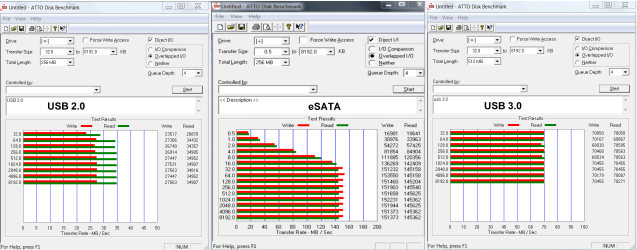
Transfer speed always depends on hardware involved. But, on my computer here is a comparason of transfer speeds. Maybe this will help.

esata-usb 3-2.png
 

My Computers

System One System Two

  • Computer type
    PC/Desktop
    Computer Manufacturer/Model Number
    ALWAYS UNDER CONSTRUCTION
    OS
    Windows 11 Pro
    CPU
    Ryzen 9 5900X
    Motherboard
    Asus X570 Crosshair Viii Hero
    Memory
    32GB G Skill DDR4-3600
    Graphics Card(s)
    EVGA RTX 3080 FTW 3 Ultra
    Sound Card
    On Board/Sennheiser PC37X Headset
    Monitor(s) Displays
    3 X Asus 27"
    Screen Resolution
    2560x1440
    Hard Drives
    2 X 1 TB NVME drives
    PSU
    EVGA 850
    Case
    Phanteks Eclipse P400A
    Cooling
    EVGA 280 AIO
    Keyboard
    Logitech G510s/ Logitech G13
    Mouse
    Logitech G502
    Internet Speed
    24/1
    Antivirus
    ESET/MBAM Pro/SAS Pro
    Browser
    Chrome/ Firefox/ Edge
  • Computer type
    Laptop
    System Manufacturer/Model Number
    Dell 16 Plus
    OS
    Windows 11 Pro
    CPU
    Intel Ultra 9 288V
    Memory
    32 GB LPDDR5X 8533
    Monitor(s) Displays
    16" Mini-LED HDR600 Touch 90 Hz
    Screen Resolution
    2560X1600
    Hard Drives
    1 TB NVME
It appears that eSATA varies considerably in values, depending on the units on the left axis (is this my supposed 40Mbps speed?. Otherwise, it is considerably higher that the other two. USB 3.0 is considerably lower than 2.0, but would require installation of a new card on my motherboard.

Considering my situation ( USB 2.0, drive cage capable of 3.0) and intended installation of an internal storage drive, what would you recommend? eSATA seems much faster and more expensive. What about my present motherboard and microprocessor capability of 3.0G???

Please advise. I am still confused.

:rolleyes:
 

My Computer

Computer Manufacturer/Model Number
HP Pavilion a4310f, 3.0GHz dual core processor,4GB ram, dual core
OS
win 7 home premium 64 bit
CPU
processor AMD Athlon(tm) II x2 250 processor 3.00GHz
Motherboard
M2N68-LA (Narra6)
Memory
4.00GB RAM
Graphics Card(s)
Integrated graphics using nVidea GeForce615SE
Sound Card
Integrated RealtekALC888S
Monitor(s) Displays
Dell 17" LCD
Hard Drives
-640GB SATA, 3.0GB/s, 7200rpm
-Lacie Rugged XL backup drive, 1TB
-SuperMulti DVD burner
Keyboard
HP USB heyboard
Mouse
USB optical mouse
On average USB 3.0 will be 2-2.5 times faster than USB 2.0. eSATA is considerably faster than either and depending on the hard drive and the external enclosure, will be close to that of an internal hard drive. Esata would also be cheaper.

Esata Bracket.
 

My Computers

System One System Two

  • Computer type
    PC/Desktop
    Computer Manufacturer/Model Number
    ALWAYS UNDER CONSTRUCTION
    OS
    Windows 11 Pro
    CPU
    Ryzen 9 5900X
    Motherboard
    Asus X570 Crosshair Viii Hero
    Memory
    32GB G Skill DDR4-3600
    Graphics Card(s)
    EVGA RTX 3080 FTW 3 Ultra
    Sound Card
    On Board/Sennheiser PC37X Headset
    Monitor(s) Displays
    3 X Asus 27"
    Screen Resolution
    2560x1440
    Hard Drives
    2 X 1 TB NVME drives
    PSU
    EVGA 850
    Case
    Phanteks Eclipse P400A
    Cooling
    EVGA 280 AIO
    Keyboard
    Logitech G510s/ Logitech G13
    Mouse
    Logitech G502
    Internet Speed
    24/1
    Antivirus
    ESET/MBAM Pro/SAS Pro
    Browser
    Chrome/ Firefox/ Edge
  • Computer type
    Laptop
    System Manufacturer/Model Number
    Dell 16 Plus
    OS
    Windows 11 Pro
    CPU
    Intel Ultra 9 288V
    Memory
    32 GB LPDDR5X 8533
    Monitor(s) Displays
    16" Mini-LED HDR600 Touch 90 Hz
    Screen Resolution
    2560X1600
    Hard Drives
    1 TB NVME
Very nice comparison. It confirms what I had experienced comparing speed of images on eSata and USB3. There must be an enormous overhead in USB3 because theoretically, the port is faster than eSata. Not that this matters a lot given the speed at which the HDD can feed. But one would expect it to be at least equal.
 

My Computer

Computer Manufacturer/Model Number
HP, Dell, Gateway, Toshiba - 4 laptops and 2 desktops
OS
Vista, Windows7, Mint Mate, Zorin, Windows 8
CPU
from 1.6GHz Duo to i7
Monitor(s) Displays
2x HP w2207
Hard Drives
5x HDD, 7x SSD, 12x Externals
Keyboard
with trackball - no mices
Mouse
Trackball mice
Internet Speed
DSL 6000
padyboy, If you want an external solution, eSata is the best. But if you have an available Sata port on your mobo and a free disk bay, that would be the cheapest and fastest solution. Also check your PSU for an available power cable. Else you'll have to split one.
 

My Computer

Computer Manufacturer/Model Number
HP, Dell, Gateway, Toshiba - 4 laptops and 2 desktops
OS
Vista, Windows7, Mint Mate, Zorin, Windows 8
CPU
from 1.6GHz Duo to i7
Monitor(s) Displays
2x HP w2207
Hard Drives
5x HDD, 7x SSD, 12x Externals
Keyboard
with trackball - no mices
Mouse
Trackball mice
Internet Speed
DSL 6000
I don't know if it is true, but I have read that it is because esata is sata to sata. USB puts out a different signal and has to be 'translated' from USB to sata.
 

My Computers

System One System Two

  • Computer type
    PC/Desktop
    Computer Manufacturer/Model Number
    ALWAYS UNDER CONSTRUCTION
    OS
    Windows 11 Pro
    CPU
    Ryzen 9 5900X
    Motherboard
    Asus X570 Crosshair Viii Hero
    Memory
    32GB G Skill DDR4-3600
    Graphics Card(s)
    EVGA RTX 3080 FTW 3 Ultra
    Sound Card
    On Board/Sennheiser PC37X Headset
    Monitor(s) Displays
    3 X Asus 27"
    Screen Resolution
    2560x1440
    Hard Drives
    2 X 1 TB NVME drives
    PSU
    EVGA 850
    Case
    Phanteks Eclipse P400A
    Cooling
    EVGA 280 AIO
    Keyboard
    Logitech G510s/ Logitech G13
    Mouse
    Logitech G502
    Internet Speed
    24/1
    Antivirus
    ESET/MBAM Pro/SAS Pro
    Browser
    Chrome/ Firefox/ Edge
  • Computer type
    Laptop
    System Manufacturer/Model Number
    Dell 16 Plus
    OS
    Windows 11 Pro
    CPU
    Intel Ultra 9 288V
    Memory
    32 GB LPDDR5X 8533
    Monitor(s) Displays
    16" Mini-LED HDR600 Touch 90 Hz
    Screen Resolution
    2560X1600
    Hard Drives
    1 TB NVME
I don't know if it is true, but I have read that it is because esata is sata to sata. USB puts out a different signal and has to be 'translated' from USB to sata.
That would explain it. I wonder where the 'translation' takes place and whether it depends on the CPU - which I doubt.
 

My Computer

Computer Manufacturer/Model Number
HP, Dell, Gateway, Toshiba - 4 laptops and 2 desktops
OS
Vista, Windows7, Mint Mate, Zorin, Windows 8
CPU
from 1.6GHz Duo to i7
Monitor(s) Displays
2x HP w2207
Hard Drives
5x HDD, 7x SSD, 12x Externals
Keyboard
with trackball - no mices
Mouse
Trackball mice
Internet Speed
DSL 6000
My guess would be that it takes place at the external enclosure. I would think it is a USB cable and must carry a USB signal up to the point where it goes into the hard drive. Like you, I seriously doubt the CPU has anything to do with it. That is just what I would think. I really don't know the answer.
 

My Computers

System One System Two

  • Computer type
    PC/Desktop
    Computer Manufacturer/Model Number
    ALWAYS UNDER CONSTRUCTION
    OS
    Windows 11 Pro
    CPU
    Ryzen 9 5900X
    Motherboard
    Asus X570 Crosshair Viii Hero
    Memory
    32GB G Skill DDR4-3600
    Graphics Card(s)
    EVGA RTX 3080 FTW 3 Ultra
    Sound Card
    On Board/Sennheiser PC37X Headset
    Monitor(s) Displays
    3 X Asus 27"
    Screen Resolution
    2560x1440
    Hard Drives
    2 X 1 TB NVME drives
    PSU
    EVGA 850
    Case
    Phanteks Eclipse P400A
    Cooling
    EVGA 280 AIO
    Keyboard
    Logitech G510s/ Logitech G13
    Mouse
    Logitech G502
    Internet Speed
    24/1
    Antivirus
    ESET/MBAM Pro/SAS Pro
    Browser
    Chrome/ Firefox/ Edge
  • Computer type
    Laptop
    System Manufacturer/Model Number
    Dell 16 Plus
    OS
    Windows 11 Pro
    CPU
    Intel Ultra 9 288V
    Memory
    32 GB LPDDR5X 8533
    Monitor(s) Displays
    16" Mini-LED HDR600 Touch 90 Hz
    Screen Resolution
    2560X1600
    Hard Drives
    1 TB NVME
USB storage is typically pretty slow. You don't mention whether you are copying to a flash drive, or an external HDD.

Flash drives have very poor write performance in most cases, typically 10MB/s or less. If you are writing a single file, it will take less time than writing a lot of small files. I've found that lots of small files makes the amount of time go up considerably.

If you're using a cable to connect your drive, the length of the cable can cause performance slowdowns. Also, connecting to the front USB connectors is often significantly slower than connecting to the back ones, since the cables used internally are often not of very good quality.


What if I go through a usb hub connected to my rear cpu port?
 

My Computer

Computer Manufacturer/Model Number
HP Pavilion a4310f, 3.0GHz dual core processor,4GB ram, dual core
OS
win 7 home premium 64 bit
CPU
processor AMD Athlon(tm) II x2 250 processor 3.00GHz
Motherboard
M2N68-LA (Narra6)
Memory
4.00GB RAM
Graphics Card(s)
Integrated graphics using nVidea GeForce615SE
Sound Card
Integrated RealtekALC888S
Monitor(s) Displays
Dell 17" LCD
Hard Drives
-640GB SATA, 3.0GB/s, 7200rpm
-Lacie Rugged XL backup drive, 1TB
-SuperMulti DVD burner
Keyboard
HP USB heyboard
Mouse
USB optical mouse
Yes, an internal drive will be faster than USB in most cases. Typically significantly faster.

USB 2.0's maximum transfer rate is 480 Mbit/s, which in practice is nowhere near that. Internal SATA II will do 3Gbit/s (again, in pracite you won't get that much, but it's still much faster than USB's maximum).

So, you'll typically see at least 6x speed difference between internal and USB.

I'm not sure what you mean by "copy vs. transfer". transfer is a pretty generic term, and is often used to mean copy, or download. Do you mean copy vs. move? If you want to move a file (delete the original after copying) then simply hold down the ctrl+alt keys when you drag and drop. Move is the default when dragging and dropping a file on the same disk, but copy is the default between disks.

Easy data cable? That's typically used between two different computers, not one computer and a drive.[/QUOTE]

I believe Easy Data Cable was suggested to avoid a RAID configuration. I thought this cable might accelerate moving files to my external usb drive.
 

My Computer

Computer Manufacturer/Model Number
HP Pavilion a4310f, 3.0GHz dual core processor,4GB ram, dual core
OS
win 7 home premium 64 bit
CPU
processor AMD Athlon(tm) II x2 250 processor 3.00GHz
Motherboard
M2N68-LA (Narra6)
Memory
4.00GB RAM
Graphics Card(s)
Integrated graphics using nVidea GeForce615SE
Sound Card
Integrated RealtekALC888S
Monitor(s) Displays
Dell 17" LCD
Hard Drives
-640GB SATA, 3.0GB/s, 7200rpm
-Lacie Rugged XL backup drive, 1TB
-SuperMulti DVD burner
Keyboard
HP USB heyboard
Mouse
USB optical mouse
"move" rather than "transfer"

Yes, an internal drive will be faster than USB in most cases. Typically significantly faster.

USB 2.0's maximum transfer rate is 480 Mbit/s, which in practice is nowhere near that. Internal SATA II will do 3Gbit/s (again, in pracite you won't get that much, but it's still much faster than USB's maximum).

So, you'll typically see at least 6x speed difference between internal and USB.

I'm not sure what you mean by "copy vs. transfer". transfer is a pretty generic term, and is often used to mean copy, or download. Do you mean copy vs. move? If you want to move a file (delete the original after copying) then simply hold down the ctrl+alt keys when you drag and drop. Move is the default when dragging and dropping a file on the same disk, but copy is the default between disks.


------------------------------------------------------------------

I have installed an internal SATA storage drive in my CPU. I now wish to move files to my storage drive while simultaneously deleting the file from my HDD.
I have not found a "move" selection on my Win 7 menu. I will continue looking.
 

My Computer

Computer Manufacturer/Model Number
HP Pavilion a4310f, 3.0GHz dual core processor,4GB ram, dual core
OS
win 7 home premium 64 bit
CPU
processor AMD Athlon(tm) II x2 250 processor 3.00GHz
Motherboard
M2N68-LA (Narra6)
Memory
4.00GB RAM
Graphics Card(s)
Integrated graphics using nVidea GeForce615SE
Sound Card
Integrated RealtekALC888S
Monitor(s) Displays
Dell 17" LCD
Hard Drives
-640GB SATA, 3.0GB/s, 7200rpm
-Lacie Rugged XL backup drive, 1TB
-SuperMulti DVD burner
Keyboard
HP USB heyboard
Mouse
USB optical mouse
Back
Top