Files take forever to download on Chrome

Sponge

New member
Local time
12:13 AM
Messages
18
For some odd reason, when I download anything through Chrome, the files take longer than they should.

Speedtest to prove it's not my internet:
5889651619.png


For example:
OODQug7.png


I have tested downloading through IE and the file I was downloading downloads instantly.

This has only recently started occurring and it's damn right getting on my nerves.
 

My Computer My Computer

At a glance

Windows 7 Professional x64Intel Core 2 Duo E8400 @ 3.00GHz8.00GB Dual-Channel DDR2 @ 398MHz (6-6-6-18)2047MB NVIDIA GeForce GTX 750 Ti (EVGA)
Computer type
PC/Desktop
Computer Manufacturer/Model Number
HP
OS
Windows 7 Professional x64
CPU
Intel Core 2 Duo E8400 @ 3.00GHz
Motherboard
Hewlett-Packard 0AA8h (XU1 PROCESSOR)
Memory
8.00GB Dual-Channel DDR2 @ 398MHz (6-6-6-18)
Graphics Card(s)
2047MB NVIDIA GeForce GTX 750 Ti (EVGA)
Sound Card
High Definition Audio Device
Monitor(s) Displays
SyncMaster (1280x1024@75Hz)
Hard Drives
931GB HITACHI HUA721010KLA330 ATA Device (SATA)
465GB Seagate Expansion USB Device (USB (SATA))
Internet Speed
http://www.speedtest.net/result/5622549473.png
Antivirus
Avast Free Antivirus
Browser
Chrome
Hello Sponge mate just how long are we talking here I can see the time in one of your attachments but generally speaking I find that the indicated time is often not right even changing every few seconds so making the total time not a realistic thing.

Now personally I would at least run these if you have not already
SFC /SCANNOW Command - System File Checker
Disk Check < if necessary include the /f and /r in the command line as per Option2
Run these in safe mode and the sfc often best run for two to three runs – you can leave out the /r switch in ckdsk if you feel it not necessary


if no fix then these

SUPERAntiSpyware | Remove Malware | Remove Spyware - AntiMalware, AntiSpyware, AntiAdware!
Malwarebytes | Malwarebytes Premium
AdwCleaner Download
ADW download from bleeping computer delete any rubbish found with the malware scans
(NB If you are running Kaspersky as the main AV then it might need disabling it when trying ADW because it does not like it at times)

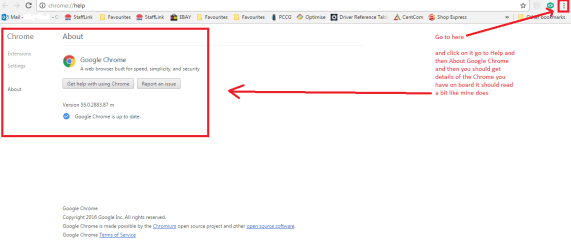
Now one other thing you might look at is in my pic
 

Attachments

  • CHROME.PNG
    CHROME.PNG
    19.9 KB · Views: 3

My Computer My Computer

At a glance

Desk1 7 Home Prem / Desk2 10 Pro / Main lap A...Desk1 i5 3750K / Laptop i7 GTX 860M / Desk2 i...Desk1 8GB (1866) / Desk2 16GB (1333) / Laptop...Desk 1& 2NVidia GTX 650 & Laptops on board Intel
Computer type
PC/Desktop
Computer Manufacturer/Model Number
Own build (new) Desk1 / Asus ROG Win 7 / Desk2 1st build
OS
Desk1 7 Home Prem / Desk2 10 Pro / Main lap Asus ROG 10 Pro 2 laptop Toshiba 7 Pro Asus P2520 7 & 10
CPU
Desk1 i5 3750K / Laptop i7 GTX 860M / Desk2 i5 2500
Motherboard
Desk1 Asus P877-V / Desk2 Gigabyte H67 UD3H / Laptop ?
Memory
Desk1 8GB (1866) / Desk2 16GB (1333) / Laptop 8Gb DDR3
Graphics Card(s)
Desk 1& 2NVidia GTX 650 & Laptops on board Intel
Sound Card
Desk 1 & 2 -XONAR DG Realtek High Def audio Laptop
Monitor(s) Displays
Desk 1 Benq HD 2450 / Desk2 Philips 24" / Laptop 17.5"
Screen Resolution
1920x1080 D1 & D2 & Laptop 1
Hard Drives
Desk1 Samsung 120GB 830 SSD
Asus ROG 256GB 850 Pro SSD
Desk2 Samsung 840 256 SSD
Toshiba 120GB EVO
PSU
Desk 1 Corsair HX 1050/ Laptop ? / Desk 2 Corsair HX 650
Case
Desk 1 Cooler HAF XM ? Toshiba laptop / Desk2 Coolermaster
Cooling
Fans on all Desk1 -2 Desk2 - all Coolermasters 5 Laptop ?
Keyboard
Desk 1 MS Sidewinder X6 Desk 2 MS Sidewinder X 4
Mouse
Desk 1&2 - Gigabyte MS 900 gamer - laptop - Logitec wireless
Internet Speed
ADSL2+
Other Info
One other Desktop (tester) and spare Toshba laptop both with SSD's
Running Kaspersky 2016 ISS on all machines config'd identically
Logitec audio stereo systems on each machine (x3)
Canon MG5250MFC
Router/modem TP-Link running WPA2SK
Hello Sponge mate just how long are we talking here I can see the time in one of your attachments but generally speaking I find that the indicated time is often not right even changing every few seconds so making the total time not a realistic thing.

Now personally I would at least run these if you have not already
SFC /SCANNOW Command - System File Checker
Disk Check < if necessary include the /f and /r in the command line as per Option2
Run these in safe mode and the sfc often best run for two to three runs – you can leave out the /r switch in ckdsk if you feel it not necessary


if no fix then these

SUPERAntiSpyware | Remove Malware | Remove Spyware - AntiMalware, AntiSpyware, AntiAdware!
Malwarebytes | Malwarebytes Premium
AdwCleaner Download
ADW download from bleeping computer delete any rubbish found with the malware scans
(NB If you are running Kaspersky as the main AV then it might need disabling it when trying ADW because it does not like it at times)

Now one other thing you might look at is in my pic

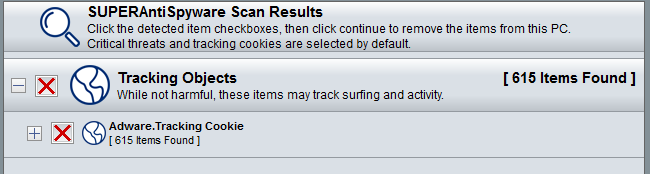
Ran a quick scan with SUPER and these were the results (will run a detailed scan later).
MYYBhOG.png

Could this have been something to do with it ya think?

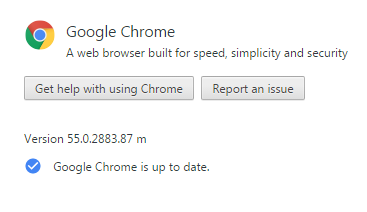
And
NP7iAxH.png
 

My Computer My Computer

At a glance

Windows 7 Professional x64Intel Core 2 Duo E8400 @ 3.00GHz8.00GB Dual-Channel DDR2 @ 398MHz (6-6-6-18)2047MB NVIDIA GeForce GTX 750 Ti (EVGA)
Computer type
PC/Desktop
Computer Manufacturer/Model Number
HP
OS
Windows 7 Professional x64
CPU
Intel Core 2 Duo E8400 @ 3.00GHz
Motherboard
Hewlett-Packard 0AA8h (XU1 PROCESSOR)
Memory
8.00GB Dual-Channel DDR2 @ 398MHz (6-6-6-18)
Graphics Card(s)
2047MB NVIDIA GeForce GTX 750 Ti (EVGA)
Sound Card
High Definition Audio Device
Monitor(s) Displays
SyncMaster (1280x1024@75Hz)
Hard Drives
931GB HITACHI HUA721010KLA330 ATA Device (SATA)
465GB Seagate Expansion USB Device (USB (SATA))
Internet Speed
http://www.speedtest.net/result/5622549473.png
Antivirus
Avast Free Antivirus
Browser
Chrome
Well the Chrome is up to date mate and the scans stuff while not hideously dangerous does fill the system with crap which will as you might imagine slow things down a bit. As many do I keep this program on board and also Malwarebytes which I use on a regular basis alongside my Kaspersky security.

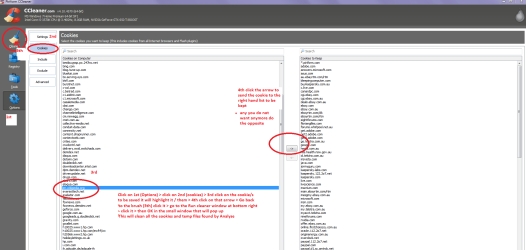
Now do you use CCleaner?? if not I think it would be a good idea to install it and use it o a regular basis because it will keep the drive clutter free and it does so many other functions too. One tip though is if you use it when you Analyse go to Options and then Cookies and make sure you keep the cookies for sites you have a password for because if you don't you might end up having to login over and over see my pic
CCleaner - Free Download or try CCleaner Professional - Piriform < always use this site (piriform) as very often it might be offered through FileHippo and I don't like mirror sites like that.
Most of us in here have it on board because it is so useful - you can for example clear up to almost 1GB of rubbish if left for a long time between scans ;)

Let us know how you go.
 

Attachments

  • CCcookies.PNG
    CCcookies.PNG
    49.7 KB · Views: 4

My Computer My Computer

At a glance

Desk1 7 Home Prem / Desk2 10 Pro / Main lap A...Desk1 i5 3750K / Laptop i7 GTX 860M / Desk2 i...Desk1 8GB (1866) / Desk2 16GB (1333) / Laptop...Desk 1& 2NVidia GTX 650 & Laptops on board Intel
Computer type
PC/Desktop
Computer Manufacturer/Model Number
Own build (new) Desk1 / Asus ROG Win 7 / Desk2 1st build
OS
Desk1 7 Home Prem / Desk2 10 Pro / Main lap Asus ROG 10 Pro 2 laptop Toshiba 7 Pro Asus P2520 7 & 10
CPU
Desk1 i5 3750K / Laptop i7 GTX 860M / Desk2 i5 2500
Motherboard
Desk1 Asus P877-V / Desk2 Gigabyte H67 UD3H / Laptop ?
Memory
Desk1 8GB (1866) / Desk2 16GB (1333) / Laptop 8Gb DDR3
Graphics Card(s)
Desk 1& 2NVidia GTX 650 & Laptops on board Intel
Sound Card
Desk 1 & 2 -XONAR DG Realtek High Def audio Laptop
Monitor(s) Displays
Desk 1 Benq HD 2450 / Desk2 Philips 24" / Laptop 17.5"
Screen Resolution
1920x1080 D1 & D2 & Laptop 1
Hard Drives
Desk1 Samsung 120GB 830 SSD
Asus ROG 256GB 850 Pro SSD
Desk2 Samsung 840 256 SSD
Toshiba 120GB EVO
PSU
Desk 1 Corsair HX 1050/ Laptop ? / Desk 2 Corsair HX 650
Case
Desk 1 Cooler HAF XM ? Toshiba laptop / Desk2 Coolermaster
Cooling
Fans on all Desk1 -2 Desk2 - all Coolermasters 5 Laptop ?
Keyboard
Desk 1 MS Sidewinder X6 Desk 2 MS Sidewinder X 4
Mouse
Desk 1&2 - Gigabyte MS 900 gamer - laptop - Logitec wireless
Internet Speed
ADSL2+
Other Info
One other Desktop (tester) and spare Toshba laptop both with SSD's
Running Kaspersky 2016 ISS on all machines config'd identically
Logitec audio stereo systems on each machine (x3)
Canon MG5250MFC
Router/modem TP-Link running WPA2SK
Sorry to goat in.
Just a couple of thoughts that may or may not be of help to you.
Have you checked any and all your chrome extensions to make sure only those you installed are present?
Try disabling them all and then attempt another download of something and see if it any quicker.
If you have any plugins, disaable all and try downloading a file and see if any quicker.
This article may or may not be of help to you.
How to troubleshoot Chrome at Home - TechRepublic

I don't use chrome, just throwing a few more ideas into the mix.
Peace out.
 

My Computer My Computer

At a glance

Win7 Pro-64 Biti7-2600-3.4GHz8 GIG DDR3onboard
Computer Manufacturer/Model Number
Put together
OS
Win7 Pro-64 Bit
CPU
i7-2600-3.4GHz
Motherboard
ASRock Z68M
Memory
8 GIG DDR3
Graphics Card(s)
onboard
Sound Card
onboard
Hard Drives
Seagate 1TB 7200RPM
PSU
680 W
Case
black
Cooling
stock fans
Keyboard
Microsoft
Mouse
Microsoft optical
No that is good BB I really was thinking the machine was cluttered to be honest and was wondering where to head off to next;)
 

My Computer My Computer

At a glance

Desk1 7 Home Prem / Desk2 10 Pro / Main lap A...Desk1 i5 3750K / Laptop i7 GTX 860M / Desk2 i...Desk1 8GB (1866) / Desk2 16GB (1333) / Laptop...Desk 1& 2NVidia GTX 650 & Laptops on board Intel
Computer type
PC/Desktop
Computer Manufacturer/Model Number
Own build (new) Desk1 / Asus ROG Win 7 / Desk2 1st build
OS
Desk1 7 Home Prem / Desk2 10 Pro / Main lap Asus ROG 10 Pro 2 laptop Toshiba 7 Pro Asus P2520 7 & 10
CPU
Desk1 i5 3750K / Laptop i7 GTX 860M / Desk2 i5 2500
Motherboard
Desk1 Asus P877-V / Desk2 Gigabyte H67 UD3H / Laptop ?
Memory
Desk1 8GB (1866) / Desk2 16GB (1333) / Laptop 8Gb DDR3
Graphics Card(s)
Desk 1& 2NVidia GTX 650 & Laptops on board Intel
Sound Card
Desk 1 & 2 -XONAR DG Realtek High Def audio Laptop
Monitor(s) Displays
Desk 1 Benq HD 2450 / Desk2 Philips 24" / Laptop 17.5"
Screen Resolution
1920x1080 D1 & D2 & Laptop 1
Hard Drives
Desk1 Samsung 120GB 830 SSD
Asus ROG 256GB 850 Pro SSD
Desk2 Samsung 840 256 SSD
Toshiba 120GB EVO
PSU
Desk 1 Corsair HX 1050/ Laptop ? / Desk 2 Corsair HX 650
Case
Desk 1 Cooler HAF XM ? Toshiba laptop / Desk2 Coolermaster
Cooling
Fans on all Desk1 -2 Desk2 - all Coolermasters 5 Laptop ?
Keyboard
Desk 1 MS Sidewinder X6 Desk 2 MS Sidewinder X 4
Mouse
Desk 1&2 - Gigabyte MS 900 gamer - laptop - Logitec wireless
Internet Speed
ADSL2+
Other Info
One other Desktop (tester) and spare Toshba laptop both with SSD's
Running Kaspersky 2016 ISS on all machines config'd identically
Logitec audio stereo systems on each machine (x3)
Canon MG5250MFC
Router/modem TP-Link running WPA2SK
Hi

Maybe you could uninstall Google Chrome.

Before uninstall Chrome, download the Chrome program and store in another location.
Also do take note on all the Extensions you are using.
Do save the bookmark to a html file, so that you can put back to bookmark.

Uninstall Google Chrome.
Monitor how the uninstall progress is going.

Restart you computer to purge, as some application will need to do before re-install.

Run the Chrome exe file.

Put back all the necessary setting, bookmarks, extensions, password, etc. unless you use online.

Just like in the same way as Windows, as some do re-install for the clean the system.
Then try download again.


Eric.
 

My Computer My Computer

At a glance

Windows 7 x64
Computer type
Laptop
Computer Manufacturer/Model Number
Toshiba L630 and L735
OS
Windows 7 x64
Hard Drives
240 GB SSD
Back
Top