
firefox 29 keeps reinstalling itself

mipak

New member
Member
Local time
4:01 AM
Messages
61
Location
The Outer Hebrides
hi ...
i know that my problem should be addressed to the mozilla site but i appear to be getting nowhere with them so i'm hoping that someone here will have experienced the same problem and found a solution.
i'm running a compaq cq58 laptop with win7 and firefox.
up to a few days ago, it was ff28 then i (stupidly) upgraded to ff29, found it was a bad decision, deleted it and reinstalled ff28.
success! ... until i restarted the computer and found that ff29 had reinstalled itself in the process.
i have redone the whole process about 6 times now but still can't get rid of ff29.
does anyone know how to overcome this problem because it's driving me up the wall!
 

My Computer My Computer

Computer type
PC/Desktop
Computer Manufacturer/Model Number
Custom build based on Asus
OS
W7Pro-64bit
CPU
INTEL G4400 SKYLAKE 3.3GHZ 3MBCACHE LGA1151
Motherboard
ASUS H110M-PLUS INTEL SKT1151 (25-03-2017)
Memory
2 X 8.00Gb DDR4 DIMM
Graphics Card(s)
NVIDIA GeForce GT430
Sound Card
Included on-board MB
Monitor(s) Displays
HP 1530
Screen Resolution
1024 x 768
Hard Drives
C: 120Gb SANDISK SATA3 SSD+
D: 160Gb SAMSUNG SATA
E: 500Gb WESTEN DIGITAL SATA
PSU
500w
Case
ATX Micro Tower
Cooling
2 fans (incl 1 in PSU)
Keyboard
Logitech K120
Mouse
Logitech B100
Internet Speed
D/L 38.5Mb // U/L 8.3
Browser
Pale Moon 28.16
Other Info
LAN ... Realtek 811H Gigabit LAN Controller
Disable Updates

Have you tried reinstalling FF28 and then disconnecting the Internet before rebooting?

If that works, go to:
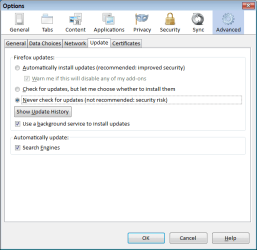
Options > Options > Advanced tab > Update

162003d1309228573-firefox-5-0-released-firefox-options-01.png

Make sure that "Never check for updates (not recommended: security risk)" is selected.
Options Advanced (Update).png
 
Last edited:

My Computer My Computer

Computer type
PC/Desktop
Computer Manufacturer/Model Number
n/a
OS
W7 Ultimate SP1, LM19.2 MATE, W10 Home 1703, W10 Pro 1703 VM, #All 64 bit
CPU
AMD Phenom II x6 1100T, 3.3 GHz
Motherboard
ASUS M4A88T-M/USB3 (AM3)
Memory
12GB DDR3 1333 G-Skill (4GB x 2), G-Skill (2GB x 2)
Graphics Card(s)
NVIDIA GeForce GTX 660
Sound Card
Realtek?
Monitor(s) Displays
Samsung S23B350
Screen Resolution
1920x1080
Hard Drives
WD Green 2TB (SATA), WD Green 3TB (SATA), WD Blue 4TB (SATA), WD Blue 6TB (SATA)
PSU
Cooler Master
Case
Antec GX300 Tower
Cooling
3x Antec TRICOOL 120mm Fans
Mouse
Wired Optical
Internet Speed
DSL
Antivirus
Avast
Browser
Pale Moon (64 bit)
Other Info
2018-12-27 Upgraded HDDs
2015-12-10 Upgraded case, graphics card, storage
2015-08-15 Upgraded motherboard & RAM
2015-07-15 Upgraded LM17.1 to LM17.2
Using earlier releases of Fx is not a good idea, as security problems with them are made public when new releases are published. However, if you insist on using an earlier release, check Control Panel/Programs and Features for Mozilla Maintenance Service; if present, remove it.

Also, reverting to earlier releases using the same Fx profile that was used for a later one is problematic; this is especially true with Fx 29.x, as it is quite different from earlier releases.

Finally, have you read the sticky at the top of Firefox Support ? mozillaZine Forums , which tells you most of what one can do to make 29.x look the way that the user desires?
 

My Computer My Computer

Computer type
PC/Desktop
Computer Manufacturer/Model Number
Intel(R) Core(TM) i5-2320 CPU @ 3.00GHz (Gateway computer)
OS
Microsoft Windows 7 Home Premium 64-bit 7601 Multiprocessor Free Service Pack 1
CPU
Intel(R) Core(TM) i5-2320 CPU @ 3.00GHz
Motherboard
Gateway IPISB-VR
Memory
8.00 GB
Graphics Card(s)
Intel(R) HD Graphics
Sound Card
(1) Realtek High Definition Audio (2) Intel(R) Display Aud
Monitor(s) Displays
ViewSonic 2250 Series
Screen Resolution
1920 x 1080 x 32 bits (4294967296 colors) @ 60 Hz
Hard Drives
(1) WDC WD10EADX-22TDHB0 (2) Generic Mini SD Reader USB Device (3) Generic USB CF Reader USB Device (4) Generic USB MS Reader USB Device (5) Generic USB SD Reader USB Device (6) Generic USB xD/SM Reader USB Device (7) Seagate FreeAgent Go
Keyboard
Gateway
Mouse
Logitech
Internet Speed
20 Mbps (Theoretical.)
Antivirus
Avast
Browser
Firefox
haven't been at my computer for a couple of weeks or so thus the delay in replying.

had a good read of the info. links ... thank you for those ... and in the end, came to the conclusion that i should 'bite the bullet' and accept ff29. that said, i hope mozilla eventually decides to revert ff29 back to the way ff28 looked in some (near) future update.

after a bit of fiddling, i managed to get 29 looking reasonably similar to 28 although there are some tweaks that don't exist anymore. very annoying .. !

can't see the reason for 'fixin' the engine when it ain't busted'.

thank you once again.
 

My Computer My Computer

Computer type
PC/Desktop
Computer Manufacturer/Model Number
Custom build based on Asus
OS
W7Pro-64bit
CPU
INTEL G4400 SKYLAKE 3.3GHZ 3MBCACHE LGA1151
Motherboard
ASUS H110M-PLUS INTEL SKT1151 (25-03-2017)
Memory
2 X 8.00Gb DDR4 DIMM
Graphics Card(s)
NVIDIA GeForce GT430
Sound Card
Included on-board MB
Monitor(s) Displays
HP 1530
Screen Resolution
1024 x 768
Hard Drives
C: 120Gb SANDISK SATA3 SSD+
D: 160Gb SAMSUNG SATA
E: 500Gb WESTEN DIGITAL SATA
PSU
500w
Case
ATX Micro Tower
Cooling
2 fans (incl 1 in PSU)
Keyboard
Logitech K120
Mouse
Logitech B100
Internet Speed
D/L 38.5Mb // U/L 8.3
Browser
Pale Moon 28.16
Other Info
LAN ... Realtek 811H Gigabit LAN Controller
As said earlier it's problematic trying to revert to earlier editions of Firefox. Look for a Firefox Extension called "Classic Theme Restorer" - it reverts FF29 to the FF28 or earlier 'look' without reducing the added security you get with FF29. It has many options in its configuration settings and I recommend it.

https://addons.mozilla.org/en-US/firefox/addon/classicthemerestorer/

It comes with warnings that it may not work with any special theme you may be using, but I've found it works with most.
 

My Computer My Computer

Computer type
PC/Desktop
Computer Manufacturer/Model Number
Alienware® ALX X58
OS
Win 7 Ult SP1/Win 10 Pro (all x64)
CPU
Intel® Core™ i7-975 Extreme O/C to 4.02 GHz, 8MB Cache
Motherboard
Asus® P6T Deluxe V2 X58 LGA1366
Memory
24GB Corsair Vengeance DDR3 SDRAM at 1600MHz - 6 x 4096MB
Graphics Card(s)
1792 MB NVIDIA® GeForce® GTX 295 Dual Core
Sound Card
Onboard Soundmax® High-Definition 7.1 Performance Audio
Monitor(s) Displays
Samsung XL2370 LED backlit 23" W/S 2ms response time
Screen Resolution
1920 X 1080
Hard Drives
2 x 500gb SATA II
1 x 1TB SATA II
1 external eSATA LaCie 3TB
(Non-RAID)
PSU
Alienware® 1200 Watt Multi-GPU
Case
Alienware® P2 ALX Chassis with AlienIce™ 3.0 Video Cooling
Cooling
Alienware® High-Perf. Liquid Cooling + Acoustic Dampening
Keyboard
Microsoft® Wireless Entertainment 8000 + Logitech® G15 Wired
Mouse
Microsoft® Wireless Laser 8000 + Logitech® G9 Wired
Internet Speed
1Gb/s
Antivirus
McAfee LiveSafe
Browser
Firefox - latest
Other Info
Using non-RAID on purpose as I find RAID to be too temperamental.
Now set to AHCI
h...i (stupidly) upgraded to ff29, found it was a bad decision,...
If you do not like FF29, then consider a Firefox-based browser (like Pale Moon) that will not be changing the user experience to include all of the Social Media stuff.

You should read the list of stuff that Pale Moon disables before you install it:
Pale Moon - Technical Details
 

My Computer My Computer

Computer type
Laptop
Computer Manufacturer/Model Number
Employer provided Dell Latitude
OS
W7 Pro SP1 64bit
CPU
i7
Memory
8GB
Graphics Card(s)
Intel HD Graphics
Hard Drives
crappy SSD
Antivirus
Employer mandated Symantec Endpoint Protection
Browser
Pale Moon 64bit, IE11 64bit & Chrome 64bit
thanks for that ...
actually, that was one of the add-ons that's help me although i think there are a few things that can't be resurrected so to speak. firefox has become a 'work in progress' and want to stay and see what happens.
having said that, a couple of sites have also mentioned pale moon as well as usernamesissues ... thank you.
i downloaded and installed it about an hour ago and seems to have so many similarities with ff. very impressive.
that's about as far as i've got so far.
thanks to all.
 

My Computer My Computer

Computer type
PC/Desktop
Computer Manufacturer/Model Number
Custom build based on Asus
OS
W7Pro-64bit
CPU
INTEL G4400 SKYLAKE 3.3GHZ 3MBCACHE LGA1151
Motherboard
ASUS H110M-PLUS INTEL SKT1151 (25-03-2017)
Memory
2 X 8.00Gb DDR4 DIMM
Graphics Card(s)
NVIDIA GeForce GT430
Sound Card
Included on-board MB
Monitor(s) Displays
HP 1530
Screen Resolution
1024 x 768
Hard Drives
C: 120Gb SANDISK SATA3 SSD+
D: 160Gb SAMSUNG SATA
E: 500Gb WESTEN DIGITAL SATA
PSU
500w
Case
ATX Micro Tower
Cooling
2 fans (incl 1 in PSU)
Keyboard
Logitech K120
Mouse
Logitech B100
Internet Speed
D/L 38.5Mb // U/L 8.3
Browser
Pale Moon 28.16
Other Info
LAN ... Realtek 811H Gigabit LAN Controller
i am also experiencing issues with FF29 not syncing my bookmarks, passwords, history, and settings as I use FF29 on my own personal laptop and on a school computer running XP, so i decided to ditch FF and started running IE and Google Chrome as the sync on Chrome works all the time, they need a sync feature on IE though
 

My Computer My Computer

Computer type
Laptop
Computer Manufacturer/Model Number
Toshiba Satellite C655-S5547
OS
Windows 7 Pro 64bit
CPU
Intel(R) Core(TM) i3-2350M CPU @ 2.30 GHZ
Memory
4.00 GB
Graphics Card(s)
Intel HD Graphiics
Sound Card
Conexant HD Audio
Monitor(s) Displays
Generic PnP Monitor
Screen Resolution
1366 x 768 x 32 bits (4294967296 colors) @ 60 Hz
Hard Drives
TI106321W0B(C:) 450GB
Keyboard
Standard PS/2 Keyboard
Mouse
Synaptics Pointing Device
Internet Speed
51.68 mb/s download and 12.08 mb/s upload as of 6/24/15
Antivirus
Webroot Secure Anywhere
Browser
IE11, Mozilla Firefox 41.1.01, and Google Chrome if I must
After my initial screw up installing LM17, I blocked FF updates and so I have FF28 when I use Linux.

On W7, I've been using Pale Moon since August last year, as a protest against Mozilla's obsession with adding useless "fluff" features, instead of fixing the issues that annoy me (bookmarks manager, spell checker, dodgy session restore feature).

The pointless "lets copy Chrome" GUI change has further reinforced my decision. :(
 

My Computer My Computer

Computer type
PC/Desktop
Computer Manufacturer/Model Number
n/a
OS
W7 Ultimate SP1, LM19.2 MATE, W10 Home 1703, W10 Pro 1703 VM, #All 64 bit
CPU
AMD Phenom II x6 1100T, 3.3 GHz
Motherboard
ASUS M4A88T-M/USB3 (AM3)
Memory
12GB DDR3 1333 G-Skill (4GB x 2), G-Skill (2GB x 2)
Graphics Card(s)
NVIDIA GeForce GTX 660
Sound Card
Realtek?
Monitor(s) Displays
Samsung S23B350
Screen Resolution
1920x1080
Hard Drives
WD Green 2TB (SATA), WD Green 3TB (SATA), WD Blue 4TB (SATA), WD Blue 6TB (SATA)
PSU
Cooler Master
Case
Antec GX300 Tower
Cooling
3x Antec TRICOOL 120mm Fans
Mouse
Wired Optical
Internet Speed
DSL
Antivirus
Avast
Browser
Pale Moon (64 bit)
Other Info
2018-12-27 Upgraded HDDs
2015-12-10 Upgraded case, graphics card, storage
2015-08-15 Upgraded motherboard & RAM
2015-07-15 Upgraded LM17.1 to LM17.2

My Computer My Computer

Computer type
Laptop
Computer Manufacturer/Model Number
Employer provided Dell Latitude
OS
W7 Pro SP1 64bit
CPU
i7
Memory
8GB
Graphics Card(s)
Intel HD Graphics
Hard Drives
crappy SSD
Antivirus
Employer mandated Symantec Endpoint Protection
Browser
Pale Moon 64bit, IE11 64bit & Chrome 64bit
lehnerus2000,
There seems to be a Pale Moon for Linux too. But I've not tested it.
I recently discovered that info too. :)
Like you, I haven't tried it.

Firefox seems much faster and more reliable running on Linux Distros, than it does on Windows.
For example, the session restore feature has never failed in my Linux installs.

Pale Moon suffers from the same session restore issue (on my PC in W7).

I suspect that the Avast Resident scanner is responsible (i.e. it interferes with the loading of the session restore file).
I did try adding "Exceptions" for the session restore files, but it didn't fix the issue.
In any case, "Exceptions" don't work properly in Avast (unlike AVG).

The restore files are not being corrupted (I've tested them).

I now use the session restore feature in Tab Mix Plus, because even if it initially fails, you can just load a past session from the menu.

Pale Moon also suffers the same spell checker issue as Firefox (on my PC in W7).
 
Last edited:

My Computer My Computer

Computer type
PC/Desktop
Computer Manufacturer/Model Number
n/a
OS
W7 Ultimate SP1, LM19.2 MATE, W10 Home 1703, W10 Pro 1703 VM, #All 64 bit
CPU
AMD Phenom II x6 1100T, 3.3 GHz
Motherboard
ASUS M4A88T-M/USB3 (AM3)
Memory
12GB DDR3 1333 G-Skill (4GB x 2), G-Skill (2GB x 2)
Graphics Card(s)
NVIDIA GeForce GTX 660
Sound Card
Realtek?
Monitor(s) Displays
Samsung S23B350
Screen Resolution
1920x1080
Hard Drives
WD Green 2TB (SATA), WD Green 3TB (SATA), WD Blue 4TB (SATA), WD Blue 6TB (SATA)
PSU
Cooler Master
Case
Antec GX300 Tower
Cooling
3x Antec TRICOOL 120mm Fans
Mouse
Wired Optical
Internet Speed
DSL
Antivirus
Avast
Browser
Pale Moon (64 bit)
Other Info
2018-12-27 Upgraded HDDs
2015-12-10 Upgraded case, graphics card, storage
2015-08-15 Upgraded motherboard & RAM
2015-07-15 Upgraded LM17.1 to LM17.2
Back
Top