Firefox: Can't drag URLs to Links bar

reo

New member
Member
Local time
8:26 PM
Messages
47
I first used my version on a USB stick, and thought that it was because it wasn't installed. The USB version works fine on XP and Vista.

I installed it, and still can't use the link bar. Build 7100, ff 3.0.10.

Any ideas?

Thanks,

Reo
 

My Computer My Computer

At a glance

vista x64
OS
vista x64
Try running firefox in safe mode and see if it works then? Just to avoid confusion, I mean the safe mode version of firefox, not running firefox in windows safe mode.
 

My Computer My Computer

At a glance

Windows 7 Ultimate x64 | Windows XP Pro x86 |...AMD Athlon 64 X2 Dual Core 5200 2.7 GHz3G RAMATI HD Radeon 4670
Computer Manufacturer/Model Number
Started out as an AST180
OS
Windows 7 Ultimate x64 | Windows XP Pro x86 | Windows Vista Ultimate x86
CPU
AMD Athlon 64 X2 Dual Core 5200 2.7 GHz
Motherboard
Acer EM61SM/EM61PM
Memory
3G RAM
Graphics Card(s)
ATI HD Radeon 4670
Screen Resolution
1280x1024
Hard Drives
Western Digital Caviar Black WD1001FALS 1TB 7200 RPM 32MB Cache, 160 GB Seagate
PSU
Corsair 450VX 450W
Keyboard
Microsoft Media Pro 3000
Mouse
Logitech MX310
Try running firefox in safe mode and see if it works then? Just to avoid confusion, I mean the safe mode version of firefox, not running firefox in windows safe mode.

That's a new one for me. How do I access safe mode?

Thanks,

Reid
 

My Computer My Computer

At a glance

vista x64
OS
vista x64
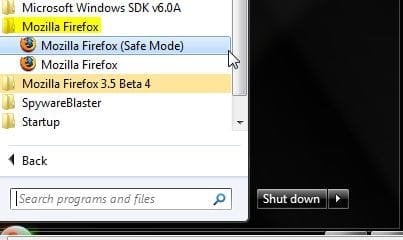
It should be in your Start Menu under Mozilla Firefox.

safemodeff.JPG
 

My Computer My Computer

At a glance

Windows 7 Ultimate x64 SP1Core i7 920 (D0) @ 4Ghz, *26c idle *65c full ...12GB DDR3 Corsair Dominator -CMD12GX3M6A1600C...Zotac Geforce GTX 770
Computer type
PC/Desktop
Computer Manufacturer/Model Number
Airbot 2.0
OS
Windows 7 Ultimate x64 SP1
CPU
Core i7 920 (D0) @ 4Ghz, *26c idle *65c full load on air
Motherboard
Asus P6X58D Premium - Sata 6Gb/s - USB 3.0
Memory
12GB DDR3 Corsair Dominator -CMD12GX3M6A1600C8 at 1600MHz
Graphics Card(s)
Zotac Geforce GTX 770
Sound Card
ASUS Xonar D2X
Monitor(s) Displays
1 LG 24" Flatron W2453V-PF 1 Samsung 24" P2450H both 2ms RT
Screen Resolution
1920x1080@60hz
Hard Drives
1 Samsung 250GB 840 Evo SSD
1 OCZ Vertex2 180GB SSD
1 TB Samsung Spinpoint F1 7200RPM 32MB cache
2 500GB WD Caviar Blacks 7200RPM 32MB cache (WD5001AALS)

Pioneer DVD Burner DVR-S18M
PSU
Corsair HX1000W
Case
Cooler Master HAF 932
Cooling
Case Fans *3 230mm, *1 140mm/CPU - *Tuniq Tower 120 Extreme
Keyboard
Logitech Wireless MK700
Mouse
Logitech Wireless MK700
Internet Speed
DL 15 Mbps UL 0.98 Mbps
Antivirus
None
Browser
Firefox Nightly
Other Info
Processor-7.7 *RAM- 7.9 *Graphics-7.9 *Gaming Graphics- 7.9 *SSD- 7.8 W.E.I final score= 7.7
*Phone- LG Nexus 5
The link bar does work in safe mode. So, where do I go from here?

Reid
 

My Computer My Computer

At a glance

vista x64
OS
vista x64
Then it might be one of your add ons causing a problem. Disable whatever add ons you have one by one and try and find out which one it might be causing the problem.
 

My Computer My Computer

At a glance

Windows 7 Ultimate x64 SP1Core i7 920 (D0) @ 4Ghz, *26c idle *65c full ...12GB DDR3 Corsair Dominator -CMD12GX3M6A1600C...Zotac Geforce GTX 770
Computer type
PC/Desktop
Computer Manufacturer/Model Number
Airbot 2.0
OS
Windows 7 Ultimate x64 SP1
CPU
Core i7 920 (D0) @ 4Ghz, *26c idle *65c full load on air
Motherboard
Asus P6X58D Premium - Sata 6Gb/s - USB 3.0
Memory
12GB DDR3 Corsair Dominator -CMD12GX3M6A1600C8 at 1600MHz
Graphics Card(s)
Zotac Geforce GTX 770
Sound Card
ASUS Xonar D2X
Monitor(s) Displays
1 LG 24" Flatron W2453V-PF 1 Samsung 24" P2450H both 2ms RT
Screen Resolution
1920x1080@60hz
Hard Drives
1 Samsung 250GB 840 Evo SSD
1 OCZ Vertex2 180GB SSD
1 TB Samsung Spinpoint F1 7200RPM 32MB cache
2 500GB WD Caviar Blacks 7200RPM 32MB cache (WD5001AALS)

Pioneer DVD Burner DVR-S18M
PSU
Corsair HX1000W
Case
Cooler Master HAF 932
Cooling
Case Fans *3 230mm, *1 140mm/CPU - *Tuniq Tower 120 Extreme
Keyboard
Logitech Wireless MK700
Mouse
Logitech Wireless MK700
Internet Speed
DL 15 Mbps UL 0.98 Mbps
Antivirus
None
Browser
Firefox Nightly
Other Info
Processor-7.7 *RAM- 7.9 *Graphics-7.9 *Gaming Graphics- 7.9 *SSD- 7.8 W.E.I final score= 7.7
*Phone- LG Nexus 5
Change your folder option to view hidden folder and go to your user name and go to AppDatta/Roaming/Mozilla and rename the folder to Mozilla (2) and start up Firefox and see if you can now drag your URL's to the links bar, if that works it must be a setting or addon that has caused your problem and you will need to delete the new Mozilla folsder and rename the old one again and find out what setting it was that stopped you.
 

My Computer My Computer

At a glance

Windows 7 Ultimate Vista Ultimate x64Core 2 Duo E8500 3.16Ghz @ 3.8Ghz2x2Gigs Patriot PC2-6400 LLInno3D GeForce GTX260 216 SP
Computer Manufacturer/Model Number
Home Brew
OS
Windows 7 Ultimate Vista Ultimate x64
CPU
Core 2 Duo E8500 3.16Ghz @ 3.8Ghz
Motherboard
eVGA 750i FTW
Memory
2x2Gigs Patriot PC2-6400 LL
Graphics Card(s)
Inno3D GeForce GTX260 216 SP
Monitor(s) Displays
ASUS VW222U 22" 2ms Response time
Screen Resolution
1680x1050
Hard Drives
SATA 150GB
SATA II 250GB
USB IDE 750GB Ext.
PSU
HYTEC 600W & Thermaltake 650W Toughpower Power Exp
Case
Thermaltake Armor LCS (Liquid Cooling System)
Cooling
Liquid Cooling System
Keyboard
Logitech G15 Gaming Keyboard
Mouse
Logitech G9 Gaming Mouse
The solution for re-enabling drag and drop in Firefox was quite simple: Ensure the "Run this program as an Administrator" check-box is unticked in the windows Firefox shortcut compatibility settings.

If you were like me, you may have previously enabled that compatibility setting to resolve issues with other Firefox addons, unknowingly disabling drag-n-drop from the desktop to firefox. With recent addon updates, I found that running in administrator mode was no longer needed.

Hope this helps a few of you with this frustrating problem.
 

My Computer My Computer

At a glance

Win8.1Pro64bitIntel CoreDuo Quad-Core Q95508GAMD
Computer type
PC/Desktop
Computer Manufacturer/Model Number
Custom
OS
Win8.1Pro64bit
CPU
Intel CoreDuo Quad-Core Q9550
Motherboard
GigaByte GA-P35C-DS3R ver1.1
Memory
8G
Graphics Card(s)
AMD
Hard Drives
Many
Antivirus
Webroot
Browser
Firefox
Hello and WELCOME, @wclusa::)

You wrote:

The solution for re-enabling drag and drop in Firefox was quite simple: Ensure the "Run this program as an Administrator" check-box is unticked in the windows Firefox shortcut compatibility settings.

If you were like me, you may have previously enabled that compatibility setting to resolve issues with other Firefox addons, unknowingly disabling drag-n-drop from the desktop to firefox. With recent addon updates, I found that running in administrator mode was no longer needed.

Hope this helps a few of you with this frustrating problem.

Unfortunately, as this thread is over 6 years old, many things have changed since then, as far as how Firefox works.
And it's probably unlikely that the OP or others are closely following it by now.;)

Thanks for your helpful input, though!


Cheers, MM
 

My Computer My Computer

At a glance

OEM Windows 7 Ult (x64) SP1Intel Core-i7 3770 @ 3.4 GHz16 GB DDR3 SDRAM @ 1333 MHzNVidia GeForce GT620 1 GB
Computer type
PC/Desktop
Computer Manufacturer/Model Number
Dell Studio XPS 8500
OS
OEM Windows 7 Ult (x64) SP1
CPU
Intel Core-i7 3770 @ 3.4 GHz
Motherboard
"Dell" branded
Memory
16 GB DDR3 SDRAM @ 1333 MHz
Graphics Card(s)
NVidia GeForce GT620 1 GB
Sound Card
THX TruStudio PC
Monitor(s) Displays
Dell U2410 Full HD
Hard Drives
2.0 TB SATA2 @ 7200 RPM
PSU
350W
Keyboard
MS 4000 Ergon - Wired
Mouse
Logitech Anywhere MX
Internet Speed
Cable HSI w/Turbo (router)
Antivirus
KIS-MBAM Premium-MBAE Premium
Browser
Fx (current version); IE
Other Info
And a Win7/64 Pro laptop; And a Win10/64 Pro desktop.
Thank you for reminding me: This fix works with the current version of Firefox, at the time of writing: 41.0.2. It is something worth trying when other possible solutions have failed: firefox safemode, windows escape key, bad plug-in, etc.

PS: Posted in this forum as is near the top of the search hit list for this specific problem.
 

My Computer My Computer

At a glance

Win8.1Pro64bitIntel CoreDuo Quad-Core Q95508GAMD
Computer type
PC/Desktop
Computer Manufacturer/Model Number
Custom
OS
Win8.1Pro64bit
CPU
Intel CoreDuo Quad-Core Q9550
Motherboard
GigaByte GA-P35C-DS3R ver1.1
Memory
8G
Graphics Card(s)
AMD
Hard Drives
Many
Antivirus
Webroot
Browser
Firefox
Thank you for reminding me: This fix works with the current version of Firefox, at the time of writing: 41.0.2. It is something worth trying when other possible solutions have failed: firefox safemode, windows escape key, bad plug-in, etc.

Actually, the current version of Fx is 42, released on Nov 3.

PS: Posted in this forum as is near the top of the search hit list for this specific problem.
Fair enough.
I was merely pointing out that few OPs follow a forum thread for 6 years.:D

That is all.:D

Cheers,
MM
 

My Computer My Computer

At a glance

OEM Windows 7 Ult (x64) SP1Intel Core-i7 3770 @ 3.4 GHz16 GB DDR3 SDRAM @ 1333 MHzNVidia GeForce GT620 1 GB
Computer type
PC/Desktop
Computer Manufacturer/Model Number
Dell Studio XPS 8500
OS
OEM Windows 7 Ult (x64) SP1
CPU
Intel Core-i7 3770 @ 3.4 GHz
Motherboard
"Dell" branded
Memory
16 GB DDR3 SDRAM @ 1333 MHz
Graphics Card(s)
NVidia GeForce GT620 1 GB
Sound Card
THX TruStudio PC
Monitor(s) Displays
Dell U2410 Full HD
Hard Drives
2.0 TB SATA2 @ 7200 RPM
PSU
350W
Keyboard
MS 4000 Ergon - Wired
Mouse
Logitech Anywhere MX
Internet Speed
Cable HSI w/Turbo (router)
Antivirus
KIS-MBAM Premium-MBAE Premium
Browser
Fx (current version); IE
Other Info
And a Win7/64 Pro laptop; And a Win10/64 Pro desktop.
The solution for re-enabling drag and drop in Firefox was quite simple: Ensure the "Run this program as an Administrator" check-box is unticked in the windows Firefox shortcut compatibility settings.

If you were like me, you may have previously enabled that compatibility setting to resolve issues with other Firefox addons, unknowingly disabling drag-n-drop from the desktop to firefox. With recent addon updates, I found that running in administrator mode was no longer needed.

Hope this helps a few of you with this frustrating problem.
Running Firefox as admin is dangerous. I realize that you are no longer doing that. I'm just pointing it out for others that find this thread via searches.

Also, running Firefox as admin should not impact drag/drop to the link bar (the problem in the original post). It will (as you pointed out) prevent drag/drop from desktop to Firefox due to process isolation. The desktop (which is Windows Explorer) is running at the medium integrity level. Firefox (when running as admin) is running at the high integrity level. The lower process is limited in what it can do to the higher process.

This isolation can also be seen with notepad (most any app). Normally, you can drag/drop a file from Windows Explorer into notepad. If notepad is running as admin, the drag/drop will fail.

The same can be seen with the command prompt window. I'm in the habit of dragging files from Windows Explorer and dropping them into the command prompt window. Doing that types out the path to the file (which might be quite long). If the command prompt window id running as admin, the drag/drop will fail. I have to resort to shift+right-click > copy as path -- then paste the path in.
 

My Computer My Computer

At a glance

W7 Pro SP1 64biti78GBIntel HD Graphics
Computer type
Laptop
Computer Manufacturer/Model Number
Employer provided Dell Latitude
OS
W7 Pro SP1 64bit
CPU
i7
Memory
8GB
Graphics Card(s)
Intel HD Graphics
Hard Drives
crappy SSD
Antivirus
Employer mandated Symantec Endpoint Protection
Browser
Pale Moon 64bit, IE11 64bit & Chrome 64bit
Back
Top