
Thank you for your help.
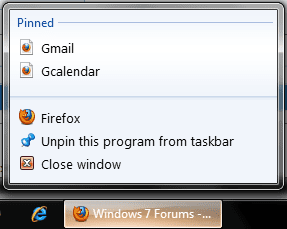
I haven't been able to figure out how to change the icon for Internet shortcuts I have pinned to my Firefox jump list. If you look at the first picture I've attached, it shows the generic icons displayed in my jump list. The second picture shows the actual Internet shortcuts that were used to pin to the Firefox jump list. You'll notice they have customized icons associated with them. Unfortunately, the customized icons disappear once the shortcuts are pinned to the Firefox jump list and I'm unable to right click the icon to view their properties (i.e. change their shortcuts) once their pinned to the jump list.
I haven't been able to figure out how to change the icon for Internet shortcuts I have pinned to my Firefox jump list. If you look at the first picture I've attached, it shows the generic icons displayed in my jump list. The second picture shows the actual Internet shortcuts that were used to pin to the Firefox jump list. You'll notice they have customized icons associated with them. Unfortunately, the customized icons disappear once the shortcuts are pinned to the Firefox jump list and I'm unable to right click the icon to view their properties (i.e. change their shortcuts) once their pinned to the jump list.
Attachments

My Computer
- OS
- Windows 7


