- Local time
- 9:28 AM
- Messages
- 128
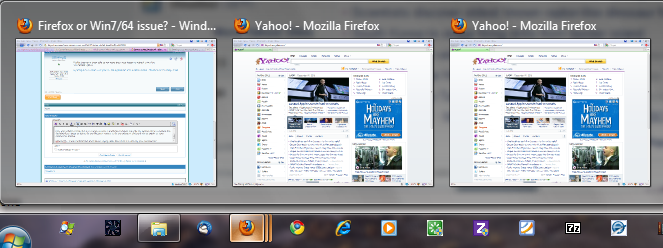
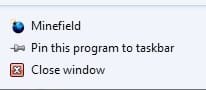
For some reason, Firefox will not open an additional instance unless I right click the pinned FF icon and right click the program in the little window and select run as admin.
I checked Chrome and IE, and they both open additional instances of the program simply by rt clicking the icon and left clicking the program.
I've been rebuilding my computer after a HD crash requiring a new HD. This issue is recent within the last few days.. ie, I've had normal multiple FF instances running since the rebuild.
I'm not sure if this is a FF issue or something to do with W7/64.
Any ideas?
I checked Chrome and IE, and they both open additional instances of the program simply by rt clicking the icon and left clicking the program.
I've been rebuilding my computer after a HD crash requiring a new HD. This issue is recent within the last few days.. ie, I've had normal multiple FF instances running since the rebuild.
I'm not sure if this is a FF issue or something to do with W7/64.
Any ideas?
My Computer
- OS
- Windows 7 x64 home premium
- CPU
- Intel core i5-2500k
- Motherboard
- Asus P8Z68-V Pro
- Memory
- 2x4GB G.Skill DDR3-1333, 2x2GB AData DDR3-1333
- Graphics Card(s)
- HD3000 graphics
- Sound Card
- on board
- Monitor(s) Displays
- Samsung 19" syncmaster
- Screen Resolution
- 1280x1024
- Hard Drives
- Intel 80 GB X25-M SSD
Samsung HD321KJ 320 GB SATA
Samsung HD204UI 2.0 TB SATA
WD 1.5 TB Green eSATA in an external NexStar enclosure
- PSU
- Corsair HX520W
- Case
- Antec Solo
- Cooling
- CoolerMaster Hyper 212+ with dual fans
- Keyboard
- MS Natural Ergonomic 4000
- Mouse
- Logitech
- Internet Speed
- RoadRunner