Firefox Sound doesnt appear in mixer.

beast m0de

New member
Local time
1:52 PM
Messages
3
Hey, i recently upgraded to windows 7, and in the volume mixer firefox does not appear. No sound works in firefox. I also tried google chrome and it doesnt work.

Any ideas?
 

My Computer My Computer

At a glance

windows
OS
windows
What happens when you play a youtube video?
 

My Computer My Computer

At a glance

Windows 7 Ultimate x64 ®™Intel Core 2 Duo (2.2 GHz)2x 2GB Corsair (667 MHz)NVIDIA 8600M GS (256MB)
Computer Manufacturer/Model Number
Sony Vaio FZ21Z
OS
Windows 7 Ultimate x64 ®™
CPU
Intel Core 2 Duo (2.2 GHz)
Motherboard
Sony (Intel Chipset)
Memory
2x 2GB Corsair (667 MHz)
Graphics Card(s)
NVIDIA 8600M GS (256MB)
Sound Card
Sigmatel
Monitor(s) Displays
15.4" TFT X-Black
Screen Resolution
1280x800
Hard Drives
Western Digital 300GB Scorpio Black (7200rpm)
Mouse
Logitech Anywhere MX
Internet Speed
Sky 5MB
video only... no sound
 

My Computer My Computer

At a glance

windows
OS
windows
Have you looked at THIS already?
 

My Computer My Computer

At a glance

Windows 7 Ultimate x64 ®™Intel Core 2 Duo (2.2 GHz)2x 2GB Corsair (667 MHz)NVIDIA 8600M GS (256MB)
Computer Manufacturer/Model Number
Sony Vaio FZ21Z
OS
Windows 7 Ultimate x64 ®™
CPU
Intel Core 2 Duo (2.2 GHz)
Motherboard
Sony (Intel Chipset)
Memory
2x 2GB Corsair (667 MHz)
Graphics Card(s)
NVIDIA 8600M GS (256MB)
Sound Card
Sigmatel
Monitor(s) Displays
15.4" TFT X-Black
Screen Resolution
1280x800
Hard Drives
Western Digital 300GB Scorpio Black (7200rpm)
Mouse
Logitech Anywhere MX
Internet Speed
Sky 5MB
yea... my firefox doesnt appear in the sound mixer, thus i cant adjust the volume.........
 

My Computer My Computer

At a glance

windows
OS
windows
Not sure what to suggest then if the steps at the Mozilla support site don't work.
 

My Computer My Computer

At a glance

Windows 7 Ultimate x64 ®™Intel Core 2 Duo (2.2 GHz)2x 2GB Corsair (667 MHz)NVIDIA 8600M GS (256MB)
Computer Manufacturer/Model Number
Sony Vaio FZ21Z
OS
Windows 7 Ultimate x64 ®™
CPU
Intel Core 2 Duo (2.2 GHz)
Motherboard
Sony (Intel Chipset)
Memory
2x 2GB Corsair (667 MHz)
Graphics Card(s)
NVIDIA 8600M GS (256MB)
Sound Card
Sigmatel
Monitor(s) Displays
15.4" TFT X-Black
Screen Resolution
1280x800
Hard Drives
Western Digital 300GB Scorpio Black (7200rpm)
Mouse
Logitech Anywhere MX
Internet Speed
Sky 5MB
any answers on this i'm having the same problem?
 

My Computer My Computer

At a glance

windows vista
OS
windows vista
Same Issue

I have the same issue, though it only started in the last few weeks. Seems to affect the beta of Firefox 4 as well as the latest version of Firefox 3.
 

My Computer My Computer

At a glance

Windows 7 Professional
OS
Windows 7 Professional
Hi, rack88, bigwebb83 and beast m0de, welcome to the Seven Forums! :D

I dunno, guys. I've been using FF x64 for quite some time now (4.0b8pre, currently) and have never seen this issue.

Have you tried starting FF in safe mode or with a new (test) profile? It might be an add-on, extension or plug-in that broke with the latest updates. To root it out you will have to disable them one at time until the issue goes away; then you'll have found the culprit.

If all else fails, uninstall FF (your bookmarks and settings will be saved unless you specifically indicate you want to delete them) and do a re-install.

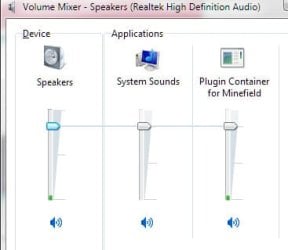
BTW, as far as the "Mixer," FF doesn't show up specifically but the plug-in does:

ScreenShot00205.jpg
 

My Computer My Computer

At a glance

Windows 7 Ultimate x64 SP1Core2 Duo4 GBGM965 on-board
Computer Manufacturer/Model Number
Toshiba L355D
OS
Windows 7 Ultimate x64 SP1
CPU
Core2 Duo
Motherboard
Intel
Memory
4 GB
Graphics Card(s)
GM965 on-board
Sound Card
RealTek on-board
Monitor(s) Displays
19"+17"(laptop)
Screen Resolution
1440x900 (x 2)
Hard Drives
500GB Ext. 200GB Internal
PSU
N/A
Case
N/A
Cooling
N/A
I fixed it

It been a long time, but this thread comes up for a lot of ppl, so here it goes:

In the latest version of Firefox (Apr 2019)

- paste 'about:preferences' in your URL bar
- Search 'sound' in the search field
- Uncheck the box 'Block websites from automatically playing sound'

You may need to restart Firefox

You should now see Firefox in Volume Mixer

Congratulations

classicarl
 
Last edited by a moderator:

My Computer My Computer

At a glance

Windows 7
Computer type
PC/Desktop
OS
Windows 7
Back
Top