Firefox won't open

mk10

New member
Member
Local time
4:24 PM
Messages
35
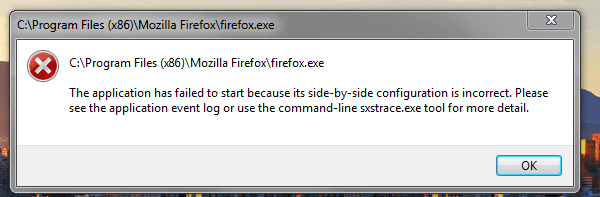
When I tried to open Firefox I got this error.
 

Attachments

  • firefox.PNG
    firefox.PNG
    13.5 KB · Views: 49

My Computer

OS
Microsoft Windows 7 Home Premium , Service Pack 1, 64 bit
CPU
Intel(R) Core(TM) i7 CPU 860 @ 2.80GHz
Motherboard
Acer, H57M01, , U01L101701309
Memory
8.0GB Dual-Channel DDR3 @ 659MHz (9-9-9-24)
Graphics Card(s)
ATI Radeon HD 5700 Series, 1024 Mb
Hard Drives
C: Total - 468941 MB, Free - 269855 MB; D: Total - 469464 MB, Free - 282338 MB;

My Computer

Computer Manufacturer/Model Number
HCL
OS
Winbdows 7 ultimate x64 | Ubuntu 12.04 x64 LTS
CPU
Core 2 Duo e7400 @ 2.90GHz
Motherboard
Gigabyte G31M-ES2L
Memory
3GB DDR2
Graphics Card(s)
Asus Nvidia GTX 560Ti 1GB
Sound Card
On-board
Monitor(s) Displays
HCL eZeeBee 18.5" LCD
Screen Resolution
1366x768 @ 60Hz
Hard Drives
Western Digital 320GB
PSU
Corsair CX500 V2 500W
Cooling
Stock
Keyboard
Stock
Mouse
Stock
Internet Speed
15-25kBps D/L | 10kBps U/L | Hey Don't laugh
Tried it but it didn't work.
 

My Computer

OS
Microsoft Windows 7 Home Premium , Service Pack 1, 64 bit
CPU
Intel(R) Core(TM) i7 CPU 860 @ 2.80GHz
Motherboard
Acer, H57M01, , U01L101701309
Memory
8.0GB Dual-Channel DDR3 @ 659MHz (9-9-9-24)
Graphics Card(s)
ATI Radeon HD 5700 Series, 1024 Mb
Hard Drives
C: Total - 468941 MB, Free - 269855 MB; D: Total - 469464 MB, Free - 282338 MB;
Did that and it still doesn't work.
 

My Computer

OS
Microsoft Windows 7 Home Premium , Service Pack 1, 64 bit
CPU
Intel(R) Core(TM) i7 CPU 860 @ 2.80GHz
Motherboard
Acer, H57M01, , U01L101701309
Memory
8.0GB Dual-Channel DDR3 @ 659MHz (9-9-9-24)
Graphics Card(s)
ATI Radeon HD 5700 Series, 1024 Mb
Hard Drives
C: Total - 468941 MB, Free - 269855 MB; D: Total - 469464 MB, Free - 282338 MB;

My Computer

Computer Manufacturer/Model Number
Hewlett packard/p6512uk
OS
Microsoft Windows 7 Home Premium 64-bit 7600
CPU
IIx4 amd athelon 635 processor
Motherboard
FOXCONN 2AA9
Memory
2x2gb
Graphics Card(s)
ati radeon HD 5450
Sound Card
(1) Realtek High Definition Audio (2) AMD High Definition
Monitor(s) Displays
samsung lcd tv 32"
Screen Resolution
1360x 768
Hard Drives
(1) WDC WD10 01FAES-60Z2A0 SATA Disk Device (2) Maxtor OneTouch USB Device (3) ST310003 33AS USB Device (4) WD My Book 1111 USB Device
PSU
?
Cooling
air!
Keyboard
wireless hp
Mouse
wireless Hp,optical
Internet Speed
1.10mb/s
Antivirus
MSE
Browser
Firefox

My Computer

OS
Microsoft Windows 7 Home Premium , Service Pack 1, 64 bit
CPU
Intel(R) Core(TM) i7 CPU 860 @ 2.80GHz
Motherboard
Acer, H57M01, , U01L101701309
Memory
8.0GB Dual-Channel DDR3 @ 659MHz (9-9-9-24)
Graphics Card(s)
ATI Radeon HD 5700 Series, 1024 Mb
Hard Drives
C: Total - 468941 MB, Free - 269855 MB; D: Total - 469464 MB, Free - 282338 MB;
Mine was doing that but if you check processes it might still be going after you check processes END IT !

Then try to start Firefox it happened to me last night This Browser has become a issue not only me but others as well if Firefox keeps these nagging problems up im going to boot this browser and just use Opera
 

My Computer

Computer type
PC/Desktop
Computer Manufacturer/Model Number
CoreI7-6700K MrFingerIII Special Builds
OS
Windows 10 Home Premium 64bit sp1
CPU
Intel I7-6700K @ 4.6 Ghz 1.344 volts everyday OC
Motherboard
Asrock Fatality K6 Z170 Socket 1151
Memory
32GB G-Skill TridentZ 3200mhz 16-18-18-38 DDR4
Graphics Card(s)
Sli Gigabyte Windforce GTX 980 G1
Sound Card
AC97 Creative Rage Tactic 3D Headphones Bluetooth
Monitor(s) Displays
27" Asus ROG Swift PG278Q G-Sync 48" Vizio Smart HD TV
Screen Resolution
2560x1440p 27"- 48" Currently Gaming at 2560x1440p Res 2K
Hard Drives
250GB Samsung Evo840SSD Seagate baracuda 500 GB WD Mybook 500Gb 1TB Seagate Barracuda
PSU
HX1050w Corsair Silver 80plus certified crosfire/sli
Case
Enthod Pro Full Tower
Cooling
Corsair H110i GT 280 mm High Performance WaterBlock
Keyboard
Logitech wireless keyboard
Mouse
Logitech wireless mouse
Internet Speed
Cox Cable 100+ mb
Antivirus
WebRoot Spysweeper with Antivirus
Browser
IE-10, Chrome, Opera
Other Info
My Other Rig is a AMD FX8320E @4.6Ghz 16GB Ballistic Sport Ram
Mobo Asrock Fatality 990FX 120GB OCZ SSD 1TB Seagate Barracuda Corsair H75 Cooling PSU Corsair CX750
GPU GTX Gigabyte 970G1
Mine was doing that but if you check processes it might still be going after you check processes END IT !

Then try to start Firefox it happened to me last night This Browser has become a issue not only me but others as well if Firefox keeps these nagging problems up im going to boot this browser and just use Opera

Thanks for the help, it still doesn't work. But the nightly build works.
 

My Computer

OS
Microsoft Windows 7 Home Premium , Service Pack 1, 64 bit
CPU
Intel(R) Core(TM) i7 CPU 860 @ 2.80GHz
Motherboard
Acer, H57M01, , U01L101701309
Memory
8.0GB Dual-Channel DDR3 @ 659MHz (9-9-9-24)
Graphics Card(s)
ATI Radeon HD 5700 Series, 1024 Mb
Hard Drives
C: Total - 468941 MB, Free - 269855 MB; D: Total - 469464 MB, Free - 282338 MB;

My Computer

Computer Manufacturer/Model Number
Hewlett packard/p6512uk
OS
Microsoft Windows 7 Home Premium 64-bit 7600
CPU
IIx4 amd athelon 635 processor
Motherboard
FOXCONN 2AA9
Memory
2x2gb
Graphics Card(s)
ati radeon HD 5450
Sound Card
(1) Realtek High Definition Audio (2) AMD High Definition
Monitor(s) Displays
samsung lcd tv 32"
Screen Resolution
1360x 768
Hard Drives
(1) WDC WD10 01FAES-60Z2A0 SATA Disk Device (2) Maxtor OneTouch USB Device (3) ST310003 33AS USB Device (4) WD My Book 1111 USB Device
PSU
?
Cooling
air!
Keyboard
wireless hp
Mouse
wireless Hp,optical
Internet Speed
1.10mb/s
Antivirus
MSE
Browser
Firefox

My Computer

OS
Microsoft Windows 7 Home Premium , Service Pack 1, 64 bit
CPU
Intel(R) Core(TM) i7 CPU 860 @ 2.80GHz
Motherboard
Acer, H57M01, , U01L101701309
Memory
8.0GB Dual-Channel DDR3 @ 659MHz (9-9-9-24)
Graphics Card(s)
ATI Radeon HD 5700 Series, 1024 Mb
Hard Drives
C: Total - 468941 MB, Free - 269855 MB; D: Total - 469464 MB, Free - 282338 MB;
i do apologize for childishly overlooking that my caps were on and i couldn't be bothered to retype, i did however offer you some help,(not to mention spending some time googling your issue)
VERY KIND OF ME

very mature
i do apologize for childishly overlooking that my caps were on and i couldn't be bothered to retype, i did however offer you some help,(not to mention spending some time googling your issue)
very kind of me

thank you:)
dont mention it, it was kind of you to edit my caps in my last post
 

My Computer

Computer Manufacturer/Model Number
Hewlett packard/p6512uk
OS
Microsoft Windows 7 Home Premium 64-bit 7600
CPU
IIx4 amd athelon 635 processor
Motherboard
FOXCONN 2AA9
Memory
2x2gb
Graphics Card(s)
ati radeon HD 5450
Sound Card
(1) Realtek High Definition Audio (2) AMD High Definition
Monitor(s) Displays
samsung lcd tv 32"
Screen Resolution
1360x 768
Hard Drives
(1) WDC WD10 01FAES-60Z2A0 SATA Disk Device (2) Maxtor OneTouch USB Device (3) ST310003 33AS USB Device (4) WD My Book 1111 USB Device
PSU
?
Cooling
air!
Keyboard
wireless hp
Mouse
wireless Hp,optical
Internet Speed
1.10mb/s
Antivirus
MSE
Browser
Firefox
IT MAY HELP TO KNOW WHAT TYPE OF SIDE BY SIDE ERRORS YOU ARE GETTING. Please provide us with your Event Viewer administrative logs by following these steps:
  1. Click Start Menu
  2. Type eventvwr into Search programs and files (do not hit enter)
  3. Right click eventvwr.exe and click Run as administrator
  4. Expand Custom Views
  5. Click Administrative Events
  6. Right click Administrative Events
  7. Save all Events in Custom View As...
  8. Save them in a folder where you will remember which folder and save as Errors.evtx
  9. When asked, save the display information in English.
  10. Go to where you saved Errors.evtx
  11. Create a new folder by right clicking in a blank area within the folder Errors.evtx is saved in. You could also click New Folder at the top of the directory under the directory path box.
  12. Name the new folder Errors.
  13. Place Errors.evtx and the LocaleMetaData folder into the new Errors folder.
  14. Right click the Errors folder -> send to -> compressed (zipped) folder
  15. Upload the .zip file here.
 

My Computer

Computer Manufacturer/Model Number
HP Pavilion e9110t
OS
Windows 7 Home Premium 64 Bit
CPU
Intel(R) Core(TM)2 Quad CPU Q9550 @ 2.83GHz
Motherboard
Pegatron IPIEL-LA3
Memory
6.00 GB Hundai HMT125U6BFR8C-H9
Graphics Card(s)
ATI Radeon HD 4850
Sound Card
Realtek High Definition Audio/ATI High Definition Audio
Monitor(s) Displays
Acer AL2216W
Screen Resolution
1680x1050
Hard Drives
Hitachi HDP725050GLA360 ATA Device 500 GB
PSU
Unknown/installed by HP
Case
HP generic case
Cooling
Intel Stock Cooling
Keyboard
HP Keyboard
Mouse
HP Mouse
Internet Speed
Download: 19.15 Mbps Upload: 1.67 Mbps
Other Info
Network Adapter Realtek RTL8168D/8111D Family PCI-E Gigabit Ethernet NIC (NDIS 6.20)
Network Adapter 802.11n Wireless PCI Express Card LAN Adapter
Very mature
i do apologize for childishly overlooking that my caps were on and i couldn't be bothered to retype, i did however offer you some help,(not to mention spending some time googling your issue)
VERY KIND OF ME

i do apologize for childishly overlooking that my caps were on and i couldn't be bothered to retype, i did however offer you some help,(not to mention spending some time googling your issue)
very kind of me

thank you:)
dont mention it, it was kind of you to edit my caps in my last post

I didn't edit it, it happened automatically.
 

My Computer

OS
Microsoft Windows 7 Home Premium , Service Pack 1, 64 bit
CPU
Intel(R) Core(TM) i7 CPU 860 @ 2.80GHz
Motherboard
Acer, H57M01, , U01L101701309
Memory
8.0GB Dual-Channel DDR3 @ 659MHz (9-9-9-24)
Graphics Card(s)
ATI Radeon HD 5700 Series, 1024 Mb
Hard Drives
C: Total - 468941 MB, Free - 269855 MB; D: Total - 469464 MB, Free - 282338 MB;
thats ok, i did look for a firefox add on that allows me to change the case for txt i highlight,
so you have helped me.
you didnt say if the link i gave you before was any use.
 

My Computer

Computer Manufacturer/Model Number
Hewlett packard/p6512uk
OS
Microsoft Windows 7 Home Premium 64-bit 7600
CPU
IIx4 amd athelon 635 processor
Motherboard
FOXCONN 2AA9
Memory
2x2gb
Graphics Card(s)
ati radeon HD 5450
Sound Card
(1) Realtek High Definition Audio (2) AMD High Definition
Monitor(s) Displays
samsung lcd tv 32"
Screen Resolution
1360x 768
Hard Drives
(1) WDC WD10 01FAES-60Z2A0 SATA Disk Device (2) Maxtor OneTouch USB Device (3) ST310003 33AS USB Device (4) WD My Book 1111 USB Device
PSU
?
Cooling
air!
Keyboard
wireless hp
Mouse
wireless Hp,optical
Internet Speed
1.10mb/s
Antivirus
MSE
Browser
Firefox
IT MAY HELP TO KNOW WHAT TYPE OF SIDE BY SIDE ERRORS YOU ARE GETTING. Please provide us with your Event Viewer administrative logs by following these steps:
  1. Click Start Menu
  2. Type eventvwr into Search programs and files (do not hit enter)
  3. Right click eventvwr.exe and click Run as administrator
  4. Expand Custom Views
  5. Click Administrative Events
  6. Right click Administrative Events
  7. Save all Events in Custom View As...
  8. Save them in a folder where you will remember which folder and save as Errors.evtx
  9. When asked, save the display information in English.
  10. Go to where you saved Errors.evtx
  11. Create a new folder by right clicking in a blank area within the folder Errors.evtx is saved in. You could also click New Folder at the top of the directory under the directory path box.
  12. Name the new folder Errors.
  13. Place Errors.evtx and the LocaleMetaData folder into the new Errors folder.
  14. Right click the Errors folder -> send to -> compressed (zipped) folder
  15. Upload the .zip file here.

This and can you run firefox in safe mode? Type firefox in start button search field, look for firefox (safe mode) in the displayed results, click it.
If it doesn't appear, right click firefox shortcut and select properties. Append [spacebar]-safe-mode in the target box i.e. it should like like
Code:
...firefox.exe -safe-mode
 

My Computer

Computer Manufacturer/Model Number
HCL
OS
Winbdows 7 ultimate x64 | Ubuntu 12.04 x64 LTS
CPU
Core 2 Duo e7400 @ 2.90GHz
Motherboard
Gigabyte G31M-ES2L
Memory
3GB DDR2
Graphics Card(s)
Asus Nvidia GTX 560Ti 1GB
Sound Card
On-board
Monitor(s) Displays
HCL eZeeBee 18.5" LCD
Screen Resolution
1366x768 @ 60Hz
Hard Drives
Western Digital 320GB
PSU
Corsair CX500 V2 500W
Cooling
Stock
Keyboard
Stock
Mouse
Stock
Internet Speed
15-25kBps D/L | 10kBps U/L | Hey Don't laugh
attached errors
 

Attachments

My Computer

OS
Microsoft Windows 7 Home Premium , Service Pack 1, 64 bit
CPU
Intel(R) Core(TM) i7 CPU 860 @ 2.80GHz
Motherboard
Acer, H57M01, , U01L101701309
Memory
8.0GB Dual-Channel DDR3 @ 659MHz (9-9-9-24)
Graphics Card(s)
ATI Radeon HD 5700 Series, 1024 Mb
Hard Drives
C: Total - 468941 MB, Free - 269855 MB; D: Total - 469464 MB, Free - 282338 MB;
You frequently receive the following error:
Code:
Log Name:      Application
Source:        .NET Runtime
Date:          4/16/2012 6:24:30 PM
Event ID:      1022
Task Category: None
Level:         Error
Keywords:      Classic
User:          N/A
Computer:      Peter-PC
Description:
.NET Runtime version 4.0.30319.261 - There was a failure initializing profiling API attach infrastructure.  This process will not allow a profiler to attach.  HRESULT: 0x80004005.  Process ID (decimal): 4980.  Message ID: [0x2509].

Uninstall .Net Framework 4.0 from Start Menu -> Control Panel -> Uninstall a program. Then download and install it again from Download: Microsoft .NET Framework 4 (Web Installer) - Microsoft Download Center - Download Details and afterward, install all Windows updates associated with it. You will need to open Windows Updates and check for Updates for the new updates to appear.

 

My Computer

Computer Manufacturer/Model Number
HP Pavilion e9110t
OS
Windows 7 Home Premium 64 Bit
CPU
Intel(R) Core(TM)2 Quad CPU Q9550 @ 2.83GHz
Motherboard
Pegatron IPIEL-LA3
Memory
6.00 GB Hundai HMT125U6BFR8C-H9
Graphics Card(s)
ATI Radeon HD 4850
Sound Card
Realtek High Definition Audio/ATI High Definition Audio
Monitor(s) Displays
Acer AL2216W
Screen Resolution
1680x1050
Hard Drives
Hitachi HDP725050GLA360 ATA Device 500 GB
PSU
Unknown/installed by HP
Case
HP generic case
Cooling
Intel Stock Cooling
Keyboard
HP Keyboard
Mouse
HP Mouse
Internet Speed
Download: 19.15 Mbps Upload: 1.67 Mbps
Other Info
Network Adapter Realtek RTL8168D/8111D Family PCI-E Gigabit Ethernet NIC (NDIS 6.20)
Network Adapter 802.11n Wireless PCI Express Card LAN Adapter
You frequently receive the following error:
Code:
Log Name:      Application
Source:        .NET Runtime
Date:          4/16/2012 6:24:30 PM
Event ID:      1022
Task Category: None
Level:         Error
Keywords:      Classic
User:          N/A
Computer:      Peter-PC
Description:
.NET Runtime version 4.0.30319.261 - There was a failure initializing profiling API attach infrastructure.  This process will not allow a profiler to attach.  HRESULT: 0x80004005.  Process ID (decimal): 4980.  Message ID: [0x2509].

Uninstall .Net Framework 4.0 from Start Menu -> Control Panel -> Uninstall a program. Then download and install it again from Download: Microsoft .NET Framework 4 (Web Installer) - Microsoft Download Center - Download Details and afterward, install all Windows updates associated with it. You will need to open Windows Updates and check for Updates for the new updates to appear.

I've been having problems with windows update.
http://www.sevenforums.com/windows-updates-activation/224510-repetitive-windows-updates.html
 

My Computer

OS
Microsoft Windows 7 Home Premium , Service Pack 1, 64 bit
CPU
Intel(R) Core(TM) i7 CPU 860 @ 2.80GHz
Motherboard
Acer, H57M01, , U01L101701309
Memory
8.0GB Dual-Channel DDR3 @ 659MHz (9-9-9-24)
Graphics Card(s)
ATI Radeon HD 5700 Series, 1024 Mb
Hard Drives
C: Total - 468941 MB, Free - 269855 MB; D: Total - 469464 MB, Free - 282338 MB;

My Computer

Computer Manufacturer/Model Number
HP Pavilion e9110t
OS
Windows 7 Home Premium 64 Bit
CPU
Intel(R) Core(TM)2 Quad CPU Q9550 @ 2.83GHz
Motherboard
Pegatron IPIEL-LA3
Memory
6.00 GB Hundai HMT125U6BFR8C-H9
Graphics Card(s)
ATI Radeon HD 4850
Sound Card
Realtek High Definition Audio/ATI High Definition Audio
Monitor(s) Displays
Acer AL2216W
Screen Resolution
1680x1050
Hard Drives
Hitachi HDP725050GLA360 ATA Device 500 GB
PSU
Unknown/installed by HP
Case
HP generic case
Cooling
Intel Stock Cooling
Keyboard
HP Keyboard
Mouse
HP Mouse
Internet Speed
Download: 19.15 Mbps Upload: 1.67 Mbps
Other Info
Network Adapter Realtek RTL8168D/8111D Family PCI-E Gigabit Ethernet NIC (NDIS 6.20)
Network Adapter 802.11n Wireless PCI Express Card LAN Adapter
Back
Top