Firefox..

mark39 said:
Hi can anyone help me with this error on FF 3.5.2?

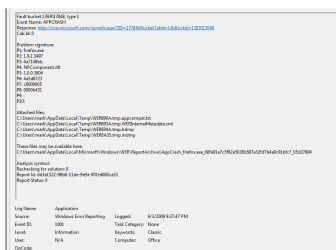
It may be a Data Execution Protection issue with NPcomponent.dll

Try Turning on DEP for all programs:

Computer> Properties> Advanced System Settings> Advanced> Performance - settings> Data Execution Protection> Turn on DEP for all programs
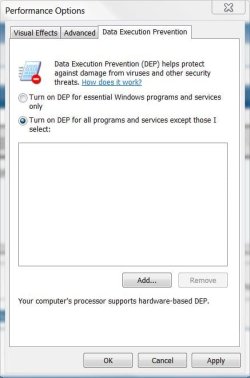
DEP.JPG

As you surmised, if the minidump folder does not exist, then you haven't had any Blue Screens of Death. Your just having an app crash, not a BSOD. You'd know if you did ;)
 

My Computer

Computer type
PC/Desktop
Computer Manufacturer/Model Number
Systems by SmartEyeball
OS
8 Pro x64
CPU
i7 3770K 4.6GHz
Motherboard
ASUS P8Z77 WS
Memory
16GB G.Skill Trident X 2666mhz
Graphics Card(s)
x2 EVGA 780 Ti Superclocked SLI
Sound Card
SB X-FI Surround 5.1 PRO USB / ATH-AD900 Headphones
Monitor(s) Displays
x3 Dell U2410 / 58" Samsung
Screen Resolution
5760*1200/ 1920*1200
Hard Drives
2x Intel 520 240GB (RAID 0) * 2x WD Caviar Blacks 2TB (RAID 0) * 2TB WD Caviar Black * Sony Optirac DVD
PSU
Silverstone Strider Evolution 1200W
Case
Thermaltake Level 10 GT Snow Edition
Cooling
Noctua NH-D14
Keyboard
Topre Realforce // Ducky Shine MX Black // Filco Ninja TKL
Mouse
Thermaltake Theron (Highly Recommended) + Razer Imperator
Antivirus
MSE
Browser
IE, FF, WaterFox
Other Info
GT Extreme V2 Sim Racing Cockpit + 40" LCD and K/B Mouse stand ▼
Fanatec CSR Elite Wheel + Clubsport V1 Pedals + CSR shifter/7G-H ▼Saitek X52 Pro ▼ TrackIR 5 Pro
Buttkicker v2 Seat Rumbler with Dedicated 5.1 and Sub Woofer attached to frame ▼
=
Bloody Big Grin
I'll try that and let you know, thanks.
 

My Computer

Computer Manufacturer/Model Number
Acer Travelmate 5730 - Custom built PC
OS
Windows 7 Ultimate x64 - Windows 7 Pro x64
CPU
Intel Core 2 Duo T6570 - Intel Core i5-650
Motherboard
Intel Mobile 4 Series - Gigabyte GA-P55-US3L
Memory
4GB DDR2 667 - 6GB DDR3 PC3-10700
Graphics Card(s)
Intel GMA4500MHD - Nvidia GeForce GTX460
Sound Card
Realtek ALC268 - Realtek ALC888
Monitor(s) Displays
Built in LCD - Philips
Screen Resolution
1280 x 800 - 1280 x 1024
Hard Drives
1 x 500GB SATA - Laptop
1 x 250GB SATA Samsung Spinpoint - PC
1 x 500GB SATA Hitachi - PC
1 x 500GB SATA Seagate - PC
PSU
Not sure on make but 600W
Case
Not sure but from PC World
Cooling
Standard Intel cooler
Keyboard
Logitech Media Elite
Mouse
Microsoft standard wireless mouse
Internet Speed
Up to 8MB (Orange)
firefox loading blank links

Call me a newbie if you must. However, I am having difficulty fixing this Firefox (safari, opera, IE and Chrome, they all do it) problem with links loading as a blank page. On the tab is the following info: click (GIF image 1x1) and it varies with different browsers but is generally the same I think. I dual boot with XP and do not have this problem when using xp or when I boot in safe mode on win 7. Have tried disabling all of my add-ons and plugins on Firefox, etc. I somehow believe this (FF) is the culprit and I am most likely incorrect with this assumption. I just do not know what it would be on the os that is keeping me from opening links. This is very frustrating. Does anyone have any suggestions? Am I just an idiot and am missing something right in front of my nose? It is possible I have posted this in the wrong thread if indeed it is not FF causing this coronary. If this is the case I do apologize. Thanks so much.
 

My Computer

Computer Manufacturer/Model Number
Dell Vostro 400
OS
dual booting xp and windows 7
CPU
e4500
Memory
4 GB
Graphics Card(s)
Geforce 8800 gts
Sound Card
realtek HD audio
Monitor(s) Displays
emachines 19 in.
Hard Drives
stock 150 GB HDD
Seagate Barracuda 120 GB 7200.9
Call me a newbie if you must. However, I am having difficulty fixing this Firefox (safari, opera, IE and Chrome, they all do it) problem with links loading as a blank page. On the tab is the following info: click (GIF image 1x1) and it varies with different browsers but is generally the same I think. I dual boot with XP and do not have this problem when using xp or when I boot in safe mode on win 7. Have tried disabling all of my add-ons and plugins on Firefox, etc. I somehow believe this (FF) is the culprit and I am most likely incorrect with this assumption. I just do not know what it would be on the os that is keeping me from opening links. This is very frustrating. Does anyone have any suggestions? Am I just an idiot and am missing something right in front of my nose? It is possible I have posted this in the wrong thread if indeed it is not FF causing this coronary. If this is the case I do apologize. Thanks so much.

What ad blocker? what anti-virus, what firewall. If its all browsers displaying a 1x1 gif its probably something loke no-script, ad- blocker, etc.


Ken
 

My Computer

Computer Manufacturer/Model Number
HP Pavillion dv-7 1005 Tx
OS
Win 8 Release candidate 8400
CPU
[email protected]
Memory
4 gigs
Graphics Card(s)
Nvidia 9600M
Sound Card
HD built-in
Monitor(s) Displays
17" Wxga
Screen Resolution
1440x900
Cooling
none
Internet Speed
45Mb down 5Mb up
no ad block and I do not have the no-script installed either on FF. Have checked the other browsers for add-ons, plugins, etc. with nothing extra installed. I use Kapersky anti-virus with their firewall turned on as well as the Windows firewall.

I downloaded Opera 10.0 yesterday evening and tried reaching the Dell website through a link and the tab displayed " www.kqzyfj.com/click-249294-10495969?sid=777". Could this mean I have some sort of spyware or malware going on? It sounds like something is preventing me from reaching the intended destination. Well, that is obvious. I just cannot figure it out. Yet. Since I can load links just fine in safe mode does this mean it is something such as an add-on or plugin or extension? I am edging ever closer to reinstalling if I fail to fix this problem. Is this my best bet or am I jumping the gun here? I promise, last time I bug anyone with this problem. Thanks again!
 

My Computer

Computer Manufacturer/Model Number
Dell Vostro 400
OS
dual booting xp and windows 7
CPU
e4500
Memory
4 GB
Graphics Card(s)
Geforce 8800 gts
Sound Card
realtek HD audio
Monitor(s) Displays
emachines 19 in.
Hard Drives
stock 150 GB HDD
Seagate Barracuda 120 GB 7200.9
Same Issue

I am having the same issue as Mark39

Running W7 RTM (from Technet) x64
6GB Ram - although I am often starved for Ram as i run some very memory hungry apps

FF 3.5.2 with latest versions of
Adblock plus
cookie culler
xmarks

It happens 5 to 10 times a day
Edit: I have turned on DEP as I have not been BSOD'ing
Hi can anyone help me with this error on FF 3.5.2?

Problem signature
Problem Event Name: APPCRASH
Application Name: firefox.exe
Application Version: 1.9.1.3497
Application Timestamp: 4a7148bb
Fault Module Name: NPComponent.dll
Fault Module Version: 1.0.0.3804
Fault Module Timestamp: 4a5d6723
Exception Code: c0000005
Exception Offset: 0000b431
OS Version: 6.1.7600.2.0.0.256.48
Locale ID: 2057
Additional Information 1: 6c07
Additional Information 2: 6c07b41ce76985ff9d04e72757be79d8
Additional Information 3: cd37
Additional Information 4: cd37ba72e570afb90253271da02f601c

It's happening at least 10-15 times a day

Thank you in advance
 
Last edited:

My Computer

Computer type
PC/Desktop
Computer Manufacturer/Model Number
3 Home Built Computers
OS
Server 2012 R2, Windows 8.1 , W7 ultimate x64
CPU
Q6600,
Motherboard
Gigabyte ga-p35-ds4, ga-ep45-ud3p, ga-p35-dq6
Memory
8G, 4G, 2G
Graphics Card(s)
7300GS, 9600GT, 8600GT
Sound Card
onboard ALC889
Monitor(s) Displays
dell, TV
Screen Resolution
1280x1024, PAL SD TV
Hard Drives
WD 1.0T GP x2,wd 320G x2,WD 1.0T GP x2
PSU
corsair HX520,corsair HX520,corsair HX520
Case
Antec Solo, Antec Solo,Thermaltake DH101
Cooling
Thermalright TRUE, Thermalright TRUE, Ninja mini
Internet Speed
not too fast
can you go into event viewer (type event in search) go to windows logs>app tab and seewhat errors arelistedfor firefox. Use snipping tool (type snip)to take a screen shot and upload it for us to see

ken
 

My Computer

Computer Manufacturer/Model Number
HP Pavillion dv-7 1005 Tx
OS
Win 8 Release candidate 8400
CPU
[email protected]
Memory
4 gigs
Graphics Card(s)
Nvidia 9600M
Sound Card
HD built-in
Monitor(s) Displays
17" Wxga
Screen Resolution
1440x900
Cooling
none
Internet Speed
45Mb down 5Mb up
can you go into event viewer (type event in search) go to windows logs>app tab and seewhat errors arelistedfor firefox. Use snipping tool (type snip)to take a screen shot and upload it for us to see

ken

Thanks Ken

I have also uploaded the windows error reporting file for the crash (as a txt file)
moz-screenshot.png

Best regards

Mark
 

Attachments

  • Firefox Crash.PNG
    Firefox Crash.PNG
    15.1 KB · Views: 15
  • FirefoxCrash.txt
    FirefoxCrash.txt
    14.9 KB · Views: 9
  • FirefoxCrash2.PNG
    FirefoxCrash2.PNG
    7.6 KB · Views: 9

My Computer

Computer type
PC/Desktop
Computer Manufacturer/Model Number
3 Home Built Computers
OS
Server 2012 R2, Windows 8.1 , W7 ultimate x64
CPU
Q6600,
Motherboard
Gigabyte ga-p35-ds4, ga-ep45-ud3p, ga-p35-dq6
Memory
8G, 4G, 2G
Graphics Card(s)
7300GS, 9600GT, 8600GT
Sound Card
onboard ALC889
Monitor(s) Displays
dell, TV
Screen Resolution
1280x1024, PAL SD TV
Hard Drives
WD 1.0T GP x2,wd 320G x2,WD 1.0T GP x2
PSU
corsair HX520,corsair HX520,corsair HX520
Case
Antec Solo, Antec Solo,Thermaltake DH101
Cooling
Thermalright TRUE, Thermalright TRUE, Ninja mini
Internet Speed
not too fast
I haven't had the error ever since I disabled the .NET Framework and Skype plugins, FF has been running sweet now for 6 days and no problems.
 

My Computer

Computer Manufacturer/Model Number
Acer Travelmate 5730 - Custom built PC
OS
Windows 7 Ultimate x64 - Windows 7 Pro x64
CPU
Intel Core 2 Duo T6570 - Intel Core i5-650
Motherboard
Intel Mobile 4 Series - Gigabyte GA-P55-US3L
Memory
4GB DDR2 667 - 6GB DDR3 PC3-10700
Graphics Card(s)
Intel GMA4500MHD - Nvidia GeForce GTX460
Sound Card
Realtek ALC268 - Realtek ALC888
Monitor(s) Displays
Built in LCD - Philips
Screen Resolution
1280 x 800 - 1280 x 1024
Hard Drives
1 x 500GB SATA - Laptop
1 x 250GB SATA Samsung Spinpoint - PC
1 x 500GB SATA Hitachi - PC
1 x 500GB SATA Seagate - PC
PSU
Not sure on make but 600W
Case
Not sure but from PC World
Cooling
Standard Intel cooler
Keyboard
Logitech Media Elite
Mouse
Microsoft standard wireless mouse
Internet Speed
Up to 8MB (Orange)
Hi can anyone help me with this error on FF 3.5.2?

Problem signature
Problem Event Name: APPCRASH
Application Name: firefox.exe
Application Version: 1.9.1.3497
Application Timestamp: 4a7148bb
Fault Module Name: NPComponent.dll
Fault Module Version: 1.0.0.3804
Fault Module Timestamp: 4a5d6723
Exception Code: c0000005
Exception Offset: 0000b431
OS Version: 6.1.7600.2.0.0.256.48
Locale ID: 2057
Additional Information 1: 6c07
Additional Information 2: 6c07b41ce76985ff9d04e72757be79d8
Additional Information 3: cd37
Additional Information 4: cd37ba72e570afb90253271da02f601c

It's happening at least 10-15 times a day

Thank you in advance

I have absolutely no idea what caused this but I had something similar - I am now running Namoroka 3.6 Alpha 1 (firefox 3.6 for all intents and purposes) and have not had a crash or a problem. You can find it here

Namoroka Alpha 1 Release Notes
 

My Computer

Computer Manufacturer/Model Number
Self build
OS
Windows 7 Ultimate x64
CPU
AMD Phenom II x4
Motherboard
Gigabyte 880
Memory
8GB
Graphics Card(s)
NVIDIA GeForce HD
Sound Card
Realtek HD Audio
Screen Resolution
1920 x 1080
Hard Drives
2 x 1TB
PSU
Thermalake 550w
Case
XCase
Internet Speed
8MB
I am having the same issue as Mark39

Running W7 RTM (from Technet) x64
6GB Ram - although I am often starved for Ram as i run some very memory hungry apps

FF 3.5.2 with latest versions of
Adblock plus
cookie culler
xmarks

It happens 5 to 10 times a day
Edit: I have turned on DEP as I have not been BSOD'ing

Maybe Firefox.exe and NPcomponent.dll are only 32-bit modules in C:\Program Files (x86)

and don't get along with an 64-bit OS...

Does Firefox 3.5.2 have a 64-bit version that you could try?
 

My Computer

Computer Manufacturer/Model Number
Gateway GT5056
OS
XP_Pro, W7_7201, W7RC.vhd, SciLinux5.3, Fedora12, Fedora9_2x, OpenSolaris_09-06
CPU
AMD 64x2
Motherboard
Yes
Memory
1 gig
Graphics Card(s)
Dunno
Sound Card
Realtek something
Monitor(s) Displays
Samsung SyncMaster 940MW w/TV
Screen Resolution
1280x1024
Hard Drives
250 GB WD, USB Seagate Freedesk 1.5 T
Internet Speed
Cable modem
Other Info
1 + 1 = 10b,
7 + 7 = 16o,
a + b = 15h.
I haven't had the error ever since I disabled the .NET Framework and Skype plugins, FF has been running sweet now for 6 days and no problems.

May I know how you do that?

Last night while browsing this site, FF 3.5.2 "freeze" and even after repeated canceling via Task Manager couldn't shut down FF and what made it even worst was eventually IE, Windows all inoperable and was forced to do a hard restart to regain back FF and Windows 7.
 

My Computer

OS
Windows 7 Pro x64 RTM
CPU
Intel
If you go to tools>add-ons on the menu bar the add-on/plugin box will open. Click on the plugin tab and all your addins will be displayed. From there it's just a simple matter to either disable or uninstall whichever plugin you want to.
 

My Computer

Computer Manufacturer/Model Number
Acer Travelmate 5730 - Custom built PC
OS
Windows 7 Ultimate x64 - Windows 7 Pro x64
CPU
Intel Core 2 Duo T6570 - Intel Core i5-650
Motherboard
Intel Mobile 4 Series - Gigabyte GA-P55-US3L
Memory
4GB DDR2 667 - 6GB DDR3 PC3-10700
Graphics Card(s)
Intel GMA4500MHD - Nvidia GeForce GTX460
Sound Card
Realtek ALC268 - Realtek ALC888
Monitor(s) Displays
Built in LCD - Philips
Screen Resolution
1280 x 800 - 1280 x 1024
Hard Drives
1 x 500GB SATA - Laptop
1 x 250GB SATA Samsung Spinpoint - PC
1 x 500GB SATA Hitachi - PC
1 x 500GB SATA Seagate - PC
PSU
Not sure on make but 600W
Case
Not sure but from PC World
Cooling
Standard Intel cooler
Keyboard
Logitech Media Elite
Mouse
Microsoft standard wireless mouse
Internet Speed
Up to 8MB (Orange)
Well I finally found another Browser that is FAsssssssssssssst. They fixed the Email problem, tabs works great, I have been using as second Browser, to go to places I visit often... Opera 10.10.
Might be worth some looking into.
 
Skype plugin seems to be the problem

I have 2 machines which are almost identical. I was only getting problems with one machine so I decided to look fro differences. It seems that skype snuck a plugin into firefox on machine that was having the problems.

I disabled the skype plugin and have had no problems for 3 days.

Beware of programs that add plugins without your specific consent.

mark
 

My Computer

Computer type
PC/Desktop
Computer Manufacturer/Model Number
3 Home Built Computers
OS
Server 2012 R2, Windows 8.1 , W7 ultimate x64
CPU
Q6600,
Motherboard
Gigabyte ga-p35-ds4, ga-ep45-ud3p, ga-p35-dq6
Memory
8G, 4G, 2G
Graphics Card(s)
7300GS, 9600GT, 8600GT
Sound Card
onboard ALC889
Monitor(s) Displays
dell, TV
Screen Resolution
1280x1024, PAL SD TV
Hard Drives
WD 1.0T GP x2,wd 320G x2,WD 1.0T GP x2
PSU
corsair HX520,corsair HX520,corsair HX520
Case
Antec Solo, Antec Solo,Thermaltake DH101
Cooling
Thermalright TRUE, Thermalright TRUE, Ninja mini
Internet Speed
not too fast
The Firefox 3.5.X.X alpha versions ARE available in 64-bit and also 32-bit... But on my 64-bit system om using the 32-bit because it's impossible to use the 64-bit browser! Its mainly due to the fact that Adobe Flash/Shockwave player(s) are not available in 64-bit... So its very fast... but you cant view any flash animations...though you can still view java... :)
 

My Computer

Computer Manufacturer/Model Number
HP dv6000t CTO Entertainment Lappy |My Desktop @ Bottom
OS
7 x64/ Back-Track 4
CPU
Intel Core 2 Duo CPU 8300@ 2.4 Ghz
Motherboard
HP's Own
Memory
4096 MB DDR2
Graphics Card(s)
Nvidia 8400M GS
Sound Card
Altec Lansing (The usual on Laptops )
Monitor(s) Displays
Laptop Screen. 17' Wide.
Screen Resolution
1280 x 800
Hard Drives
150 GB HDD.
Cooling
2 External Fans, Undervolted, Coolant
Keyboard
Norm. Cheap Random Keyboard
Mouse
Norm. Cheap Random Mouse
Other Info
This is my Homemade Desktop :)
HDD: Western Digital Caviar Blue 320GB 16MB 7200RPM SATA2
And more to come in a bit! :D
Back
Top