First daily WiFi connection gives limited access, reconnection needed

CaptainDju

New member
Member
Local time
1:10 AM
Messages
14
Hi everyone,

I have recently switched my work laptop from Win XP to Win 7 and have started encountering a weird WiFi issue.

When I turn the laptop on in the morning it auto connects to my home WiFi without any problem, but indicates that there is limited access and I can't use anything requiring internet.

So my first reaction was to disconnect/reconnect and guess what? It worked.

Now every single day I have to do the same manual disconnect/reconnect, which is getting old fast :)

I tried troubleshooting this issue and here are some conclusion I reached based on my testing:
- No such issue encountered with any Win XP machine
- No such issue encountered with any Ubuntu machine (12.04)
- Exact same issue encountered on my girlfriend's laptop (also on Win 7)
- My work laptop uses a VPN to access the company's network, but I manually launch it after the internet is connected, so it cannot have an impact on the initial WiFi connection

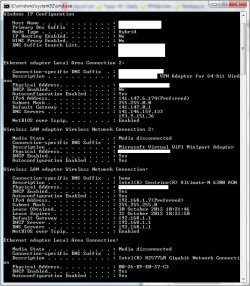
I have attached the result of ipconfig /all if it can help, but at this point I'm stuck.

Would anyone have any suggestion?
 

Attachments
  • ipconfig.jpg
    ipconfig.jpg
    81.7 KB · Views: 11

My Computer My Computer

At a glance

Windows 7 Home Premium 64bitIntel Core i5 2500KG.Skill Kit Extreme3 2 x 4 Go PC12800 Sniper ...MSI N560GTX-TI Twin Frozr II/OC (GTX 560 Ti 2...
OS
Windows 7 Home Premium 64bit
CPU
Intel Core i5 2500K
Motherboard
Asus P8P67 LE Rev 3.0 (Révision B3)
Memory
G.Skill Kit Extreme3 2 x 4 Go PC12800 Sniper CAS 9
Graphics Card(s)
MSI N560GTX-TI Twin Frozr II/OC (GTX 560 Ti 2 Go)
Sound Card
Logitech G35 headset (USB)
Monitor(s) Displays
ASUS VW246H
Hard Drives
Crucial M4 64 Go SATA Revision 3.0
Samsung Spinpoint F3 S-ATA - 1 To - 32 Mo
PSU
Antec HCG - 520W
Case
Cooler Master Silencio
Cooling
Cooler Master Hyper 212 Plus
Keyboard
Logitech G15
Mouse
Razer Imperator
Internet Speed
25Mb/s down - 3Mb/s up
Almost 200 views and no replies, either my issue is just too weird or I'm not providing enough information, am I missing something?
 

My Computer My Computer

At a glance

Windows 7 Home Premium 64bitIntel Core i5 2500KG.Skill Kit Extreme3 2 x 4 Go PC12800 Sniper ...MSI N560GTX-TI Twin Frozr II/OC (GTX 560 Ti 2...
OS
Windows 7 Home Premium 64bit
CPU
Intel Core i5 2500K
Motherboard
Asus P8P67 LE Rev 3.0 (Révision B3)
Memory
G.Skill Kit Extreme3 2 x 4 Go PC12800 Sniper CAS 9
Graphics Card(s)
MSI N560GTX-TI Twin Frozr II/OC (GTX 560 Ti 2 Go)
Sound Card
Logitech G35 headset (USB)
Monitor(s) Displays
ASUS VW246H
Hard Drives
Crucial M4 64 Go SATA Revision 3.0
Samsung Spinpoint F3 S-ATA - 1 To - 32 Mo
PSU
Antec HCG - 520W
Case
Cooler Master Silencio
Cooling
Cooler Master Hyper 212 Plus
Keyboard
Logitech G15
Mouse
Razer Imperator
Internet Speed
25Mb/s down - 3Mb/s up
I am having similar question with Win7. I will post and see if something turns up.
 

My Computer My Computer

At a glance

windows 7 home premium 64 but
OS
windows 7 home premium 64 but
Hi all,

I have never managed to resolve this issue, and now it seems to be getting worse.

It used to only happen once the laptop was started, but now it also happens during any kind of regular use.

Would anyone have any clue as to what this Limited Access issue could be coming from?
 

My Computer My Computer

At a glance

Windows 7 Home Premium 64bitIntel Core i5 2500KG.Skill Kit Extreme3 2 x 4 Go PC12800 Sniper ...MSI N560GTX-TI Twin Frozr II/OC (GTX 560 Ti 2...
OS
Windows 7 Home Premium 64bit
CPU
Intel Core i5 2500K
Motherboard
Asus P8P67 LE Rev 3.0 (Révision B3)
Memory
G.Skill Kit Extreme3 2 x 4 Go PC12800 Sniper CAS 9
Graphics Card(s)
MSI N560GTX-TI Twin Frozr II/OC (GTX 560 Ti 2 Go)
Sound Card
Logitech G35 headset (USB)
Monitor(s) Displays
ASUS VW246H
Hard Drives
Crucial M4 64 Go SATA Revision 3.0
Samsung Spinpoint F3 S-ATA - 1 To - 32 Mo
PSU
Antec HCG - 520W
Case
Cooler Master Silencio
Cooling
Cooler Master Hyper 212 Plus
Keyboard
Logitech G15
Mouse
Razer Imperator
Internet Speed
25Mb/s down - 3Mb/s up
Hi all,

I have never managed to resolve this issue, and now it seems to be getting worse.

It used to only happen once the laptop was started, but now it also happens during any kind of regular use.

Would anyone have any clue as to what this Limited Access issue could be coming from?

It's very likely this problem is from your Ethernet Virtual adaptor, even though you said you don't launch it until after you get a connection, disable the Virtual adaptor and the Windows Virtual WiFi mini port adaptor, restart then try to narrow down the problem by enabling and disabling them both to see which one might be causing the problem.
 

My Computer My Computer

At a glance

Windows 7 Ult, Windows 8.1 Pro,Q9650-4.275GHz, E8600 4.5GHz, E6750-3.8GHzG.Skill PC2 9600 1200Mhz 5 5 5 15 2TGTX480
Computer type
PC/Desktop
Computer Manufacturer/Model Number
Home built
OS
Windows 7 Ult, Windows 8.1 Pro,
CPU
Q9650-4.275GHz, E8600 4.5GHz, E6750-3.8GHz
Motherboard
Evga 780i FTW
Memory
G.Skill PC2 9600 1200Mhz 5 5 5 15 2T
Graphics Card(s)
GTX480
Sound Card
Asus Xonar D2
Monitor(s) Displays
HannsG
Screen Resolution
1680X1050
Hard Drives
GSkill Phoenix Pro 120GB SSD
PSU
ThermalTake Toughpower 1000Watt modular
Case
ThermalTake XaserV
Cooling
Xigmatek S1283
Keyboard
Logitech G15
Mouse
Logitech G9
Internet Speed
T1
It's very likely this problem is from your Ethernet Virtual adaptor, even though you said you don't launch it until after you get a connection, disable the Virtual adaptor and the Windows Virtual WiFi mini port adaptor, restart then try to narrow down the problem by enabling and disabling them both to see which one might be causing the problem.
As I am facing this issue exclusively when I use the WiFi I will then assume I should do as you suggest but disable the Ethernet adaptor instead, am I right?

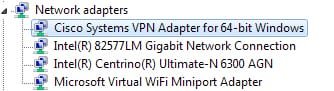
Here's what I have as far as network adapters, my understanding is that I would need are the Cisco VPN adapter (when I need to VPN), the Gigabit one (when I connect via ethernet) and the WiFi one (when I connect via WiFi, I don't know what the Centrino one is.

attachment.php
 

Attachments

  • Network adapters.jpg
    Network adapters.jpg
    9.9 KB · Views: 48

My Computer My Computer

At a glance

Windows 7 Home Premium 64bitIntel Core i5 2500KG.Skill Kit Extreme3 2 x 4 Go PC12800 Sniper ...MSI N560GTX-TI Twin Frozr II/OC (GTX 560 Ti 2...
OS
Windows 7 Home Premium 64bit
CPU
Intel Core i5 2500K
Motherboard
Asus P8P67 LE Rev 3.0 (Révision B3)
Memory
G.Skill Kit Extreme3 2 x 4 Go PC12800 Sniper CAS 9
Graphics Card(s)
MSI N560GTX-TI Twin Frozr II/OC (GTX 560 Ti 2 Go)
Sound Card
Logitech G35 headset (USB)
Monitor(s) Displays
ASUS VW246H
Hard Drives
Crucial M4 64 Go SATA Revision 3.0
Samsung Spinpoint F3 S-ATA - 1 To - 32 Mo
PSU
Antec HCG - 520W
Case
Cooler Master Silencio
Cooling
Cooler Master Hyper 212 Plus
Keyboard
Logitech G15
Mouse
Razer Imperator
Internet Speed
25Mb/s down - 3Mb/s up
On the ipconfig/all, I can't tell if it's the Ethernet adaptor or the Cisco because you blocked out the description for some reason, but looking at it's IP it must be the Cisco and it appears to be using your Ethernet connection for the VPN.

The Centrino is your wireless adaptor.

The reason I say this is because certain VPN's like Hamachi and other virtual adaptors, and dual connections in general will cause connection problems on Windows machines. It's best to narrow down the cause by disabling them all to see which one is causing the problem.

Of course installing the latest driver is a good option, maybe Intel has a different driver version for the Centrino.
http://downloadcenter.intel.com/SearchResult.aspx?lang=eng&ProductFamily=Wireless+Networking&ProductLine=Intel%c2%ae+Centrino%c2%ae+Wi-Fi+Products&ProductProduct=Intel%c2%ae+Centrino%c2%ae+Ultimate-N+6300+and+Intel%c2%ae+Centrino%c2%ae+Advanced-N+6200+products&ProdId=3200&LineId=1784&FamilyId=1783
 
Last edited:

My Computer My Computer

At a glance

Windows 7 Ult, Windows 8.1 Pro,Q9650-4.275GHz, E8600 4.5GHz, E6750-3.8GHzG.Skill PC2 9600 1200Mhz 5 5 5 15 2TGTX480
Computer type
PC/Desktop
Computer Manufacturer/Model Number
Home built
OS
Windows 7 Ult, Windows 8.1 Pro,
CPU
Q9650-4.275GHz, E8600 4.5GHz, E6750-3.8GHz
Motherboard
Evga 780i FTW
Memory
G.Skill PC2 9600 1200Mhz 5 5 5 15 2T
Graphics Card(s)
GTX480
Sound Card
Asus Xonar D2
Monitor(s) Displays
HannsG
Screen Resolution
1680X1050
Hard Drives
GSkill Phoenix Pro 120GB SSD
PSU
ThermalTake Toughpower 1000Watt modular
Case
ThermalTake XaserV
Cooling
Xigmatek S1283
Keyboard
Logitech G15
Mouse
Logitech G9
Internet Speed
T1
I disabled by internal Centrino WiFi adapter and added an external adater ($10) and that fixed my problem. Completely. FWIW, I used a Airlink USB N adapter.
 

My Computer My Computer

At a glance

windows 7 home premium 64 but
OS
windows 7 home premium 64 but
I will first try to update the drivers then play the disabling game, I will keep you posted.

Note that I have the same issue on another Win 7 laptop that doesn't use any VPN and doesn't have any VPN software installed.
 

My Computer My Computer

At a glance

Windows 7 Home Premium 64bitIntel Core i5 2500KG.Skill Kit Extreme3 2 x 4 Go PC12800 Sniper ...MSI N560GTX-TI Twin Frozr II/OC (GTX 560 Ti 2...
OS
Windows 7 Home Premium 64bit
CPU
Intel Core i5 2500K
Motherboard
Asus P8P67 LE Rev 3.0 (Révision B3)
Memory
G.Skill Kit Extreme3 2 x 4 Go PC12800 Sniper CAS 9
Graphics Card(s)
MSI N560GTX-TI Twin Frozr II/OC (GTX 560 Ti 2 Go)
Sound Card
Logitech G35 headset (USB)
Monitor(s) Displays
ASUS VW246H
Hard Drives
Crucial M4 64 Go SATA Revision 3.0
Samsung Spinpoint F3 S-ATA - 1 To - 32 Mo
PSU
Antec HCG - 520W
Case
Cooler Master Silencio
Cooling
Cooler Master Hyper 212 Plus
Keyboard
Logitech G15
Mouse
Razer Imperator
Internet Speed
25Mb/s down - 3Mb/s up
Back
Top