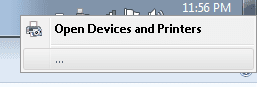
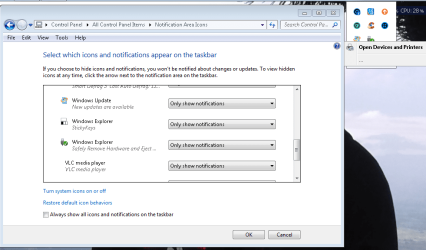
Open Control Panel & select Notification Area Icons. When that opens look for Windows Explorer & then click on the little arrow on the panel showing options & change it to "Only Show Notifications".
If Windows Explorer is not showing click on Restore Default Icon Behaviours.
My Computer
At a glance
Windows 7 Home Premium 64 bit sp1Intel i5 3570 3.4Ghz Ivy Bridge SKT 1155 quad...G-Skill Rip Jaws 16Gb (8x2) DDR3 -1600 PC3 12...Gigabyte NVIDIA GT610 1Gb DDR3 810/1200 PCI-E...
If you mean safely eject hardware and you are not showing an eject cmd in your context menu; I had this problem awhile back and running the "Hardware and devices troubleshooter (H&D T)" fixed it for me.
After you open the troubleshooter click on Hardware and Sound and let the list populate, H&D is 3rd? one down the list.
If you click on Advanced you can repair any problems automatically by checking the auto box, and a report will generate to let you know what was checked and repaired or if all tests were okay.
If you don't check the auto box the tests will run and you will have the option to repair any problems the troubleshooter finds. A final report will be run to let you know what was fixed and what was not.
The choice is yours but I've always run troubleshooter's in auto.
My Computer
At a glance
Originally Win 7 Hm Prem x64 Ver 6.1.7600 Bui...Intel i3 530 2.93GHz, 2933MHz 2 Cores 4 Logic...6GB of 1,333MHz DDR3 SDRAM32MB Intel Graphics Media Accelerator HD IGChip
Computer type
PC/Desktop
Computer Manufacturer/Model Number
Gateway DX4831-01e (Mid-Tower Desktop)
OS
Originally Win 7 Hm Prem x64 Ver 6.1.7600 Build 7601-SP1 | Upgraded to Windows 10 December 14, 2019
In Device Manager, Disk Drives, Find your flash drive. Right click on it and select Properties. In Policies, if the first option is selected, then you don't need to use the "Safely remove......" feature.
You are correct, you don't always need to eject safely if you are observant to what the drive is doing. It's a fail-safe to make sure you don't lose or corrupt the information on the drive.
As long as you are sure the drive has completed it's "writings" go ahead and remove it.
Windows 7 Ultimate x32 With Sp1 + Vista Ultim...Intel Mobile Core 2 Duo T5750 @ 2.00GHz Merom...2.00GB Dual-Channel DDR2 @ 332MHz (5-5-5-15)Mobile Intel(R) 965 Express Chipset Family
Computer type
Laptop
Computer Manufacturer/Model Number
hp compaq presario c795VU notebook pc
OS
Windows 7 Ultimate x32 With Sp1 + Vista Ultimate x32 with Sp1 & Sp2 !!
CPU
Intel Mobile Core 2 Duo T5750 @ 2.00GHz Merom 65nm Technolog
Motherboard
Hewlett-Packard 30D9 (CPU)
Memory
2.00GB Dual-Channel DDR2 @ 332MHz (5-5-5-15)
Graphics Card(s)
Mobile Intel(R) 965 Express Chipset Family
Sound Card
High Definition Audio Device
Monitor(s) Displays
LP154WX4-TLCB on Mobile Intel 965 Express Chipset Family
Screen Resolution
1280x800 @ 60Hz
Hard Drives
149GB Western Digital WDC WD1600BEVS-60VAT0 ATA Device (SATA)
Keyboard
Standard 101/102-Key or Microsoft Natural PS/2 Key + HP QLB
Mouse
ALPS pointing device
Antivirus
Kaspersky AV 2017(Win 7) & AVG AntiVirus Free 2016 (VISTA)
Hi All,
Greets, wither 2 : Sir,
Thanks for the compliments. Much appreciated.
My Computer
At a glance
Windows 7 Ultimate x32 With Sp1 + Vista Ultim...Intel Mobile Core 2 Duo T5750 @ 2.00GHz Merom...2.00GB Dual-Channel DDR2 @ 332MHz (5-5-5-15)Mobile Intel(R) 965 Express Chipset Family
Computer type
Laptop
Computer Manufacturer/Model Number
hp compaq presario c795VU notebook pc
OS
Windows 7 Ultimate x32 With Sp1 + Vista Ultimate x32 with Sp1 & Sp2 !!
CPU
Intel Mobile Core 2 Duo T5750 @ 2.00GHz Merom 65nm Technolog
Motherboard
Hewlett-Packard 30D9 (CPU)
Memory
2.00GB Dual-Channel DDR2 @ 332MHz (5-5-5-15)
Graphics Card(s)
Mobile Intel(R) 965 Express Chipset Family
Sound Card
High Definition Audio Device
Monitor(s) Displays
LP154WX4-TLCB on Mobile Intel 965 Express Chipset Family
Screen Resolution
1280x800 @ 60Hz
Hard Drives
149GB Western Digital WDC WD1600BEVS-60VAT0 ATA Device (SATA)
Keyboard
Standard 101/102-Key or Microsoft Natural PS/2 Key + HP QLB
Mouse
ALPS pointing device
Antivirus
Kaspersky AV 2017(Win 7) & AVG AntiVirus Free 2016 (VISTA)