
Flash drive FAT32 v NTFS

Roderunner

Exterminator
Guru
Gold Member
VIP
Local time
2:03 PM
Messages
2,362
Location
Scotland
Hi Folks, I have a 32gb flash drive in FAT32 format containing 158 folders some have sub folders total size 24.4gb. All are music albums in MP3 format as this is all I can use to play them in my car.
One of the albums was corrupted (unknown name) forcing me to reformat the drive as it could not be deleted. Replacing them from an HDD in NTFS took almost 1 hour.
After a short period of use, another file got corrupted, (a Leonard Cohen folder) so I did the same again.
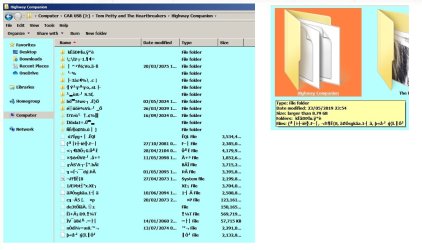
Then it happened again as in my image.
RR.JPG

Please note I am not looking for a fix for this.

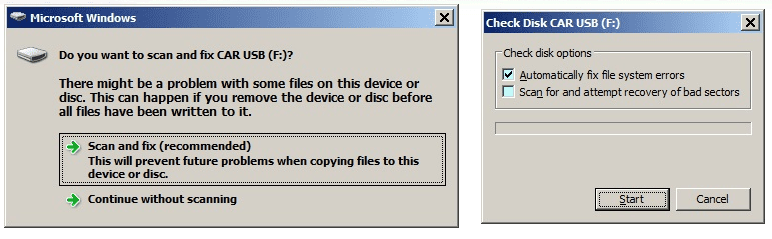
The flash drive had only been used on my Desktop wired pc, when it was attached to my Laptop, I got this:-
RR1.png

I accessed the files on my flash drive and was able to delete all of the corrupt files as in above image.
Isn't life fun!!!!

I now have that same flash drive formatted to NTFS and it is working perfectly but not used in my car.

A brief explanation would be appreciated.
 

My Computer My Computer

Computer Manufacturer/Model Number
Look in my Signature.
OS
Win7 H.Prem. 32bit+SP1
Hello Roderunner,

Perhaps the Desktop wired PC has a faulty USB connection, or maybe has a virus of some kind. When was the last time this computer had a virus scan? Had you checked Device Manager for faulty devices?
 

My Computer My Computer

Computer type
PC/Desktop
OS
Windows 7 x64, Vista x64, 8.1 smartphone
CPU
Intel E8400 65W 64-bit
Motherboard
Gigabyte EP45-UD3LR
Memory
DDR2 2 x 2GB, 1GB x 2
Graphics Card(s)
XFX Radeon HD5750
Sound Card
AMD High Definition Audio; Realtek High Definition Audio
Monitor(s) Displays
iiyama prolite X2377HDS
Screen Resolution
1920 x 1080
Hard Drives
500GB 7200 rpm Seagate ST3500413AS 16MB, 500GB 5400 rpm Toshiba MQ02ABF050H 32MB, 200GB 7200 rpm Seagate ST3200820AS 8MB, 2TB 7200 rpm Western Digital WD20EZRX 64MB
PSU
Enermax Liberty Modular
Case
Antec P193 Midi Tower
Keyboard
Mionix ZIBAL 60
Mouse
Razer USB 2.0 Diamondback Mouse or Huion Graphics Tablet
Browser
Internet Explorer, Lunascape, Firefox, Opera, Avast Safezone
Hello Roderunner,

Perhaps the Desktop wired PC has a faulty USB connection, or maybe has a virus of some kind. When was the last time this computer had a virus scan? Had you checked Device Manager for faulty devices?
My Desktop pc works perfectly. What I want to know is why a flash drive will work in NTFS but not so well in FAT32.
 

My Computer My Computer

Computer Manufacturer/Model Number
Look in my Signature.
OS
Win7 H.Prem. 32bit+SP1
The default for all flash drive is FAT32 format, basically because Fat is universal (Linux, Windows, Mac).
The only explanation for corruption files is a bad connection while writing or a bad drive.
 

My Computers My Computers

System One System Two

  • Computer type
    PC/Desktop
    Computer Manufacturer/Model Number
    custom build
    OS
    Windows 7 HP 64
    CPU
    i5 6600K - 800MHz to 4200MHz
    Motherboard
    GA-Z170-HD3P
    Memory
    4+4G GSkill DDR4 3000
    Graphics Card(s)
    IG - Intel 530
    Monitor(s) Displays
    Samsung 226BW
    Screen Resolution
    1680x1050
    Hard Drives
    (1) -1 SM951 – 128GB M.2 AHCI PCIe SSD drive for Windows 7 and Lubuntu
    (2) -1 WD SATA 3 - 1T for Data
    (3) -1 WD SATA 3 - 1T for backup
    PSU
    Thermaltake 450W TR2 gold
    Keyboard
    Old and good Chicony mechanical keyboard
    Mouse
    Logitech mX performance - 9 buttons (had to disable some)
    Internet Speed
    500Mb/s
    Browser
    Firefox 64
    Other Info
    TinyWall firewall
  • Computer type
    Laptop
    System Manufacturer/Model Number
    Asus Q550LF
    OS
    Windows 7 Pro
    CPU
    i7-4500U 800MHz to 3.0GHz
    Motherboard
    Asus Q550LF
    Memory
    (4+4)G DDR3 1600
    Graphics Card(s)
    IG intel 4400 + NVIDIA GeForce GT 745M
    Sound Card
    Realtek
    Monitor(s) Displays
    LG Display LP156WF4-SPH1
    Screen Resolution
    1920 x 1080
    Hard Drives
    BX500 120G SSD for Windows and programs +
    1T HDD for data
    Internet Speed
    500 Mb/s
    Browser
    Firefox
    Other Info
    TinyWall firewall
My Desktop pc works perfectly. What I want to know is why a flash drive will work in NTFS but not so well in FAT32.
NTFS is a journaling file system but FAT32 is not. Journaling helps prevent corruption when file writes are interrupted when they are not complete, which happens a lot with usb drives because people do not wait for (or even use) the "its safe to remove your device now" message. Waiting for that message is important because cache writing may be on by default so you think the files being written are done but they are really not.
NTFS journaling - Wikipedia
 

My Computer My Computer

Computer type
PC/Desktop
Computer Manufacturer/Model Number
diy
OS
Win7 pro x64
CPU
stock i7 7700k
Motherboard
Gigabyte Z270N-WIFI mini-ITX
Memory
Corsair Vengeance LPX 16GB (2x8GB) DDR4 @ 3200MHz
Graphics Card(s)
integrated Intel HD 630
Sound Card
onboard Realtek ALC1220
Monitor(s) Displays
two vertically mounted samsung 55" 4k un55mu8000
Screen Resolution
1920x1280
Hard Drives
256GB Samsung EVO 960 M.2 pci-e NVMe SSD
PSU
SilverStone Nightjar ST45NF 450Watt Fanless
Case
No case. Motherboard is mounted directly onto power supply
Cooling
Evercool low profile 815EP with Panaflow 12L fan at 7v
Keyboard
Ortek MCK-86 mini
Mouse
Belkin 5-button USB
Internet Speed
spectrum 400mbps
My guess is the drive is failing.
When used with FAT32 the bad blocks are being used in a folder structure where the problem is easily visible. When used with NTFS the blocks may currently be unused or used as data blocks. In the latter case you would not see the problem unless you played the effected file.
 

My Computer My Computer

Computer type
PC/Desktop
Computer Manufacturer/Model Number
HP
OS
Windows 7 Pro 64 bit
CPU
Xeon W3520
Memory
8 GB
Graphics Card(s)
Nvidia Geforce 210
The default for all flash drive is FAT32 format, basically because Fat is universal (Linux, Windows, Mac).
The only explanation for corruption files is a bad connection while writing or a bad drive.

FAT32 is only for drives upto 32gb

NTFS is a journaling file system but FAT32 is not. Journaling helps prevent corruption when file writes are interrupted when they are not complete, which happens a lot with usb drives because people do not wait for (or even use) the "its safe to remove your device now" message. Waiting for that message is important because cache writing may be on by default so you think the files being written are done but they are really not.
NTFS journaling - Wikipedia

Drive is still working in NTFS without trouble.

My guess is the drive is failing.
When used with FAT32 the bad blocks are being used in a folder structure where the problem is easily visible. When used with NTFS the blocks may currently be unused or used as data blocks. In the latter case you would not see the problem unless you played the effected file.

Thanks
 

My Computer My Computer

Computer Manufacturer/Model Number
Look in my Signature.
OS
Win7 H.Prem. 32bit+SP1
Back
Top