Folder Icon - Change Default Icon

How to Change Windows 7 Default Folder Icons using Resource Hacker

   Information
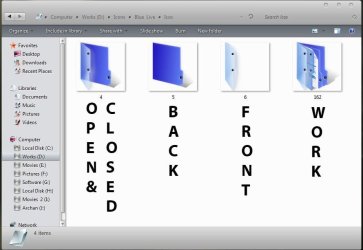
Windows 7 Folders are Live Folders , and they are not a single icon, but a combination of 5 different icons . In imageres.dll's icon group, the numbers of these 5 icons are respectively 3, 4, 5, 6, and 162 . So it is to change all the five icons to change the folder icon's look.

   Note
Tools Required :
1. Resource Hacker
2. System File Replacer

   Warning
To be safe and secured, it is better to http://www.sevenforums.com/tutorials/663-backup-complete-computer-create-image-backup.html before starting any customization activities. Moreover, I recommend to have manual backup (copy and paste in a secured place) of the files before modifying, so that it may be changed easily to default as and when it is needed.


OPTION ONE

To Change the Default Folder Icon to a Custom Icon


1. Open your resource hacker, Click on file > open ; it will open an window naming "open file continuing resource ...." make it sure that the location of look in box is System 32 . Type the filename "imageres.dll" , click the open button .
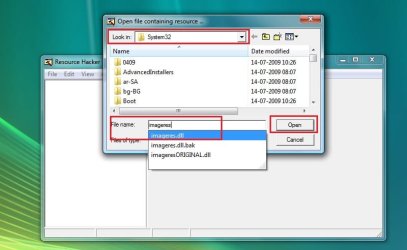
1.jpg
2. Click on the plus sign in front of "Icon Group" .
2.JPG
3. Now change 3, 4, 5, and 6 respectively with the Custom Icons . (The process is the same as described in http://www.sevenforums.com/tutorials/73191-icons-change-using-resource-hacker.html ; from step 9 to step 13; repeat steps for each number) {Change both 3 and 4 with the same open folder icon, 5 with the back side icon , and 6 with the front side icon}
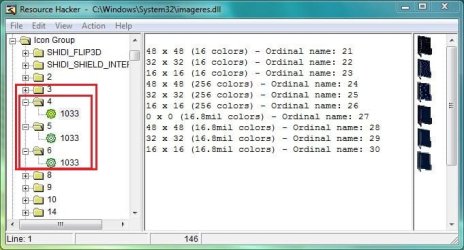
3.JPG
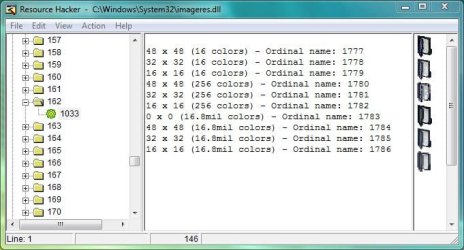
4. Scroll down to 162, and change it (using the same process, with the icon having some stuff in it) .
4.JPG
:warn:
   Note
During Steps 3 and 4 , if you get a dialog saying "out of system resources", dont worry . Click OK and proceed . As all the resolutions (13 resolution layers are usually required there for system icons; for all the alternative locations) are not found, such a dialog pops up . It wont resist our customization.


5. Now File > Save As . In the "Save File As" window, set the save location to Desktop, give the filename "imageres.dll" and save .

So your custom imageres.dll file is ready . Now it is to apply .

6. Take Ownership of the original imageres.dll file, have a manual backup of it , and place the modded one to C:\Windows\System32 , choose Copy and Replace, if prompted . Otherwise, you may use System File Replacer to do the replacement .

   Information
For a 32 bit system, manual work for changing system resources is completed here, but if you are using a 64 bit system , you are to do the same for the imageres.dll situated in SysWoW64, too (as suggested by Bongo)


So your custom folder icon set is done . Now make it workable .

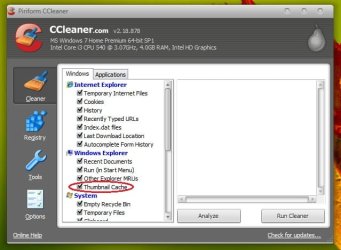
7. To make the icons take effect , rebuild the icon cache, and delete the thumbnail cache.

8. Restart your Computer . After restarting, you may have another Disk Cleanup, to make the changes perfectly. If the thumbnail Cache is not deleted and Icon Cache is not Rebuilt, no change will take effect at all.


OPTION TWO

To Restore the Default Folder Icon


1. To restore the defaults, you will need your manual backup of the original imageres.dll file, that you have made earlier. Next, follow steps 6, 7 and 8 with it to get back the defaults.

 
Last edited by a moderator:
Nice tutorial Arc
 

My Computer

Computer type
Laptop
Computer Manufacturer/Model Number
Sager NP9170
OS
Win 7 Pro x64 / Win 10 Pro
CPU
Intel(R) Core(TM) i7-3630QM CPU @ 2.40GHz
Motherboard
CLEVO P170EM
Memory
12 GB
Graphics Card(s)
(1) Intel(R) HD Graphics 4000 (2) NVIDIA GeForce GTX 675M
Sound Card
(1) Realtek High Definition Audio (2) Intel(R) Display Aud
Monitor(s) Displays
17.3
Screen Resolution
1920x1080
Hard Drives
(1) Samsung 860 EVO 500GB(OS) (1) Samsung 860 EVO 500GB(Data)
Keyboard
Backlite
Antivirus
MSE, Malwarebytes Pro
Browser
Firefox
Other Info
DESKTOP: Custom-built.
OS: Win 10 Pro x64.
CASE: Rosewill R5.
CPU: Intel I5 4670K CPU @ 3.40GHz.
CPU COOLER: Cool Master Hyper 212 EVO.
MOTHERBOARD: Asus Z87-A.
MEMORY: Kingston HyperX 2x4 GB.
GPU: Nvidia Geforce 650 TI.
PSU: Corsair TX750.
DRIVES: (1) Samsung 840 120 GB SSD (2) Western Digital blue 500 GB 7200 RPM.
Very nice, but if you do not want to work with the registry, you may use this simple method - lokks more involved than it really is.

1. Make a .ico from any picture

For that you use this little program on the web - no installation required (speaking of cloud computing, LOL). The following 4 pictures explain the steps:


2. Apply you new .ico to any folder

The following pictures explain this:

Folder Icon Change - Vista Forums

a) Right click on the folder in question and "Open folder location"


b) Right click on subject folder > Properties > Customize tab

c) Go to "Change Icon" and browse to the folder where you stored your .ico

d) Pick your .ico > Apply and you are done
 
Last edited by a moderator:

My Computer

Computer Manufacturer/Model Number
HP, Dell, Gateway, Toshiba - 4 laptops and 2 desktops
OS
Vista, Windows7, Mint Mate, Zorin, Windows 8
CPU
from 1.6GHz Duo to i7
Monitor(s) Displays
2x HP w2207
Hard Drives
5x HDD, 7x SSD, 12x Externals
Keyboard
with trackball - no mices
Mouse
Trackball mice
Internet Speed
DSL 6000
Thanks Jerry :D It is that one that Shawn told me to post .
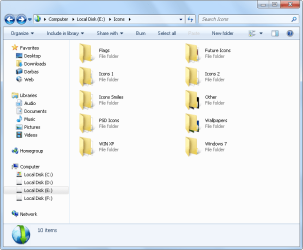
Great contribution Wolfgang . This process will give excellent results with thumbnail preview turned off .
 

My Computer

Computer type
PC/Desktop
Computer Manufacturer/Model Number
Self Assembled
OS
Microsoft Windows 10 Pro Insider Preview 64-bit
CPU
Intel(R) Core(TM) i3-4130 CPU @ 3.40GHz
Motherboard
Gigabyte Technology Co., Ltd. B85M-D3H
Memory
Corsair Vengence 4GB x2 (8.00GB Dual-Channel DDR3 @ 798MHz)
Graphics Card(s)
2047MB GeForce GTS 450 (ZOTAC International)
Sound Card
Onboard (Realtek High Definition Audio)
Monitor(s) Displays
LG Flatron E2040T
Screen Resolution
1600x900
Hard Drives
Western Digital 1 TB
Seagate 500 GB
PSU
Corsair VS550
Case
Cooler Master K380
Cooling
Cooler Master Seidon 120V Plus
Keyboard
Logitech MK260r
Mouse
Logitech MK260r
Internet Speed
PMPL Broadband
Antivirus
Windows Defender + MBAM
Browser
Firefox
Other Info
Dell Studio 15" Laptop
Arc, I had nothing else to do this afternoon - LOL. I hope you do not mind me making such a massive addendum.
 

My Computer

Computer Manufacturer/Model Number
HP, Dell, Gateway, Toshiba - 4 laptops and 2 desktops
OS
Vista, Windows7, Mint Mate, Zorin, Windows 8
CPU
from 1.6GHz Duo to i7
Monitor(s) Displays
2x HP w2207
Hard Drives
5x HDD, 7x SSD, 12x Externals
Keyboard
with trackball - no mices
Mouse
Trackball mice
Internet Speed
DSL 6000
Arc, I had nothing else to do this afternoon - LOL. I hope you do not mind me making such a massive addendum.
Even the question does not arise at all . It feels nice that you found some lacuna of my works and filled it up . In my opinion, it would be great if it was accompanied with some screenshots, and a statement about the thumbnail cache :)
 

My Computer

Computer type
PC/Desktop
Computer Manufacturer/Model Number
Self Assembled
OS
Microsoft Windows 10 Pro Insider Preview 64-bit
CPU
Intel(R) Core(TM) i3-4130 CPU @ 3.40GHz
Motherboard
Gigabyte Technology Co., Ltd. B85M-D3H
Memory
Corsair Vengence 4GB x2 (8.00GB Dual-Channel DDR3 @ 798MHz)
Graphics Card(s)
2047MB GeForce GTS 450 (ZOTAC International)
Sound Card
Onboard (Realtek High Definition Audio)
Monitor(s) Displays
LG Flatron E2040T
Screen Resolution
1600x900
Hard Drives
Western Digital 1 TB
Seagate 500 GB
PSU
Corsair VS550
Case
Cooler Master K380
Cooling
Cooler Master Seidon 120V Plus
Keyboard
Logitech MK260r
Mouse
Logitech MK260r
Internet Speed
PMPL Broadband
Antivirus
Windows Defender + MBAM
Browser
Firefox
Other Info
Dell Studio 15" Laptop
Hi,

what I want to do is to disable "Live folders" and keep thumbnails for pictures and videos. So in step 3 and 4:

3. Now change 3, 4, 5, and 6 respectively with the Custom Icons . (The process is the same as described in Icons - Change Using Resource Hacker ; from step 9 to step 13; repeat steps for each number) {Change both 3 and 4 with the same open folder icon, 5 with the back side icon , and 6 with the front side icon}

4. Scroll down to 162, and change it (using the same process, with the icon having some stuff in it) .

3, 4, 5, 6 and 162 I have changed with the same folder icon and its almost worked :) But just almost take a look at screen whats happend:

Live Folder.png

If I understand right each folder has generated unique thumbnail (folder.jpg) and in my case after modified "imageres.dll" its under the folder icon. Maybe its possible to create transparent folder.gif and apply it to ALL folder? Any ideas?
 

My Computer

OS
Windows 7 Ultimate x64
Welcome aboard, Tomas :D

Mate you cannot disable live folders and keep thumbnail preview at a time , coz one automatically confirm the other . As you have changed all the icon imageres files, but your thumbnail preview is enabled, those are messed up. Here you need the different icons as shown in the snip below :

Capture.JPG

For your query , better you follow the tutorial http://www.sevenforums.com/tutorials/11738-thumbnail-previews-enable-disable.html . Moreover, if thumbnail preview is disabled, the best and the easiest way to change folder icons is the tutorial http://www.sevenforums.com/tutorials/23825-folder-icon-change-windows-7-default-folder-icon.html .

Hope it helps :)
 

My Computer

Computer type
PC/Desktop
Computer Manufacturer/Model Number
Self Assembled
OS
Microsoft Windows 10 Pro Insider Preview 64-bit
CPU
Intel(R) Core(TM) i3-4130 CPU @ 3.40GHz
Motherboard
Gigabyte Technology Co., Ltd. B85M-D3H
Memory
Corsair Vengence 4GB x2 (8.00GB Dual-Channel DDR3 @ 798MHz)
Graphics Card(s)
2047MB GeForce GTS 450 (ZOTAC International)
Sound Card
Onboard (Realtek High Definition Audio)
Monitor(s) Displays
LG Flatron E2040T
Screen Resolution
1600x900
Hard Drives
Western Digital 1 TB
Seagate 500 GB
PSU
Corsair VS550
Case
Cooler Master K380
Cooling
Cooler Master Seidon 120V Plus
Keyboard
Logitech MK260r
Mouse
Logitech MK260r
Internet Speed
PMPL Broadband
Antivirus
Windows Defender + MBAM
Browser
Firefox
Other Info
Dell Studio 15" Laptop
And if i replace back and front icons with a blank one?
because i have only the full icon
 

My Computer

OS
Windows 7 Ultimate x64
And if i replace back and front icons with a blank one?
because i have only the full icon
Lol .... you know what will happen :D as you posted the screenshot above :)

Getting icons is not tough a lot .... if you need I/we may supply it to you . But is you want to make all folders look essentially same, I have told it earlier that the easiest way is to follow the tutorial http://www.sevenforums.com/tutorials...lder-icon.html, and with thumbnails preview disabled .
 

My Computer

Computer type
PC/Desktop
Computer Manufacturer/Model Number
Self Assembled
OS
Microsoft Windows 10 Pro Insider Preview 64-bit
CPU
Intel(R) Core(TM) i3-4130 CPU @ 3.40GHz
Motherboard
Gigabyte Technology Co., Ltd. B85M-D3H
Memory
Corsair Vengence 4GB x2 (8.00GB Dual-Channel DDR3 @ 798MHz)
Graphics Card(s)
2047MB GeForce GTS 450 (ZOTAC International)
Sound Card
Onboard (Realtek High Definition Audio)
Monitor(s) Displays
LG Flatron E2040T
Screen Resolution
1600x900
Hard Drives
Western Digital 1 TB
Seagate 500 GB
PSU
Corsair VS550
Case
Cooler Master K380
Cooling
Cooler Master Seidon 120V Plus
Keyboard
Logitech MK260r
Mouse
Logitech MK260r
Internet Speed
PMPL Broadband
Antivirus
Windows Defender + MBAM
Browser
Firefox
Other Info
Dell Studio 15" Laptop
i know that tutorial, just followed it
my goal is to find out a way to keep thumbnails preview enabled, because i want previews of my pics and docs...

but if i cant, i give up :D
 

My Computer

OS
Windows 7 Ultimate x64
As far as I know, you cant . But dont give it up before talking with Brink .

He might have / may find out a solution, if possible .

You can send him a PM /VM asking it .
 

My Computer

Computer type
PC/Desktop
Computer Manufacturer/Model Number
Self Assembled
OS
Microsoft Windows 10 Pro Insider Preview 64-bit
CPU
Intel(R) Core(TM) i3-4130 CPU @ 3.40GHz
Motherboard
Gigabyte Technology Co., Ltd. B85M-D3H
Memory
Corsair Vengence 4GB x2 (8.00GB Dual-Channel DDR3 @ 798MHz)
Graphics Card(s)
2047MB GeForce GTS 450 (ZOTAC International)
Sound Card
Onboard (Realtek High Definition Audio)
Monitor(s) Displays
LG Flatron E2040T
Screen Resolution
1600x900
Hard Drives
Western Digital 1 TB
Seagate 500 GB
PSU
Corsair VS550
Case
Cooler Master K380
Cooling
Cooler Master Seidon 120V Plus
Keyboard
Logitech MK260r
Mouse
Logitech MK260r
Internet Speed
PMPL Broadband
Antivirus
Windows Defender + MBAM
Browser
Firefox
Other Info
Dell Studio 15" Laptop
Why did some folders change and the others didn't?

foldersfi.png
 

My Computer

Computer Manufacturer/Model Number
ASUS G72 Notebook
OS
Windows 7 Ultimate 64-bit
CPU
Intel® Core™2 Duo mobile processor P8700 2.53 GHz
Memory
6GB DDRII
Graphics Card(s)
NVIDIA GeForce GTX 260M
Sound Card
EAX Advanced HD 4.0 + Logitech Wireless Headset G930
Monitor(s) Displays
17.3" LED-backlit LCD high-definition plus widescreen
Screen Resolution
1600 x 900
Hard Drives
2 x Seagate Momentus 500 GB 5400.6 SATA 3Gb/s
Cooling
Targus
Mouse
Logitech Wireless Trackball M570
Internet Speed
3 to 6 Mbps Download / .5 to 1 Mbps Upload
Other Info
Clear Modem with Wi-fi*
Comodo Internet Security Premium
Why did some folders change and the others didn't?
Interesting ! After a restart, delete the thumbnail cache and rebuild the icon cache once again .

My best assumption is that you haven't deleted the thumbnail cache properly .... and so it is happening . Ccleaner can do it nicely .
Untitled.jpg
 

My Computer

Computer type
PC/Desktop
Computer Manufacturer/Model Number
Self Assembled
OS
Microsoft Windows 10 Pro Insider Preview 64-bit
CPU
Intel(R) Core(TM) i3-4130 CPU @ 3.40GHz
Motherboard
Gigabyte Technology Co., Ltd. B85M-D3H
Memory
Corsair Vengence 4GB x2 (8.00GB Dual-Channel DDR3 @ 798MHz)
Graphics Card(s)
2047MB GeForce GTS 450 (ZOTAC International)
Sound Card
Onboard (Realtek High Definition Audio)
Monitor(s) Displays
LG Flatron E2040T
Screen Resolution
1600x900
Hard Drives
Western Digital 1 TB
Seagate 500 GB
PSU
Corsair VS550
Case
Cooler Master K380
Cooling
Cooler Master Seidon 120V Plus
Keyboard
Logitech MK260r
Mouse
Logitech MK260r
Internet Speed
PMPL Broadband
Antivirus
Windows Defender + MBAM
Browser
Firefox
Other Info
Dell Studio 15" Laptop
Why did some folders change and the others didn't?
Interesting ! After a restart, delete the thumbnail cache and rebuild the icon cache once again .

My best assumption is that you haven't deleted the thumbnail cache properly .... and so it is happening . Ccleaner can do it nicely .
View attachment 149089

You are right.
I didn't.
After the restart I forgot it.
Thanks for reminding me that.
(I saved the shortcuts in my bookmarks how to delete the thumbnail cache and rebuild the icon cache, but I forgot to apply).
 

My Computer

Computer Manufacturer/Model Number
ASUS G72 Notebook
OS
Windows 7 Ultimate 64-bit
CPU
Intel® Core™2 Duo mobile processor P8700 2.53 GHz
Memory
6GB DDRII
Graphics Card(s)
NVIDIA GeForce GTX 260M
Sound Card
EAX Advanced HD 4.0 + Logitech Wireless Headset G930
Monitor(s) Displays
17.3" LED-backlit LCD high-definition plus widescreen
Screen Resolution
1600 x 900
Hard Drives
2 x Seagate Momentus 500 GB 5400.6 SATA 3Gb/s
Cooling
Targus
Mouse
Logitech Wireless Trackball M570
Internet Speed
3 to 6 Mbps Download / .5 to 1 Mbps Upload
Other Info
Clear Modem with Wi-fi*
Comodo Internet Security Premium
I can't seem to get this to work. I have the images.dll, I can open it with reshack and my new icons are there. I have cleaned and rebuilt both caches in different orders, restarted in different orders, everything. I even when in manually and took ownership of the file, and did the cache rebuild through the command prompt (ran as admin.).

I found these folders that would go great with my theme, but can't get them to work.

Any help is much appreciated!
 

My Computer

Computer Manufacturer/Model Number
Me
OS
Windows Ult. x64
CPU
AMD 720 @ 3.6
Motherboard
MSI NF980-G65
Memory
2 x2GB
Graphics Card(s)
2x GTX 470
Hard Drives
2 x 250GB WD Caviar Blue SE16
PSU
Corsair 950TX
Case
Antec 900 modded
Cooling
XSPC Rasa rs360
Arc I just used your tutorial and it works perfect.
I would like to make one suggestion for those using 64-bit they will need to do the same .dll in C:\Windows\SysWOW64 also.
Jerry
My Music.png
 

My Computer

Computer type
Laptop
Computer Manufacturer/Model Number
Sager NP9170
OS
Win 7 Pro x64 / Win 10 Pro
CPU
Intel(R) Core(TM) i7-3630QM CPU @ 2.40GHz
Motherboard
CLEVO P170EM
Memory
12 GB
Graphics Card(s)
(1) Intel(R) HD Graphics 4000 (2) NVIDIA GeForce GTX 675M
Sound Card
(1) Realtek High Definition Audio (2) Intel(R) Display Aud
Monitor(s) Displays
17.3
Screen Resolution
1920x1080
Hard Drives
(1) Samsung 860 EVO 500GB(OS) (1) Samsung 860 EVO 500GB(Data)
Keyboard
Backlite
Antivirus
MSE, Malwarebytes Pro
Browser
Firefox
Other Info
DESKTOP: Custom-built.
OS: Win 10 Pro x64.
CASE: Rosewill R5.
CPU: Intel I5 4670K CPU @ 3.40GHz.
CPU COOLER: Cool Master Hyper 212 EVO.
MOTHERBOARD: Asus Z87-A.
MEMORY: Kingston HyperX 2x4 GB.
GPU: Nvidia Geforce 650 TI.
PSU: Corsair TX750.
DRIVES: (1) Samsung 840 120 GB SSD (2) Western Digital blue 500 GB 7200 RPM.
Thanks!

Thank you so much for this fantastic tutorial! I had found some places online which suggested Resource Hacker but didn't go any farther. This worked out perfectly my first time through and I couldn't be happier. Unfortunately now I'm in for quite a few sleepless nights endlessly tweaking my UI. :D

I definitely second the other user's suggestion of ConvertIcon as a great resource.. a couple little tips in using it though: uncheck any output dimensions larger than your input file. And it works best if you create or crop your input file to the exact dimensions (ie, 512x512)

And finally, here's a killer source of high-quality icons: Icon Archive - Search 282,126 free icons, desktop icons, download icons, social icons, xp icons, vista icons This is where I found the icon set that started me down this road of needing to edit the default folder: Profesional Red Iconset (57 icons) | Tuziibanez
 

My Computer

Computer Manufacturer/Model Number
Dell XPS8300
OS
Windows 7 Home Premium 64bit
CPU
Core i7-2600 @ 3.4GHz
Memory
8GB
Graphics Card(s)
ATI Radeon 5700
Sound Card
Onboard
Monitor(s) Displays
22" - HP w2207h
Case
Dell tower
Arc I just used your tutorial and it works perfect.
I would like to make one suggestion for those using 64-bit they will need to do the same .dll in C:\Windows\SysWOW64 also.
Jerry
View attachment 167592

Hmm.. I have Win 7 Home Premium 64bit and just went through the tutorial myself without seeing this post. But it seems to have worked just fine.. is there something I'm missing?
 

My Computer

Computer Manufacturer/Model Number
Dell XPS8300
OS
Windows 7 Home Premium 64bit
CPU
Core i7-2600 @ 3.4GHz
Memory
8GB
Graphics Card(s)
ATI Radeon 5700
Sound Card
Onboard
Monitor(s) Displays
22" - HP w2207h
Case
Dell tower

Attachments

  • Capture.JPG
    Capture.JPG
    53.5 KB · Views: 1,080

My Computer

Computer type
PC/Desktop
Computer Manufacturer/Model Number
Self Assembled
OS
Microsoft Windows 10 Pro Insider Preview 64-bit
CPU
Intel(R) Core(TM) i3-4130 CPU @ 3.40GHz
Motherboard
Gigabyte Technology Co., Ltd. B85M-D3H
Memory
Corsair Vengence 4GB x2 (8.00GB Dual-Channel DDR3 @ 798MHz)
Graphics Card(s)
2047MB GeForce GTS 450 (ZOTAC International)
Sound Card
Onboard (Realtek High Definition Audio)
Monitor(s) Displays
LG Flatron E2040T
Screen Resolution
1600x900
Hard Drives
Western Digital 1 TB
Seagate 500 GB
PSU
Corsair VS550
Case
Cooler Master K380
Cooling
Cooler Master Seidon 120V Plus
Keyboard
Logitech MK260r
Mouse
Logitech MK260r
Internet Speed
PMPL Broadband
Antivirus
Windows Defender + MBAM
Browser
Firefox
Other Info
Dell Studio 15" Laptop
Back
Top