
All the icons were fine until couple of weeks ago.
From then onward all my folders are not showing the correct contents.
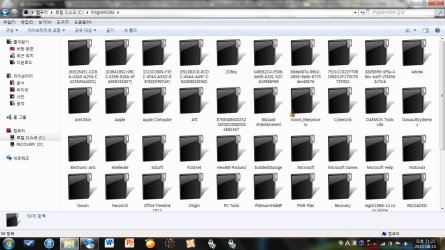
What I mean by this is that all the folders are shown closed, despite the fact that there are files in them.
When I create new folders, they are also closed no matter what files I put in.
(Don't mind the folders being Black, It was working fine with that for over 2 years)
(Refer to the attachment please)
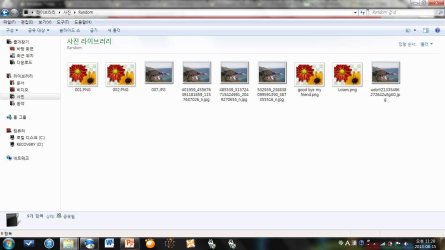
Also It does no show thumbnails..
(eg. music files showing no album jackets, Videos not showing previews, Pictures with no preview)
[File view is set to large icons]
(refer to the attachment please)
I been looking for the solution for weeks now, but haven't found a suitable fix for this..
Does anyone know how to fix this issue?
So far I've tried :
1. Rebuilding the Icon cache (http://www.sevenforums.com/tutorials/49819-icon-cache-rebuild.html)
2. I tried system restore back to when the folders were normal
3. Cleaning/Fix registry using CCleaner, RegClean Pro
4. Restoring to normal theme (this just made folders back to yellow, folders were still closed)
5. Virus check
If anyone know how to fix it please help, it would be very grateful...
From then onward all my folders are not showing the correct contents.
What I mean by this is that all the folders are shown closed, despite the fact that there are files in them.
When I create new folders, they are also closed no matter what files I put in.
(Don't mind the folders being Black, It was working fine with that for over 2 years)
(Refer to the attachment please)
Also It does no show thumbnails..
(eg. music files showing no album jackets, Videos not showing previews, Pictures with no preview)
[File view is set to large icons]
(refer to the attachment please)
I been looking for the solution for weeks now, but haven't found a suitable fix for this..
Does anyone know how to fix this issue?
So far I've tried :
1. Rebuilding the Icon cache (http://www.sevenforums.com/tutorials/49819-icon-cache-rebuild.html)
2. I tried system restore back to when the folders were normal
3. Cleaning/Fix registry using CCleaner, RegClean Pro
4. Restoring to normal theme (this just made folders back to yellow, folders were still closed)
5. Virus check
If anyone know how to fix it please help, it would be very grateful...
Attachments
My Computer
At a glance
windows 7 home premium 64 bitI5 4808 GbRadeon HD 5650
- Computer type
- Laptop
- Computer Manufacturer/Model Number
- HP
- OS
- windows 7 home premium 64 bit
- CPU
- I5 480
- Memory
- 8 Gb
- Graphics Card(s)
- Radeon HD 5650


