Folder Icons Size

bohq

New member
Local time
10:43 PM
Messages
9
Hello there,

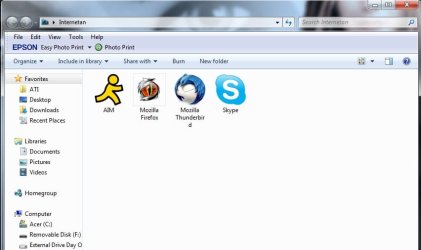
I'd like to ask for some help about icons inside a or all folders. Icons are in default size when I open a folder.

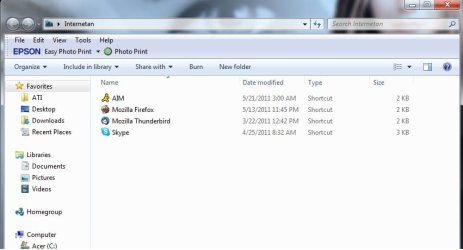
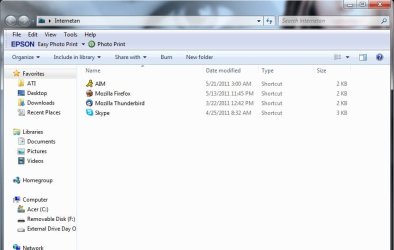
I try to change the icon size but when I close and reopen the folder, this happens to all the folders, it reverts back to the default view size.

I have Tuneup Utilities 2011 and did the Reload Icons and Repair Icon Cache function but still same results. Can anyone help me out? Thanks a bunch!

Upper left image is the default, upper right is after resizing and the bottom one is when I reopen it. Sorry, I'm not knowledgeable when it comes to this.
 

Attachments
  • Default.jpg
    Default.jpg
    38.9 KB · Views: 28
  • Custom.jpg
    Custom.jpg
    37.2 KB · Views: 24
  • Reopen.jpg
    Reopen.jpg
    34.3 KB · Views: 20

My Computer

OS
Windows 7 Home Premiuim x64
CPU
Intel i5
Memory
2G
Graphics Card(s)
ATI Mobility Radeon

My Computer

Computer type
PC/Desktop
Computer Manufacturer/Model Number
Self built custom
OS
64-bit Windows 11 Pro for Workstations
CPU
Intel i7-8700K OC'd to 5 GHz
Motherboard
ASUS ROG Maximus XI Formula Z390
Memory
64 GB (4x16GB) G.SKILL TridentZ RGB DDR4 3600 MHz
Graphics Card(s)
ASUS ROG-STRIX-GTX1080TI-O11G-GAMING
Sound Card
Integrated
Monitor(s) Displays
2 x Samsung Odyssey G7 27"
Screen Resolution
2560x1440
Hard Drives
1TB Samsung 990 PRO M.2,
4TB Samsung 990 PRO PRO M.2,
TerraMaster F8 SSD Plus NAS
PSU
Seasonic Prime Titanium 850W
Case
Thermaltake Core P3
Cooling
Corsair Hydro H115i
Keyboard
Logitech wireless K800
Mouse
Logitech MX Master 4
Internet Speed
2 Gb/s Download and 100 Mb/s Upload
Antivirus
Malwarebyte Anti-Malware Premium
Browser
Google Chrome
Other Info
Logitech Z625 speaker system,
Logitech BRIO 4K Pro webcam,
HP Color LaserJet Pro MFP M477fdn,
APC SMART-UPS RT 1000 XL - SURT1000XLI,
Galaxy S23 Plus phone
Hello Shawn, thanks for the reply. Unfortunately, it still does revert to the default....
 

My Computer

OS
Windows 7 Home Premiuim x64
CPU
Intel i5
Memory
2G
Graphics Card(s)
ATI Mobility Radeon
Umm, ok. If you like, you could use the tutorial below to set a default folder view for all folders in Windows 7. You will still be able to manually adjust individual folder views afterwards though.

http://www.sevenforums.com/tutorials/41198-folder-view-set-default-all-folders.html

If that still doesn't work, then I think it may be related to the custom "Epson Easy Photo Print" command bar buttons. You could temporarily uninstall it to test and see.
 

My Computer

Computer type
PC/Desktop
Computer Manufacturer/Model Number
Self built custom
OS
64-bit Windows 11 Pro for Workstations
CPU
Intel i7-8700K OC'd to 5 GHz
Motherboard
ASUS ROG Maximus XI Formula Z390
Memory
64 GB (4x16GB) G.SKILL TridentZ RGB DDR4 3600 MHz
Graphics Card(s)
ASUS ROG-STRIX-GTX1080TI-O11G-GAMING
Sound Card
Integrated
Monitor(s) Displays
2 x Samsung Odyssey G7 27"
Screen Resolution
2560x1440
Hard Drives
1TB Samsung 990 PRO M.2,
4TB Samsung 990 PRO PRO M.2,
TerraMaster F8 SSD Plus NAS
PSU
Seasonic Prime Titanium 850W
Case
Thermaltake Core P3
Cooling
Corsair Hydro H115i
Keyboard
Logitech wireless K800
Mouse
Logitech MX Master 4
Internet Speed
2 Gb/s Download and 100 Mb/s Upload
Antivirus
Malwarebyte Anti-Malware Premium
Browser
Google Chrome
Other Info
Logitech Z625 speaker system,
Logitech BRIO 4K Pro webcam,
HP Color LaserJet Pro MFP M477fdn,
APC SMART-UPS RT 1000 XL - SURT1000XLI,
Galaxy S23 Plus phone
Here's what I did:
1. Uninstalled Epson toolbar.
2. Restored Default Folder templates.
2. Merged .reg file for Documents folder.

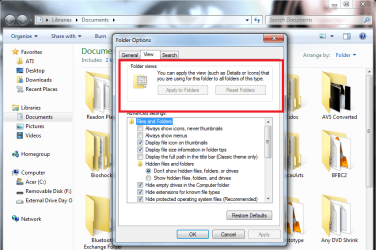
Strange thing is it won't let me apply to all the folders. "Apply to Folders" option is not highlighted.
Also tried to merge the General, Videos, Music and Pictures .reg files with each corresponding folder. Changes were retained in the said folders after reopening but still won't let me apply to personal folders. Hope I don't confuse you.
 

Attachments

  • No change.png
    No change.png
    72.7 KB · Views: 24

My Computer

OS
Windows 7 Home Premiuim x64
CPU
Intel i5
Memory
2G
Graphics Card(s)
ATI Mobility Radeon
Shawn, i clicked the "Apply to Folders" option from my personal folder and it worked! It retained the changes after reopening. But would it be possible for me to set a different icon size for some folders? Because right now everything has the same icon size and arrangement for each and every folder.... Sorry for being such a bother...
 

My Computer

OS
Windows 7 Home Premiuim x64
CPU
Intel i5
Memory
2G
Graphics Card(s)
ATI Mobility Radeon
You wouldn't be able to do this in a library folder though. For user folders, it has to be done from with the C:\Users\(user-name) folder instead.


Shawn, i clicked the "Apply to Folders" option from my personal folder and it worked! It retained the changes after reopening. But would it be possible for me to set a different icon size for some folders? Because right now everything has the same icon size and arrangement for each and every folder.... Sorry for being such a bother...

In libraries, all subfolders in a main library folder share the same folder view no matter where it was set at in the library. You are able to have separate Arrange by view settings in each added right click -> New -> Folder created in the library itself though.
 

My Computer

Computer type
PC/Desktop
Computer Manufacturer/Model Number
Self built custom
OS
64-bit Windows 11 Pro for Workstations
CPU
Intel i7-8700K OC'd to 5 GHz
Motherboard
ASUS ROG Maximus XI Formula Z390
Memory
64 GB (4x16GB) G.SKILL TridentZ RGB DDR4 3600 MHz
Graphics Card(s)
ASUS ROG-STRIX-GTX1080TI-O11G-GAMING
Sound Card
Integrated
Monitor(s) Displays
2 x Samsung Odyssey G7 27"
Screen Resolution
2560x1440
Hard Drives
1TB Samsung 990 PRO M.2,
4TB Samsung 990 PRO PRO M.2,
TerraMaster F8 SSD Plus NAS
PSU
Seasonic Prime Titanium 850W
Case
Thermaltake Core P3
Cooling
Corsair Hydro H115i
Keyboard
Logitech wireless K800
Mouse
Logitech MX Master 4
Internet Speed
2 Gb/s Download and 100 Mb/s Upload
Antivirus
Malwarebyte Anti-Malware Premium
Browser
Google Chrome
Other Info
Logitech Z625 speaker system,
Logitech BRIO 4K Pro webcam,
HP Color LaserJet Pro MFP M477fdn,
APC SMART-UPS RT 1000 XL - SURT1000XLI,
Galaxy S23 Plus phone
Back
Top