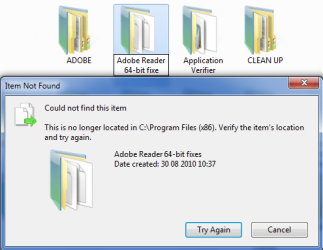
folder issue with sp1

jmm

New member
Member
VIP
Local time
2:36 PM
Messages
107
Hi, after installing sp1, i can no longer rename or move folders - restoring previous os restores normal folder function - tried vista's fd32.reg patch with no success - also, sfc/scannow cmd doesnt find anything wrong - any ideas?
 

My Computer

Computer type
Laptop
Computer Manufacturer/Model Number
Dell Latitude E7240
OS
Microsoft Windows 7 Professionnel 64 bits 7601 Multiprocessor Free Service Pack 1
CPU
Intel(R) Core(TM) i5-4310U CPU @ 2.00GHz
Motherboard
Dell Inc. 08YF01
Memory
8,00 GB
Graphics Card(s)
Intel(R) HD Graphics Family
Sound Card
(1) Bluetooth Audio (2) Périphérique High Definition Audio
Monitor(s) Displays
Mobile Intel 965
Screen Resolution
1366 x 768 x 32 bits (4294967296 colors) @ 59 Hz
Hard Drives
SK hynix SH920 mSATA 128
Hi, after installing sp1, i can no longer rename or move folders - restoring previous os restores normal folder function - tried vista's fd32.reg patch with no success - also, sfc/scannow cmd doesnt find anything wrong - any ideas?

There is a pre SP-1 install proccedure did you follow it? What error codes are generated if you try?
 

My Computer

Computer Manufacturer/Model Number
HP Pavillion dv-7 1005 Tx
OS
Win 8 Release candidate 8400
CPU
[email protected]
Memory
4 gigs
Graphics Card(s)
Nvidia 9600M
Sound Card
HD built-in
Monitor(s) Displays
17" Wxga
Screen Resolution
1440x900
Cooling
none
Internet Speed
45Mb down 5Mb up
didnt try preinstall procedure - will do...
error is "could not find this item - this is no longer located in C:\users... - verify item's location and try again...
 

My Computer

Computer type
Laptop
Computer Manufacturer/Model Number
Dell Latitude E7240
OS
Microsoft Windows 7 Professionnel 64 bits 7601 Multiprocessor Free Service Pack 1
CPU
Intel(R) Core(TM) i5-4310U CPU @ 2.00GHz
Motherboard
Dell Inc. 08YF01
Memory
8,00 GB
Graphics Card(s)
Intel(R) HD Graphics Family
Sound Card
(1) Bluetooth Audio (2) Périphérique High Definition Audio
Monitor(s) Displays
Mobile Intel 965
Screen Resolution
1366 x 768 x 32 bits (4294967296 colors) @ 59 Hz
Hard Drives
SK hynix SH920 mSATA 128
Did you change anything related to the file system?

I had the same problem - it turned out that the cause was that I previously disabled libraries using the registry "hack" posted somewhere here in the forums. After re-applying the reg hack the problem was gone.

SP1 seems to change lots of system settings (esp. custom "hacks") and gets confused if they are not in original state.

I would try to re-apply any custom hack you are using.
 

My Computer

OS
Win 7 x64 SP1
This was going to be my thread (below) but it seems I'm not alone!!

SP1 Doesn't like Me!!

Is anyone else seeing something like this?

Item not found.PNG

It happens when I try to Rename or Cut 'n' Paste. When I hit the Try Again button the action is successful. I've had to do this about ten times now, which was ten times too many (!) so I've rolled back to remove SP1.
Any suggestions for my next attempt?
 

My Computer

OS
windows 7 ultimate
Did you change anything related to the file system?

I had the same problem - it turned out that the cause was that I previously disabled libraries using the registry "hack" posted somewhere here in the forums. After re-applying the reg hack the problem was gone.

SP1 seems to change lots of system settings (esp. custom "hacks") and gets confused if they are not in original state.

I would try to re-apply any custom hack you are using.

For what it is worth:

I had the custom hack to completely get rid of Libraries.

After the SP 1 update, I see a "Libaries" folder at the top left of my explorer tree, but nowhere else as yet.

I do NOT have any problems renaming folders.

I also had hacks to get rid of "networking" and "favorites" in the explorer tree. They did not reappear like libraries did.

I may have to re-hack to get rid of libraries again.
 

My Computer

Computer type
PC/Desktop
Computer Manufacturer/Model Number
Ignatz Special; 4 speed manual gearbox; factory air conditioning; one of one
OS
Windows 7 Home Premium SP1, 64-bit
CPU
Intel Skylake i5-6600K, not overclocked
Motherboard
AsRock Z170M Extreme 4, micro ATX
Memory
8 GB HyperX DDR4-2666 (2 x 4 GB)
Graphics Card(s)
none; graphics are integrated on CPU
Sound Card
onboard: Realtek ALC1150; external: USB Behringer UF0-202
Monitor(s) Displays
Dell S2340M 23 inch IPS
Screen Resolution
1600 x 900
Hard Drives
System: Crucial MX100 series SSD, 128 GB;
Data: Samsung Spinpoint 103SJ, 1 TB;
Backup: WD Caviar Green WD30EZRX-00D8PB0, 3 TB
PSU
Rosewill SilentNight 500 watt fanless, semi-modular
Case
Antec Solo II
Cooling
Noctua NH-U12S; Noctua F12 intake, Noctua S12A exhaust
Keyboard
Microsoft 200 6JH-00001 USB
Mouse
Dell or Microsoft optical wired; USB
Antivirus
Microsoft Security Essentials and Malwarebytes Premium
Browser
Pale Moon
Other Info
All fans PWM; speeds at idle: CPU circa 500 rpm; intake circa 600 rpm; exhaust circa 600 rpm; CPU temps 27 idle and 47 C load in a warm room (27 C/81 F) when running Intel Extreme Tuning Utility stress test.
This was going to be my thread (below) but it seems I'm not alone!!

SP1 Doesn't like Me!!

Is anyone else seeing something like this?

View attachment 140125

It happens when I try to Rename or Cut 'n' Paste. When I hit the Try Again button the action is successful. I've had to do this about ten times now, which was ten times too many (!) so I've rolled back to remove SP1.
Any suggestions for my next attempt?

Yes, that was EXACTLY my problem as well, and it was caused by installing SP1 on a Win7 with the Library hack. Solution: re-apply library registry hack. :D
 

My Computer

OS
Win 7 x64 SP1
indeed i had used the disable_libraries registry hack - however, when i try the restore_libraries hack i get the "cannot import *.reg - not all data was written... - some keys are open..." error - following instructions at Grant Read Write (Full Control) Permissions on Registry Keys (Fix Cannot Import and Access Denied Error in RegEdit) » My Digital Life , i therefore took full control of 3 folders (i assume that gives full control of subfolders and keys therein):
- HKEY_LOCAL_MACHINE\SOFTWARE\Microsoft\Windows\CurrentVersion\Explorer
- HKEY_CLASSES_ROOT\CLSID
- HKEY_LOCAL_MACHINE\SOFTWARE\Classes\CLSID
but i still cannot update the registry with the restore_libraries hack (same error msg as mentioned above)...
please help!
 

My Computer

Computer type
Laptop
Computer Manufacturer/Model Number
Dell Latitude E7240
OS
Microsoft Windows 7 Professionnel 64 bits 7601 Multiprocessor Free Service Pack 1
CPU
Intel(R) Core(TM) i5-4310U CPU @ 2.00GHz
Motherboard
Dell Inc. 08YF01
Memory
8,00 GB
Graphics Card(s)
Intel(R) HD Graphics Family
Sound Card
(1) Bluetooth Audio (2) Périphérique High Definition Audio
Monitor(s) Displays
Mobile Intel 965
Screen Resolution
1366 x 768 x 32 bits (4294967296 colors) @ 59 Hz
Hard Drives
SK hynix SH920 mSATA 128
... realizing that the trick might be to re-apply disable_libraries hack AFTER sp1 install, i reinstalled sp1 (3rd time) and to my surprise i was able to move/rename folders and the libraries folder was back in the explorer - therefore somehow the restore_libraries hack must have worked despite regedit's error msg (see previous post) - puzzling but whatever, i have now decided to apply a hack that just removes the library folder from explorer (How to Remove and Hide “Libraries” Group from Navigation Pane of Windows 7 Explorer » My Digital Life) without disabling libraries, which is fine for me...
thanks to you all!
 

My Computer

Computer type
Laptop
Computer Manufacturer/Model Number
Dell Latitude E7240
OS
Microsoft Windows 7 Professionnel 64 bits 7601 Multiprocessor Free Service Pack 1
CPU
Intel(R) Core(TM) i5-4310U CPU @ 2.00GHz
Motherboard
Dell Inc. 08YF01
Memory
8,00 GB
Graphics Card(s)
Intel(R) HD Graphics Family
Sound Card
(1) Bluetooth Audio (2) Périphérique High Definition Audio
Monitor(s) Displays
Mobile Intel 965
Screen Resolution
1366 x 768 x 32 bits (4294967296 colors) @ 59 Hz
Hard Drives
SK hynix SH920 mSATA 128
Well I finally got SP1 installed after using the Undo Disable Libraries in Windows 7 registry hack.
Which was strange as I hadn't used the Disable Libraries in Windows 7 in the first place! :confused:
 

My Computer

OS
windows 7 ultimate
Back
Top