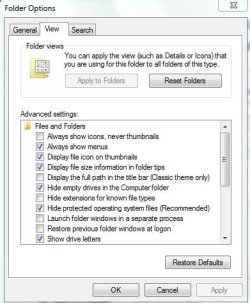
Folder Options - Open

How to Open Folder Options in Windows 7

   Information
This will show you the various methods of how to open the Folder Options window in Windows 7.
   Note
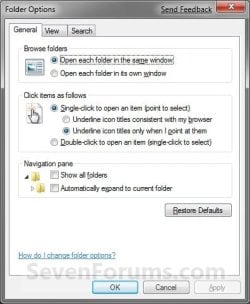
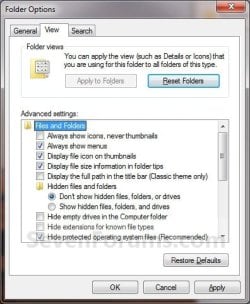
Folder Options can change the way files and folders function, as well as how the content in folders are displayed.
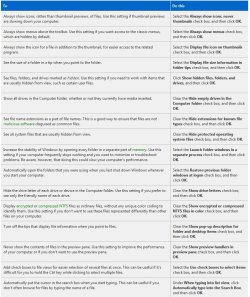
Details.jpg


EXAMPLE: Folder Options
General_Folder_Options.jpg

Folder_Options-1.jpg Folder_Options-2.jpg


OPTION ONE

To Open Folder Options in the Control Panel


NOTE: The Apply to Folders option will be grayed out unless you open Folder Options (Method Two or Method Three) from within the same Windows Explorer window that you want to have applied to the other folders that have the same folder template.
1. Open the Control Panel (icons view).

2. Click on the Folder Options icon.


OPTION TWO

To Open Folder Options in Windows Explorer Organize Button


1. Open a Windows Explorer window.

2. Click on the Organize button. (See screenshot below)

3. Click on Folder and Search Options.
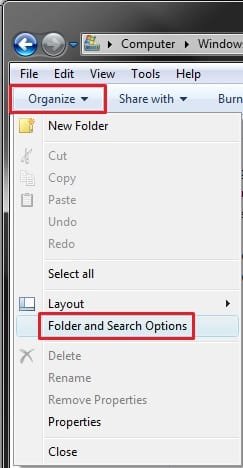
Organize.jpg


OPTION THREE

To Open Folder Options in Windows Explorer Tools Menu


1. Open a Windows Explorer window.

2. Click on the Tools (ALT and ALT+T) Menu bar item. (See screenshot below)

3. Click on Folder Options.
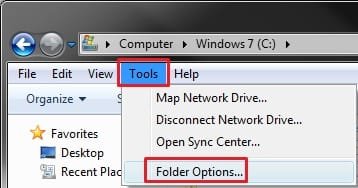
Tools.jpg
That's it,
Shawn


Attachments

  • 8794.png
    8794.png
    20.6 KB · Views: 0
  • 8795.png
    8795.png
    9.6 KB · Views: 0
Last edited:
If there's some 'globality' for using methods two or three, as opposed to possibly only changing folder options for 'whatever group one might be in' when using method one, disclosing this might be helpful.
 

My Computer

Computer Manufacturer/Model Number
HP DV4-1030ee
OS
Windows 7 Pro
CPU
[email protected], 2 Core Logical Processors
Motherboard
Compal 30F8 99.74
Memory
Total Physical Memory 2.00 GB
Graphics Card(s)
NVIDIA GeForce9200M GS
Sound Card
NVIDIA HDMI Audio with IDT High Definition Audio CODEC
Monitor(s) Displays
Generic PnP Monitor (14.0"vis)
Screen Resolution
1200 X 800 recommended, but set to 1074 X 768
Hard Drives
FUJITSU MHY2160BH 160.04 GB drive 0
PSU
High Performance
Case
Stock
Cooling
Stock
Keyboard
Stock
Mouse
Logitech M-UV96
Internet Speed
down 2.89 Mb/s & up 0.73 Mb/s
Other Info
Acer Aspire One, XPH SP3, x86, 'Windows NT', 2.0 Ghz CPU, 2 Gb RAM, Mobile Intel 945 Express Chipset Family graphics
'card', RealtekHD Audio Driver v5.10.0.5628 audio 'card', and USB 2.0.
Hello Wguru,

Could you be a bit more specific on what you mean??
 

My Computer

Computer type
PC/Desktop
Computer Manufacturer/Model Number
Self built custom
OS
64-bit Windows 11 Pro for Workstations
CPU
Intel i7-8700K OC'd to 5 GHz
Motherboard
ASUS ROG Maximus XI Formula Z390
Memory
64 GB (4x16GB) G.SKILL TridentZ RGB DDR4 3600 MHz
Graphics Card(s)
ASUS ROG-STRIX-GTX1080TI-O11G-GAMING
Sound Card
Integrated
Monitor(s) Displays
2 x Samsung Odyssey G7 27"
Screen Resolution
2560x1440
Hard Drives
1TB Samsung 990 PRO M.2,
4TB Samsung 990 PRO PRO M.2,
TerraMaster F8 SSD Plus NAS
PSU
Seasonic Prime Titanium 850W
Case
Thermaltake Core P3
Cooling
Corsair Hydro H115i
Keyboard
Logitech wireless K800
Mouse
Logitech MX Master 4
Internet Speed
2 Gb/s Download and 100 Mb/s Upload
Antivirus
Malwarebyte Anti-Malware Premium
Browser
Google Chrome
Other Info
Logitech Z625 speaker system,
Logitech BRIO 4K Pro webcam,
HP Color LaserJet Pro MFP M477fdn,
APC SMART-UPS RT 1000 XL - SURT1000XLI,
Galaxy S23 Plus phone
I believe that Windows 'folders options' (Vista and W7) may now be keyed to 'folder groups' (My Documents, My Videos, etc.).

I was curious if your article's context also applies to that aspect of 'folder options', ie; while accessing folder options in any of those manners, are cerain manners specific to folder groups, ref. 'globality'?
 

My Computer

Computer Manufacturer/Model Number
HP DV4-1030ee
OS
Windows 7 Pro
CPU
[email protected], 2 Core Logical Processors
Motherboard
Compal 30F8 99.74
Memory
Total Physical Memory 2.00 GB
Graphics Card(s)
NVIDIA GeForce9200M GS
Sound Card
NVIDIA HDMI Audio with IDT High Definition Audio CODEC
Monitor(s) Displays
Generic PnP Monitor (14.0"vis)
Screen Resolution
1200 X 800 recommended, but set to 1074 X 768
Hard Drives
FUJITSU MHY2160BH 160.04 GB drive 0
PSU
High Performance
Case
Stock
Cooling
Stock
Keyboard
Stock
Mouse
Logitech M-UV96
Internet Speed
down 2.89 Mb/s & up 0.73 Mb/s
Other Info
Acer Aspire One, XPH SP3, x86, 'Windows NT', 2.0 Ghz CPU, 2 Gb RAM, Mobile Intel 945 Express Chipset Family graphics
'card', RealtekHD Audio Driver v5.10.0.5628 audio 'card', and USB 2.0.
Wguru,

I'm sorry, I may be dense today, but I'm still not catching what you mean by folder groups, or group that you are in. Do you mean standard vs administrator?

The Folder Option settings are global only in the user account that they are set in. The exception is the "Apply to Folders" options using METHOD ONE instead of the other methods.
 

My Computer

Computer type
PC/Desktop
Computer Manufacturer/Model Number
Self built custom
OS
64-bit Windows 11 Pro for Workstations
CPU
Intel i7-8700K OC'd to 5 GHz
Motherboard
ASUS ROG Maximus XI Formula Z390
Memory
64 GB (4x16GB) G.SKILL TridentZ RGB DDR4 3600 MHz
Graphics Card(s)
ASUS ROG-STRIX-GTX1080TI-O11G-GAMING
Sound Card
Integrated
Monitor(s) Displays
2 x Samsung Odyssey G7 27"
Screen Resolution
2560x1440
Hard Drives
1TB Samsung 990 PRO M.2,
4TB Samsung 990 PRO PRO M.2,
TerraMaster F8 SSD Plus NAS
PSU
Seasonic Prime Titanium 850W
Case
Thermaltake Core P3
Cooling
Corsair Hydro H115i
Keyboard
Logitech wireless K800
Mouse
Logitech MX Master 4
Internet Speed
2 Gb/s Download and 100 Mb/s Upload
Antivirus
Malwarebyte Anti-Malware Premium
Browser
Google Chrome
Other Info
Logitech Z625 speaker system,
Logitech BRIO 4K Pro webcam,
HP Color LaserJet Pro MFP M477fdn,
APC SMART-UPS RT 1000 XL - SURT1000XLI,
Galaxy S23 Plus phone
No problem. Thanks for sticking with me.

As I understand it, Vista and Windows 7 platforms 'inovated' the Windows folders by 'grouping' them.

In that the tutorial simply defines differing ways of accessing 'folder views', I'm just asking if there's any meaningful purpose for Windows so affoding three ways to access folder views.

As such, I'm left wondering if because post XP users now "set their preferred folder view" (doing so in a given folder group), eg; the "My Videos" group, as opposed other grouped folders like "My Documents", "My Pictures", etc., and the user's preferred folder view thereafter pertains to but that one 'group' of folders.

Again, since there may be some meaningfulness in how one accesses 'folder views', I'm curious if one methond over the other two, may or may not set 'all folder groups' as opposed to one group.

Maybe I'm using the wrong term, there, but you should get the gist of it.

So again, 'if' there's some 'globality' (group wise) for using (the tutoria's) methods two or three, as opposed to possibly only changing folder options for 'whatever group one might be in' (when using method one), disclosing it might be helpful.
 

My Computer

Computer Manufacturer/Model Number
HP DV4-1030ee
OS
Windows 7 Pro
CPU
[email protected], 2 Core Logical Processors
Motherboard
Compal 30F8 99.74
Memory
Total Physical Memory 2.00 GB
Graphics Card(s)
NVIDIA GeForce9200M GS
Sound Card
NVIDIA HDMI Audio with IDT High Definition Audio CODEC
Monitor(s) Displays
Generic PnP Monitor (14.0"vis)
Screen Resolution
1200 X 800 recommended, but set to 1074 X 768
Hard Drives
FUJITSU MHY2160BH 160.04 GB drive 0
PSU
High Performance
Case
Stock
Cooling
Stock
Keyboard
Stock
Mouse
Logitech M-UV96
Internet Speed
down 2.89 Mb/s & up 0.73 Mb/s
Other Info
Acer Aspire One, XPH SP3, x86, 'Windows NT', 2.0 Ghz CPU, 2 Gb RAM, Mobile Intel 945 Express Chipset Family graphics
'card', RealtekHD Audio Driver v5.10.0.5628 audio 'card', and USB 2.0.

My Computer

Computer type
PC/Desktop
Computer Manufacturer/Model Number
Self built custom
OS
64-bit Windows 11 Pro for Workstations
CPU
Intel i7-8700K OC'd to 5 GHz
Motherboard
ASUS ROG Maximus XI Formula Z390
Memory
64 GB (4x16GB) G.SKILL TridentZ RGB DDR4 3600 MHz
Graphics Card(s)
ASUS ROG-STRIX-GTX1080TI-O11G-GAMING
Sound Card
Integrated
Monitor(s) Displays
2 x Samsung Odyssey G7 27"
Screen Resolution
2560x1440
Hard Drives
1TB Samsung 990 PRO M.2,
4TB Samsung 990 PRO PRO M.2,
TerraMaster F8 SSD Plus NAS
PSU
Seasonic Prime Titanium 850W
Case
Thermaltake Core P3
Cooling
Corsair Hydro H115i
Keyboard
Logitech wireless K800
Mouse
Logitech MX Master 4
Internet Speed
2 Gb/s Download and 100 Mb/s Upload
Antivirus
Malwarebyte Anti-Malware Premium
Browser
Google Chrome
Other Info
Logitech Z625 speaker system,
Logitech BRIO 4K Pro webcam,
HP Color LaserJet Pro MFP M477fdn,
APC SMART-UPS RT 1000 XL - SURT1000XLI,
Galaxy S23 Plus phone
Hi my dear friends. I'm from Iran and I don't know English well.
I have a question about "Folder Options" page.
I think a virus affect my PC and my Folder Options.but its not the virus brontok.
however seems my Anti Virus has detected the virus and cleaned it.
before this i couldn't view my Folder Options.but now i can. but it appears like the image below:
5-11-2010 6-18-49 PM.jpg
Namely the categories of Folder Options does'nt show up.And all of
lines are in on category.
Thanks for your help.
 

My Computer

OS
Windows 7 Ultimate,32bit edition
CPU
Dual core 2.5 GHz
Motherboard
ASUS
Memory
2GB
Graphics Card(s)
G-force 8400 xfx
Monitor(s) Displays
LG1760TR
Screen Resolution
1280*1024
Hard Drives
MAXTOR 40GB

My Computer

Computer type
PC/Desktop
Computer Manufacturer/Model Number
Self built custom
OS
64-bit Windows 11 Pro for Workstations
CPU
Intel i7-8700K OC'd to 5 GHz
Motherboard
ASUS ROG Maximus XI Formula Z390
Memory
64 GB (4x16GB) G.SKILL TridentZ RGB DDR4 3600 MHz
Graphics Card(s)
ASUS ROG-STRIX-GTX1080TI-O11G-GAMING
Sound Card
Integrated
Monitor(s) Displays
2 x Samsung Odyssey G7 27"
Screen Resolution
2560x1440
Hard Drives
1TB Samsung 990 PRO M.2,
4TB Samsung 990 PRO PRO M.2,
TerraMaster F8 SSD Plus NAS
PSU
Seasonic Prime Titanium 850W
Case
Thermaltake Core P3
Cooling
Corsair Hydro H115i
Keyboard
Logitech wireless K800
Mouse
Logitech MX Master 4
Internet Speed
2 Gb/s Download and 100 Mb/s Upload
Antivirus
Malwarebyte Anti-Malware Premium
Browser
Google Chrome
Other Info
Logitech Z625 speaker system,
Logitech BRIO 4K Pro webcam,
HP Color LaserJet Pro MFP M477fdn,
APC SMART-UPS RT 1000 XL - SURT1000XLI,
Galaxy S23 Plus phone
Realy thanks for your help Mr.Shawn.
this topic solved my problem.again thank you.
Arash
 

My Computer

OS
Windows 7 Ultimate,32bit edition
CPU
Dual core 2.5 GHz
Motherboard
ASUS
Memory
2GB
Graphics Card(s)
G-force 8400 xfx
Monitor(s) Displays
LG1760TR
Screen Resolution
1280*1024
Hard Drives
MAXTOR 40GB
You're most welcome Arash. :)
 

My Computer

Computer type
PC/Desktop
Computer Manufacturer/Model Number
Self built custom
OS
64-bit Windows 11 Pro for Workstations
CPU
Intel i7-8700K OC'd to 5 GHz
Motherboard
ASUS ROG Maximus XI Formula Z390
Memory
64 GB (4x16GB) G.SKILL TridentZ RGB DDR4 3600 MHz
Graphics Card(s)
ASUS ROG-STRIX-GTX1080TI-O11G-GAMING
Sound Card
Integrated
Monitor(s) Displays
2 x Samsung Odyssey G7 27"
Screen Resolution
2560x1440
Hard Drives
1TB Samsung 990 PRO M.2,
4TB Samsung 990 PRO PRO M.2,
TerraMaster F8 SSD Plus NAS
PSU
Seasonic Prime Titanium 850W
Case
Thermaltake Core P3
Cooling
Corsair Hydro H115i
Keyboard
Logitech wireless K800
Mouse
Logitech MX Master 4
Internet Speed
2 Gb/s Download and 100 Mb/s Upload
Antivirus
Malwarebyte Anti-Malware Premium
Browser
Google Chrome
Other Info
Logitech Z625 speaker system,
Logitech BRIO 4K Pro webcam,
HP Color LaserJet Pro MFP M477fdn,
APC SMART-UPS RT 1000 XL - SURT1000XLI,
Galaxy S23 Plus phone
... I used the 'Organize | Layout | Navigation Pane (turn it off so there is only one pane) and that step changes all other folders including Windows Explorer.

So how do we setup one folder with unique properties?

Also how can we turn off the address bar and or the Organize bar in just one folder?

The Navigation Pane, the Address Bar, the "Organize bar" are elements of Windows Explorer's properties not folder properties. Therefore, you can not do what you want.
 

My Computer

Computer type
PC/Desktop
Computer Manufacturer/Model Number
Alienware Aurora ALX R4
OS
Windows 10 Pro (x64)
CPU
Intel Core i7-3930K (3.2GHz - 4.5GHz)
Motherboard
Alienware Aurora-R4 x79
Memory
4x Samsung 4GB PC3-12800 DDR3 (16GB 1600MHz)
Graphics Card(s)
Nvidia Geforce GTX 690
Sound Card
SteelSeries Siberia Elite
Monitor(s) Displays
Dell UltraSharp U3011
Screen Resolution
2560x1600
Hard Drives
Samsung 850 Pro 256 GB, Seagate 1TB Desktop Hybrid HDD, 2x Western Digital 4TB Green HDD
PSU
875W Some Dell PSU <.<
Case
Alienware Aurora ALX
Cooling
Custom Liquid Cooling (EK CPU & GPU blocks) dual EK 480RAD
Keyboard
Logitech G710+ Mechanical
Mouse
Logitech G700s
Internet Speed
Verizon Fios (50 mbps average)
Other Info
Server: Intel NUC D54250WYK: i5-4250U, 16GB, 256 GB mSATA, Windows Server 2012 R2
Ok here is a new problem.....I just got Win7 Pro 64bit. I was reading in here about how to get the other regional Themes to show up in the personalization options. So for one of the steps you need to go turn on hidden files and folders. Ok no problem i'm a computer tech and i've done that tons of times on WinXP Pro.

Now I understand that the way windows handles folder options is a bit different now especialy in regard to the idea that folder settings, even if you use "Apply to Folders" which of course used to be "Apply to ALL Folders". So I want to see hidden and system files on my C: so I can goto the folder it talks about in getting the other localization themes. And of course sure enough it's there, I proceed and everything is happy.

So imagine my surprise when I close out back to the desktop and I am now seeing two "desktop.ini" hidden system files on my desktop now. I did not select "Apply to Folders" in any of these instances however it seems like the view option of "Show hidden files, folders, and drives" and the check-box for "show protected operating system files" both propagate to all Windows Explorer views on the system, weather you want them to or not. I have so far tried selecting the options for Opening each folder in it's own window, and Launching folder windows in a seperate process as both those options I know have been used before to help gain control over what is or isnt shown in any one individual folder, but neither of these seemed to work.

any ideas here? I like to be able to see all files and folders on my computer to see if there is anything extra being hidden from me in other folders and installations besides the OS itself, but I don't like having the greyed out system files showing up on my desktop view.
 

My Computer

Computer Manufacturer/Model Number
Custom Build
OS
Win7 64 bit Pro
CPU
Processor Intel(R) Core(TM)2 Duo CPU E8400 @ 3.00GHz, 3
Motherboard
ASUS P5N-E SLI Bios rev 1406
Memory
4096GB
Graphics Card(s)
Nvidia GTS 450
Sound Card
Creative X-Fi Audigy Gamer
Monitor(s) Displays
Gateway VX920 CRT
Screen Resolution
1280x1024 @ 85hz
Hard Drives
Model WDC WD3200JB-00KFA0 ATA Device
Model WDC WD32 00AAKS-00B3A SCSI Disk Device
Model ST325031 8AS SCSI Disk Device
PSU
Thermaltake TR2-600W
Case
custom
Cooling
system fans, added some.
Keyboard
Logitech SK-2930
Mouse
Microsoft Intellimouse Optical
Internet Speed
Mid speed Cable modem

My Computer

Computer type
PC/Desktop
Computer Manufacturer/Model Number
Self built custom
OS
64-bit Windows 11 Pro for Workstations
CPU
Intel i7-8700K OC'd to 5 GHz
Motherboard
ASUS ROG Maximus XI Formula Z390
Memory
64 GB (4x16GB) G.SKILL TridentZ RGB DDR4 3600 MHz
Graphics Card(s)
ASUS ROG-STRIX-GTX1080TI-O11G-GAMING
Sound Card
Integrated
Monitor(s) Displays
2 x Samsung Odyssey G7 27"
Screen Resolution
2560x1440
Hard Drives
1TB Samsung 990 PRO M.2,
4TB Samsung 990 PRO PRO M.2,
TerraMaster F8 SSD Plus NAS
PSU
Seasonic Prime Titanium 850W
Case
Thermaltake Core P3
Cooling
Corsair Hydro H115i
Keyboard
Logitech wireless K800
Mouse
Logitech MX Master 4
Internet Speed
2 Gb/s Download and 100 Mb/s Upload
Antivirus
Malwarebyte Anti-Malware Premium
Browser
Google Chrome
Other Info
Logitech Z625 speaker system,
Logitech BRIO 4K Pro webcam,
HP Color LaserJet Pro MFP M477fdn,
APC SMART-UPS RT 1000 XL - SURT1000XLI,
Galaxy S23 Plus phone
Hello Rangerman, and welcome to Seven Forums.

The two Desktop.ini files are hidden protected OS files. You would just need to do step 5 in OPTION ONE in the tutorial below to hide them again, and still see the other hidden system files. :)

http://www.sevenforums.com/tutorials/394-hidden-files-folders-show-hide.html

Hope this helps,
Shawn


Well actually not unfortunately. I don't think you fully understood what I was asking. Before Win7 (and i'm assuming maybe also Vista, never used it, saw it a few times and it looked like junk) there was a way and/or windows by default would save your folder view options for ALL options displayed in the "Folder Options" box for EACH FOLDER YOU MODIFIED ONLY, UNLESS You told windows in the Folder Options box you wanted to use those view options for all folders on the computer.

Now however these view options I am specifically interested in are propagated to ALL folders viewed in explorer WEATHER I WANT THEM TO BE OR NOT. I want ALL folders on my computer to be able to show hidden files and folders and protected system operating files because many programs and viruses and such tell windows that they should be shown as hidden files and folders and/or also try to use the file tag of a protected operating system file as well.

Basically to post this in a nutshell, I want to be able to set folder options to show hidden files and folders and protected system operating files on the entire computer EXCEPT for the desktop and unfortunately there is no way to do this with the Folder Options box as anytime you select or deselect either of these options it is propagated to the entire computer weather I want it to be or not. I was able to do this up to WinXP, now with Win7 I cannot for some reason because of the changes to how the Folder Options box works in the system.
 

My Computer

Computer Manufacturer/Model Number
Custom Build
OS
Win7 64 bit Pro
CPU
Processor Intel(R) Core(TM)2 Duo CPU E8400 @ 3.00GHz, 3
Motherboard
ASUS P5N-E SLI Bios rev 1406
Memory
4096GB
Graphics Card(s)
Nvidia GTS 450
Sound Card
Creative X-Fi Audigy Gamer
Monitor(s) Displays
Gateway VX920 CRT
Screen Resolution
1280x1024 @ 85hz
Hard Drives
Model WDC WD3200JB-00KFA0 ATA Device
Model WDC WD32 00AAKS-00B3A SCSI Disk Device
Model ST325031 8AS SCSI Disk Device
PSU
Thermaltake TR2-600W
Case
custom
Cooling
system fans, added some.
Keyboard
Logitech SK-2930
Mouse
Microsoft Intellimouse Optical
Internet Speed
Mid speed Cable modem
Sorry, but there is no way to unhide all hidden files everywhere except on the Desktop. It's a all or none setting. :(
 

My Computer

Computer type
PC/Desktop
Computer Manufacturer/Model Number
Self built custom
OS
64-bit Windows 11 Pro for Workstations
CPU
Intel i7-8700K OC'd to 5 GHz
Motherboard
ASUS ROG Maximus XI Formula Z390
Memory
64 GB (4x16GB) G.SKILL TridentZ RGB DDR4 3600 MHz
Graphics Card(s)
ASUS ROG-STRIX-GTX1080TI-O11G-GAMING
Sound Card
Integrated
Monitor(s) Displays
2 x Samsung Odyssey G7 27"
Screen Resolution
2560x1440
Hard Drives
1TB Samsung 990 PRO M.2,
4TB Samsung 990 PRO PRO M.2,
TerraMaster F8 SSD Plus NAS
PSU
Seasonic Prime Titanium 850W
Case
Thermaltake Core P3
Cooling
Corsair Hydro H115i
Keyboard
Logitech wireless K800
Mouse
Logitech MX Master 4
Internet Speed
2 Gb/s Download and 100 Mb/s Upload
Antivirus
Malwarebyte Anti-Malware Premium
Browser
Google Chrome
Other Info
Logitech Z625 speaker system,
Logitech BRIO 4K Pro webcam,
HP Color LaserJet Pro MFP M477fdn,
APC SMART-UPS RT 1000 XL - SURT1000XLI,
Galaxy S23 Plus phone
Ok thanks anyways. It seems kind of silly of them to change that. As there used to be an option in Folder Options to save the settings for each folder you opened Folder Options on individually. Well maybe i'll pester Microsoft about it and see if they can fix it. I hate having to go turn off and on the two options whenever I want to see something because half the time I actually notice new things since it's on already and then go "Hmmm...what is that new system file/hidden file/folder. :)
 

My Computer

Computer Manufacturer/Model Number
Custom Build
OS
Win7 64 bit Pro
CPU
Processor Intel(R) Core(TM)2 Duo CPU E8400 @ 3.00GHz, 3
Motherboard
ASUS P5N-E SLI Bios rev 1406
Memory
4096GB
Graphics Card(s)
Nvidia GTS 450
Sound Card
Creative X-Fi Audigy Gamer
Monitor(s) Displays
Gateway VX920 CRT
Screen Resolution
1280x1024 @ 85hz
Hard Drives
Model WDC WD3200JB-00KFA0 ATA Device
Model WDC WD32 00AAKS-00B3A SCSI Disk Device
Model ST325031 8AS SCSI Disk Device
PSU
Thermaltake TR2-600W
Case
custom
Cooling
system fans, added some.
Keyboard
Logitech SK-2930
Mouse
Microsoft Intellimouse Optical
Internet Speed
Mid speed Cable modem
Hiyya Shawn just found the one click icon start doing my son's gamer for him - how good is that - thanks again :cool:
 

My Computer

Computer type
PC/Desktop
Computer Manufacturer/Model Number
Own build (new) Desk1 / Asus ROG Win 7 / Desk2 1st build
OS
Desk1 7 Home Prem / Desk2 10 Pro / Main lap Asus ROG 10 Pro 2 laptop Toshiba 7 Pro Asus P2520 7 & 10
CPU
Desk1 i5 3750K / Laptop i7 GTX 860M / Desk2 i5 2500
Motherboard
Desk1 Asus P877-V / Desk2 Gigabyte H67 UD3H / Laptop ?
Memory
Desk1 8GB (1866) / Desk2 16GB (1333) / Laptop 8Gb DDR3
Graphics Card(s)
Desk 1& 2NVidia GTX 650 & Laptops on board Intel
Sound Card
Desk 1 & 2 -XONAR DG Realtek High Def audio Laptop
Monitor(s) Displays
Desk 1 Benq HD 2450 / Desk2 Philips 24" / Laptop 17.5"
Screen Resolution
1920x1080 D1 & D2 & Laptop 1
Hard Drives
Desk1 Samsung 120GB 830 SSD
Asus ROG 256GB 850 Pro SSD
Desk2 Samsung 840 256 SSD
Toshiba 120GB EVO
PSU
Desk 1 Corsair HX 1050/ Laptop ? / Desk 2 Corsair HX 650
Case
Desk 1 Cooler HAF XM ? Toshiba laptop / Desk2 Coolermaster
Cooling
Fans on all Desk1 -2 Desk2 - all Coolermasters 5 Laptop ?
Keyboard
Desk 1 MS Sidewinder X6 Desk 2 MS Sidewinder X 4
Mouse
Desk 1&2 - Gigabyte MS 900 gamer - laptop - Logitec wireless
Internet Speed
ADSL2+
Other Info
One other Desktop (tester) and spare Toshba laptop both with SSD's
Running Kaspersky 2016 ISS on all machines config'd identically
Logitec audio stereo systems on each machine (x3)
Canon MG5250MFC
Router/modem TP-Link running WPA2SK
Hello John,

Yeah, I like to use the single click to open option as well. :)
 

My Computer

Computer type
PC/Desktop
Computer Manufacturer/Model Number
Self built custom
OS
64-bit Windows 11 Pro for Workstations
CPU
Intel i7-8700K OC'd to 5 GHz
Motherboard
ASUS ROG Maximus XI Formula Z390
Memory
64 GB (4x16GB) G.SKILL TridentZ RGB DDR4 3600 MHz
Graphics Card(s)
ASUS ROG-STRIX-GTX1080TI-O11G-GAMING
Sound Card
Integrated
Monitor(s) Displays
2 x Samsung Odyssey G7 27"
Screen Resolution
2560x1440
Hard Drives
1TB Samsung 990 PRO M.2,
4TB Samsung 990 PRO PRO M.2,
TerraMaster F8 SSD Plus NAS
PSU
Seasonic Prime Titanium 850W
Case
Thermaltake Core P3
Cooling
Corsair Hydro H115i
Keyboard
Logitech wireless K800
Mouse
Logitech MX Master 4
Internet Speed
2 Gb/s Download and 100 Mb/s Upload
Antivirus
Malwarebyte Anti-Malware Premium
Browser
Google Chrome
Other Info
Logitech Z625 speaker system,
Logitech BRIO 4K Pro webcam,
HP Color LaserJet Pro MFP M477fdn,
APC SMART-UPS RT 1000 XL - SURT1000XLI,
Galaxy S23 Plus phone
Back
Top