Folder rename not changing object name

Craigjw

New member
Local time
8:06 PM
Messages
22
I am copying some old My Documents directories that I backed up from a couple of previous installations.

I copy the first My Documents directory to a backup directory and then I rename it to something else eg "My documents 1", then try to copy the second My documents directory into the backup directory, but it gives me the message:

This destination already contains a folder named "My documents 1".

Do you still want to merge this folder
My documents 1
with this one?
My documents.

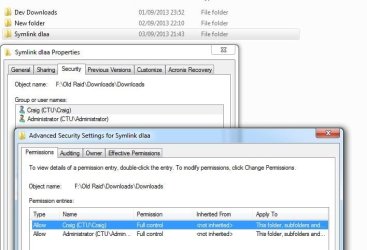
I checked the properties->security/advanced->effective permissions
The object name still retains the original name of the directory, can someone assist me in why this is happening, so that I may rename it correctly please.

Thanks in advance.
 

My Computer

OS
Windows 7
CPU
E6600 2.4ghz Intel Core 2 Duo
Motherboard
Asus P5 DH Deluxe
Memory
4GB
Graphics Card(s)
NVidia 8800 GTS
Sound Card
N/A
Monitor(s) Displays
24" TFT
Before getting too involved I'd try naming it to something without the "My Documents" being any part of the name. Just see what happens.
 

My Computer

Computer Manufacturer/Model Number
HP Media Center
OS
Windows 7 32 bit
CPU
AMD 5200+ dual core
Memory
2 GB
Graphics Card(s)
NVidia GeForce 6150SE 128 MB
Monitor(s) Displays
CRT
Screen Resolution
1280x1024
Hard Drives
500 GB Sata internal :

SIIG USB 3.0 docking stations w/WD Caviar Black 6 Gb/s drives
Keyboard
PS/2
Mouse
PS/2 Wheel Mouse
Other Info
SIIG USB 3.0 PCIexpress card.
Tried that, still thinks it's the same object name.
 

My Computer

OS
Windows 7
CPU
E6600 2.4ghz Intel Core 2 Duo
Motherboard
Asus P5 DH Deluxe
Memory
4GB
Graphics Card(s)
NVidia 8800 GTS
Sound Card
N/A
Monitor(s) Displays
24" TFT
This is all I've found so far that seems like it may be related.
 

My Computer

Computer Manufacturer/Model Number
HP Media Center
OS
Windows 7 32 bit
CPU
AMD 5200+ dual core
Memory
2 GB
Graphics Card(s)
NVidia GeForce 6150SE 128 MB
Monitor(s) Displays
CRT
Screen Resolution
1280x1024
Hard Drives
500 GB Sata internal :

SIIG USB 3.0 docking stations w/WD Caviar Black 6 Gb/s drives
Keyboard
PS/2
Mouse
PS/2 Wheel Mouse
Other Info
SIIG USB 3.0 PCIexpress card.
I'm not using special character. Here's a screen shot
 

Attachments

  • DirsNames.JPG
    DirsNames.JPG
    50.5 KB · Views: 4

My Computer

OS
Windows 7
CPU
E6600 2.4ghz Intel Core 2 Duo
Motherboard
Asus P5 DH Deluxe
Memory
4GB
Graphics Card(s)
NVidia 8800 GTS
Sound Card
N/A
Monitor(s) Displays
24" TFT
I solved the issue, it was my desktop.ini file.
 

My Computer

OS
Windows 7
CPU
E6600 2.4ghz Intel Core 2 Duo
Motherboard
Asus P5 DH Deluxe
Memory
4GB
Graphics Card(s)
NVidia 8800 GTS
Sound Card
N/A
Monitor(s) Displays
24" TFT
Thanks for posting the solution. :)
 

My Computer

Computer Manufacturer/Model Number
HP Media Center
OS
Windows 7 32 bit
CPU
AMD 5200+ dual core
Memory
2 GB
Graphics Card(s)
NVidia GeForce 6150SE 128 MB
Monitor(s) Displays
CRT
Screen Resolution
1280x1024
Hard Drives
500 GB Sata internal :

SIIG USB 3.0 docking stations w/WD Caviar Black 6 Gb/s drives
Keyboard
PS/2
Mouse
PS/2 Wheel Mouse
Other Info
SIIG USB 3.0 PCIexpress card.
Help With Desktop.ini

I am having this exact same issue. I have had to reinstall Windows 7 several times for various reasons. I always save my My Documents folder each time I do so. I have four of these saved to an internal hard drive I use for backups. I would like to rename each My Documents folder to reflect the years they were used, ie. Documents 2009-2010, Documents 2010-2012, Documents 2012-2015.

I have renamed the folders as stated above, but the object name did not change for the two most recent, and it will not let me put them in the same folder without merging. Can someone help me fix this problem. How, exactly, is the desktop.ini file involved. I tried deleting them in my backups, but this didn't do anything. Thank you in advance for any help.
 

My Computer

Computer type
PC/Desktop
Computer Manufacturer/Model Number
Lenovo
OS
Windows 7 Ultimate x64
CPU
i5-4440
Memory
12GB DDR3
Graphics Card(s)
EVGA NVidia GTS 450
Antivirus
Avast
Browser
Chrome
Back
Top