
To whom it may concern.
I would be grateful if someone may be able to assist me.
I renamed my "My Pictures" folder to a different name and then also renamed it in the registry under the following key HKEY_Current User\Software\Microsoft\Windows\Current Version\Explorer\User Shell Folders.
I then renamed it back to "My Pictures" after it did not bring the desired change hoped for, however in the registry I had made an error in renaming where I renamed the Value Data key to "My Picturs" without the "e."
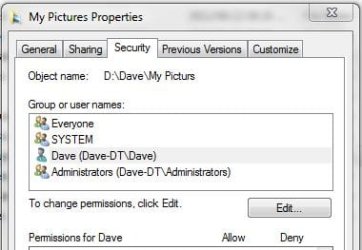
This however has all now been rectified however if I go to Properties of the now My Pictures folder I see that the Object Name is still "My Picturs" under the Security or Sharing tab.
Also I do not see My Pictures Folder reflected if I wanted to add it to the library however I can navigate to it within Windows Explorer.
My question is how can I now edit the Object Name of which I have attached a copy to see what I am talking about.
Searching the registry for "My Picturs" has brought up no results.
Your help and assistance to a silly tired error of mine would be apreciated.
With thanks
Dave Peter
I would be grateful if someone may be able to assist me.
I renamed my "My Pictures" folder to a different name and then also renamed it in the registry under the following key HKEY_Current User\Software\Microsoft\Windows\Current Version\Explorer\User Shell Folders.
I then renamed it back to "My Pictures" after it did not bring the desired change hoped for, however in the registry I had made an error in renaming where I renamed the Value Data key to "My Picturs" without the "e."
This however has all now been rectified however if I go to Properties of the now My Pictures folder I see that the Object Name is still "My Picturs" under the Security or Sharing tab.
Also I do not see My Pictures Folder reflected if I wanted to add it to the library however I can navigate to it within Windows Explorer.
My question is how can I now edit the Object Name of which I have attached a copy to see what I am talking about.
Searching the registry for "My Picturs" has brought up no results.
Your help and assistance to a silly tired error of mine would be apreciated.
With thanks
Dave Peter
Attachments
My Computer
At a glance
Windows 7 SP1Intel R Core2 GBATI Mobility Radeon HD 5470
- Computer type
- Laptop
- Computer Manufacturer/Model Number
- Toshiba
- OS
- Windows 7 SP1
- CPU
- Intel R Core
- Memory
- 2 GB
- Graphics Card(s)
- ATI Mobility Radeon HD 5470
- Monitor(s) Displays
- Generic PNP Monitor
- Screen Resolution
- 1366 * 786
- Hard Drives
- Toshiba MK5065GSXN ATA Device
- PSU
- Intel Core Duo 5 Processor
- Other Info
- Laptop Machine


