Folder Template - Change

How to Change a Folder Template in Windows 7

   Information
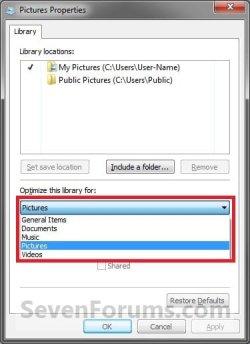
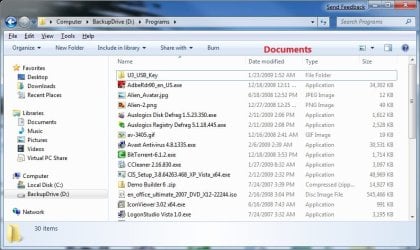
This will show you how to change a folder template in Windows Explorer to have it optimized as either a General Items, Documents, Pictures, Music, or Videos folder in Windows 7.


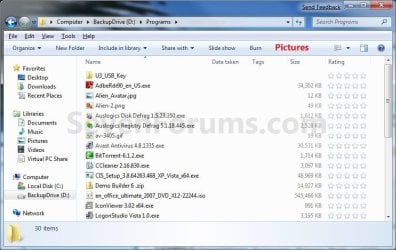
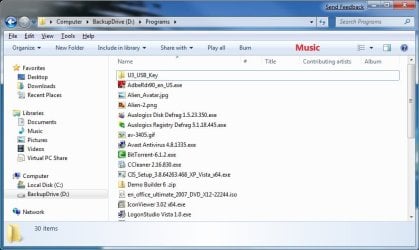
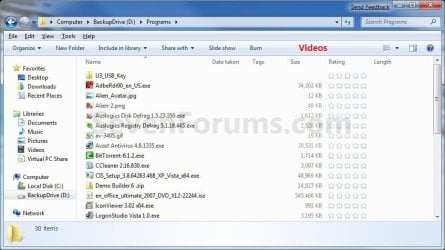
EXAMPLE: General Items, Documents, Pictures, Music, and Videos templates
NOTE: These screenshots are with using the Details view. What you see in your window will also depend on what you have the View arrangement, Group by, Sort by, Stack by arrangement, or icon size set as.
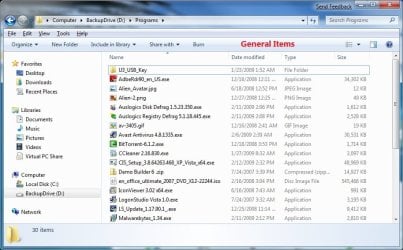
General_Items.jpg

Documents.jpg

Pictures.jpg

Music.jpg

Videos.jpg


OPTION ONE

To Change Template of a Folder or Drive in Windows Explorer

1. Open Windows Explorer, and do step 2, 3, or 4 below for what you would like to do.

2. Right click on a folder or drive that you want to change the template of, click on Properties.
NOTE: You will not be able to do this for the C: drive that you current Windows 7 is installed on, and also not for the folders in the root directory of C:. A) Go to step 5 below.
OR

3. Open a folder that you want to change the template of, click on View (menu bar), and click on Customize This Folder. (see screenshot below) View.jpg
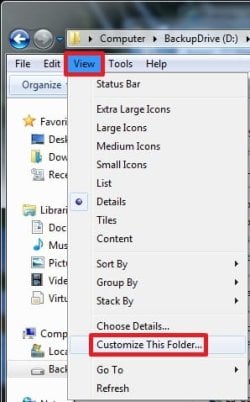
A) Go to step 5 below.
OR

4. Open a folder that you want to change the template of, right click on a empty space in the window, and click on Customize This Folder. (see screenshot below) Right_Click.jpg
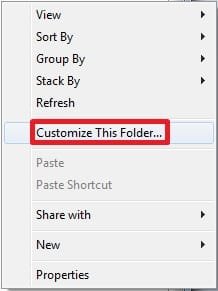
A) Go to step 5 below.
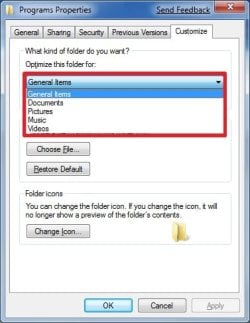
5. Click on the Customize tab. Under What kind of folder do you want, select the folder template that you want to have the folder optimized for, and click on OK. (See screenshots below)
NOTE: If you wish to also apply this template to all subfolders in this folder, then check that box as well. Properties1.jpgProperties2.jpg


OPTION TWO

To Change Template of a Library


NOTE: All included folders in a library will share the same folder template. 1. Open the Libraries folder.

2. Right click on the library folder (ex: Pictures) that you want to change the folder template for, and click on Properties. (See screenshot below) Library_Folders.jpg
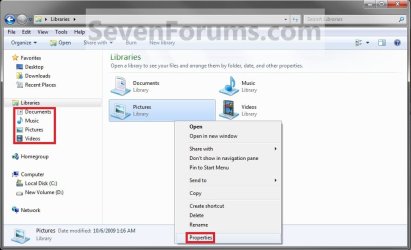
3. Under Optimize this library for, select the folder template that you want for the library and click OK. (See screenshots below) Library_Properties1.jpgLibrary_Properties2.jpg
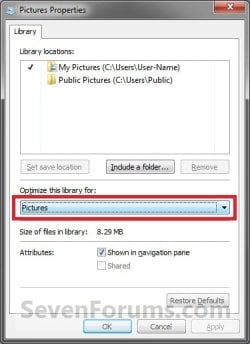
That's it,
Shawn


Last edited:
Thanks for information....,
try it...:D:cool:
 

My Computer

Computer Manufacturer/Model Number
Biostar
OS
Windows 7
CPU
Inntel Core 2 Duo E7300
Motherboard
Biostar
Memory
! Gb
Graphics Card(s)
Geoforce 7300
Sound Card
Realtek
Monitor(s) Displays
Samsung CRT 17"
Hard Drives
Seagate
PSU
Simbada
Case
simbada
Cooling
Fan Standart
You're welcome Arissetiadi, and welcome to Seven Forums. :)
 

My Computer

Computer type
PC/Desktop
Computer Manufacturer/Model Number
Self built custom
OS
64-bit Windows 11 Pro for Workstations
CPU
Intel i7-8700K OC'd to 5 GHz
Motherboard
ASUS ROG Maximus XI Formula Z390
Memory
64 GB (4x16GB) G.SKILL TridentZ RGB DDR4 3600 MHz
Graphics Card(s)
ASUS ROG-STRIX-GTX1080TI-O11G-GAMING
Sound Card
Integrated
Monitor(s) Displays
2 x Samsung Odyssey G7 27"
Screen Resolution
2560x1440
Hard Drives
1TB Samsung 990 PRO M.2,
4TB Samsung 990 PRO PRO M.2,
TerraMaster F8 SSD Plus NAS
PSU
Seasonic Prime Titanium 850W
Case
Thermaltake Core P3
Cooling
Corsair Hydro H115i
Keyboard
Logitech wireless K800
Mouse
Logitech MX Master 4
Internet Speed
2 Gb/s Download and 100 Mb/s Upload
Antivirus
Malwarebyte Anti-Malware Premium
Browser
Google Chrome
Other Info
Logitech Z625 speaker system,
Logitech BRIO 4K Pro webcam,
HP Color LaserJet Pro MFP M477fdn,
APC SMART-UPS RT 1000 XL - SURT1000XLI,
Galaxy S23 Plus phone
I have a bit more of a complicated issue. My Windows 7 install doesn't seem to properly display my "Contacts" folder as being for contacts. I.e. I do not have the additional contact-specific options like "Import / Export" etc on my toolbar. There are plenty of solutions out there for Vista to correct this, where one needs only "Customize this folder", select "Contacts" from the list, and you're done. However, this is not available for Windows 7... If you can figure out a solution to this issue, that would be great. I am computer savvy, and still I actually tried contacting Microsoft technical support via a chat session and let him remote desktop to see what he could do, but he couldn't figure it out either (for a good hour and with consultation with other tech support people), and he had to mark the issue as "unresolved".

Thoughts?
 

My Computer

OS
Windows 7 Home Premium

My Computer

Computer type
PC/Desktop
Computer Manufacturer/Model Number
Self built custom
OS
64-bit Windows 11 Pro for Workstations
CPU
Intel i7-8700K OC'd to 5 GHz
Motherboard
ASUS ROG Maximus XI Formula Z390
Memory
64 GB (4x16GB) G.SKILL TridentZ RGB DDR4 3600 MHz
Graphics Card(s)
ASUS ROG-STRIX-GTX1080TI-O11G-GAMING
Sound Card
Integrated
Monitor(s) Displays
2 x Samsung Odyssey G7 27"
Screen Resolution
2560x1440
Hard Drives
1TB Samsung 990 PRO M.2,
4TB Samsung 990 PRO PRO M.2,
TerraMaster F8 SSD Plus NAS
PSU
Seasonic Prime Titanium 850W
Case
Thermaltake Core P3
Cooling
Corsair Hydro H115i
Keyboard
Logitech wireless K800
Mouse
Logitech MX Master 4
Internet Speed
2 Gb/s Download and 100 Mb/s Upload
Antivirus
Malwarebyte Anti-Malware Premium
Browser
Google Chrome
Other Info
Logitech Z625 speaker system,
Logitech BRIO 4K Pro webcam,
HP Color LaserJet Pro MFP M477fdn,
APC SMART-UPS RT 1000 XL - SURT1000XLI,
Galaxy S23 Plus phone
It worked like a charm, thanks! Hopefully this helps some other people, as there isn't a lot of visibility for trying to fix a contacts folder for Windows 7 -a Google search shows it all is for Vista, which isn't applicable in this case! Maybe Microsoft tech support will stumble across this so they themselves can fix the problem... :D
 

My Computer

OS
Windows 7 Home Premium
You're welcome Supe. :)
 

My Computer

Computer type
PC/Desktop
Computer Manufacturer/Model Number
Self built custom
OS
64-bit Windows 11 Pro for Workstations
CPU
Intel i7-8700K OC'd to 5 GHz
Motherboard
ASUS ROG Maximus XI Formula Z390
Memory
64 GB (4x16GB) G.SKILL TridentZ RGB DDR4 3600 MHz
Graphics Card(s)
ASUS ROG-STRIX-GTX1080TI-O11G-GAMING
Sound Card
Integrated
Monitor(s) Displays
2 x Samsung Odyssey G7 27"
Screen Resolution
2560x1440
Hard Drives
1TB Samsung 990 PRO M.2,
4TB Samsung 990 PRO PRO M.2,
TerraMaster F8 SSD Plus NAS
PSU
Seasonic Prime Titanium 850W
Case
Thermaltake Core P3
Cooling
Corsair Hydro H115i
Keyboard
Logitech wireless K800
Mouse
Logitech MX Master 4
Internet Speed
2 Gb/s Download and 100 Mb/s Upload
Antivirus
Malwarebyte Anti-Malware Premium
Browser
Google Chrome
Other Info
Logitech Z625 speaker system,
Logitech BRIO 4K Pro webcam,
HP Color LaserJet Pro MFP M477fdn,
APC SMART-UPS RT 1000 XL - SURT1000XLI,
Galaxy S23 Plus phone
Thanks Brink for another great tutorial, for some reason i was missing the menu taskbar in my folders , perhaps another one of Win 7 strange defaults , but once i restored that , it went well and it keeps the new settings even after renaming or moving a folder. This was the last costomization to do. i now feel i have the perfect OS. i'm gonna do a backup of that on DVDs before i install any programs. my bare bone OS is 25.2GB

your forum and support made the difference between fuillure and success
 

My Computer

Computer Manufacturer/Model Number
BlueDove Custom
OS
Windows 7 Enterprise (x64)
CPU
Intel i7 860 Quad Core
Motherboard
Intel DP55KG
Memory
4GB @ 1600Mhz Kingston with XMP
Graphics Card(s)
ENGTS250 Dark Knight cooler (1GB GDDR3)
Sound Card
onboard -- Realtek HD
Monitor(s) Displays
Samsung SyncMaster 245T with MagicRotation
Screen Resolution
1920 x 1200
Hard Drives
2 x 150GB raptor 10,000rpm
1 x 2000GB Black Caviar 7,200rpm
1 x 2000GB Green Caviar 7,200rpm
2 x 2000GB Green Caviar 5,400rpm
PSU
Thermaltake TR2 RX 750W
Case
Antec p182
Cooling
Corsair liquid cooler
Keyboard
Microsoft comfort curve 2000
Mouse
Microsoft comfort serie 4500
Internet Speed
180KB/s
Other Info
Backup Drives:
4 Bay Enclosure Mediasonic
4 x 2000GB Green Caviar
You're most welcome BlueDove. Thank you. :)
 

My Computer

Computer type
PC/Desktop
Computer Manufacturer/Model Number
Self built custom
OS
64-bit Windows 11 Pro for Workstations
CPU
Intel i7-8700K OC'd to 5 GHz
Motherboard
ASUS ROG Maximus XI Formula Z390
Memory
64 GB (4x16GB) G.SKILL TridentZ RGB DDR4 3600 MHz
Graphics Card(s)
ASUS ROG-STRIX-GTX1080TI-O11G-GAMING
Sound Card
Integrated
Monitor(s) Displays
2 x Samsung Odyssey G7 27"
Screen Resolution
2560x1440
Hard Drives
1TB Samsung 990 PRO M.2,
4TB Samsung 990 PRO PRO M.2,
TerraMaster F8 SSD Plus NAS
PSU
Seasonic Prime Titanium 850W
Case
Thermaltake Core P3
Cooling
Corsair Hydro H115i
Keyboard
Logitech wireless K800
Mouse
Logitech MX Master 4
Internet Speed
2 Gb/s Download and 100 Mb/s Upload
Antivirus
Malwarebyte Anti-Malware Premium
Browser
Google Chrome
Other Info
Logitech Z625 speaker system,
Logitech BRIO 4K Pro webcam,
HP Color LaserJet Pro MFP M477fdn,
APC SMART-UPS RT 1000 XL - SURT1000XLI,
Galaxy S23 Plus phone
Customize this folder missing

I only see Choose Details? I want to be able to type the first few characters of a folder when I open up My Documents. At present when I type characters, Explorer jumps to files instead of folders. I want it to look for folder names before searching files.
 

My Computer

Computer Manufacturer/Model Number
Gateway M6827
OS
Win 7 Professional 32-bit
CPU
Intel Core 2 Duo CPU T5750 @ 2.00 GHz
Memory
3GB
Monitor(s) Displays
ViewSonic Vx900
Screen Resolution
1280x1024
Hard Drives
150GB Hard Drive
Hello Nabilalk,

What is the folder location that does not have the Customize this folder option as described in step 2 and step 3?
 

My Computer

Computer type
PC/Desktop
Computer Manufacturer/Model Number
Self built custom
OS
64-bit Windows 11 Pro for Workstations
CPU
Intel i7-8700K OC'd to 5 GHz
Motherboard
ASUS ROG Maximus XI Formula Z390
Memory
64 GB (4x16GB) G.SKILL TridentZ RGB DDR4 3600 MHz
Graphics Card(s)
ASUS ROG-STRIX-GTX1080TI-O11G-GAMING
Sound Card
Integrated
Monitor(s) Displays
2 x Samsung Odyssey G7 27"
Screen Resolution
2560x1440
Hard Drives
1TB Samsung 990 PRO M.2,
4TB Samsung 990 PRO PRO M.2,
TerraMaster F8 SSD Plus NAS
PSU
Seasonic Prime Titanium 850W
Case
Thermaltake Core P3
Cooling
Corsair Hydro H115i
Keyboard
Logitech wireless K800
Mouse
Logitech MX Master 4
Internet Speed
2 Gb/s Download and 100 Mb/s Upload
Antivirus
Malwarebyte Anti-Malware Premium
Browser
Google Chrome
Other Info
Logitech Z625 speaker system,
Logitech BRIO 4K Pro webcam,
HP Color LaserJet Pro MFP M477fdn,
APC SMART-UPS RT 1000 XL - SURT1000XLI,
Galaxy S23 Plus phone
Hello Nabilalk,

What is the folder location that does not have the Customize this folder option as described in step 2 and step 3?
No folders in my Libraries have the customize this folder option. Only folders outside of Libraries.
 

My Computer

Computer Manufacturer/Model Number
Gateway M6827
OS
Win 7 Professional 32-bit
CPU
Intel Core 2 Duo CPU T5750 @ 2.00 GHz
Memory
3GB
Monitor(s) Displays
ViewSonic Vx900
Screen Resolution
1280x1024
Hard Drives
150GB Hard Drive
Ah, that would be why then.

The folder template for individual Library subfolders, Computer, or root directories like the C: drive cannot be changed in Windows 7.

You will only be able to do OPTION TWO to change the folder template for everything in a library instead.

Hope this helps,
Shawn
 

My Computer

Computer type
PC/Desktop
Computer Manufacturer/Model Number
Self built custom
OS
64-bit Windows 11 Pro for Workstations
CPU
Intel i7-8700K OC'd to 5 GHz
Motherboard
ASUS ROG Maximus XI Formula Z390
Memory
64 GB (4x16GB) G.SKILL TridentZ RGB DDR4 3600 MHz
Graphics Card(s)
ASUS ROG-STRIX-GTX1080TI-O11G-GAMING
Sound Card
Integrated
Monitor(s) Displays
2 x Samsung Odyssey G7 27"
Screen Resolution
2560x1440
Hard Drives
1TB Samsung 990 PRO M.2,
4TB Samsung 990 PRO PRO M.2,
TerraMaster F8 SSD Plus NAS
PSU
Seasonic Prime Titanium 850W
Case
Thermaltake Core P3
Cooling
Corsair Hydro H115i
Keyboard
Logitech wireless K800
Mouse
Logitech MX Master 4
Internet Speed
2 Gb/s Download and 100 Mb/s Upload
Antivirus
Malwarebyte Anti-Malware Premium
Browser
Google Chrome
Other Info
Logitech Z625 speaker system,
Logitech BRIO 4K Pro webcam,
HP Color LaserJet Pro MFP M477fdn,
APC SMART-UPS RT 1000 XL - SURT1000XLI,
Galaxy S23 Plus phone
Ah, that would be why then.

The folder template for individual Library subfolders, Computer, or root directories like the C: drive cannot be changed in Windows 7.

You will only be able to do OPTION TWO to change the folder template for everything in a library instead.

Hope this helps,
Shawn

Well that stinks :p
 

My Computer

Computer Manufacturer/Model Number
Gateway M6827
OS
Win 7 Professional 32-bit
CPU
Intel Core 2 Duo CPU T5750 @ 2.00 GHz
Memory
3GB
Monitor(s) Displays
ViewSonic Vx900
Screen Resolution
1280x1024
Hard Drives
150GB Hard Drive
Well, you could also open the folders from their original locations (ex: C:\Users\(user-name)\Pictures) instead of through the library. This way you will be able to change the folder templates of it.
 

My Computer

Computer type
PC/Desktop
Computer Manufacturer/Model Number
Self built custom
OS
64-bit Windows 11 Pro for Workstations
CPU
Intel i7-8700K OC'd to 5 GHz
Motherboard
ASUS ROG Maximus XI Formula Z390
Memory
64 GB (4x16GB) G.SKILL TridentZ RGB DDR4 3600 MHz
Graphics Card(s)
ASUS ROG-STRIX-GTX1080TI-O11G-GAMING
Sound Card
Integrated
Monitor(s) Displays
2 x Samsung Odyssey G7 27"
Screen Resolution
2560x1440
Hard Drives
1TB Samsung 990 PRO M.2,
4TB Samsung 990 PRO PRO M.2,
TerraMaster F8 SSD Plus NAS
PSU
Seasonic Prime Titanium 850W
Case
Thermaltake Core P3
Cooling
Corsair Hydro H115i
Keyboard
Logitech wireless K800
Mouse
Logitech MX Master 4
Internet Speed
2 Gb/s Download and 100 Mb/s Upload
Antivirus
Malwarebyte Anti-Malware Premium
Browser
Google Chrome
Other Info
Logitech Z625 speaker system,
Logitech BRIO 4K Pro webcam,
HP Color LaserJet Pro MFP M477fdn,
APC SMART-UPS RT 1000 XL - SURT1000XLI,
Galaxy S23 Plus phone

My Computer

Computer Manufacturer/Model Number
Gateway M6827
OS
Win 7 Professional 32-bit
CPU
Intel Core 2 Duo CPU T5750 @ 2.00 GHz
Memory
3GB
Monitor(s) Displays
ViewSonic Vx900
Screen Resolution
1280x1024
Hard Drives
150GB Hard Drive
Sorry, but you lost me. I do not see what searching for a folder in a library has to do with the folder template or changing the folder view. :huh:
 

My Computer

Computer type
PC/Desktop
Computer Manufacturer/Model Number
Self built custom
OS
64-bit Windows 11 Pro for Workstations
CPU
Intel i7-8700K OC'd to 5 GHz
Motherboard
ASUS ROG Maximus XI Formula Z390
Memory
64 GB (4x16GB) G.SKILL TridentZ RGB DDR4 3600 MHz
Graphics Card(s)
ASUS ROG-STRIX-GTX1080TI-O11G-GAMING
Sound Card
Integrated
Monitor(s) Displays
2 x Samsung Odyssey G7 27"
Screen Resolution
2560x1440
Hard Drives
1TB Samsung 990 PRO M.2,
4TB Samsung 990 PRO PRO M.2,
TerraMaster F8 SSD Plus NAS
PSU
Seasonic Prime Titanium 850W
Case
Thermaltake Core P3
Cooling
Corsair Hydro H115i
Keyboard
Logitech wireless K800
Mouse
Logitech MX Master 4
Internet Speed
2 Gb/s Download and 100 Mb/s Upload
Antivirus
Malwarebyte Anti-Malware Premium
Browser
Google Chrome
Other Info
Logitech Z625 speaker system,
Logitech BRIO 4K Pro webcam,
HP Color LaserJet Pro MFP M477fdn,
APC SMART-UPS RT 1000 XL - SURT1000XLI,
Galaxy S23 Plus phone
Sorry, but you lost me. I do not see what searching for a folder in a library has to do with the folder template or changing the folder view. :huh:

I thought the folder template could be set to remember the settings for specific folders. I like to navigate with the keyboard and when I open up a folder I like to type the name of the folder that I want to quick-navigate to. In the Library folders, Explorer quick navigates to files versus folders. In the non-Library folders, folders are navigated to first and files second.
 

My Computer

Computer Manufacturer/Model Number
Gateway M6827
OS
Win 7 Professional 32-bit
CPU
Intel Core 2 Duo CPU T5750 @ 2.00 GHz
Memory
3GB
Monitor(s) Displays
ViewSonic Vx900
Screen Resolution
1280x1024
Hard Drives
150GB Hard Drive
Back
Top