
Folders on desktop not showing what's inside

Try this, from the start menu RT click Computer/Properties, in the right pane of the window that opens, click Advanced system settings. Under the performance box click Settings. In the Visual effects tab check the box shown, show thumbnails instead of icons, OK,OK, close system properties.

http://www.sevenforums.com/tutorials/11738-thumbnail-previews-enable-disable.html

I tried this by toggling this option and it should work for both of you.
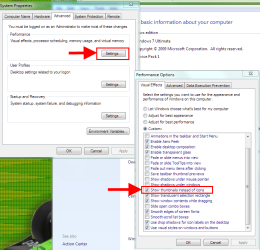
Capture.PNG
 
Last edited by a moderator:

My Computer My Computer

At a glance

Windows 7 Ultimate X64 SP1Intel i5-2550K, Differing ~4.4-4.8GHz No buil...16GB G.Skill Sniper 1866MHz @ 2133MHz 2x8GBASUS GTX650TIB-DC2OC-2GD5, (650TI Boost)
Computer type
PC/Desktop
Computer Manufacturer/Model Number
Home Built Desktop By DataTech
OS
Windows 7 Ultimate X64 SP1
CPU
Intel i5-2550K, Differing ~4.4-4.8GHz No built in GPU
Motherboard
ASUS P8Z68-V PRO/GEN3
Memory
16GB G.Skill Sniper 1866MHz @ 2133MHz 2x8GB
Graphics Card(s)
ASUS GTX650TIB-DC2OC-2GD5, (650TI Boost)
Sound Card
Onboard Realtek 5-1
Monitor(s) Displays
Samsung P2570HD
Screen Resolution
1920x1080
Hard Drives
Samsung 840 Pro 256GB SSD for OS, 500GB Seagate Constellation (Enterprise drive) for Data
PSU
Corsair HX650W
Case
Inwin Dragon Rider
Cooling
Hyper 212 EVO w/two Noctua fans, push-pull, @1300 RPM
Keyboard
E-Z Eyes, bright yellow keys with large characters
Mouse
steelseries SENSEI Laser Pro Gaming
Internet Speed
48-51Mbs Mbs down, 11 Mbs up Xfinity Cable
Antivirus
Norton Internet Security 2013
Browser
IE 10, Opera, Pale Moon if needed
Other Info
4 case fans, LG BluRay-RE, ASUS DVD-RW, Mr. Fusion power supply, 1.21 gigawatts.
Thanks but sorry Britton30 it didn't work. I did as you suggested (start button, right click on computer, select properties on bottom, Advanced System Settings is actually on left pane, Advanced tab, Settings, Show Thumbnails instead of icon was already checked. So I unchecked it, hit apply, ok and ok again and re-booted PC. The repeated the process only this time I DID CHECK the box, hit apply and ok, ok and re-booted again and still no cute little pages and pictures showing on desktop folders.
 

My Computer My Computer

At a glance

Windows 7 64-bit Home PremiumCore i7 92012GBNvidia 9800 GT
Computer Manufacturer/Model Number
HP m9650f
OS
Windows 7 64-bit Home Premium
CPU
Core i7 920
Motherboard
Intel X58
Memory
12GB
Graphics Card(s)
Nvidia 9800 GT
Sound Card
on board
Monitor(s) Displays
Syncmaster P2370
Screen Resolution
1920x1080
Hard Drives
WD 1 TB
PSU
Corsair 650
Case
HP
Cooling
air

My Computer My Computer

At a glance

Windows 7 Ultimate X64 SP1Intel i5-2550K, Differing ~4.4-4.8GHz No buil...16GB G.Skill Sniper 1866MHz @ 2133MHz 2x8GBASUS GTX650TIB-DC2OC-2GD5, (650TI Boost)
Computer type
PC/Desktop
Computer Manufacturer/Model Number
Home Built Desktop By DataTech
OS
Windows 7 Ultimate X64 SP1
CPU
Intel i5-2550K, Differing ~4.4-4.8GHz No built in GPU
Motherboard
ASUS P8Z68-V PRO/GEN3
Memory
16GB G.Skill Sniper 1866MHz @ 2133MHz 2x8GB
Graphics Card(s)
ASUS GTX650TIB-DC2OC-2GD5, (650TI Boost)
Sound Card
Onboard Realtek 5-1
Monitor(s) Displays
Samsung P2570HD
Screen Resolution
1920x1080
Hard Drives
Samsung 840 Pro 256GB SSD for OS, 500GB Seagate Constellation (Enterprise drive) for Data
PSU
Corsair HX650W
Case
Inwin Dragon Rider
Cooling
Hyper 212 EVO w/two Noctua fans, push-pull, @1300 RPM
Keyboard
E-Z Eyes, bright yellow keys with large characters
Mouse
steelseries SENSEI Laser Pro Gaming
Internet Speed
48-51Mbs Mbs down, 11 Mbs up Xfinity Cable
Antivirus
Norton Internet Security 2013
Browser
IE 10, Opera, Pale Moon if needed
Other Info
4 case fans, LG BluRay-RE, ASUS DVD-RW, Mr. Fusion power supply, 1.21 gigawatts.
ran it ... all systems normal
 

My Computer My Computer

At a glance

Windows 7 64-bit Home PremiumCore i7 92012GBNvidia 9800 GT
Computer Manufacturer/Model Number
HP m9650f
OS
Windows 7 64-bit Home Premium
CPU
Core i7 920
Motherboard
Intel X58
Memory
12GB
Graphics Card(s)
Nvidia 9800 GT
Sound Card
on board
Monitor(s) Displays
Syncmaster P2370
Screen Resolution
1920x1080
Hard Drives
WD 1 TB
PSU
Corsair 650
Case
HP
Cooling
air
My problems is that the previews are there and may be there for days but then will disappear. It may happen when there is some activity in the folder but the other day they disappeared when I did something completely unrelated to the folder.

bordercollie did you try resetting your icon cache and/or doing my workaround which is restoring the default icon for the folder? I have to do it through Explorer (desktop) first then (sometimes) the folder itself.
 

My Computer My Computer

At a glance

Win 7 Home Premium x64Intel Core i3-540 3.07 GHz4 GB (2 X 2) Dual-Channel PC-10600 DDR3 @ 665...Integrated Intel H57
Computer Manufacturer/Model Number
HP p6608f
OS
Win 7 Home Premium x64
CPU
Intel Core i3-540 3.07 GHz
Motherboard
MS-7613 (Iona-GL8E)
Memory
4 GB (2 X 2) Dual-Channel PC-10600 DDR3 @ 665MHz (9-9-9-24)
Graphics Card(s)
Integrated Intel H57
Sound Card
Integrated Realtek ALC888S Audio
Monitor(s) Displays
17" SDM-HS73 (a vestige from my old computer)
Screen Resolution
1280 X 1024
Hard Drives
750GB SATA 7200 RPM
PSU
250W
Keyboard
HP USB keyboard
Mouse
HP USB optical mouse
Internet Speed
15Mbps/1Mbps
Sorry guys (or gals) I have no other ideas. :(
 

My Computer My Computer

At a glance

Windows 7 Ultimate X64 SP1Intel i5-2550K, Differing ~4.4-4.8GHz No buil...16GB G.Skill Sniper 1866MHz @ 2133MHz 2x8GBASUS GTX650TIB-DC2OC-2GD5, (650TI Boost)
Computer type
PC/Desktop
Computer Manufacturer/Model Number
Home Built Desktop By DataTech
OS
Windows 7 Ultimate X64 SP1
CPU
Intel i5-2550K, Differing ~4.4-4.8GHz No built in GPU
Motherboard
ASUS P8Z68-V PRO/GEN3
Memory
16GB G.Skill Sniper 1866MHz @ 2133MHz 2x8GB
Graphics Card(s)
ASUS GTX650TIB-DC2OC-2GD5, (650TI Boost)
Sound Card
Onboard Realtek 5-1
Monitor(s) Displays
Samsung P2570HD
Screen Resolution
1920x1080
Hard Drives
Samsung 840 Pro 256GB SSD for OS, 500GB Seagate Constellation (Enterprise drive) for Data
PSU
Corsair HX650W
Case
Inwin Dragon Rider
Cooling
Hyper 212 EVO w/two Noctua fans, push-pull, @1300 RPM
Keyboard
E-Z Eyes, bright yellow keys with large characters
Mouse
steelseries SENSEI Laser Pro Gaming
Internet Speed
48-51Mbs Mbs down, 11 Mbs up Xfinity Cable
Antivirus
Norton Internet Security 2013
Browser
IE 10, Opera, Pale Moon if needed
Other Info
4 case fans, LG BluRay-RE, ASUS DVD-RW, Mr. Fusion power supply, 1.21 gigawatts.
I ran Disk Cleanup then selected Thumbnails.
Then I right-clicked on the desktop folders, selected Customize, then change icon. I changed it to a a folder with something in it as that's what I want. LOL Hit Apply, OK and RE-BOOTED.
Went back to desktop folders, right-click > Customize and changed their view back to default and re-booted.
No work.
I just rand Dick Cleaner again and I see 1MB of Thumbnails to be removed. I'm not expecting it to work but if it does, I'll post back here again. If I don't post, you know two runs of Disk Cleaner then Thumbnails did not work.
 

My Computer My Computer

At a glance

Windows 7 64-bit Home PremiumCore i7 92012GBNvidia 9800 GT
Computer Manufacturer/Model Number
HP m9650f
OS
Windows 7 64-bit Home Premium
CPU
Core i7 920
Motherboard
Intel X58
Memory
12GB
Graphics Card(s)
Nvidia 9800 GT
Sound Card
on board
Monitor(s) Displays
Syncmaster P2370
Screen Resolution
1920x1080
Hard Drives
WD 1 TB
PSU
Corsair 650
Case
HP
Cooling
air
Did you ever try to change the default folder icon used by all folders, or use some sort of custom theme that may be the cause of this?

This is driving me absolutely crazy. Now it is happening with music folders that didn't used to do it.

What if I did what you mentuion somehow changed a default folder icon. What can I do to restore everything?
 

My Computer My Computer

At a glance

Win 7 Home Premium x64Intel Core i3-540 3.07 GHz4 GB (2 X 2) Dual-Channel PC-10600 DDR3 @ 665...Integrated Intel H57
Computer Manufacturer/Model Number
HP p6608f
OS
Win 7 Home Premium x64
CPU
Intel Core i3-540 3.07 GHz
Motherboard
MS-7613 (Iona-GL8E)
Memory
4 GB (2 X 2) Dual-Channel PC-10600 DDR3 @ 665MHz (9-9-9-24)
Graphics Card(s)
Integrated Intel H57
Sound Card
Integrated Realtek ALC888S Audio
Monitor(s) Displays
17" SDM-HS73 (a vestige from my old computer)
Screen Resolution
1280 X 1024
Hard Drives
750GB SATA 7200 RPM
PSU
250W
Keyboard
HP USB keyboard
Mouse
HP USB optical mouse
Internet Speed
15Mbps/1Mbps
Run a scan of Malwarebytes, run it in safemode if needed.
This might even be caused by crap software.
 

My Computer My Computer

At a glance

Windows 7 Ultimate SP1 x64/Ubuntu 11
OS
Windows 7 Ultimate SP1 x64/Ubuntu 11
Hi,

I found this thread whilst googling the same happening for me. It's driving me potty too :(

I have found it does this with folders created on the desktop. Folders created in My Documents and then dragged over are fine.

Weird.
 

My Computer My Computer

At a glance

Win7 HP x64
OS
Win7 HP x64
MissBrb - I had to try what you said has worked for you but alas, it did not work for moi.
 

My Computer My Computer

At a glance

Windows 7 64-bit Home PremiumCore i7 92012GBNvidia 9800 GT
Computer Manufacturer/Model Number
HP m9650f
OS
Windows 7 64-bit Home Premium
CPU
Core i7 920
Motherboard
Intel X58
Memory
12GB
Graphics Card(s)
Nvidia 9800 GT
Sound Card
on board
Monitor(s) Displays
Syncmaster P2370
Screen Resolution
1920x1080
Hard Drives
WD 1 TB
PSU
Corsair 650
Case
HP
Cooling
air
OK, out of the blue (not BSOD. LOL) all of a sudden, my desktop folders have pages showing !!! :D :D :D
I didn't do anything - no updates, no registry tweaks nothing.
I'm just happy they are showing life, I mean contents instead of empty folders.
 

My Computer My Computer

At a glance

Windows 7 64-bit Home PremiumCore i7 92012GBNvidia 9800 GT
Computer Manufacturer/Model Number
HP m9650f
OS
Windows 7 64-bit Home Premium
CPU
Core i7 920
Motherboard
Intel X58
Memory
12GB
Graphics Card(s)
Nvidia 9800 GT
Sound Card
on board
Monitor(s) Displays
Syncmaster P2370
Screen Resolution
1920x1080
Hard Drives
WD 1 TB
PSU
Corsair 650
Case
HP
Cooling
air
OK, out of the blue (not BSOD. LOL) all of a sudden, my desktop folders have pages showing !!! :D :D :D
I didn't do anything - no updates, no registry tweaks nothing.
I'm just happy they are showing life, I mean contents instead of empty folders.

I figured someone would report they started working. Aren't computers fun. Glad they are working for you.

Of course mine still are wonky, and not just the desktop but my beloved music folders as well :cry: .
http://www.sevenforums.com/general-...s-about-how-folders-contents-displayed-2.html
I have my workaround for some of it but my obsessive-compulsive tendencies would really like to have this solved.
 

My Computer My Computer

At a glance

Win 7 Home Premium x64Intel Core i3-540 3.07 GHz4 GB (2 X 2) Dual-Channel PC-10600 DDR3 @ 665...Integrated Intel H57
Computer Manufacturer/Model Number
HP p6608f
OS
Win 7 Home Premium x64
CPU
Intel Core i3-540 3.07 GHz
Motherboard
MS-7613 (Iona-GL8E)
Memory
4 GB (2 X 2) Dual-Channel PC-10600 DDR3 @ 665MHz (9-9-9-24)
Graphics Card(s)
Integrated Intel H57
Sound Card
Integrated Realtek ALC888S Audio
Monitor(s) Displays
17" SDM-HS73 (a vestige from my old computer)
Screen Resolution
1280 X 1024
Hard Drives
750GB SATA 7200 RPM
PSU
250W
Keyboard
HP USB keyboard
Mouse
HP USB optical mouse
Internet Speed
15Mbps/1Mbps
For you all, you may have to try running sfc /scannow more than once.
If there are custom themes installed, remove them to see if that helps. the above procedure should reset any theme customization.
 

My Computer My Computer

At a glance

Windows 7 Ultimate X64 SP1Intel i5-2550K, Differing ~4.4-4.8GHz No buil...16GB G.Skill Sniper 1866MHz @ 2133MHz 2x8GBASUS GTX650TIB-DC2OC-2GD5, (650TI Boost)
Computer type
PC/Desktop
Computer Manufacturer/Model Number
Home Built Desktop By DataTech
OS
Windows 7 Ultimate X64 SP1
CPU
Intel i5-2550K, Differing ~4.4-4.8GHz No built in GPU
Motherboard
ASUS P8Z68-V PRO/GEN3
Memory
16GB G.Skill Sniper 1866MHz @ 2133MHz 2x8GB
Graphics Card(s)
ASUS GTX650TIB-DC2OC-2GD5, (650TI Boost)
Sound Card
Onboard Realtek 5-1
Monitor(s) Displays
Samsung P2570HD
Screen Resolution
1920x1080
Hard Drives
Samsung 840 Pro 256GB SSD for OS, 500GB Seagate Constellation (Enterprise drive) for Data
PSU
Corsair HX650W
Case
Inwin Dragon Rider
Cooling
Hyper 212 EVO w/two Noctua fans, push-pull, @1300 RPM
Keyboard
E-Z Eyes, bright yellow keys with large characters
Mouse
steelseries SENSEI Laser Pro Gaming
Internet Speed
48-51Mbs Mbs down, 11 Mbs up Xfinity Cable
Antivirus
Norton Internet Security 2013
Browser
IE 10, Opera, Pale Moon if needed
Other Info
4 case fans, LG BluRay-RE, ASUS DVD-RW, Mr. Fusion power supply, 1.21 gigawatts.
I'm watching this because I have exactly the same problem - still.

One day a month on average I will get the 'pages' showing then empty from there on.

Isn't it annoying :(
 

My Computer My Computer

At a glance

MSDN Home PremiumIntel i54GbATI Radeon HD 5770
Computer Manufacturer/Model Number
Novatech (UK) iRush Pro
OS
MSDN Home Premium
CPU
Intel i5
Motherboard
Intel DP55WB
Memory
4Gb
Graphics Card(s)
ATI Radeon HD 5770
Sound Card
On Board
Monitor(s) Displays
Philips 170B
Hard Drives
1 x 1Tb
(7 Partitions)
PSU
750W
Case
Antec 300
Cooling
Tricool Fans
Keyboard
Microsoft 3000 Wireless
Mouse
Microsoft 5000 Wireless BlueTrack
Internet Speed
6.1 Mbps
Back
Top