Font Sizes

Starmon

New member
Local time
8:20 AM
Messages
2
Location
Northern Front Range
How to increase the FontSize in 'Applications/Processes/Services/Performance/Networking/Users' in Task Manager in Windows 7 Home Premium 32bit. NONE OF THE ABOVE ANSWERS (From a Search on this Question), & that means the DPI increase doesn't effect Font Size in Task Manager & the Personalization/Theme Colors, .....Doesn't Even Come Close, to effecting a change. I can find no where in Registry to make a SIMPLE FONTSIZE change.... Now it seems to be at '9 point' Tahoma, I can hardly see it on my 24" ASUS. Resolution is NOT the Problem, COLOR is NOT the Problem, it is the SIZE !!! ******And Please Try the Solution on your Machine, before you suggest it to me, to make sure it is The Soluition*******
 
Last edited:

My Computer

Computer type
PC/Desktop
Computer Manufacturer/Model Number
Dell Vostro 1700
OS
Windows 7 Home Premium 32bit
CPU
Intel Mobile Core 2 Duo T9300
Motherboard
OHX767
Memory
4Gig
Graphics Card(s)
OnBoard
Sound Card
OnBoard
Monitor(s) Displays
OnBoard, 24" ASUS
Screen Resolution
1440x900
Hard Drives
Ricoh SD/MMC Disk Device
WD 10EAVS External USB Device
WDC WD1600BEVS-60RST0 ATA Device
WDC WD32 00BEVE-00A0HT0 USB Device
Cooling
OnBoard, 4" Rotary Fan
Keyboard
OnBoard
Mouse
MS Standard Wireless Optical
Antivirus
Comodo Internet Security Premium 10
Browser
Firefox 52.0.1 32-bit
Other Info
Think cosmic !!
Your post is hard to read in that colored font.

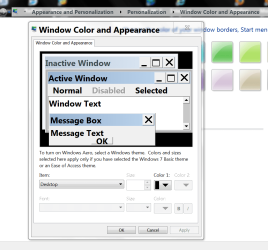
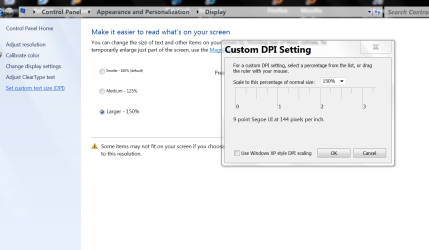
Have you been here to change font size and DPI.

Font Size.PNG

DPI.PNG


Jack
 

My Computer

Computer type
PC/Desktop
Computer Manufacturer/Model Number
Home made Desktop
OS
Windows 10 Pro. 64/ version 1709 Windows 7 Pro/64
CPU
Intel i7-6800K @ 4.3
Motherboard
ASUS X-99 Deluxe II
Memory
Corsair Platinum 16 gig @2400
Graphics Card(s)
EVGA GTX 1070 OC
Monitor(s) Displays
Asus 27" LED LCD/VE278Q
Screen Resolution
1920-1080 or 1280-720 HDMI
Hard Drives
INTEL SSD 730-240 Gb Sata 3.0/
PSU
EVGA Platium 1200W
Case
Phanteks Luxe Tempered Glass 8 fans/ one radiator
Cooling
XSPC/ Water Cooled CPU
Keyboard
Das 4 Professional
Mouse
Logitech M705/MX Anywhere 2-S
Internet Speed
100 mbits
Antivirus
Microsoft Security Essentials/ Malwarebytes Premium 3.0/ SAS
Browser
I.E. 11 default/Firefox/ ISP Time Warner Cable/Spectrum
Other Info
LG BluRay Burner/
Sound system-KLipsch-THX/
Icy Dock ssd Hot Swap bays.
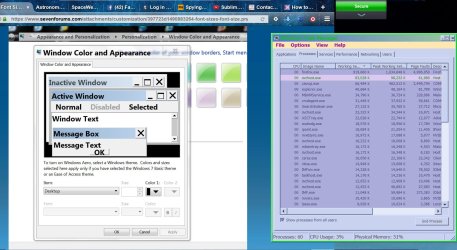
Well Jack, like I said none of those above 'fixes' worked. I tried the Ones you suggested first, they don't 'touch' the Task Manager Window..... By thanks for playing. I did manage to increase the MinWidth of each row, that does help readability, but as you can see the FONT is soooooo Small. And that's ALL I want to change.
 

Attachments

  • TaskManger.jpg
    TaskManger.jpg
    532.4 KB · Views: 3
Last edited:

My Computer

Computer type
PC/Desktop
Computer Manufacturer/Model Number
Dell Vostro 1700
OS
Windows 7 Home Premium 32bit
CPU
Intel Mobile Core 2 Duo T9300
Motherboard
OHX767
Memory
4Gig
Graphics Card(s)
OnBoard
Sound Card
OnBoard
Monitor(s) Displays
OnBoard, 24" ASUS
Screen Resolution
1440x900
Hard Drives
Ricoh SD/MMC Disk Device
WD 10EAVS External USB Device
WDC WD1600BEVS-60RST0 ATA Device
WDC WD32 00BEVE-00A0HT0 USB Device
Cooling
OnBoard, 4" Rotary Fan
Keyboard
OnBoard
Mouse
MS Standard Wireless Optical
Antivirus
Comodo Internet Security Premium 10
Browser
Firefox 52.0.1 32-bit
Other Info
Think cosmic !!
Back
Top