Fonts - Change

How to Change the Default Fonts in Windows 7

   Information
This will show you how to change most or all of the default fonts in Windows 7 for Active Title Bar, Icon, Inactive Title Bar, Menu, Message Box, Palette Title, Selected Items, ToolTip, and various Dialog Box text and buttons.

:warn:Changing a Windows 7 font doesn't change your program fonts.

For a list of all default fonts that come supplied with Windows 7, see: Fonts supplied with Windows 7


OPTION ONE

Through Advanced Appearance Settings


   Note
This will let you change the default font, font size, and font color for the Active Title Bar, Icon, Inactive Title Bar, Menu, Message Box, Palette Title, Selected Items, and ToolTip text. See this link under step 8 there for the default Advanced Appearance settings: http://www.sevenforums.com/tutorials/282-window-color-appearance-change.html
   Tip
All Advanced Appearance settings for a single user are stored in the three registry keys below.


  • HKEY_CURRENT_USER\Control Panel\Colors
  • HKEY_CURRENT_USER\Control Panel\Desktop\Colors
  • HKEY_CURRENT_USER\Control Panel\Desktop\WindowMetrics
1. If you have Windows 7 Starter or Home Basic
A) Open the Control Panel (icons view), and click on the Display icon.

B) In the left blue pane, click on the Change color scheme link. (see screenshot below)
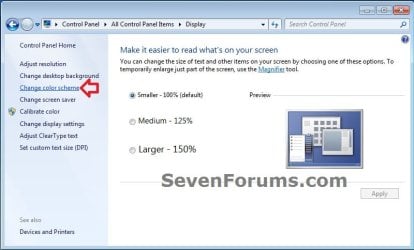
Starter_Basic-1.jpg
C) Click on the Advanced button. (see screenshot below)
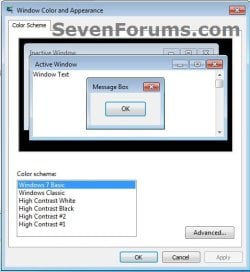
Starter_Basic-2.jpg
D) Go to step 3.
2. If you have Windows 7 Home Premium, Professional, Ultimate, or Enterprise
A) Right click on a empty space on the desktop and click on Personalize. (see screenshot below)
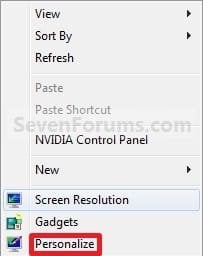
Right_Click.jpg
B) Click on the Window Color link at the bottom of the window. (See screenshot below)
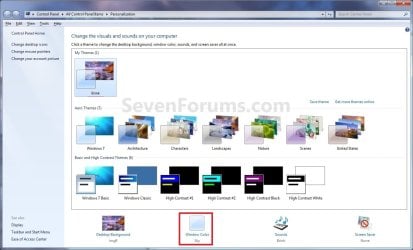
Personalize.jpg
C) Click on the Advanced appearance settings link. (See screenshot below)


   Warning

  • If you have selected a Basic and High Contrast Themes, then you will not see the screenshot. Instead, you will see the screenshot below step 4.
  • If you have selected a Aero Themes, then you will see the screenshot. Continue to step 4.
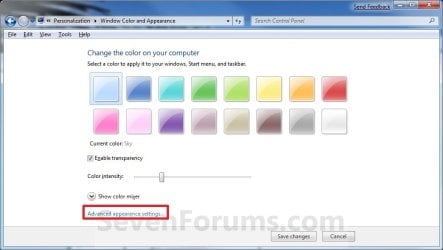
Color_and_Appearance-1.jpg
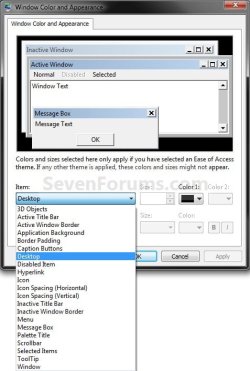
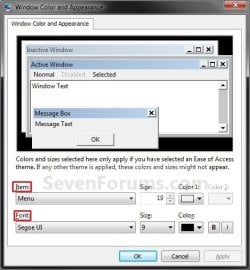
3. Select a Item that you want to change the font for. (see screenshots below)
NOTE: Not all of these items will have a font for them.
Classic_Color_and_Appearance-2.jpg

Classic_Color_and_Appearance-1.jpg

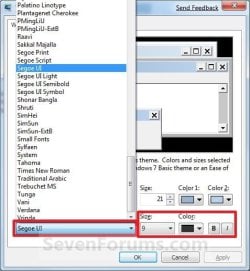
4. To Change the Item Font
A) Click on the Font drop down menu and select a font. (see screenshot below)
Select_Font.jpg
5. To Change the Item Font Size
A) Click on the Size drop down menu and select a number for the size. The higher the number, the larger the size. (see screenshot above)
6. To Change the Item Font Color
A) Click on the Color drop down menu and select a color. (see screenshot below step 4)
7. To Have the Item Font in Bold
A) Click the B button to highlight it. If it is not highlighted, then the font will not be in bold. (see screenshot below step 4)
8. To Have the Item Font in Italic
A) Click on the I button to highlight it. If it is not highlighted, then the font will not be in italic. (see screenshot below step 4)
9. Repeat steps 3 to 8 until you have changed all of the fonts for the select items that you wanted.

10. When done, click on OK. (see screenshots below step 3)

11. Close the Window Color and Appearance window. (see screenshot below step 2B)
NOTE: You will not have this to do if you have a Basic and High Contrast Themes selected.


OPTION TWO

To Change or Restore Default Dialog Box Text and Buttons Fonts


NOTE: This will let you change the default fonts for most of the Windows 7 dialog box text and button text through the registry.
1. To Change the Dialog Box Text and Buttons Fonts
A) Open the Start Menu, type regedit in the search box, and press Enter.

B) If prompted by UAC, then click on Yes.

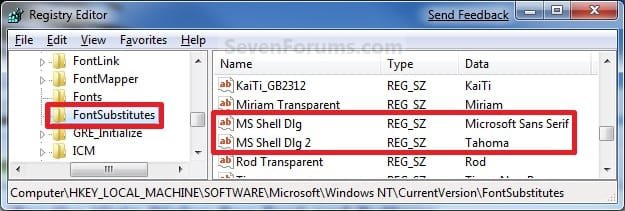
C) In regedit, navigate to the location below (See screenshots below)
NOTE: The default fonts are the ones displayed below.

Code:
HKEY_LOCAL_MACHINE\SOFTWARE\Microsoft\Windows NT\CurrentVersion\FontSubstitutes
Reg.jpg
D) In the right pane, right click on MS Shell Dlg and click on Modify. (See screenshot above)

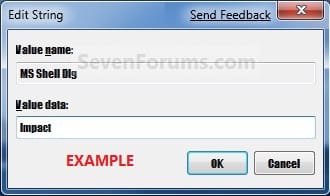
E) Type in the name of the font you want to use and click on OK. (See left screenshot below)
NOTE: You can get the name of the font from the Font Folder Location C:\Windows\Fonts. Right click on the single font and click on Properties to see the file name. For a font group, you will need to open it first to see the single fonts in it. Be sure that you use the exact same font name that is listed. Do not include the Regular part or file extension in the font name. For example, I would type Impact instead of Impact Regular or Impact.ttf.
Modify1.jpg

Modify1B.jpg

F) In the right pane, right click on MS Shell Dlg 2 and click on Modify. (See screenshot below step 1C)

G) Type in the name of the font you want to use and click on OK. (See left screenshot below)
NOTE: You can get the name of the font from the Font Folder Location C:\Windows\Fonts. Be sure that you use the exact same font name that is listed. Do not include the Regular part in the font name. For example, I would type Impact instead of Impact Regular.
Modify2.jpg

Modify2B.jpg

H) Close regedit.

I) Go to step 3.
2. To Restore Default Dialog Box Text and Buttons Fonts
A) Click on the Download button below, and download the file below.
Restore_Default_Dialog_Box_Fonts.reg


Download


B) Save the .reg file to the desktop.

C) Right click the downloaded .reg file, and click on Merge.

D) Click on Run, Yes (UAC), Yes, and OK when prompted.

E) Continue on to step 3.
3. Log off and log on, or restart the computer to apply the font changes.


OPTION THREE

To Change All Default Fonts


NOTE: This will let you change the default fonts used by Windows 7 using the registry.
1. To Change Default Fonts Using a REG File Download
NOTE: This changes the default fonts in Windows 7 to the Tahoma font. You could use this REG file download to make doing step 2 below easier by editing the REG file for the font you want to use instead of Tahoma.
A) Click on the Download button below, and download the file below.
Set_Tahoma_Default_Font.reg


Download


B) Save the .reg file to your desktop.

C) Double click on the downloaded .reg file to merge it.

D) Click on Run, Yes (UAC), Yes, and OK when prompted to approve the merge.

E) Log off and log on, or restart the computer to apply changes.

F) When done, you can delete the downloaded .reg file if you like.
2. To Manually Change Default Fonts by Creating a REG File
NOTE: The REG file in step 1 is the same as in step 2B below. You can use it and just edit the font that you would like to use instead of Tahoma in step below.
A) Open Notepad.

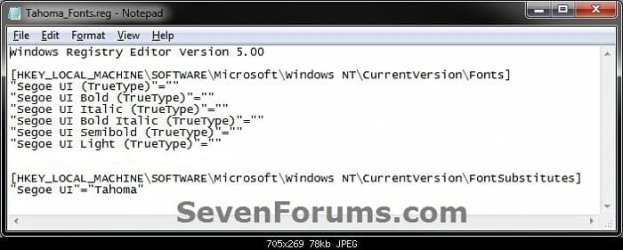
B) Copy and Paste the code below into Notepad.

Code:
Windows Registry Editor Version 5.00
 
[HKEY_LOCAL_MACHINE\SOFTWARE\Microsoft\Windows NT\CurrentVersion\Fonts]
"Segoe UI (TrueType)"=""
"Segoe UI Bold (TrueType)"=""
"Segoe UI Italic (TrueType)"=""
"Segoe UI Bold Italic (TrueType)"=""
"Segoe UI Semibold (TrueType)"=""
"Segoe UI Light (TrueType)"=""
 
[HKEY_LOCAL_MACHINE\SOFTWARE\Microsoft\Windows NT\CurrentVersion\FontSubstitutes]
"Segoe UI"="[B][COLOR=red]Tahoma[/COLOR][/B]"
All-1.jpg
C) In Notepad, edit Tahoma in quotes with the name of the font that you would like to use in instead with it still in quotes. (see screenshot below)
NOTE: You can get the name of the font from the Font Folder Location C:\Windows\Fonts. Be sure that you use the exact same font name that is listed. Do not include the Regular part in the font name. For example, I would type Impact instead of Impact Regular.
All-2.jpg

All-3.jpg

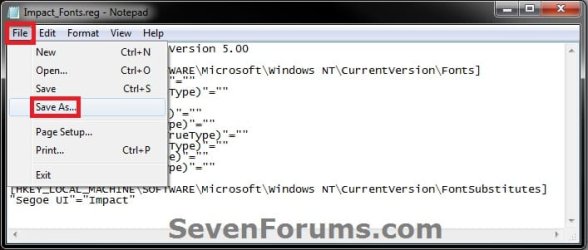
D) In Notepad, click on File (Menu bar) and Save As. (see screenshot below)
All-4.jpg
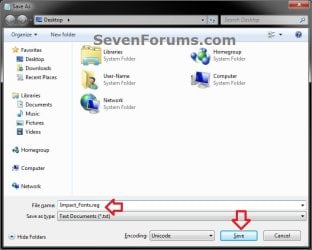
E) Type in a name you would like with a .reg file extension (ex: Impact-Fonts.reg), then click on the Save button. (see screenshot below)
All-5.jpg
D) Double click on the downloaded .reg file to merge it.

E) Click on Run, Yes (UAC), Yes, and OK when prompted to approve the merge.

F) Log off and log on, or restart the computer to apply changes.
3. To Restore the Default Fonts
NOTE: This will ONLY undo all changes that you made using either step 1 or step 2 in OPTION THREE above, and restore the original default fonts used by Windows 7.
A) Click on the Download button below, and download the file below.
Default_Fonts.reg


Download


B) Save the .reg file to your desktop.

C) Double click on the downloaded .reg file to merge it.

D) Click on Run, Yes (UAC), Yes, and OK when prompted to approve the merge.

E) Log off and log on, or restart the computer to apply changes.

F) When done, you can delete the downloaded .reg file if you like.
That's it,
Shawn


Attachments

Last edited:
halo...

i want to ask.. i have change my fonts successfully but when i change the themes it go back to old fonts. so i have to change the fonts back. if i save the theme, the theme will have duplicate ( 2 same themes ). anybody know how we can change the fonts so when we change the themes, it will never effect the font that we change ?:confused:
 

My Computer My Computer

At a glance

windows 7 ultimate2.5gb
Computer Manufacturer/Model Number
dell
OS
windows 7 ultimate
Memory
2.5gb
Hard Drives
120gb
Hello Sizuka, and welcome to Seven Forums.

I have not seen a way to prevent this from being changed when you use a new theme.

As a workaround, see if you can save the theme with the font changes first. Next, change your theme manually and not with a themepack, and save this theme again. Are the changed font's still in the new current theme this way? If so, then you can just right click on the other theme to delete it.
 

My Computer My Computer

At a glance

64-bit Windows 11 Pro for WorkstationsIntel i7-8700K OC'd to 5 GHz64 GB (4x16GB) G.SKILL TridentZ RGB DDR4 3600...ASUS ROG-STRIX-GTX1080TI-O11G-GAMING
Computer type
PC/Desktop
Computer Manufacturer/Model Number
Self built custom
OS
64-bit Windows 11 Pro for Workstations
CPU
Intel i7-8700K OC'd to 5 GHz
Motherboard
ASUS ROG Maximus XI Formula Z390
Memory
64 GB (4x16GB) G.SKILL TridentZ RGB DDR4 3600 MHz
Graphics Card(s)
ASUS ROG-STRIX-GTX1080TI-O11G-GAMING
Sound Card
Integrated
Monitor(s) Displays
2 x Samsung Odyssey G7 27"
Screen Resolution
2560x1440
Hard Drives
1TB Samsung 990 PRO M.2,
4TB Samsung 990 PRO PRO M.2,
TerraMaster F8 SSD Plus NAS
PSU
Seasonic Prime Titanium 850W
Case
Thermaltake Core P3
Cooling
Corsair Hydro H115i
Keyboard
Logitech wireless K800
Mouse
Logitech MX Master 4
Internet Speed
2 Gb/s Download and 100 Mb/s Upload
Antivirus
Malwarebyte Anti-Malware Premium
Browser
Google Chrome
Other Info
Logitech Z625 speaker system,
Logitech BRIO 4K Pro webcam,
HP Color LaserJet Pro MFP M477fdn,
APC SMART-UPS RT 1000 XL - SURT1000XLI,
Galaxy S23 Plus phone
Fonts in Applications

Brink-----I saw where you said "no question is a dumb question"----I need help!!!
I do a lot of photography and Post Process my photos in Lightroom 2, Photoshop Elements 7 and DPP. Anyway, when I open these programs the fonts are so small you can barely read them. The pictures are the correct size----IS there a way to change the font sizes to correct his----I hope you understand what I'm trying to convey---Thanks
 

My Computer My Computer

At a glance

dell
OS
dell
Hello Gatornole,

I'm sorry, but usually programs will have their own independant font settings from Windows. You will need to look in that program's settings to see if there may be an option to change the font size.

As a temporary workaround, you can use Magnifier to help see the fine print better.

Hope this helps some,
Shawn
 

My Computer My Computer

At a glance

64-bit Windows 11 Pro for WorkstationsIntel i7-8700K OC'd to 5 GHz64 GB (4x16GB) G.SKILL TridentZ RGB DDR4 3600...ASUS ROG-STRIX-GTX1080TI-O11G-GAMING
Computer type
PC/Desktop
Computer Manufacturer/Model Number
Self built custom
OS
64-bit Windows 11 Pro for Workstations
CPU
Intel i7-8700K OC'd to 5 GHz
Motherboard
ASUS ROG Maximus XI Formula Z390
Memory
64 GB (4x16GB) G.SKILL TridentZ RGB DDR4 3600 MHz
Graphics Card(s)
ASUS ROG-STRIX-GTX1080TI-O11G-GAMING
Sound Card
Integrated
Monitor(s) Displays
2 x Samsung Odyssey G7 27"
Screen Resolution
2560x1440
Hard Drives
1TB Samsung 990 PRO M.2,
4TB Samsung 990 PRO PRO M.2,
TerraMaster F8 SSD Plus NAS
PSU
Seasonic Prime Titanium 850W
Case
Thermaltake Core P3
Cooling
Corsair Hydro H115i
Keyboard
Logitech wireless K800
Mouse
Logitech MX Master 4
Internet Speed
2 Gb/s Download and 100 Mb/s Upload
Antivirus
Malwarebyte Anti-Malware Premium
Browser
Google Chrome
Other Info
Logitech Z625 speaker system,
Logitech BRIO 4K Pro webcam,
HP Color LaserJet Pro MFP M477fdn,
APC SMART-UPS RT 1000 XL - SURT1000XLI,
Galaxy S23 Plus phone
  • Yay, Thank you!. I like Verdana :D:D
 

My Computer My Computer

At a glance

Windows 7 Ultimate ..AMD Athlon(tm) 64Processor 3200+ 2.00GHz1,00 GB *Poor* loolNVIDIA GeForce 7600 GT (Microfosoft Corporati...
OS
Windows 7 Ultimate ..
CPU
AMD Athlon(tm) 64Processor 3200+ 2.00GHz
Memory
1,00 GB *Poor* lool
Graphics Card(s)
NVIDIA GeForce 7600 GT (Microfosoft Corporation - WDDM )
Sound Card
Realtek AC'97
Monitor(s) Displays
SyncMaster 940MW ( Samsung )
Screen Resolution
1440x900
Hard Drives
Maxtor 6L200P0 ATA Devide
ST340016A ATA Device

37,2GB - 122 GB - 67,8 GB
Cooling
Spire
Keyboard
Standard ps/2 Keyboard
Mouse
HID mouse ( Logitech )
thanx alot ... brink ..
 

My Computer My Computer

At a glance

windows 7 ultimate2.5gb
Computer Manufacturer/Model Number
dell
OS
windows 7 ultimate
Memory
2.5gb
Hard Drives
120gb
Let me first say Hello to everybody and that i found the solution to a lot of problems on your forums, you are a great community. I hope you can help me with my problem , i don`t know exactly how but i managed to change my font to italic on moust of the text and bold on some of it, can someone please help me to put it back to normal because it`s just awfull this way.

P.S. every wrinting is in ITALIC even in games, ... if there is no solution i think i will reinstall the windows ...

Vlad
 
Last edited:

My Computer My Computer

At a glance

windows 7
OS
windows 7
Hello Sizuka and Vlad, and welcome to Seven Forums. :)


Vlad,

Did you already go through the tutorial to see if any of those settings were set to "Italic"?

If you have, then you might see if doing a system restore using a restore point dated before this happened may be able to fix it for you. If not, the you might try a repair install before having to restort to a clean reinstall.

Hope this helps,
Shawn
 

My Computer My Computer

At a glance

64-bit Windows 11 Pro for WorkstationsIntel i7-8700K OC'd to 5 GHz64 GB (4x16GB) G.SKILL TridentZ RGB DDR4 3600...ASUS ROG-STRIX-GTX1080TI-O11G-GAMING
Computer type
PC/Desktop
Computer Manufacturer/Model Number
Self built custom
OS
64-bit Windows 11 Pro for Workstations
CPU
Intel i7-8700K OC'd to 5 GHz
Motherboard
ASUS ROG Maximus XI Formula Z390
Memory
64 GB (4x16GB) G.SKILL TridentZ RGB DDR4 3600 MHz
Graphics Card(s)
ASUS ROG-STRIX-GTX1080TI-O11G-GAMING
Sound Card
Integrated
Monitor(s) Displays
2 x Samsung Odyssey G7 27"
Screen Resolution
2560x1440
Hard Drives
1TB Samsung 990 PRO M.2,
4TB Samsung 990 PRO PRO M.2,
TerraMaster F8 SSD Plus NAS
PSU
Seasonic Prime Titanium 850W
Case
Thermaltake Core P3
Cooling
Corsair Hydro H115i
Keyboard
Logitech wireless K800
Mouse
Logitech MX Master 4
Internet Speed
2 Gb/s Download and 100 Mb/s Upload
Antivirus
Malwarebyte Anti-Malware Premium
Browser
Google Chrome
Other Info
Logitech Z625 speaker system,
Logitech BRIO 4K Pro webcam,
HP Color LaserJet Pro MFP M477fdn,
APC SMART-UPS RT 1000 XL - SURT1000XLI,
Galaxy S23 Plus phone
Hey, well i didn`t make a restore point and the repaire part never worked for me , anyway i made a fresh instal and i`m creating a restore point as i`m writing this replay, and i learned my lesson and will use restore from now on ... thanks for everything
 

My Computer My Computer

At a glance

windows 7
OS
windows 7
You're welcome Vlad. I'm just sorry that it took a clean reinstall. :(
 

My Computer My Computer

At a glance

64-bit Windows 11 Pro for WorkstationsIntel i7-8700K OC'd to 5 GHz64 GB (4x16GB) G.SKILL TridentZ RGB DDR4 3600...ASUS ROG-STRIX-GTX1080TI-O11G-GAMING
Computer type
PC/Desktop
Computer Manufacturer/Model Number
Self built custom
OS
64-bit Windows 11 Pro for Workstations
CPU
Intel i7-8700K OC'd to 5 GHz
Motherboard
ASUS ROG Maximus XI Formula Z390
Memory
64 GB (4x16GB) G.SKILL TridentZ RGB DDR4 3600 MHz
Graphics Card(s)
ASUS ROG-STRIX-GTX1080TI-O11G-GAMING
Sound Card
Integrated
Monitor(s) Displays
2 x Samsung Odyssey G7 27"
Screen Resolution
2560x1440
Hard Drives
1TB Samsung 990 PRO M.2,
4TB Samsung 990 PRO PRO M.2,
TerraMaster F8 SSD Plus NAS
PSU
Seasonic Prime Titanium 850W
Case
Thermaltake Core P3
Cooling
Corsair Hydro H115i
Keyboard
Logitech wireless K800
Mouse
Logitech MX Master 4
Internet Speed
2 Gb/s Download and 100 Mb/s Upload
Antivirus
Malwarebyte Anti-Malware Premium
Browser
Google Chrome
Other Info
Logitech Z625 speaker system,
Logitech BRIO 4K Pro webcam,
HP Color LaserJet Pro MFP M477fdn,
APC SMART-UPS RT 1000 XL - SURT1000XLI,
Galaxy S23 Plus phone
Dialog boxes out of size

Hi being new on this forum and having a problem.
Hope that this is the right topic to raise this question.
Dialog boxes out of size on Windows 7
Default font?
Perhaps after a TweakUI program the problem occurred that some menus are out of size en don´t fit in their boxes, buttons may not be visible.
It´s also with User account ctrl and a printer application.
It may have something to do with DPI settings or fontsize because lettertypes appear larger than normal. This may be caused by the Bold Size?
Dialog boxes are not expanding while the menu's underneath do.
Example
This is a Dutch version
If anyone knows the answer to correct this, or the registerkey?
2rgcoqw.jpg

10yovbn.jpg

9iwjk4.jpg

I'm pretty shure that I have accidently changed something in the default font size by playing with theme's. (Aero is set transparant.)
One thing is that the default font has a strike trough as you can see in the picture above, perhaps indicating that its no longer valid?
But don't know how to change that, since as you can see these buttons are out of reach.
It may be done in the register, but it is not clear how to identify the default-font or size.

Perhaps increasing the dialog Box itself would at least made it more usefull.

Changing default fontsize may corrupt dialogboxes

Any help would be welcome.
 
 
Last edited:

My Computer My Computer

At a glance

Microsoft Windows 7 Ultimate 64-bits 7601 Mul...Intel(R) Core(TM)2 Duo CPU E8400 @ 3.00GHz8,00 GB(1) Intel(R) G41 Express Chipset (2) Intel(R)...
Computer type
PC/Desktop
OS
Microsoft Windows 7 Ultimate 64-bits 7601 Multiprocessor Free Service Pack 1
CPU
Intel(R) Core(TM)2 Duo CPU E8400 @ 3.00GHz
Motherboard
ASRock G41MH/USB3.
Memory
8,00 GB
Graphics Card(s)
(1) Intel(R) G41 Express Chipset (2) Intel(R) G41 Express
Sound Card
(1) VIA High Definition Audio (2) Intel(R) High Definition
Monitor(s) Displays
S24B350 Samsung
Screen Resolution
1920 x 1080 x 32 bits (4294967296 colors) @ 60 Hz
Hard Drives
(1) ST31000528AS ATA Device (2) Generic- Compact Flash USB Device (3) Generic- MS/MS-Pro USB Device (4) Generic- SD/MMC USB Device (5) Generic- SM/xD-Picture USB Device
Antivirus
ZoneAlarm Free Antivirus + Firewall version: 12.0.104.000 Vs
Hello Bernardus, and welcome to Seven Forums.

The bold could have caused it to appear like that. You can double check with the default Advanced appearance settings under step 8 in the tutorial below to see if one of them may be what you have changed.

http://www.sevenforums.com/tutorials/282-window-color-appearance-change.html

If you can't find it then set everything back to default and try one by one until you have isolated it.

Hope this helps,
Shawn
 

My Computer My Computer

At a glance

64-bit Windows 11 Pro for WorkstationsIntel i7-8700K OC'd to 5 GHz64 GB (4x16GB) G.SKILL TridentZ RGB DDR4 3600...ASUS ROG-STRIX-GTX1080TI-O11G-GAMING
Computer type
PC/Desktop
Computer Manufacturer/Model Number
Self built custom
OS
64-bit Windows 11 Pro for Workstations
CPU
Intel i7-8700K OC'd to 5 GHz
Motherboard
ASUS ROG Maximus XI Formula Z390
Memory
64 GB (4x16GB) G.SKILL TridentZ RGB DDR4 3600 MHz
Graphics Card(s)
ASUS ROG-STRIX-GTX1080TI-O11G-GAMING
Sound Card
Integrated
Monitor(s) Displays
2 x Samsung Odyssey G7 27"
Screen Resolution
2560x1440
Hard Drives
1TB Samsung 990 PRO M.2,
4TB Samsung 990 PRO PRO M.2,
TerraMaster F8 SSD Plus NAS
PSU
Seasonic Prime Titanium 850W
Case
Thermaltake Core P3
Cooling
Corsair Hydro H115i
Keyboard
Logitech wireless K800
Mouse
Logitech MX Master 4
Internet Speed
2 Gb/s Download and 100 Mb/s Upload
Antivirus
Malwarebyte Anti-Malware Premium
Browser
Google Chrome
Other Info
Logitech Z625 speaker system,
Logitech BRIO 4K Pro webcam,
HP Color LaserJet Pro MFP M477fdn,
APC SMART-UPS RT 1000 XL - SURT1000XLI,
Galaxy S23 Plus phone
Hello Brink

Thank you for your reply.

However, as I stretched out, I can't see or reach these buttons, as indicated by you, because the menu is out of size. Especially the bold button.
So please tell me how to change this in the register?
The dialogbox looks exactly as the last image I have posted.

With regards
 

My Computer My Computer

At a glance

Microsoft Windows 7 Ultimate 64-bits 7601 Mul...Intel(R) Core(TM)2 Duo CPU E8400 @ 3.00GHz8,00 GB(1) Intel(R) G41 Express Chipset (2) Intel(R)...
Computer type
PC/Desktop
OS
Microsoft Windows 7 Ultimate 64-bits 7601 Multiprocessor Free Service Pack 1
CPU
Intel(R) Core(TM)2 Duo CPU E8400 @ 3.00GHz
Motherboard
ASRock G41MH/USB3.
Memory
8,00 GB
Graphics Card(s)
(1) Intel(R) G41 Express Chipset (2) Intel(R) G41 Express
Sound Card
(1) VIA High Definition Audio (2) Intel(R) High Definition
Monitor(s) Displays
S24B350 Samsung
Screen Resolution
1920 x 1080 x 32 bits (4294967296 colors) @ 60 Hz
Hard Drives
(1) ST31000528AS ATA Device (2) Generic- Compact Flash USB Device (3) Generic- MS/MS-Pro USB Device (4) Generic- SD/MMC USB Device (5) Generic- SM/xD-Picture USB Device
Antivirus
ZoneAlarm Free Antivirus + Firewall version: 12.0.104.000 Vs
Bernardus,

See if you may be able to do so from within Safe Mode instead.
 

My Computer My Computer

At a glance

64-bit Windows 11 Pro for WorkstationsIntel i7-8700K OC'd to 5 GHz64 GB (4x16GB) G.SKILL TridentZ RGB DDR4 3600...ASUS ROG-STRIX-GTX1080TI-O11G-GAMING
Computer type
PC/Desktop
Computer Manufacturer/Model Number
Self built custom
OS
64-bit Windows 11 Pro for Workstations
CPU
Intel i7-8700K OC'd to 5 GHz
Motherboard
ASUS ROG Maximus XI Formula Z390
Memory
64 GB (4x16GB) G.SKILL TridentZ RGB DDR4 3600 MHz
Graphics Card(s)
ASUS ROG-STRIX-GTX1080TI-O11G-GAMING
Sound Card
Integrated
Monitor(s) Displays
2 x Samsung Odyssey G7 27"
Screen Resolution
2560x1440
Hard Drives
1TB Samsung 990 PRO M.2,
4TB Samsung 990 PRO PRO M.2,
TerraMaster F8 SSD Plus NAS
PSU
Seasonic Prime Titanium 850W
Case
Thermaltake Core P3
Cooling
Corsair Hydro H115i
Keyboard
Logitech wireless K800
Mouse
Logitech MX Master 4
Internet Speed
2 Gb/s Download and 100 Mb/s Upload
Antivirus
Malwarebyte Anti-Malware Premium
Browser
Google Chrome
Other Info
Logitech Z625 speaker system,
Logitech BRIO 4K Pro webcam,
HP Color LaserJet Pro MFP M477fdn,
APC SMART-UPS RT 1000 XL - SURT1000XLI,
Galaxy S23 Plus phone
Hi Brink

Tried that, same problem, however some dialogboxes look normal in safe mode.
But I can't find in safe mode, the one that should be accessed, the classic dialogbox with advanced options for fontsize (last picture).
 

My Computer My Computer

At a glance

Microsoft Windows 7 Ultimate 64-bits 7601 Mul...Intel(R) Core(TM)2 Duo CPU E8400 @ 3.00GHz8,00 GB(1) Intel(R) G41 Express Chipset (2) Intel(R)...
Computer type
PC/Desktop
OS
Microsoft Windows 7 Ultimate 64-bits 7601 Multiprocessor Free Service Pack 1
CPU
Intel(R) Core(TM)2 Duo CPU E8400 @ 3.00GHz
Motherboard
ASRock G41MH/USB3.
Memory
8,00 GB
Graphics Card(s)
(1) Intel(R) G41 Express Chipset (2) Intel(R) G41 Express
Sound Card
(1) VIA High Definition Audio (2) Intel(R) High Definition
Monitor(s) Displays
S24B350 Samsung
Screen Resolution
1920 x 1080 x 32 bits (4294967296 colors) @ 60 Hz
Hard Drives
(1) ST31000528AS ATA Device (2) Generic- Compact Flash USB Device (3) Generic- MS/MS-Pro USB Device (4) Generic- SD/MMC USB Device (5) Generic- SM/xD-Picture USB Device
Antivirus
ZoneAlarm Free Antivirus + Firewall version: 12.0.104.000 Vs
Not to worry Bernardus. You should also be able to do a System Restore (at boot if needed) using a restore point dated before you made these changed to fix it.
 

My Computer My Computer

At a glance

64-bit Windows 11 Pro for WorkstationsIntel i7-8700K OC'd to 5 GHz64 GB (4x16GB) G.SKILL TridentZ RGB DDR4 3600...ASUS ROG-STRIX-GTX1080TI-O11G-GAMING
Computer type
PC/Desktop
Computer Manufacturer/Model Number
Self built custom
OS
64-bit Windows 11 Pro for Workstations
CPU
Intel i7-8700K OC'd to 5 GHz
Motherboard
ASUS ROG Maximus XI Formula Z390
Memory
64 GB (4x16GB) G.SKILL TridentZ RGB DDR4 3600 MHz
Graphics Card(s)
ASUS ROG-STRIX-GTX1080TI-O11G-GAMING
Sound Card
Integrated
Monitor(s) Displays
2 x Samsung Odyssey G7 27"
Screen Resolution
2560x1440
Hard Drives
1TB Samsung 990 PRO M.2,
4TB Samsung 990 PRO PRO M.2,
TerraMaster F8 SSD Plus NAS
PSU
Seasonic Prime Titanium 850W
Case
Thermaltake Core P3
Cooling
Corsair Hydro H115i
Keyboard
Logitech wireless K800
Mouse
Logitech MX Master 4
Internet Speed
2 Gb/s Download and 100 Mb/s Upload
Antivirus
Malwarebyte Anti-Malware Premium
Browser
Google Chrome
Other Info
Logitech Z625 speaker system,
Logitech BRIO 4K Pro webcam,
HP Color LaserJet Pro MFP M477fdn,
APC SMART-UPS RT 1000 XL - SURT1000XLI,
Galaxy S23 Plus phone
Hi Brink

The problem is as I figured out yesterday by trying a saved backup/restore, that it must have happened in a very early state of the installation.
This means that I have to do it all over again, including all the registrations, as I try a systemrestorepoint, if there is such a point? so that is worrying me the most. It must be possible to change some silly registerkey, it would save me days.
 

My Computer My Computer

At a glance

Microsoft Windows 7 Ultimate 64-bits 7601 Mul...Intel(R) Core(TM)2 Duo CPU E8400 @ 3.00GHz8,00 GB(1) Intel(R) G41 Express Chipset (2) Intel(R)...
Computer type
PC/Desktop
OS
Microsoft Windows 7 Ultimate 64-bits 7601 Multiprocessor Free Service Pack 1
CPU
Intel(R) Core(TM)2 Duo CPU E8400 @ 3.00GHz
Motherboard
ASRock G41MH/USB3.
Memory
8,00 GB
Graphics Card(s)
(1) Intel(R) G41 Express Chipset (2) Intel(R) G41 Express
Sound Card
(1) VIA High Definition Audio (2) Intel(R) High Definition
Monitor(s) Displays
S24B350 Samsung
Screen Resolution
1920 x 1080 x 32 bits (4294967296 colors) @ 60 Hz
Hard Drives
(1) ST31000528AS ATA Device (2) Generic- Compact Flash USB Device (3) Generic- MS/MS-Pro USB Device (4) Generic- SD/MMC USB Device (5) Generic- SM/xD-Picture USB Device
Antivirus
ZoneAlarm Free Antivirus + Firewall version: 12.0.104.000 Vs
Bernardus,

Before doing a clean install and having to redo everything, try a repair install instead. This way you will not have to lose anything if it can fix it for you. :)
 

My Computer My Computer

At a glance

64-bit Windows 11 Pro for WorkstationsIntel i7-8700K OC'd to 5 GHz64 GB (4x16GB) G.SKILL TridentZ RGB DDR4 3600...ASUS ROG-STRIX-GTX1080TI-O11G-GAMING
Computer type
PC/Desktop
Computer Manufacturer/Model Number
Self built custom
OS
64-bit Windows 11 Pro for Workstations
CPU
Intel i7-8700K OC'd to 5 GHz
Motherboard
ASUS ROG Maximus XI Formula Z390
Memory
64 GB (4x16GB) G.SKILL TridentZ RGB DDR4 3600 MHz
Graphics Card(s)
ASUS ROG-STRIX-GTX1080TI-O11G-GAMING
Sound Card
Integrated
Monitor(s) Displays
2 x Samsung Odyssey G7 27"
Screen Resolution
2560x1440
Hard Drives
1TB Samsung 990 PRO M.2,
4TB Samsung 990 PRO PRO M.2,
TerraMaster F8 SSD Plus NAS
PSU
Seasonic Prime Titanium 850W
Case
Thermaltake Core P3
Cooling
Corsair Hydro H115i
Keyboard
Logitech wireless K800
Mouse
Logitech MX Master 4
Internet Speed
2 Gb/s Download and 100 Mb/s Upload
Antivirus
Malwarebyte Anti-Malware Premium
Browser
Google Chrome
Other Info
Logitech Z625 speaker system,
Logitech BRIO 4K Pro webcam,
HP Color LaserJet Pro MFP M477fdn,
APC SMART-UPS RT 1000 XL - SURT1000XLI,
Galaxy S23 Plus phone
Hi Brink

Problem Solved!!!!!!!!! :D

Some *Bast***ly* theme or tweak (sorry about that) removed some of the default fonttypes Segoe.
Comparing the set of fonts with a fresh installed drive let me discover that at least 10 versions had been removed. That explained the striketrough as I pointed out in the pictures above. Windows choose offcourse related types which unfortunately were bold and expanded their menu's outsizing the dialogbox.
So happy me, no trouble with days of reinstallings and endless options.
I copied the missing set into the working one and causa finita.

Thank you for your replies en hope that this will be a lesson for others not to play with defaultfonts without a good restorepoint or backup before adding changes. The reverse may not be possible as I found out.

With regards
 

My Computer My Computer

At a glance

Microsoft Windows 7 Ultimate 64-bits 7601 Mul...Intel(R) Core(TM)2 Duo CPU E8400 @ 3.00GHz8,00 GB(1) Intel(R) G41 Express Chipset (2) Intel(R)...
Computer type
PC/Desktop
OS
Microsoft Windows 7 Ultimate 64-bits 7601 Multiprocessor Free Service Pack 1
CPU
Intel(R) Core(TM)2 Duo CPU E8400 @ 3.00GHz
Motherboard
ASRock G41MH/USB3.
Memory
8,00 GB
Graphics Card(s)
(1) Intel(R) G41 Express Chipset (2) Intel(R) G41 Express
Sound Card
(1) VIA High Definition Audio (2) Intel(R) High Definition
Monitor(s) Displays
S24B350 Samsung
Screen Resolution
1920 x 1080 x 32 bits (4294967296 colors) @ 60 Hz
Hard Drives
(1) ST31000528AS ATA Device (2) Generic- Compact Flash USB Device (3) Generic- MS/MS-Pro USB Device (4) Generic- SD/MMC USB Device (5) Generic- SM/xD-Picture USB Device
Antivirus
ZoneAlarm Free Antivirus + Firewall version: 12.0.104.000 Vs
That's great news Bernadus. Thank you for posting back with your results. :)
 

My Computer My Computer

At a glance

64-bit Windows 11 Pro for WorkstationsIntel i7-8700K OC'd to 5 GHz64 GB (4x16GB) G.SKILL TridentZ RGB DDR4 3600...ASUS ROG-STRIX-GTX1080TI-O11G-GAMING
Computer type
PC/Desktop
Computer Manufacturer/Model Number
Self built custom
OS
64-bit Windows 11 Pro for Workstations
CPU
Intel i7-8700K OC'd to 5 GHz
Motherboard
ASUS ROG Maximus XI Formula Z390
Memory
64 GB (4x16GB) G.SKILL TridentZ RGB DDR4 3600 MHz
Graphics Card(s)
ASUS ROG-STRIX-GTX1080TI-O11G-GAMING
Sound Card
Integrated
Monitor(s) Displays
2 x Samsung Odyssey G7 27"
Screen Resolution
2560x1440
Hard Drives
1TB Samsung 990 PRO M.2,
4TB Samsung 990 PRO PRO M.2,
TerraMaster F8 SSD Plus NAS
PSU
Seasonic Prime Titanium 850W
Case
Thermaltake Core P3
Cooling
Corsair Hydro H115i
Keyboard
Logitech wireless K800
Mouse
Logitech MX Master 4
Internet Speed
2 Gb/s Download and 100 Mb/s Upload
Antivirus
Malwarebyte Anti-Malware Premium
Browser
Google Chrome
Other Info
Logitech Z625 speaker system,
Logitech BRIO 4K Pro webcam,
HP Color LaserJet Pro MFP M477fdn,
APC SMART-UPS RT 1000 XL - SURT1000XLI,
Galaxy S23 Plus phone
Back
Top