Fonts - Install

How to Install a Font in Windows 7 and Windows 8


   Information
This tutorial will show you how to install a font that you have downloaded in Windows 7 and Windows 8.

For a list of all default fonts that come supplied with Windows 7, see: Fonts supplied with Windows 7

For a list of all default fonts that come supplied with Windows 8, see: Fonts supplied with Windows 8

   Note
Windows comes with TrueType fonts and OpenType fonts. They work with a variety of computers, printers, and programs.

  • TrueType fonts (.ttf/.ttc) can be scaled to any size and are clear and readable in all sizes. They can be sent to any printer or other output device supported by Windows.
  • OpenType fonts (.otf) are related to TrueType fonts, but typically incorporate a greater extension of the basic character set, such as small capitalization, old-style numerals, and more detailed shapes, such as glyph and ligatures. OpenType fonts are also clear and readable in all sizes and can be sent to any printer or other output device supported by Windows.
  • PostScript fonts are fonts created by Adobe Systems that are smooth, detailed, and of high quality. They are often used for printing, especially professional-quality printing, such as books or magazines.
   Tip
If you need a default Windows font, then please just post a request for it here, and I'll be happy to post a clean copy of it for you. :)

   Warning
If you install a TrueType font with exactly the same name as a PostScript font on the same computer, Windows won't know which one to access, which could result in a font type being altered. To avoid this, don't install different types of fonts with the same name.


Here's How:
1. Download the font that you want to install.
NOTE: You can download fonts from a software program, the Internet, or your organization's network. You can get free fonts from the links at Microsoft Typography - Font foundries.
WARNING: Before you download a font, make sure you trust the source.

2. Unblock the font.

3. Do step 4, 5, or 6 below for how you would like to install the font.

4. Install Font Option One
A) Right click or press and hold on the downloaded font, click/tap on Install, and go to step 7 below.
5. Install Font Option Two
A) Double click/tap on the downloaded font, click/tap on the Install button, and go to step 7 below. (See screeenshot below)
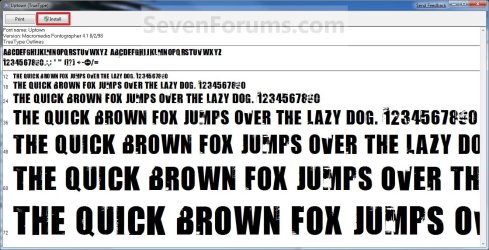
Font_Preview.jpg
6. Install Font Option Three
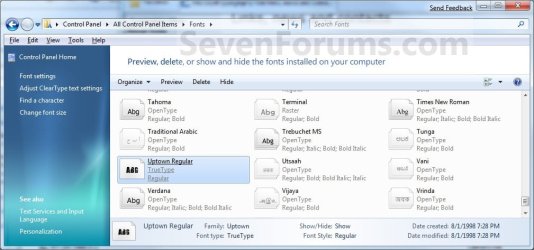
A) Drag and drop the downloaded font into the Fonts Control Panel page location, and go to step 7 below. (See screenshot below)
NOTE: You can either navigate to C:\Windows\Fonts in Windows Explorer or open the Control Panel (icons view) and click/tap on the Fonts icon to open the Fonts Control Panel page.
Location-2.jpg
7. You can verify that the font is installed by seeing if it is listed in the Fonts Control Panel page.
NOTE: You can either navigate to C:\Windows\Fonts in Windows Explorer or open the Control Panel (icons view) and click on the Fonts icon to open the Fonts Control Panel page.
That's it,
Shawn


Last edited:
Question on fonts... How many fonts can Windows 7 handle before there are adverse affects on the operating system and memory usage?
 

My Computer

Computer Manufacturer/Model Number
Dell XPS M1710
OS
Windows 7 Pro
CPU
Intel T7400 (2.16Ghz)
Motherboard
XPS M1710 Motherboard
Memory
Kingston HyperX 4GB 800MHz DDR2
Graphics Card(s)
Nvidia Geforce Go 7900 GTX
Sound Card
Sigmatel Audio HD
Monitor(s) Displays
17" WUXGA UltraSharp TrueLife
Screen Resolution
1920x1200
Hard Drives
320GB Sata 7200RPM 16MB Cache
PSU
130 Watt AC Adapter
Case
Silver/Black XPS 17" Case with 7 sets of multicolor LEDs
Cooling
2 High Speed Fans and Heat Pipes
Internet Speed
Time Warner Roadrunner 20Mb
Other Info
4x BluRay
apologies for rejuvenating this thread but I'm just trying to find out if 'snapcounts' problem was ever solved as I'm now having exactly the same issue.
the problem has only recently surfaced but I can't for the life of me track down a reason why.
 

My Computer

OS
Windows 7 Ultimate 64 bit
CPU
Intel Core 2 Duo E6850 3.00Ghz
Memory
4.0 Gig Ram
Graphics Card(s)
nVidia GEForce 8600 GT
Monitor(s) Displays
ASUS 1680x1050
Guys in XP you can navigate to /document and settings/Windows/Fonts/then you click on file - install new font then it goes faster than ever .. ..is there any thing like this here?
 

My Computer

OS
7
CPU
Core i7 920
Motherboard
GA EX58 UD3R
Memory
4 Giga 1800 (2X2GB)
Graphics Card(s)
HD 5770 Power Color 1 GB DDR5
Hello 3bood, and welcome to Seven Forums.

Steps 4, 5, or 6 in the tutorial on the first page are pretty fast.
 

My Computer

Computer type
PC/Desktop
Computer Manufacturer/Model Number
Self built custom
OS
64-bit Windows 11 Pro for Workstations
CPU
Intel i7-8700K OC'd to 5 GHz
Motherboard
ASUS ROG Maximus XI Formula Z390
Memory
64 GB (4x16GB) G.SKILL TridentZ RGB DDR4 3600 MHz
Graphics Card(s)
ASUS ROG-STRIX-GTX1080TI-O11G-GAMING
Sound Card
Integrated
Monitor(s) Displays
2 x Samsung Odyssey G7 27"
Screen Resolution
2560x1440
Hard Drives
1TB Samsung 990 PRO M.2,
4TB Samsung 990 PRO PRO M.2,
TerraMaster F8 SSD Plus NAS
PSU
Seasonic Prime Titanium 850W
Case
Thermaltake Core P3
Cooling
Corsair Hydro H115i
Keyboard
Logitech wireless K800
Mouse
Logitech MX Master 4
Internet Speed
2 Gb/s Download and 100 Mb/s Upload
Antivirus
Malwarebyte Anti-Malware Premium
Browser
Google Chrome
Other Info
Logitech Z625 speaker system,
Logitech BRIO 4K Pro webcam,
HP Color LaserJet Pro MFP M477fdn,
APC SMART-UPS RT 1000 XL - SURT1000XLI,
Galaxy S23 Plus phone
I am trying to install my fonts and none of these examples is working for me. Any suggestions?
 

My Computer

OS
Windows 7
Hello Swimmy, and welcome to Seven Forums.

Where did you get the fonts at? Could post a link to them, for us to test?

Does it say that these fonts are compatible with Windows 7?
 

My Computer

Computer type
PC/Desktop
Computer Manufacturer/Model Number
Self built custom
OS
64-bit Windows 11 Pro for Workstations
CPU
Intel i7-8700K OC'd to 5 GHz
Motherboard
ASUS ROG Maximus XI Formula Z390
Memory
64 GB (4x16GB) G.SKILL TridentZ RGB DDR4 3600 MHz
Graphics Card(s)
ASUS ROG-STRIX-GTX1080TI-O11G-GAMING
Sound Card
Integrated
Monitor(s) Displays
2 x Samsung Odyssey G7 27"
Screen Resolution
2560x1440
Hard Drives
1TB Samsung 990 PRO M.2,
4TB Samsung 990 PRO PRO M.2,
TerraMaster F8 SSD Plus NAS
PSU
Seasonic Prime Titanium 850W
Case
Thermaltake Core P3
Cooling
Corsair Hydro H115i
Keyboard
Logitech wireless K800
Mouse
Logitech MX Master 4
Internet Speed
2 Gb/s Download and 100 Mb/s Upload
Antivirus
Malwarebyte Anti-Malware Premium
Browser
Google Chrome
Other Info
Logitech Z625 speaker system,
Logitech BRIO 4K Pro webcam,
HP Color LaserJet Pro MFP M477fdn,
APC SMART-UPS RT 1000 XL - SURT1000XLI,
Galaxy S23 Plus phone
Hello Swimmy, and welcome to Seven Forums.

Where did you get the fonts at? Could post a link to them, for us to test?

Does it say that these fonts are compatible with Windows 7?

They are fonts saved to an external hard drive that I saved.

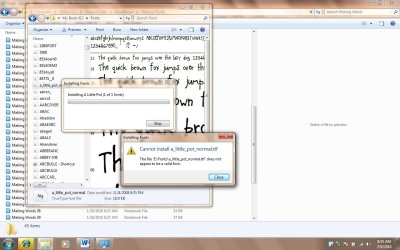
I've attached a screenshot here.
 

Attachments

  • error installing fonts.jpg
    error installing fonts.jpg
    239.7 KB · Views: 467

My Computer

OS
Windows 7
Swimmy,

If you would, could you place one of them that will not install in a ZIP file, then upload the ZIP file here. This way we can take a look at and test it to see what may be the problem?

EDIT:
From your screenshot, it doesn't appear that the TTF font is Windows 7 compatible. Do you remember where you got it from?
 

My Computer

Computer type
PC/Desktop
Computer Manufacturer/Model Number
Self built custom
OS
64-bit Windows 11 Pro for Workstations
CPU
Intel i7-8700K OC'd to 5 GHz
Motherboard
ASUS ROG Maximus XI Formula Z390
Memory
64 GB (4x16GB) G.SKILL TridentZ RGB DDR4 3600 MHz
Graphics Card(s)
ASUS ROG-STRIX-GTX1080TI-O11G-GAMING
Sound Card
Integrated
Monitor(s) Displays
2 x Samsung Odyssey G7 27"
Screen Resolution
2560x1440
Hard Drives
1TB Samsung 990 PRO M.2,
4TB Samsung 990 PRO PRO M.2,
TerraMaster F8 SSD Plus NAS
PSU
Seasonic Prime Titanium 850W
Case
Thermaltake Core P3
Cooling
Corsair Hydro H115i
Keyboard
Logitech wireless K800
Mouse
Logitech MX Master 4
Internet Speed
2 Gb/s Download and 100 Mb/s Upload
Antivirus
Malwarebyte Anti-Malware Premium
Browser
Google Chrome
Other Info
Logitech Z625 speaker system,
Logitech BRIO 4K Pro webcam,
HP Color LaserJet Pro MFP M477fdn,
APC SMART-UPS RT 1000 XL - SURT1000XLI,
Galaxy S23 Plus phone
here's one...

I have over 5,000 fonts that always worked with XP and Vista and NONE of them will import. So, the only options I have are what's included with Windows 7? I hope not. I don't remember where I got that specific font, but many I have purchased. Here's another-I purchased this from djinkers.com ....

Swimmy,

If you would, could you place one of them that will not install in a ZIP file, then upload the ZIP file here. This way we can take a look at and test it to see what may be the problem?

EDIT:
From your screenshot, it doesn't appear that the TTF font is Windows 7 compatible. Do you remember where you got it from?

Most all of them are TTF. Why wouldn't they work?
 

Attachments

My Computer

OS
Windows 7
They both installed for me, so it seems to be a permission issue. Do you have UAC turned on to be able to grant permission?
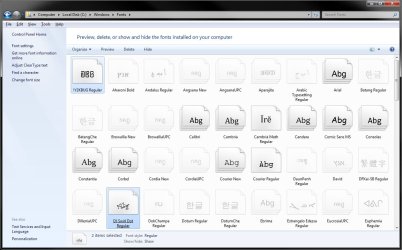
Fonts.jpg
As a test, copy a few fonts that you want to install to your desktop, then see if they will install from that location. If they do, then take ownership of the fonts folder and all of it's contents (the fonts) on your external drive and "Allow" your user account "Full Control" of them. Afterwards, see if you are able to install them.
 

My Computer

Computer type
PC/Desktop
Computer Manufacturer/Model Number
Self built custom
OS
64-bit Windows 11 Pro for Workstations
CPU
Intel i7-8700K OC'd to 5 GHz
Motherboard
ASUS ROG Maximus XI Formula Z390
Memory
64 GB (4x16GB) G.SKILL TridentZ RGB DDR4 3600 MHz
Graphics Card(s)
ASUS ROG-STRIX-GTX1080TI-O11G-GAMING
Sound Card
Integrated
Monitor(s) Displays
2 x Samsung Odyssey G7 27"
Screen Resolution
2560x1440
Hard Drives
1TB Samsung 990 PRO M.2,
4TB Samsung 990 PRO PRO M.2,
TerraMaster F8 SSD Plus NAS
PSU
Seasonic Prime Titanium 850W
Case
Thermaltake Core P3
Cooling
Corsair Hydro H115i
Keyboard
Logitech wireless K800
Mouse
Logitech MX Master 4
Internet Speed
2 Gb/s Download and 100 Mb/s Upload
Antivirus
Malwarebyte Anti-Malware Premium
Browser
Google Chrome
Other Info
Logitech Z625 speaker system,
Logitech BRIO 4K Pro webcam,
HP Color LaserJet Pro MFP M477fdn,
APC SMART-UPS RT 1000 XL - SURT1000XLI,
Galaxy S23 Plus phone
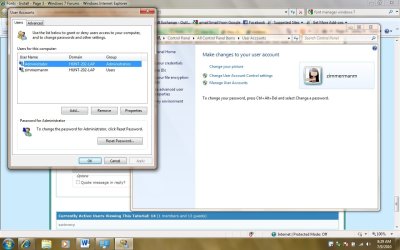
I tried to install them from the desktop and they wouldn't. My laptop is owned by my school-so you're saying I don't have administrative priviledges to add the fonts? I tried to do what you suggested and I can't make changes. That stinks! Thank you for all your help, if you have any other ideas, please let me know.
 

Attachments

  • user info.jpg
    user info.jpg
    222.1 KB · Views: 282

My Computer

OS
Windows 7
Ah, if your user account is not an administrator type user account, then you will not be able to install fonts. :(
 

My Computer

Computer type
PC/Desktop
Computer Manufacturer/Model Number
Self built custom
OS
64-bit Windows 11 Pro for Workstations
CPU
Intel i7-8700K OC'd to 5 GHz
Motherboard
ASUS ROG Maximus XI Formula Z390
Memory
64 GB (4x16GB) G.SKILL TridentZ RGB DDR4 3600 MHz
Graphics Card(s)
ASUS ROG-STRIX-GTX1080TI-O11G-GAMING
Sound Card
Integrated
Monitor(s) Displays
2 x Samsung Odyssey G7 27"
Screen Resolution
2560x1440
Hard Drives
1TB Samsung 990 PRO M.2,
4TB Samsung 990 PRO PRO M.2,
TerraMaster F8 SSD Plus NAS
PSU
Seasonic Prime Titanium 850W
Case
Thermaltake Core P3
Cooling
Corsair Hydro H115i
Keyboard
Logitech wireless K800
Mouse
Logitech MX Master 4
Internet Speed
2 Gb/s Download and 100 Mb/s Upload
Antivirus
Malwarebyte Anti-Malware Premium
Browser
Google Chrome
Other Info
Logitech Z625 speaker system,
Logitech BRIO 4K Pro webcam,
HP Color LaserJet Pro MFP M477fdn,
APC SMART-UPS RT 1000 XL - SURT1000XLI,
Galaxy S23 Plus phone
Can't install ttf

When I try to install a ttf that i downloaded it gives me this error message

Can't install.....(name of the file) does not appear to be a valid font.
I tried all of your recommendations to no avial.
Any other suggestions.
Cheers.
 

My Computer

Computer Manufacturer/Model Number
Hewlett-Packard Hp Pavilion dv6 Notebook PC
OS
Windows7 Home Premium 64 bit.
CPU
Processor: AMD Turion II p520 Dual-core processor 2.30 GHz
Memory
Installed RAM 3.00 GB (2.74GB available)
Monitor(s) Displays
Generic PnP Monitor
Thanks will try that. Looks like my son has changed the account settings.
 

My Computer

Computer Manufacturer/Model Number
Hewlett-Packard Hp Pavilion dv6 Notebook PC
OS
Windows7 Home Premium 64 bit.
CPU
Processor: AMD Turion II p520 Dual-core processor 2.30 GHz
Memory
Installed RAM 3.00 GB (2.74GB available)
Monitor(s) Displays
Generic PnP Monitor
Hello Axeman, and welcome to Seven Forums.

Uh?? :huh:
 

My Computer

Computer type
PC/Desktop
Computer Manufacturer/Model Number
Self built custom
OS
64-bit Windows 11 Pro for Workstations
CPU
Intel i7-8700K OC'd to 5 GHz
Motherboard
ASUS ROG Maximus XI Formula Z390
Memory
64 GB (4x16GB) G.SKILL TridentZ RGB DDR4 3600 MHz
Graphics Card(s)
ASUS ROG-STRIX-GTX1080TI-O11G-GAMING
Sound Card
Integrated
Monitor(s) Displays
2 x Samsung Odyssey G7 27"
Screen Resolution
2560x1440
Hard Drives
1TB Samsung 990 PRO M.2,
4TB Samsung 990 PRO PRO M.2,
TerraMaster F8 SSD Plus NAS
PSU
Seasonic Prime Titanium 850W
Case
Thermaltake Core P3
Cooling
Corsair Hydro H115i
Keyboard
Logitech wireless K800
Mouse
Logitech MX Master 4
Internet Speed
2 Gb/s Download and 100 Mb/s Upload
Antivirus
Malwarebyte Anti-Malware Premium
Browser
Google Chrome
Other Info
Logitech Z625 speaker system,
Logitech BRIO 4K Pro webcam,
HP Color LaserJet Pro MFP M477fdn,
APC SMART-UPS RT 1000 XL - SURT1000XLI,
Galaxy S23 Plus phone
Windows 7 Home Premium 32 Bit

Could you please send me the downloadable defaut Fonts for Windows 7 Home Premium. It seems my current Fonts are corrupted due to some malware or otherwise.
 

My Computer

OS
Windows 7 Home Premium 32bit.
Hello Kanchanman, and welcome to Seven Forums.

Sorry mate, that would just be to large of a file to be able to upload here. :(

I would recommend to do a full scan of your system with MalwareBytes free to help make sure that your system is clean.

Afterwards, you could see if running a sfc /scannow command may help. If not, then you could do a system restore using a restore point dated (if available) when they were fine.

Hope this helps,
Shawn
 

My Computer

Computer type
PC/Desktop
Computer Manufacturer/Model Number
Self built custom
OS
64-bit Windows 11 Pro for Workstations
CPU
Intel i7-8700K OC'd to 5 GHz
Motherboard
ASUS ROG Maximus XI Formula Z390
Memory
64 GB (4x16GB) G.SKILL TridentZ RGB DDR4 3600 MHz
Graphics Card(s)
ASUS ROG-STRIX-GTX1080TI-O11G-GAMING
Sound Card
Integrated
Monitor(s) Displays
2 x Samsung Odyssey G7 27"
Screen Resolution
2560x1440
Hard Drives
1TB Samsung 990 PRO M.2,
4TB Samsung 990 PRO PRO M.2,
TerraMaster F8 SSD Plus NAS
PSU
Seasonic Prime Titanium 850W
Case
Thermaltake Core P3
Cooling
Corsair Hydro H115i
Keyboard
Logitech wireless K800
Mouse
Logitech MX Master 4
Internet Speed
2 Gb/s Download and 100 Mb/s Upload
Antivirus
Malwarebyte Anti-Malware Premium
Browser
Google Chrome
Other Info
Logitech Z625 speaker system,
Logitech BRIO 4K Pro webcam,
HP Color LaserJet Pro MFP M477fdn,
APC SMART-UPS RT 1000 XL - SURT1000XLI,
Galaxy S23 Plus phone
Thanks , I will try that for sure. BTW can the default font file be sent on my email ID?
 

My Computer

OS
Windows 7 Home Premium 32bit.
Kanchanman,

Let's see what the results of the sfc /scannow are first. It may be able to fix them for you. If not, it will give you a list using OPTION THREE in that tutorial for which ones that need to be replaced. :)
 

My Computer

Computer type
PC/Desktop
Computer Manufacturer/Model Number
Self built custom
OS
64-bit Windows 11 Pro for Workstations
CPU
Intel i7-8700K OC'd to 5 GHz
Motherboard
ASUS ROG Maximus XI Formula Z390
Memory
64 GB (4x16GB) G.SKILL TridentZ RGB DDR4 3600 MHz
Graphics Card(s)
ASUS ROG-STRIX-GTX1080TI-O11G-GAMING
Sound Card
Integrated
Monitor(s) Displays
2 x Samsung Odyssey G7 27"
Screen Resolution
2560x1440
Hard Drives
1TB Samsung 990 PRO M.2,
4TB Samsung 990 PRO PRO M.2,
TerraMaster F8 SSD Plus NAS
PSU
Seasonic Prime Titanium 850W
Case
Thermaltake Core P3
Cooling
Corsair Hydro H115i
Keyboard
Logitech wireless K800
Mouse
Logitech MX Master 4
Internet Speed
2 Gb/s Download and 100 Mb/s Upload
Antivirus
Malwarebyte Anti-Malware Premium
Browser
Google Chrome
Other Info
Logitech Z625 speaker system,
Logitech BRIO 4K Pro webcam,
HP Color LaserJet Pro MFP M477fdn,
APC SMART-UPS RT 1000 XL - SURT1000XLI,
Galaxy S23 Plus phone
I did 1st & 2nd option. It says all ok!

I had already used the restore point option and do not have an adequate resore point created when the fonts were "okay"
 

My Computer

OS
Windows 7 Home Premium 32bit.
Back
Top