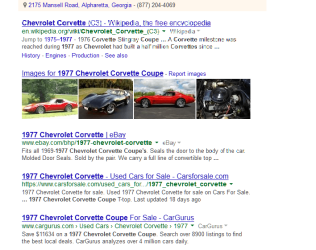
fonts messed up

xclaim

New member
Local time
7:59 AM
Messages
2
hi guys trying to figure out why these fonts are messed up ion windows 7. see image attached. as soon as i scroll it goes away and becomes ok.

any suggestions appreciated

i have windows 7 64 bit.

thanks much
 

Attachments

  • fonts messsed up.png
    fonts messsed up.png
    52.8 KB · Views: 0

My Computer My Computer

Computer type
PC/Desktop
OS
Microsoft Windows 7 Ultimate 64-bit 7601 Multiprocessor Free Service Pack 1
CPU
AMD FX(tm)-8350 Eight-Core Processor
Motherboard
ASRock 880GMH/U3S3
Memory
16.00 GB
Graphics Card(s)
ATI Radeon HD 4250
Sound Card
(1) Realtek High Definition Audio (2) High Definition Audi
Screen Resolution
1680 x 1050 x 32 bits (4294967296 colors) @ 59 Hz
Hard Drives
(1) INTEL SSDSC2CT240A3 ATA Device (2) WDC WD20EARS-00MVWB0 ATA Device (3) Hitachi HDS5C3020ALA632 SATA Disk Device (4) USB Mass Storage Device USB Device

My Computer My Computer

Computer Manufacturer/Model Number
W530-3630QM1
OS
windows 7 home 64bit
CPU
INTEL-CORE I7
Memory
16GB
Hard Drives
750GB
Browser
Chrome
Hi Welcome to Seven Forums .. Which Browser are you using .. Have you tried other Browsers .. Can you please fill in your System Specs .. The Link below will help you achieve this ...

http://www.sevenforums.com/tutorials/180324-system-info-see-your-system-specs.html#post1530002

Maxi thank you.

Done i filled out the specs on my profile.

I'm using Firefox and IE - both Browsers give me the same problem.

could it be that i have the wrong drivers installed for "ATI Radeon HD 4250"?
 

My Computer My Computer

Computer type
PC/Desktop
OS
Microsoft Windows 7 Ultimate 64-bit 7601 Multiprocessor Free Service Pack 1
CPU
AMD FX(tm)-8350 Eight-Core Processor
Motherboard
ASRock 880GMH/U3S3
Memory
16.00 GB
Graphics Card(s)
ATI Radeon HD 4250
Sound Card
(1) Realtek High Definition Audio (2) High Definition Audi
Screen Resolution
1680 x 1050 x 32 bits (4294967296 colors) @ 59 Hz
Hard Drives
(1) INTEL SSDSC2CT240A3 ATA Device (2) WDC WD20EARS-00MVWB0 ATA Device (3) Hitachi HDS5C3020ALA632 SATA Disk Device (4) USB Mass Storage Device USB Device
Hi there .. I would think Updating your Driver is always a good idea .. But if this is only happening in Browsers may not help .. How is the performance on other applications ?
 

My Computer My Computer

Computer Manufacturer/Model Number
W530-3630QM1
OS
windows 7 home 64bit
CPU
INTEL-CORE I7
Memory
16GB
Hard Drives
750GB
Browser
Chrome
In Firefox, Options -> Advanced -> General tab, do you have "use hardware acceleration when available" checked or unchecked? This could affect rendering of fonts depending on the capability of your onboard HD4250, and you might try the alternative to see if that helps or further hurts.

Of course if you have a similar problem in IE it might be a similar issue there.

What version of Catalyst driver do you have installed? As was mentioned already, having current drivers installed is almost always the right thing.

What version of Firefox and IE do you have installed?

There used to be a problem caused by a Microsoft update to IE (KB2670838 I think) that affected font rendering in Firefox when using ATI video. The workaround was to disable GFX.CONTENT.AZURE.ENABLED -> FALSE in ABOUT:CONFIG with Firefox. But I think this has been corrected, although my current Firefox setup shows this still as FALSE (and I'm not having any font rendering problem). I believe this setting is involved with "hardware acceleration" from the video card. Anyway, you might try toggling your setting to see if it helps or hurts.

Finally, you might think about installing a somewhat stronger video card. I see that your motherboard has an PCIe x16 expansion slot, so any decent low-power video card would definitely be an improvement over your onboard HD4250. For example you might consider an HD5450, HD6450, HD7750, etc., either in low-profile (if your case is small form-factor and requires low-profile cards) or full-size.

These three cards are modestly priced (and with increasingly better performance) and do not require external power, and come in low-profile with two brackets, so you can swap a full-size bracket onto a low-profile card for use in a standard mid-tower case which takes full-size expansion cards. Just a thought, as all three of these cards run with the very latest Catalyst drivers, rather than the "legacy" driver that your HD4250 uses.

 

My Computer My Computer

Computer type
PC/Desktop
Computer Manufacturer/Model Number
Home-built, two systems (1) and (2)
OS
Windows 7 Pro x64 (1), Win7 Pro X64 (2)
CPU
i5-3350p 3.1Ghz/6MB-cache (1); E8400 3.0Ghz/6MB-cache (2)
Motherboard
ASUS P8Z77-V Pro (1); ASUS P5Q3 (2)
Memory
8GB PC3-12800 DDR3 (1); 4GB PC3-10600 DDR3 (2)
Graphics Card(s)
ATI HD7750 (1), (see TV cards); ATI R7 250 (2)
Sound Card
Realtek ALC892 HD Audio (1); Realtek ALC1200 HD Audio (2)
Monitor(s) Displays
Eizo HD2441W LCD, Eizo S2433W (1); Eizo 24" S2433W (2)
Screen Resolution
1920x1200, 1920x1200 (1); 1920x1200 (2)
Hard Drives
(1) 1TB SATA-II (7200RPM), 2x2TB SATA-III (7200RPM), 250GB SATA-III (10000RPM) for OS; 2x2TB external USB 3.0

(2) 320GB SATA-II (7200RPM), 750GB SATA-II (7200RPM), 150GB SATA-II (10000RPM) for OS; 2TB external USB 3.0
PSU
Nesteq ECS-6001 600W (1); Nesteq ECS-5001 500W (2)
Case
Acousti-Case 360 (1) and (2)
Cooling
Noctua NH-U12P SE2 for CPU, 2x120mm case fans (1) and (2)
Keyboard
IBM PS/2 (1) and (2)
Mouse
Logitech MX Revolution wireless (1); Microsoft wired (2)
Internet Speed
100mbps down / 10mbps up
Antivirus
Microsoft Security Essentials; Malwarebyte Anti-Malware Pro
Browser
Firefox
Other Info
Ceton InfiniTV 4-tuner cablecard-enabled TV card as well as Hauppauge HVR-2250 OTA/ATSC 2-tuner TV card in (1), running under Win7 WMC
Back
Top