Force DirectX 9?

CallmeEclipse

New member
Local time
2:51 PM
Messages
11
I know thaqt when possible windows 7 loads any game with the latest version of DirectX, if compatible. Is there any way to force it to load a game in DirectX 9?

Note: game is compatible with directX 9,10,11
 

My Computer

OS
Windows 7
Hi CallmeEclipse.:)

Try running the game from a shortcut with -dx9 appended to the end.

For instance for Bioshock: "C:\Program Files\2K Games\BioShock \Builds\Release\Bioshock.exe" -dx9

Note there is a space before -dx9.

Hope this helps.;)
 

My Computer

Computer Manufacturer/Model Number
Samsung R60 Plus
OS
Operating System Microsoft Windows 7 Ultimate Build 7600
CPU
Mobile DualCore Intel Core 2 Duo T5550, 1833 MHz (1
Motherboard
ATI Radeon Xpress 1100/1250
Memory
2GB (DDR2-667 DDR2 SDRAM)
Graphics Card(s)
ATI Radeon Xpress 1200 Series (256 MB)
Sound Card
Realtek ALC262 @ ATI SB600 - High Definition
Monitor(s) Displays
Samsung LTN154X3-L01 [15.4" LCD]
Screen Resolution
1280x800
PSU
na
Case
na
Cooling
na
Keyboard
na
Hi CallmeEclipse.:)

Try running the game from a shortcut with -dx9 appended to the end.

For instance for Bioshock: "C:\Program Files\2K Games\BioShock \Builds\Release\Bioshock.exe" -dx9

Note there is a space before -dx9.

Hope this helps.;)
ill try it asap, thanks for the tip
 

My Computer

OS
Windows 7
It's a pleasure.

Good luck.:)
 

My Computer

Computer Manufacturer/Model Number
Samsung R60 Plus
OS
Operating System Microsoft Windows 7 Ultimate Build 7600
CPU
Mobile DualCore Intel Core 2 Duo T5550, 1833 MHz (1
Motherboard
ATI Radeon Xpress 1100/1250
Memory
2GB (DDR2-667 DDR2 SDRAM)
Graphics Card(s)
ATI Radeon Xpress 1200 Series (256 MB)
Sound Card
Realtek ALC262 @ ATI SB600 - High Definition
Monitor(s) Displays
Samsung LTN154X3-L01 [15.4" LCD]
Screen Resolution
1280x800
PSU
na
Case
na
Cooling
na
Keyboard
na
well, it seems to be working, but i cannot know for sure until i attach a debugger, ill get to it in the morning, its almost 1am i need some sleep. Thanks for the mighty quick answer by the way
 

My Computer

OS
Windows 7
Might help to know what game? Seeing as there are only two games out so far that support DirectX 11,

List of games with DirectX 11 support - Wikipedia, the free encyclopedia

and I know that GRID 2 is DX 9 and DX 11 (there is no DX 10 in it). Battleforge does support all three. If the game and hardware support it there will be (or should be) an option in the game; some like Crysis have it in the right click/context menu on the shortcut, another like ANNO 1404 only enables DX 10 when a certain setting is enabled in the in game options.

I know thaqt when possible windows 7 loads any game with the latest version of DirectX, if compatible.

No it doesn't, it is entirely dependent on which version of DirectX the game uses and whether the hardware supports it. The only way for a game to run using DirectX 11 is for the game and the video card (currently ATI's HD 5xxx series of cards only) to support it.
 

My Computer

Computer type
PC/Desktop
Computer Manufacturer/Model Number
Me
OS
Win 7 Ultimate x64
CPU
FX-8350 @ 4.6 GHz so far
Motherboard
Asus M5A97 EVO
Memory
ADATA XPG V1 Series Black 8GB DDR3 1600
Graphics Card(s)
Sapphire R9 270x Dual-X
Sound Card
Xonar DGX w/ Corsair Vengence 1300
Monitor(s) Displays
Acer S232HL Abid
Screen Resolution
1920x1080
Hard Drives
120 GB OCZ Vertex 3
500 GB Seagate 7200.12
PSU
Antec Earthwatts 650W Green
Case
Antec Three Hundred
Cooling
Cooler Master 212 EVO
Keyboard
Logitech G510
Mouse
Logitech G500s
Internet Speed
35000/3000
I know thaqt when possible windows 7 loads any game with the latest version of DirectX, if compatible.

No it doesn't, it is entirely dependent on which version of DirectX the game uses and whether the hardware supports it. The only way for a game to run using DirectX 11 is for the game and the video card (currently ATI's HD 5xxx series of cards only) to support it.

True.

Also note that some games will give you the option to choose which DX Version of the game you want to run either by game launcher or .exe file. Example - Bioshock, Crysis, Lost Planet. (All DX 10 games)

I say some, but it could/might be all if they're multi-dx games. I just know about the ones mentioned above.
 

My Computer

Computer type
PC/Desktop
Computer Manufacturer/Model Number
Custom built by me.
OS
Windows 10 Pro
CPU
Intel Core i7-4770K (3.5Ghz)
Motherboard
Gigabyte G1 Sniper 5 (F10 Bios)
Memory
32 gig Corsair Dominator Platinum (4x8Gig)
Graphics Card(s)
Sapphire Tri-X R9 Fury
Sound Card
Soundblaster ZXR
Monitor(s) Displays
NEC PA242W 24" LCD Monitor
Screen Resolution
1920 x 1200
Hard Drives
Primary - Samsung 850 Pro (512gig), Samsung 840 Pro (256gig), 2TB WD Caviar Black.
PSU
EVGA Supernova 1000 G2
Case
Cooler Master HAF X
Cooling
Corsair H100i with Corsair Air Series SP120 Quiet Fans
Keyboard
Logitech Wireless Wave
Mouse
Logitech Performance MX
Internet Speed
High Speed Cable
Antivirus
Norton Security
Browser
IE11
Other Info
Memory Timings - 1866MHz @ 9-9-9-27-1T @ 1.5 volts
Seeing as there are only two games out so far that support DirectX 11
Yes, but what about those still in beta?

Bfbc2 BETA was debugged, and afaik is now running in Dx9, thanks for the help.
 

My Computer

OS
Windows 7
Bfbc2 BETA was debugged, and afaik is now running in Dx9, thanks for the help.

What about it? It still won't run in anything other than whatever DirectX version is supported by the video card.

By the way, would help to now what video card you have.
 

My Computer

Computer type
PC/Desktop
Computer Manufacturer/Model Number
Me
OS
Win 7 Ultimate x64
CPU
FX-8350 @ 4.6 GHz so far
Motherboard
Asus M5A97 EVO
Memory
ADATA XPG V1 Series Black 8GB DDR3 1600
Graphics Card(s)
Sapphire R9 270x Dual-X
Sound Card
Xonar DGX w/ Corsair Vengence 1300
Monitor(s) Displays
Acer S232HL Abid
Screen Resolution
1920x1080
Hard Drives
120 GB OCZ Vertex 3
500 GB Seagate 7200.12
PSU
Antec Earthwatts 650W Green
Case
Antec Three Hundred
Cooling
Cooler Master 212 EVO
Keyboard
Logitech G510
Mouse
Logitech G500s
Internet Speed
35000/3000
Bfbc2 BETA was debugged, and afaik is now running in Dx9, thanks for the help.

What about it? It still won't run in anything other than whatever DirectX version is supported by the video card.

By the way, would help to now what video card you have.
uhm, im not sure you are getting the point, my Pc completly supports Dx11. the point was to get the game to run in dx9, because windows 7 automatically runs in the highest supported by the game (as long as it is compatible with your card). however i foced the game to load into dx9.

I edited the exectuable file to where it thinks dx9 is the highest it can go, or so thats what it tell windows 7. problem solved.
 

My Computer

OS
Windows 7
uhm, im not sure you are getting the point, my Pc completly supports Dx11.

Only if you have a Radeon HD 5xxx series video card, nothing else is DX 11 at this time.

the point was to get the game to run in dx9, because windows 7 automatically runs in the highest supported by the game (as long as it is compatible with your card).

that's like saying that Windows 7 somehow magically will make a game that was written using DX 9 to run in DX 10 if the video card supports it, that isn't going to happen.
 

My Computer

Computer type
PC/Desktop
Computer Manufacturer/Model Number
Me
OS
Win 7 Ultimate x64
CPU
FX-8350 @ 4.6 GHz so far
Motherboard
Asus M5A97 EVO
Memory
ADATA XPG V1 Series Black 8GB DDR3 1600
Graphics Card(s)
Sapphire R9 270x Dual-X
Sound Card
Xonar DGX w/ Corsair Vengence 1300
Monitor(s) Displays
Acer S232HL Abid
Screen Resolution
1920x1080
Hard Drives
120 GB OCZ Vertex 3
500 GB Seagate 7200.12
PSU
Antec Earthwatts 650W Green
Case
Antec Three Hundred
Cooling
Cooler Master 212 EVO
Keyboard
Logitech G510
Mouse
Logitech G500s
Internet Speed
35000/3000
uhm, im not sure you are getting the point, my Pc completly supports Dx11. the point was to get the game to run in dx9, because windows 7 automatically runs in the highest supported by the game (as long as it is compatible with your card). however i foced the game to load into dx9.

I edited the exectuable file to where it thinks dx9 is the highest it can go, or so thats what it tell windows 7. problem solved.

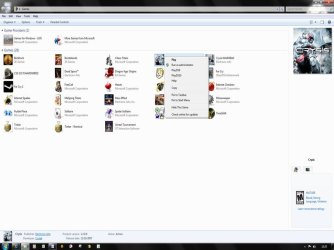
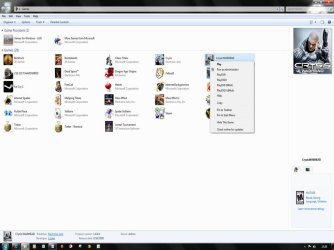
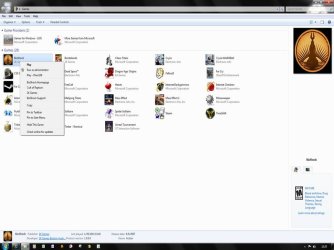
Again, even though Windows will render a game in the highest DX mode possible, it will only do so If your video card, and game, are DX11 capable.

However you can choose another DX mode via the .exe or game launcher if you don't want DX11 as I mentioned earlier. Here are some examples...

Crysis Launcher.jpg
Crysis - DX9 or 10

Crysis Warhead Launcher.jpg
Crysis Warhead - DX9 or 10, 32 or 64 bit

Bioshock Launcher.jpg
Bioshock - DX9 or 10

LP Launcher.JPG
Lost Planets - DX9 or 10

As for DX11 requirements...

Again, even though Windows 7 is DX11 capable, if the other components of the system (video card + game) are not, Windows will not run the game in DX11 mode!!! The same goes for DX10 games!!!

So, since you list no system specs, may I ask what video card and game(s) you have that are DX11 capable?

Thanks.
 

My Computer

Computer type
PC/Desktop
Computer Manufacturer/Model Number
Custom built by me.
OS
Windows 10 Pro
CPU
Intel Core i7-4770K (3.5Ghz)
Motherboard
Gigabyte G1 Sniper 5 (F10 Bios)
Memory
32 gig Corsair Dominator Platinum (4x8Gig)
Graphics Card(s)
Sapphire Tri-X R9 Fury
Sound Card
Soundblaster ZXR
Monitor(s) Displays
NEC PA242W 24" LCD Monitor
Screen Resolution
1920 x 1200
Hard Drives
Primary - Samsung 850 Pro (512gig), Samsung 840 Pro (256gig), 2TB WD Caviar Black.
PSU
EVGA Supernova 1000 G2
Case
Cooler Master HAF X
Cooling
Corsair H100i with Corsair Air Series SP120 Quiet Fans
Keyboard
Logitech Wireless Wave
Mouse
Logitech Performance MX
Internet Speed
High Speed Cable
Antivirus
Norton Security
Browser
IE11
Other Info
Memory Timings - 1866MHz @ 9-9-9-27-1T @ 1.5 volts

My Computer

Computer type
PC/Desktop
Computer Manufacturer/Model Number
Custom built by me.
OS
Windows 10 Pro
CPU
Intel Core i7-4770K (3.5Ghz)
Motherboard
Gigabyte G1 Sniper 5 (F10 Bios)
Memory
32 gig Corsair Dominator Platinum (4x8Gig)
Graphics Card(s)
Sapphire Tri-X R9 Fury
Sound Card
Soundblaster ZXR
Monitor(s) Displays
NEC PA242W 24" LCD Monitor
Screen Resolution
1920 x 1200
Hard Drives
Primary - Samsung 850 Pro (512gig), Samsung 840 Pro (256gig), 2TB WD Caviar Black.
PSU
EVGA Supernova 1000 G2
Case
Cooler Master HAF X
Cooling
Corsair H100i with Corsair Air Series SP120 Quiet Fans
Keyboard
Logitech Wireless Wave
Mouse
Logitech Performance MX
Internet Speed
High Speed Cable
Antivirus
Norton Security
Browser
IE11
Other Info
Memory Timings - 1866MHz @ 9-9-9-27-1T @ 1.5 volts
uhm, im not sure you are getting the point, my Pc completly supports Dx11. the point was to get the game to run in dx9, because windows 7 automatically runs in the highest supported by the game (as long as it is compatible with your card). however i foced the game to load into dx9.

I edited the exectuable file to where it thinks dx9 is the highest it can go, or so thats what it tell windows 7. problem solved.

Again, even though Windows will render a game in the highest DX mode possible, it will only do so If your video card, and game, are DX11 capable.

However you can choose another DX mode via the .exe or game launcher if you don't want DX11 as I mentioned earlier. Here are some examples...

View attachment 51238
Crysis - DX9 or 10

View attachment 51239
Crysis Warhead - DX9 or 10, 32 or 64 bit

View attachment 51240
Bioshock - DX9 or 10

View attachment 51241
Lost Planets - DX9 or 10

As for DX11 requirements...

Again, even though Windows 7 is DX11 capable, if the other components of the system (video card + game) are not, Windows will not run the game in DX11 mode!!! The same goes for DX10 games!!!

So, since you list no system specs, may I ask what video card and game(s) you have that are DX11 capable?

Thanks.


Hello sygnus21 ;

Forgive my ignorance, but I can't seem to locate an option for choosing the DirectX mode, when I click on the exe file of the game I want to play in the "Games" directory as you've posted in the screenshots. I got pretty excited when I read the post, but the "Run in dx9" doesn't appear where it's supposed to be. I'm in need of help here, because I have a feeling that this might work. I'm trying to launch "Scarface" in Windows 7, which I happen to realize that it may be a pointless attempt. Seems like there's a problem with the DirectX on the game's texture problems and your screenshots may have the solution for that. Any help would be appreciated.
 

My Computer

OS
Windows 7 Ultimate x64
uhm, im not sure you are getting the point, my Pc completly supports Dx11. the point was to get the game to run in dx9, because windows 7 automatically runs in the highest supported by the game (as long as it is compatible with your card). however i foced the game to load into dx9.

I edited the exectuable file to where it thinks dx9 is the highest it can go, or so thats what it tell windows 7. problem solved.

Again, even though Windows will render a game in the highest DX mode possible, it will only do so If your video card, and game, are DX11 capable.

However you can choose another DX mode via the .exe or game launcher if you don't want DX11 as I mentioned earlier. Here are some examples...

View attachment 51238
Crysis - DX9 or 10

View attachment 51239
Crysis Warhead - DX9 or 10, 32 or 64 bit

View attachment 51240
Bioshock - DX9 or 10

View attachment 51241
Lost Planets - DX9 or 10

As for DX11 requirements...

Again, even though Windows 7 is DX11 capable, if the other components of the system (video card + game) are not, Windows will not run the game in DX11 mode!!! The same goes for DX10 games!!!

So, since you list no system specs, may I ask what video card and game(s) you have that are DX11 capable?

Thanks.


Hello sygnus21 ;

Forgive my ignorance, but I can't seem to locate an option for choosing the DirectX mode, when I click on the exe file of the game I want to play in the "Games" directory as you've posted in the screenshots. I got pretty excited when I read the post, but the "Run in dx9" doesn't appear where it's supposed to be. I'm in need of help here, because I have a feeling that this might work. I'm trying to launch "Scarface" in Windows 7, which I happen to realize that it may be a pointless attempt. Seems like there's a problem with the DirectX on the game's texture problems and your screenshots may have the solution for that. Any help would be appreciated.

It won't appear in that menu because the game is already DX9. What Sygnus showed is games that are DX10, but give the option to run in DX9 as well.

Your problem will be caused by something else. Like try running in Windows XP compatibility mode, make sure graphic drivers are up to date etc.

Edit: Forget last post, should have checked date of thread, first.
 

My Computer

Computer type
PC/Desktop
Computer Manufacturer/Model Number
Custom Built
OS
Windows 8.1 Pro x64
CPU
Intel Core i7 4790k
Motherboard
MSI Z97S Krait Edition
Memory
8GB Corsair Dominator 1600MHz
Graphics Card(s)
MSI TwinFrozr GeForce GTX770
Sound Card
ASUS Xonar DX/XD 7.1
Monitor(s) Displays
Dell 24" S2409W + Dell 20" E207WFP
Screen Resolution
1920x1080 + 1680x1050
Hard Drives
1x 120GB OCZ Agility 3, 1x 750GB Western Digital Caviar Black, 1x 1TB Western Digital Caviar Blue
PSU
Corsair HX850 modular
Case
Fractal Design Define R4
Cooling
Corsair H60 w/ twin Corsair SP120 fans
Keyboard
Logitech G510S Keyboard
Mouse
Logitech G500S Laser Mouse
Internet Speed
40Mbps
Antivirus
Microsoft Security Essentials
Browser
Google Chrome
Other Info
LG Blu-Ray player

My Computer

Computer type
PC/Desktop
Computer Manufacturer/Model Number
Systems by SmartEyeball
OS
8 Pro x64
CPU
i7 3770K 4.6GHz
Motherboard
ASUS P8Z77 WS
Memory
16GB G.Skill Trident X 2666mhz
Graphics Card(s)
x2 EVGA 780 Ti Superclocked SLI
Sound Card
SB X-FI Surround 5.1 PRO USB / ATH-AD900 Headphones
Monitor(s) Displays
x3 Dell U2410 / 58" Samsung
Screen Resolution
5760*1200/ 1920*1200
Hard Drives
2x Intel 520 240GB (RAID 0) * 2x WD Caviar Blacks 2TB (RAID 0) * 2TB WD Caviar Black * Sony Optirac DVD
PSU
Silverstone Strider Evolution 1200W
Case
Thermaltake Level 10 GT Snow Edition
Cooling
Noctua NH-D14
Keyboard
Topre Realforce // Ducky Shine MX Black // Filco Ninja TKL
Mouse
Thermaltake Theron (Highly Recommended) + Razer Imperator
Antivirus
MSE
Browser
IE, FF, WaterFox
Other Info
GT Extreme V2 Sim Racing Cockpit + 40" LCD and K/B Mouse stand ▼
Fanatec CSR Elite Wheel + Clubsport V1 Pedals + CSR shifter/7G-H ▼Saitek X52 Pro ▼ TrackIR 5 Pro
Buttkicker v2 Seat Rumbler with Dedicated 5.1 and Sub Woofer attached to frame ▼
=
Bloody Big Grin
Thank you very much.

Now that I know that selecting DirectX levels on the right click menu is only for 10-11 supported games, I can easily say that it's impossible for Scarface to work on Windows 7 -unless they release a patch for adapting it to the new Os' of course. I've tried everything that I found when surfing around for a solution including you guys' suggestions. I now think that the games lack of texture showing must be based on something "both" about the graphics card drivers and DirectX. It didn't work not only in the XP compatibility mode but even on the XP mode.

So I installed the old XP I got temporarily, just to play the damn thing. Then I'll switch back to 7 without second thoughts!..

Thanks again for your support.
 

My Computer

OS
Windows 7 Ultimate x64
Hi gkologlu,

I see you got your answer. Just to be clear, since DX11 is backwards capable, Window 7 can and will play DX9 games. However If the game is incompatible with Windows 7, well that could be a completely different issue outside of DirectX's domain.

BTW check out tips 5 & 6 from my Tips on Troubleshooting Game Issues

Peace :cool:
 

My Computer

Computer type
PC/Desktop
Computer Manufacturer/Model Number
Custom built by me.
OS
Windows 10 Pro
CPU
Intel Core i7-4770K (3.5Ghz)
Motherboard
Gigabyte G1 Sniper 5 (F10 Bios)
Memory
32 gig Corsair Dominator Platinum (4x8Gig)
Graphics Card(s)
Sapphire Tri-X R9 Fury
Sound Card
Soundblaster ZXR
Monitor(s) Displays
NEC PA242W 24" LCD Monitor
Screen Resolution
1920 x 1200
Hard Drives
Primary - Samsung 850 Pro (512gig), Samsung 840 Pro (256gig), 2TB WD Caviar Black.
PSU
EVGA Supernova 1000 G2
Case
Cooler Master HAF X
Cooling
Corsair H100i with Corsair Air Series SP120 Quiet Fans
Keyboard
Logitech Wireless Wave
Mouse
Logitech Performance MX
Internet Speed
High Speed Cable
Antivirus
Norton Security
Browser
IE11
Other Info
Memory Timings - 1866MHz @ 9-9-9-27-1T @ 1.5 volts
Dx9 on windows 7

I know this post is old so I hope somebody see's this. I am having an issue getting DC universe online to run without the frame rate dropping from 60-5fps whenever I move. I am almost positive it is because of W7 making me run dx11 when the game is supposed to run on 9. I see earlier in this post that it is possible to add a dx9 behind the shortcut? How do you do this and is it possible on a game that launches through steam and a launchpad?
 

My Computer

OS
Windows 7 64bit
Back
Top