Forced Reboot

wbunnell

New member
Local time
3:47 PM
Messages
16
Windows 7.
Numerous times I have tried to reboot my computer, because it’s running slow, or sluggish. When I close all open files, and try to reboot, I get message saying something is running, do you want to force the program to shut down.
How can I find out what is running?
After reboot the computer runs faster.
 

My Computer

Computer type
PC/Desktop
OS
32
Check task manager and view processes...When asking you to force shut down there is a list behind it saying waiting for program(s) services to stop:
Check if there is any programs in the list and end its process in the task manager....
If you don't see anything, just wait for about 5 minutes.
If that didn't work, force shut down and remove all crap software from your computer.
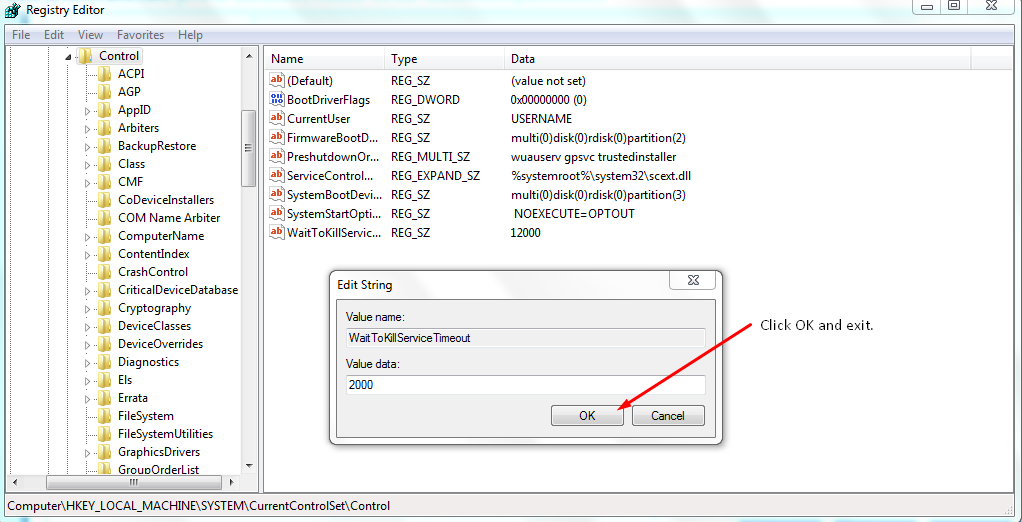
REDUCE software killing process timeout:
Go to desktop--->Right click--->New--->Shortcut--->Type this:
Code:
shutdown.exe -s -t 00 -f
---->Next-->finish.
Now launch it.
#2nd way:
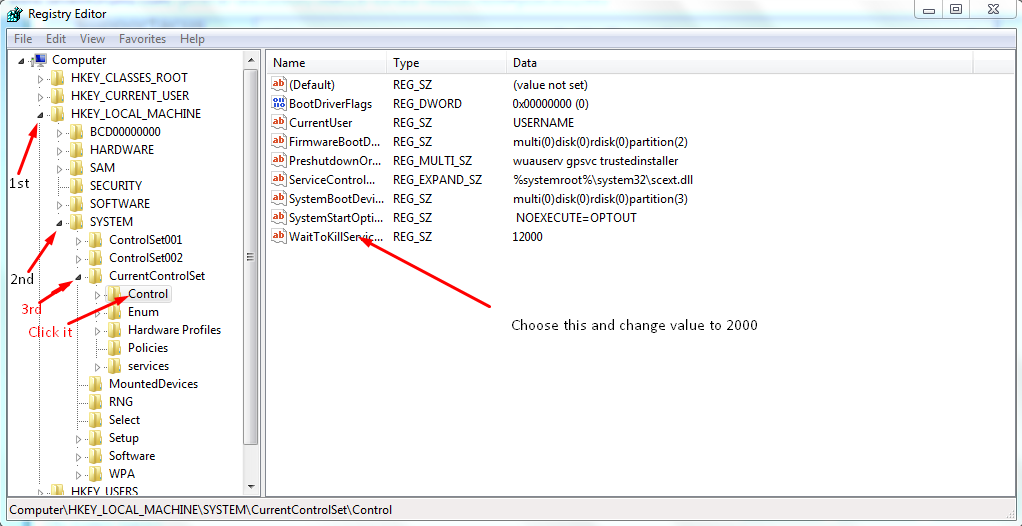
:orb: + R -->Type Regedit.exe --->Enter---> UAC Prompt click yes---->Keep expanding this path:
Code:
HKEY_LOCAL_MACHINE\SYSTEM\CurrentControlSet\Control
Should look like this:
HiLykmi.png

FSm4eby.png
 

My Computer

Computer type
Laptop
Computer Manufacturer/Model Number
Sony Corporation VAIO VPCEL22FX
OS
Microsoft Windows 7 Ultimate x64
CPU
AMD E-450 with Radeon HD Graphics
Motherboard
Sony Corporation VAIO
Memory
Nanya Technology DDR3 4.00 GB (3.60 GB usable)
Graphics Card(s)
ATI AMD Radeon HD 6320 Graphics
Sound Card
AMD High Definition Audio Device
Monitor(s) Displays
Name Generic PnP Monitor on AMD Radeon HD 6320 Graphics
Screen Resolution
1366x768 pixels
Hard Drives
-- Controller Map ----------------------------------------------------------
+ AMD SATA Controller [ATA]
- TOSHIBA MK3259GSXP SATA Disk Device
- Optiarc DVD RW AD-7740H SATA CdRom Device

--------------------------------------------------
Antivirus
Eset Smart Security 8
Browser
Google Chrome
Other Info
Old School Rock Hard Laptop...Works like a charm and reminds you of future and past.
Will try if the problem continues, just rebooted with out forcing.

Thanks for the fast reply.
 

My Computer

Computer type
PC/Desktop
OS
32
Will try if the problem continues, just rebooted with out forcing.

Thanks for the fast reply.
Any time!
Also, don't get to that registry thing unless you do what I said word by word.
Cheers!
 

My Computer

Computer type
Laptop
Computer Manufacturer/Model Number
Sony Corporation VAIO VPCEL22FX
OS
Microsoft Windows 7 Ultimate x64
CPU
AMD E-450 with Radeon HD Graphics
Motherboard
Sony Corporation VAIO
Memory
Nanya Technology DDR3 4.00 GB (3.60 GB usable)
Graphics Card(s)
ATI AMD Radeon HD 6320 Graphics
Sound Card
AMD High Definition Audio Device
Monitor(s) Displays
Name Generic PnP Monitor on AMD Radeon HD 6320 Graphics
Screen Resolution
1366x768 pixels
Hard Drives
-- Controller Map ----------------------------------------------------------
+ AMD SATA Controller [ATA]
- TOSHIBA MK3259GSXP SATA Disk Device
- Optiarc DVD RW AD-7740H SATA CdRom Device

--------------------------------------------------
Antivirus
Eset Smart Security 8
Browser
Google Chrome
Other Info
Old School Rock Hard Laptop...Works like a charm and reminds you of future and past.
Back
Top