Format of a disk issue code

Melissa

New member
Power User
Local time
9:20 AM
Messages
394
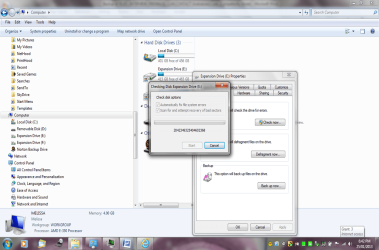
I am having trouble and getting a code when I am formatting my disk - I am checking for bad sectors.
 

Attachments

My Computer

Computer type
Laptop
Computer Manufacturer/Model Number
Sony VAIO / E Series VPCEB46FG
OS
Windows 7 Home Premium 64bit
CPU
Windows 7 Service Pack 1 x86 NTFS
Motherboard
AMD E-350 Processor
Memory
4 GB
Hard Drives
500GB
Other Info
1.6GHz
I am not too sure that is safe
I have contacted the Manufacturer and they did not advice me to do this.

I do not know which one to choose either
Not tech savvy

I also do not wish to loose data.

I have a Seagate 500GB Hard Drive

Have been advised to do the tools - check disk setting

I am not too sure what to do
 

My Computer

Computer type
Laptop
Computer Manufacturer/Model Number
Sony VAIO / E Series VPCEB46FG
OS
Windows 7 Home Premium 64bit
CPU
Windows 7 Service Pack 1 x86 NTFS
Motherboard
AMD E-350 Processor
Memory
4 GB
Hard Drives
500GB
Other Info
1.6GHz
the manu. told you not to check the drive ??? Amazing :confused:

Who`s make is the hard drive ?

have you googled that error code #

Post the exact shot you get when you try to format the drive, the 1 you posted is a check disk shot.
 

My Computer

Computer type
PC/Desktop
Computer Manufacturer/Model Number
Skylake Special #666
OS
Windows 10 Pro x64
CPU
Intel Core i7 6700K
Motherboard
Asus Sabertooth Z170 Mark 1
Memory
GSkill TridentZ RGB 16GB 3600 16-16-16-36
Graphics Card(s)
EVGA GTX 980 Ti SC x2
Sound Card
Realtek High Definition
Monitor(s) Displays
AOC G2460PG
Screen Resolution
1920 x 1080 144Hz
Hard Drives
Samsung 860 Pro 256GB, Seagate Barracuda 4TB x2
PSU
EVGA 1000 P2, EVGA White Custom Braided Cables
Case
Corsair Vengeance C70 Gunmetal Black
Cooling
Corsair H100i v2, Corsair ML120 x2, Thermal Grizzly Kryonaut
Keyboard
Logitech G910 Orion Spectrum
Mouse
Logitech G700s
Internet Speed
Verizon Fios Quantum Gateway 75/75
Antivirus
Windows Defender, Malwarebytes Free 3.8.3
Browser
Chrome
Other Info
Corsair SP120 x4, LG Blu-ray Drive, Durabrand HT-395 100 Watt Dolby Digital Amp, Corsair H2100 Wireless 7.1 Headset
I also do not wish to loose data.

I am not too sure what to do
You will lose the data anyway since you are formatting the disk.

Run the diagnostic tools as recommended.
 

My Computer

Computer type
PC/Desktop
Computer Manufacturer/Model Number
Golden Mk. I.4
OS
Windows 10 Pro x64 ; Xubuntu x64
CPU
Intel i7 860 @ 2.80 GHz O/C'ed to 4.0GHz
Motherboard
Gigabyte P55A-UD3R Rev.1. Award BIOS F13
Memory
16GB Corsair Vengance DDR3 @ 661 MHz Dual Channel (9-9-9-24)
Graphics Card(s)
EVGA NVidia GTX 560 1024MB
Sound Card
Realtek Integrated
Monitor(s) Displays
Dual Samsung SyncMaster 2494HS
Screen Resolution
1920*1080 and 1920*1080
Hard Drives
1*Samsung 840 EVO 120GB SSD;
1*OCZ Vertex 2 60GB SSD;
2*Samsung F3 SpinPoint 1TB in RAID0;
1*Samsung F1 SpinPoint 1TB;
2*Western Digital 1TB External USB 3.0
1*Western Digital 500GB External USB 3.0
1*Seagate 500GB External USB 2.0
PSU
Thermaltake ToughPower QFan 750W
Case
Thermaltake Element S VK60001W2Z
Cooling
Corsair H60 Water Cooling, 2*230mm and 2*80mm case fans
Keyboard
Logitech G110
Mouse
Logitech MX518
Exactly, the whole purpose of formatting a drive is to wipe it clean.
 

My Computer

Computer type
PC/Desktop
Computer Manufacturer/Model Number
Skylake Special #666
OS
Windows 10 Pro x64
CPU
Intel Core i7 6700K
Motherboard
Asus Sabertooth Z170 Mark 1
Memory
GSkill TridentZ RGB 16GB 3600 16-16-16-36
Graphics Card(s)
EVGA GTX 980 Ti SC x2
Sound Card
Realtek High Definition
Monitor(s) Displays
AOC G2460PG
Screen Resolution
1920 x 1080 144Hz
Hard Drives
Samsung 860 Pro 256GB, Seagate Barracuda 4TB x2
PSU
EVGA 1000 P2, EVGA White Custom Braided Cables
Case
Corsair Vengeance C70 Gunmetal Black
Cooling
Corsair H100i v2, Corsair ML120 x2, Thermal Grizzly Kryonaut
Keyboard
Logitech G910 Orion Spectrum
Mouse
Logitech G700s
Internet Speed
Verizon Fios Quantum Gateway 75/75
Antivirus
Windows Defender, Malwarebytes Free 3.8.3
Browser
Chrome
Other Info
Corsair SP120 x4, LG Blu-ray Drive, Durabrand HT-395 100 Watt Dolby Digital Amp, Corsair H2100 Wireless 7.1 Headset
Format of disk issue

I am scanning again - I did not have access to my hard drive and was going to test it at another computer.
I gather that I am going to have to format it. Do not wish to loose the data that is currently on the disk though. I think that some of the items are back up's - will this affect everything?
Thank you for being better than the manufacturer.
I read only the partial email and could not see that you instructed not to check again. Sorry.
I am not computer savvy and very frustrated.
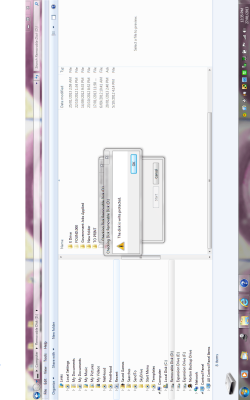
I also have another disk that is write protected - how do deal with that
 

Attachments

  • write1.PNG
    write1.PNG
    79.7 KB · Views: 6
  • write.PNG
    write.PNG
    64.9 KB · Views: 3
  • disk.PNG
    disk.PNG
    100.9 KB · Views: 4

My Computer

Computer type
Laptop
Computer Manufacturer/Model Number
Sony VAIO / E Series VPCEB46FG
OS
Windows 7 Home Premium 64bit
CPU
Windows 7 Service Pack 1 x86 NTFS
Motherboard
AMD E-350 Processor
Memory
4 GB
Hard Drives
500GB
Other Info
1.6GHz
Use Downloads | Seagate DOS download burned to CD with Windows Image Burner.

Boot it to run the extended test. it is very easy to use. Back up your files first.

Afterwards if you want you can use the wiping utility on Seatools to Quick Wipe the HD, then follow these steps to get a perfect http://www.sevenforums.com/tutorials/219487-clean-reinstall-factory-oem-windows-7-a.html#post1839164.

In your case once its all set up you can use DiscWizard | Seagate which is a free version of the premium Acronis backup imaging program to back up your Win7 image externally, even clone it to a new HD if needed. The Manual is on the downloads page and easy to understand and use. This is a free $100 value so I'd use it.
 
Format of a disk update

I tried runnning the format of the disk again and I am having trouble doing anything with it running.

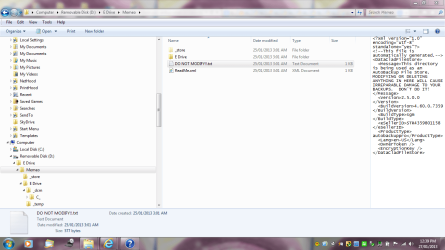
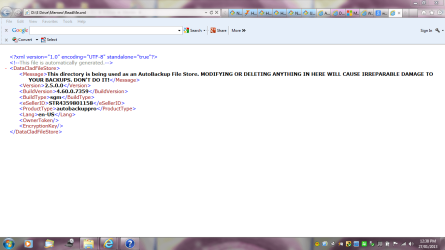
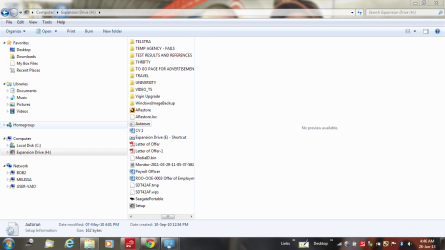
I have attached a screen shot of the latest from trying to scan it

I have sent the previous and new screen shot to the manufacturer
 

My Computer

Computer type
Laptop
Computer Manufacturer/Model Number
Sony VAIO / E Series VPCEB46FG
OS
Windows 7 Home Premium 64bit
CPU
Windows 7 Service Pack 1 x86 NTFS
Motherboard
AMD E-350 Processor
Memory
4 GB
Hard Drives
500GB
Other Info
1.6GHz
Format of disk - update

Here is the latest screen shot
 

Attachments

My Computer

Computer type
Laptop
Computer Manufacturer/Model Number
Sony VAIO / E Series VPCEB46FG
OS
Windows 7 Home Premium 64bit
CPU
Windows 7 Service Pack 1 x86 NTFS
Motherboard
AMD E-350 Processor
Memory
4 GB
Hard Drives
500GB
Other Info
1.6GHz
Melissa, why is the title of your thread trouble formatting, but yet in 1 of your replies you say you do not want to loose the data ? What is it that you are actually trying to do ?
 

My Computer

Computer type
PC/Desktop
Computer Manufacturer/Model Number
Skylake Special #666
OS
Windows 10 Pro x64
CPU
Intel Core i7 6700K
Motherboard
Asus Sabertooth Z170 Mark 1
Memory
GSkill TridentZ RGB 16GB 3600 16-16-16-36
Graphics Card(s)
EVGA GTX 980 Ti SC x2
Sound Card
Realtek High Definition
Monitor(s) Displays
AOC G2460PG
Screen Resolution
1920 x 1080 144Hz
Hard Drives
Samsung 860 Pro 256GB, Seagate Barracuda 4TB x2
PSU
EVGA 1000 P2, EVGA White Custom Braided Cables
Case
Corsair Vengeance C70 Gunmetal Black
Cooling
Corsair H100i v2, Corsair ML120 x2, Thermal Grizzly Kryonaut
Keyboard
Logitech G910 Orion Spectrum
Mouse
Logitech G700s
Internet Speed
Verizon Fios Quantum Gateway 75/75
Antivirus
Windows Defender, Malwarebytes Free 3.8.3
Browser
Chrome
Other Info
Corsair SP120 x4, LG Blu-ray Drive, Durabrand HT-395 100 Watt Dolby Digital Amp, Corsair H2100 Wireless 7.1 Headset
I actually had a USB Seagate USB 500GB Portable Hard Drive - that is the one that has the errors when I scan the data.

It asks me to format over and over again, which is getting painful. Hence putting up screen shots.

I used the back up software that came with the Seagate Desktop Seagate 1TB called Memeo to do a back up of the 500GB Hard Drive to a USB 8GB stick - this is now write protected and I can not move data off it.

I do not wish to format the disk as I have 431GB of data on it and this is several years work and I took it of my old computer that had no back up on closer inspection.

Then in the background I now am trying to figure out sharing - but will just leave the question of the data to remain.

I am in the process of using it on another computer and it works well, then will restart. I guess it is a common problem with external hard drives.
 

My Computer

Computer type
Laptop
Computer Manufacturer/Model Number
Sony VAIO / E Series VPCEB46FG
OS
Windows 7 Home Premium 64bit
CPU
Windows 7 Service Pack 1 x86 NTFS
Motherboard
AMD E-350 Processor
Memory
4 GB
Hard Drives
500GB
Other Info
1.6GHz
It lets me access it fine on this computer after going to tools and scanning and fixing bad sectors.

Yet when I put it on the other computer it will continually want to format it.

I think I will ditch what the manufacturer posted to my FB enquiry. I know you have to back up everything. Have a back up of a back up these days.

I have lost a lot data in the past - information is knowledge to me.
 

Attachments

  • hard drive.PNG
    hard drive.PNG
    74.9 KB · Views: 4

My Computer

Computer type
Laptop
Computer Manufacturer/Model Number
Sony VAIO / E Series VPCEB46FG
OS
Windows 7 Home Premium 64bit
CPU
Windows 7 Service Pack 1 x86 NTFS
Motherboard
AMD E-350 Processor
Memory
4 GB
Hard Drives
500GB
Other Info
1.6GHz
Well that is a better explanation and now you will get better help, Thank You :)
 

My Computer

Computer type
PC/Desktop
Computer Manufacturer/Model Number
Skylake Special #666
OS
Windows 10 Pro x64
CPU
Intel Core i7 6700K
Motherboard
Asus Sabertooth Z170 Mark 1
Memory
GSkill TridentZ RGB 16GB 3600 16-16-16-36
Graphics Card(s)
EVGA GTX 980 Ti SC x2
Sound Card
Realtek High Definition
Monitor(s) Displays
AOC G2460PG
Screen Resolution
1920 x 1080 144Hz
Hard Drives
Samsung 860 Pro 256GB, Seagate Barracuda 4TB x2
PSU
EVGA 1000 P2, EVGA White Custom Braided Cables
Case
Corsair Vengeance C70 Gunmetal Black
Cooling
Corsair H100i v2, Corsair ML120 x2, Thermal Grizzly Kryonaut
Keyboard
Logitech G910 Orion Spectrum
Mouse
Logitech G700s
Internet Speed
Verizon Fios Quantum Gateway 75/75
Antivirus
Windows Defender, Malwarebytes Free 3.8.3
Browser
Chrome
Other Info
Corsair SP120 x4, LG Blu-ray Drive, Durabrand HT-395 100 Watt Dolby Digital Amp, Corsair H2100 Wireless 7.1 Headset
So sorry I am getting treatment for cancer and I guess my brain cells are being affected.

Also frustrated.

I will try and achieve excellent communication levels on the forum to gain better assistance.

Accept my apologies.

I should tell you what I am doing just in case you boot me off this forum.

Thank you so much.

Would you suggest if it is not scanning and working on one computer -- try the other computer again?
 

My Computer

Computer type
Laptop
Computer Manufacturer/Model Number
Sony VAIO / E Series VPCEB46FG
OS
Windows 7 Home Premium 64bit
CPU
Windows 7 Service Pack 1 x86 NTFS
Motherboard
AMD E-350 Processor
Memory
4 GB
Hard Drives
500GB
Other Info
1.6GHz
Yes, I would put it back on the original pc. You see, computers are funny like that. Sometimes you just can`t pull a hard drive with data on it and expect it to be cooperative. You have to have all the same programs on the different ( non original pc ) For example, if you create a word document on 1 pc and don`t have word installed on the other pc, windows will not be able to read it. Adobe reader would be another example, I would hook it up to the original and see if you can access all the data, then go from there.
 

My Computer

Computer type
PC/Desktop
Computer Manufacturer/Model Number
Skylake Special #666
OS
Windows 10 Pro x64
CPU
Intel Core i7 6700K
Motherboard
Asus Sabertooth Z170 Mark 1
Memory
GSkill TridentZ RGB 16GB 3600 16-16-16-36
Graphics Card(s)
EVGA GTX 980 Ti SC x2
Sound Card
Realtek High Definition
Monitor(s) Displays
AOC G2460PG
Screen Resolution
1920 x 1080 144Hz
Hard Drives
Samsung 860 Pro 256GB, Seagate Barracuda 4TB x2
PSU
EVGA 1000 P2, EVGA White Custom Braided Cables
Case
Corsair Vengeance C70 Gunmetal Black
Cooling
Corsair H100i v2, Corsair ML120 x2, Thermal Grizzly Kryonaut
Keyboard
Logitech G910 Orion Spectrum
Mouse
Logitech G700s
Internet Speed
Verizon Fios Quantum Gateway 75/75
Antivirus
Windows Defender, Malwarebytes Free 3.8.3
Browser
Chrome
Other Info
Corsair SP120 x4, LG Blu-ray Drive, Durabrand HT-395 100 Watt Dolby Digital Amp, Corsair H2100 Wireless 7.1 Headset
Looking at the screen shot that I sent before there are two older documents called .wps which is quite old documents from my Vista machine.

I also transported some drivers to upload onto the other computer because it was quite slow on the internet and overall it was slow.

Should I just delete the .wps files and just forget they ever existed.

I have connected up the hard drive now and you can hear it reading the data over and over again.
I was told portable hard drives are like females and tempermental.

I had an NTLDR issue before.

I think I actually may be the Melissa virus.

Thanks for your assistance.

Heaps better than some tech heads I know ;)
 

My Computer

Computer type
Laptop
Computer Manufacturer/Model Number
Sony VAIO / E Series VPCEB46FG
OS
Windows 7 Home Premium 64bit
CPU
Windows 7 Service Pack 1 x86 NTFS
Motherboard
AMD E-350 Processor
Memory
4 GB
Hard Drives
500GB
Other Info
1.6GHz
Well thanks for that compliment, I would start going through that drive and get rid of everything you don`t need or can`t remember what it is. Try to start moving the files back onto the original machine if you have the room. If you manage to get it empty, try to format it and see what happens.

Make folders on the external and dump the files into them, documents, pictures, etc. that way it`s much easier to move them. After you copy and paste them, verify they are good, then delete them off the external.
 

My Computer

Computer type
PC/Desktop
Computer Manufacturer/Model Number
Skylake Special #666
OS
Windows 10 Pro x64
CPU
Intel Core i7 6700K
Motherboard
Asus Sabertooth Z170 Mark 1
Memory
GSkill TridentZ RGB 16GB 3600 16-16-16-36
Graphics Card(s)
EVGA GTX 980 Ti SC x2
Sound Card
Realtek High Definition
Monitor(s) Displays
AOC G2460PG
Screen Resolution
1920 x 1080 144Hz
Hard Drives
Samsung 860 Pro 256GB, Seagate Barracuda 4TB x2
PSU
EVGA 1000 P2, EVGA White Custom Braided Cables
Case
Corsair Vengeance C70 Gunmetal Black
Cooling
Corsair H100i v2, Corsair ML120 x2, Thermal Grizzly Kryonaut
Keyboard
Logitech G910 Orion Spectrum
Mouse
Logitech G700s
Internet Speed
Verizon Fios Quantum Gateway 75/75
Antivirus
Windows Defender, Malwarebytes Free 3.8.3
Browser
Chrome
Other Info
Corsair SP120 x4, LG Blu-ray Drive, Durabrand HT-395 100 Watt Dolby Digital Amp, Corsair H2100 Wireless 7.1 Headset
If you haven't already be sure to back up the data because having external fail to show up on one PC can portend it's failure.

Knowing now its an external HD I would run free Partition Wizard Surface Scan and File System Check on it to diagnose HD and possibly repair the file system. The Home Edition installs in seconds and is easy to run as shown in these videos:
Video help on how to perform partition surface test with Partition Wizard.
How to Check File System? Partition Wizard Video Help.

PW Home Edition can sometimes cause an external to show up in Explorer if it can be seen in PW, just by running Check File System on it. You'll see the autostart box pop up when its repaired it enough to be detected by Explorer.
 
Back
Top