Solved Formatting Notebook/Netbook.

Yeah. We already did it twice. Lol!

Oh here, it is btw.. :)

tumblr_nctl8nNQz71qfc22uo1_500.png


Oh and by the way, my friend doesn't know what to do anymore about one other thing but everytime I hibernate it or sleep my netbook, everytime I want to log in there's a "Your account has been disabled. Please see your system administrator."

Then, I have to force shut down it then after I turn on my netbook again, it's okay again. ;_; It might ruin my netbook. Oh and, is it possible to my Toshiba NB205 to upgrade to Windows 7 Ultimate? I'm just curious. :)
 

My Computer

Computer type
Laptop
Computer Manufacturer/Model Number
Toshiba L300
OS
Windows 7 Ultimate
Memory
2GB
Antivirus
Avast!
Browser
Google Chrome
You are bringing in more problems.:)

I am not going to look into it right now. Please ask your friend to check whether your user account has been set up with administrator Privileges. Ask him to disable hibernation till such time we resolve this one issue on hand first. At the moment I feel not competent to deal with your hibernation issue. Once the current setup issue is solved you may perhaps raise the hibernation issue if it still persists in a separate post for other experts to deal with.. Till such time no hibernation.Only shut down.:)

I shall continue with the current issue. Composing my post on that is going to take sometime.

I think its almost bed time for you. Right? 2215hrs.

You may go to sleep now and see my post tomorrow morning. Have a good sleep.
 

My Computer

OS
Windows 7 Home Premium 32 bit
Alright. Thank you, Robin Williams, oops! I mean, Jumanji. Lol! :D Nighty-night then. Thank you for helping me!
 

My Computer

Computer type
Laptop
Computer Manufacturer/Model Number
Toshiba L300
OS
Windows 7 Ultimate
Memory
2GB
Antivirus
Avast!
Browser
Google Chrome
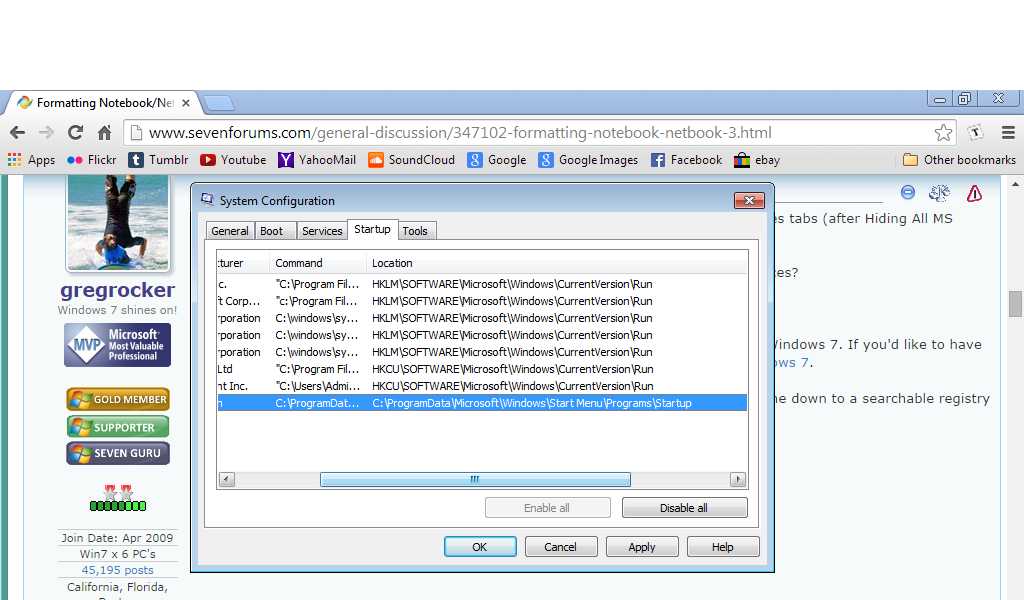
For best performance always uncheck everything in msconfig>Startup and >Services tabs (after Hiding All MS Services) except your AV and any gadgets, stickies or sync.

What is still checked on the Services tab after you tick the box to Hide All MS Services?

Can you expand the B1 listing above so we can see the location in Program Data.

Keep in mind you have done Factory Recovery which is a grossly inferior install of Win7. If you'd like to have the best possible install we will help you do the http://www.sevenforums.com/tutorials/219487-clean-reinstall-factory-oem-windows-7-a.html#post1839164.

If not Jumanji is already helping you with the Factory Recovery loop which may come down to a searchable registry listing as in similar cases.
 
Greg, I am coming into it, the registry now.

After examining the registry if everything appears ok, the OP may go in for a clean boot and try to find the culprit. That may need your expertise. I shall take leave then. :)

At the moment I do not want to impose a clean install which may be a difficult proposition for the OP to execute.. In my scheme that will be the last option, if all else fails.
 

My Computer

OS
Windows 7 Home Premium 32 bit
OK, thatdoggonegirl, here is the worksheet for you.

As gregrocker rightly guessed you are going to tackle the registry.

Start>type regedit.exe in the search field>click on regedit.exe in the Programs list to open the Registry Editor

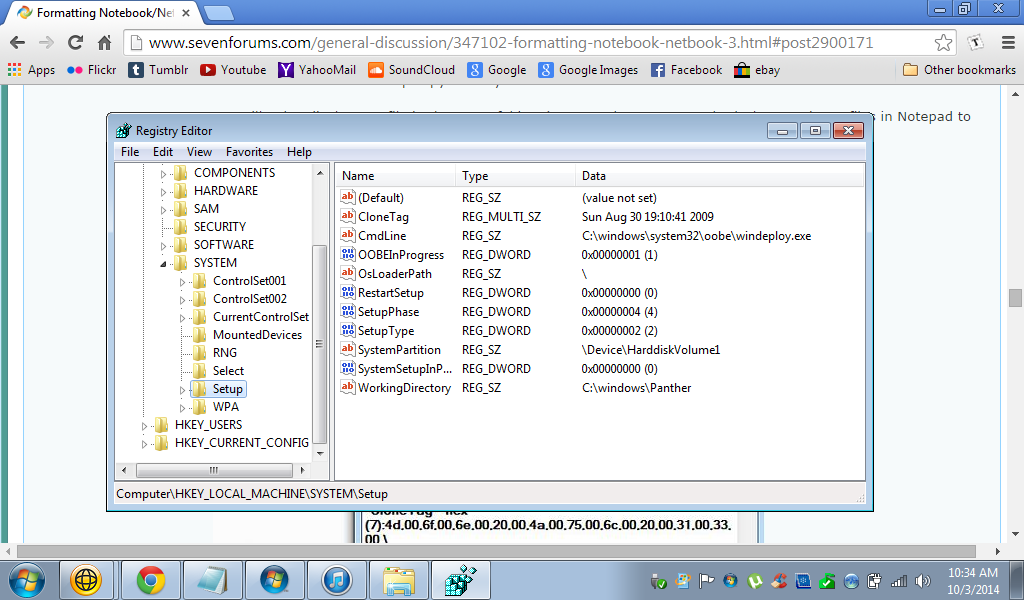
There HKEY_LOCAL_MACHINE\SYSTEM\Setup and you should see as in the screenshot below

02-10-2014 20-51-48.jpg

Examine the data values CmdLine should be empty OOBEInProgress should be 0x00000000 (0) Likewise SetUpPhase, SetupType and SystemSetupInProgress should be 0x00000000 (0) as in the above screenshot. Please note after 0x there are eight zeros.

Please post a screenshot.

If it is anything other than what has been indicated above, you will edit those entries to the indicated Data value.

You will adopt the following procedure:

Create two folders setup and setupbup on an external drive or pen drive.

In the Registry Editor, rightclick on Setup > Export. Save in setup folder > File name setupexport > save

Repeat rightclick on Setup > Export. Save in setupbup folder > File name setupexport > save

Close the registry Editor.

The second one is the backup copy which you will not touch.

You will only edit the .reg file in the setup folder. (You may however open both the saved .reg files in Notepad to confirm you have saved it right.)

Editing the saved setupexport.reg file in setup folder:

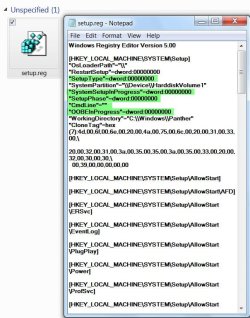
Rightclick on the *.reg file > Edit It will open in Notepad as shown below.

02-10-2014 21-15-28.jpg

In your case the data values on the highlighted names may be different and that is what you will edit to the ones shown in the screenshot above. Do not change the values of other names that are not highlighted..
"SetupType"=dword: delete anything other than 00000000 and type eight zeros after dword:

Repeat the same thing for

"SystemSetupInProgress"=dword: delete anything other than 00000000 and type eight zeros after dword:
"SetupPhase"=dword: delete anything other than 00000000 and type eight zeros after dword:
"OOBEInProgress"=dword: delete anything other than 00000000 and type eight zeros after dword:
"CmdLine"="" delete anything other than"="" and type"="" (just two consequent quotes)

After editing these should look the same as in the above screenshot.

Once you have confirmed that everything is in order click on File in the top menu bar and save.Close Notepad.

Open the setupexport.reg file in Notepad again and check the changes you have made are reflected in the reg file. Close Notepad

Right click on the .reg file > Merge.

Your registry should now reflect the changes you have made.

Open Registry Editor and check.

Close and the reboot your computer.

Problem resolved? Let us know

Though I had given you the full process, if at any point of time you have any doubts , post immediately and wait for the reply.

I have also uploaded the text file.

You may copy and paste the relevant text ( only the five mentioned herein)to your registry file opened in Notepad.

I am hitting the sack now. Will see you tom.

View attachment setup.txt
 
Last edited:

My Computer

OS
Windows 7 Home Premium 32 bit
For best performance always uncheck everything in msconfig>Startup and >Services tabs (after Hiding All MS Services) except your AV and any gadgets, stickies or sync.

What is still checked on the Services tab after you tick the box to Hide All MS Services?

Can you expand the B1 listing above so we can see the location in Program Data.

Keep in mind you have done Factory Recovery which is a grossly inferior install of Win7. If you'd like to have the best possible install we will help you do the http://www.sevenforums.com/tutorials/219487-clean-reinstall-factory-oem-windows-7-a.html#post1839164.

If not Jumanji is already helping you with the Factory Recovery loop which may come down to a searchable registry listing as in similar cases.


What is still checked on the Services tab after you tick the box to Hide All MS Services?

tumblr_ncuj0lUY721qfc22uo1_1280.png


Can you expand the B1 listing above so we can see the location in Program Data.

tumblr_ncuj0lUY721qfc22uo2_1280.png


Is that Clean Reinstall Factory needs a CD? Fyi, I'm using a netbook.
 

My Computer

Computer type
Laptop
Computer Manufacturer/Model Number
Toshiba L300
OS
Windows 7 Ultimate
Memory
2GB
Antivirus
Avast!
Browser
Google Chrome
OK, thatdoggonegirl, here is the worksheet for you.

As gregrocker rightly guessed you are going to tackle the registry.

Start>type regedit.exe in the search field>click on regedit.exe in the Programs list to open the Registry Editor

There HKEY_LOCAL_MACHINE\SYSTEM\Setup and you should see as in the screenshot below

View attachment 335428

Examine the data values CmdLine should be empty OOBEInProgress should be 0x00000000 (0) Likewise SetUpPhase, SetupType and SystemSetupInProgress should be 0x00000000 (0) as in the above screenshot. Please note after 0x there are eight zeros.

Please post a screenshot.

If it is anything other than what has been indicated above, you will edit those entries to the indicated Data value.

You will adopt the following procedure:

Create two folders setup and setupbup on an external drive or pen drive.

In the Registry Editor, rightclick on Setup > Export. Save in setup folder > File name setupexport > save

Repeat rightclick on Setup > Export. Save in setupbup folder > File name setupexport > save

Close the registry Editor.

The second one is the backup copy which you will not touch.

You will only edit the .reg file in the setup folder. (You may however open both the saved .reg files in Notepad to confirm you have saved it right.)

Editing the saved setupexport.reg file in setup folder:

Rightclick on the *.reg file > Edit It will open in Notepad as shown below.

View attachment 335423

In your case the data values on the highlighted names may be different and that is what you will edit to the ones shown in the screenshot above. Do not change the values of other names that are not highlighted..
"SetupType"=dword: delete anything other than 00000000 and type eight zeros after dword:

Repeat the same thing for

"SystemSetupInProgress"=dword: delete anything other than 00000000 and type eight zeros after dword:
"SetupPhase"=dword: delete anything other than 00000000 and type eight zeros after dword:
"OOBEInProgress"=dword: delete anything other than 00000000 and type eight zeros after dword:
"CmdLine"="" delete anything other than "" and type "" (just two consequent quotes)

After editing these should look the same as in the above screenshot.

Once you have confirmed that everything is in order click on File in the top menu bar and save.Close Notepad.

Open the setupexport.reg file in Notepad again and check the changes you have made are reflected in the reg file. Close Notepad

Right click on the .reg file > Merge.

Your registry should now reflect the changes you have made.

Open Registry Editor and check.

Close and the reboot your computer.

Problem resolved? Let us know

Though I had given you the full process, if at any point of time you have any doubts , post immediately and wait for the reply.

I have also uploaded the text file.

You may copy and paste the relevant text ( only the five mentioned herein)to your registry file opened in Notepad.

I am hitting the sack now. Will see you tom.

View attachment 335424

Oh my God. That's a long process but yeah I'll do it.

P.S. I already did the registry one before (I followed a tutorial on YouTube) [https://www.youtube.com/watch?v=00nbQEvA1yg] After I followed everything he did, it messed up my netbook but luckily I still did the export thing so everything's okay again.
 

My Computer

Computer type
Laptop
Computer Manufacturer/Model Number
Toshiba L300
OS
Windows 7 Ultimate
Memory
2GB
Antivirus
Avast!
Browser
Google Chrome
You are doing a good job.

OK, go ahead and edit the four registry entries CmdLine, OOBEInProgress, SetUpPhase, SetupType as indicated in my post. The fifth one SystemSetupInProgress is OK and does not need to be edited.

While you can directly edit in the registry, it is safer to save it, do the editing in Notepad, save it and then merge it. you will have ample time to check it thoroughly and Merge.

Though the description - the way I have done it - may look scary, it isn't difficult. When every step is indicated, it becomes longish and scary. :)

Take the help of your friend if need be.

There is nothing to do in a hurry.

Please report when done.
 

My Computer

OS
Windows 7 Home Premium 32 bit
I'm done and it worked! YAAAAAAAAY! Thank you so much! :D :) :D Look, now I'll try to hibernate it if there's something wrong to it again I'll tell you. I know you still remember what I said to you that everytime I put my netbook in hibernate or sleep mode there's always a "The system administrator blah blah is disabled" Lol.
 

My Computer

Computer type
Laptop
Computer Manufacturer/Model Number
Toshiba L300
OS
Windows 7 Ultimate
Memory
2GB
Antivirus
Avast!
Browser
Google Chrome
Everything's okay now! Yaaay! Oh my God, thank you so much! God knows how much I want to hug y'all. Lol! :D You solved my problem and you helped me, guys! God bless you, Jumanji and Greg! Is it Greg? Lol. :D

One last question: Is it okay to upgrade my Windows from Starter to Ultimate? Can I mark this solved now?

God bless this website and the people behind it especially you, Jumanji! :) :D :party: :party:
 

My Computer

Computer type
Laptop
Computer Manufacturer/Model Number
Toshiba L300
OS
Windows 7 Ultimate
Memory
2GB
Antivirus
Avast!
Browser
Google Chrome
I'm done and it worked! YAAAAAAAAY! Thank you so much! :D :) :D Look, now I'll try to hibernate it if there's something wrong to it again I'll tell you. I know you still remember what I said to you that everytime I put my netbook in hibernate or sleep mode there's always a "The system administrator blah blah is disabled" Lol.

Well done.:thumbsup: You are faster than I thought and also I have to upgrade you to "skilled" category rather than a novice. :)

Regarding your hibernation problem as well as clean install, as I told you already, raise your query in a separate thread. Those are not my cup of tea, and other experts will help you.

What I would advice you before closing my presence in this thread and saying bye is to back up your system periodically on a schedule.

I would suggest is AOMEI Backupper Best Free Backup Software for Windows 8.1, Windows 8, Windows 7, Vista, XP

You may now mark this thread as solved and that will help others under similar problems.

I am now taking leave. Bye.
 

My Computer

OS
Windows 7 Home Premium 32 bit
I don't know... upgrading may depend of your hardware... if you are using a starter edition, it may be safe to asume that you are maybe running on an Intel Atom platform... I might be wrong though.

The thing is that, in case you are using something like an Intel Atom, maybe your PC wont be capable of running Windows 7 Ultimate... buuuuut, Home Basic should suffice, has good functionality, is not a resource hog and allows better multitasking with windows than the Starter version.

I don't know if yu are experienced enough with clean installs of windows, judging by the history of posts in this thread, I could recomend to see if your Toshiba has an option for creating a recovery DVD, if it does, you may backup the original factory recovery on it (It should provide any kind of instructions for that), and then, probably looking for somo assistance for a clean install... The process can go like this:

-Looking for drivers for your specific model at Toshiba website, download and store in a USB flash or something like that.
-Getting a retail copy of Windows 7, better if it is Home Basic, if not, trying to get one that includes it, in this last case, you can get the DVD for free, but buying your serial key separately.
-Install Windows 7
-Install your drivers
-Install your programs and aplications.

now, there can be issues doing this, it's normal, that's why you may need some assistance in case you are not familiar with formatting.
 

My Computer

Computer type
PC/Desktop
Computer Manufacturer/Model Number
Assembled Desktop PC
OS
Microsoft Windows 7 Home Premium SP1 64-bit Build 7600
CPU
AMD Athlon 64 X2 5200+ Dual Core CPU @ 2.7 Ghz (Brisbane)
Motherboard
PCChips A13G+ v3.0
Memory
2x2 GB DDR2 PC-5300 (667 Mhz) Kingston ValueRAM
Graphics Card(s)
XFX ATI Radeon HD 4350 GPU (512 MB + 512 MB HM)
Sound Card
Realtek High Definition Audio Driver ALC660 @ MCP61S
Monitor(s) Displays
HP S2031 20" LED HD Widescreen Display Monitor
Screen Resolution
1600 x 900 px
Hard Drives
Maxtor Diamond Max 10 (160 GB, 7200 RPM, SATA-II Hard Disk)
Western Digital Scorpion Blue (250 GB, 5400 RPM, SATA-II External Hard Disk - Personal Data)
Toshiba MQ01ABD050 (500 GB, 5400 RPM, SATA-II External Hard Disk - Software & ISOs)
PSU
Pixxo Transformer 850W 80+ Certification PSU
Case
Compaq 5BW353 Case
Cooling
Many solutions, see other info...
Keyboard
Green Leaf (Mitzu) Standard Keyboard
Mouse
Microsoft USB Lasser Pointing Device
Internet Speed
10 MB
Antivirus
Avast Antivirus Free
Browser
Firefox, Chrome, Internet Explorer
Other Info
Windows Experience Index Result: 3.8 of 7.9.

Cooling solutions:
- AVC @ 2000/5000 RPM Copper Heatpipes (For Athlon 64 X2 6000+ CPU used in an Athlon 64 X2 5200+)
- Rear Fan 80 mm @ 2700 RPM for heat extraction
- Manhatan Chipset Cooler @ 4700/7200 RPM (For nVidia Chipset in MoBo)
- Foxconn @ 2500 RPM (Old Pentium III heatsink fan) in XFX ATI Radeon HD 4350
I'm done and it worked! YAAAAAAAAY! Thank you so much! :D :) :D Look, now I'll try to hibernate it if there's something wrong to it again I'll tell you. I know you still remember what I said to you that everytime I put my netbook in hibernate or sleep mode there's always a "The system administrator blah blah is disabled" Lol.

Well done.:thumbsup: You are faster than I thought and also I have to upgrade you to "skilled" category rather than a novice. :)

Regarding your hibernation problem as well as clean install, as I told you already, raise your query in a separate thread. Those are not my cup of tea, and other experts will help you.

What I would advice you before closing my presence in this thread and saying bye is to back up your system periodically on a schedule.

I would suggest is AOMEI Backupper Best Free Backup Software for Windows 8.1, Windows 8, Windows 7, Vista, XP

You may now mark this thread as solved and that will help others under similar problems.

I am now taking leave. Bye.

Thank you so much and God bless you, Jumanji. Bye-bye now! I hope this would be my last problem. :D Thanks for sticking with me even tho I had a lot of questions (I know, I confused you a lotta times). So long, Jumanji. :thumbsup::grouphug::party::thumbsup:
 

My Computer

Computer type
Laptop
Computer Manufacturer/Model Number
Toshiba L300
OS
Windows 7 Ultimate
Memory
2GB
Antivirus
Avast!
Browser
Google Chrome
You should judge whether you want to Upgrade by which of the extra (expensive) features you need in a higher version: http://www.sevenforums.com/tutorials/14422-compare-windows-7-editions.html

Otherwise it is the same operating system in each version, but just unlocks a few extra features.

If you have a higher version I would do a http://www.sevenforums.com/tutorials/219487-clean-reinstall-factory-oem-windows-7-a.html#post1839164 to practice your growing skills achieving the best possible install of Win7 one can have. You'll get and keep a perfect install to the exact extent you stick with the steps, tools and methods in that tutorial.
 
Back
Top