FREE Great Programs for Windows 7 [2]

Last edited by a moderator:

My Computer

Computer Manufacturer/Model Number
AMD _(Assembled)_
OS
Dual Booting Windows 7 64-Bit Ultimate Edition and Fedora 16.
CPU
AMD Phenom X4 925
Motherboard
MSI 785g-E53
Memory
4gb DDR3 G.skill RipJaws
Graphics Card(s)
ATI Radeon HD 6770
Sound Card
Realtek
Monitor(s) Displays
Dell IN2020M LED
Screen Resolution
1600*900 20"
Hard Drives
Seagate 500 Gibs
External 320 Gb Western Digital(Got Glitchy)
PSU
Cooler Master
Case
Cooler Master
Cooling
Cooler Master
Keyboard
Logitech K100
Mouse
Razor Death Adder v2 3500 dPi (Razer Goliathus Pad)
Internet Speed
Back to college Internet with Cyberroam X|
Last edited by a moderator:

My Computer

Computer Manufacturer/Model Number
packard bell IXTREME M5722
OS
Operating System : Windows 7 Home Premium Edition 6.01.7600 SP1 (x64)
CPU
Processor : Intel Core 2 Quad Q8300 @ 2500 MHz
Motherboard
Mainboard : Packard Bell (Acer EG43M )
Memory
Physical Memory :8GB Corsair4x 2GB 800MHz C5 DDR2
Graphics Card(s)
Video Card : XFX 6700 AMD
Monitor(s) Displays
Maestro 234DL - BenQ V2220 - BenQ VW2420H
Screen Resolution
Current Display :1920x1080p pixels at 60 Hz in HD LED
Hard Drives
Hard Disks : WDC (1000 GB)
Drive C: (Hard Disk) : 428 GB available on 491 GB
Drive D: (Hard Disk) : 426 GB available on 492 GB
SAMSUNG spinpoint HD103SJ 1000.2 GB
(X 2) KINGSTON SSD NOW V 30GB
PSU
XFX ProSeries 550W PSU
Case
PACKARD BELL IXTREME
Cooling
System Blower Current: 150mA Air Flow16CFM ;Akasa 90mm rear
Keyboard
Gigabyte Aivia K8100
Mouse
TRUST-Wireless Laser Mouse - Carbon edition MI-7770C
Internet Speed
TP-LINK > TL-WN951N / AV500 Gigabit Powerline Adapters
Browser
chrome dev
Other Info
EXTRA COOLING>(FAN CONTROLLER) PC Bay Cooler 3 x 40mm fans; Akasa AK-HD-BL Blue hard drive cooler 2 x 40 mm fan 4500 rpm 29.7 dBA
Bios> American Megatrends Inc.
Version : P01-A1
Date : 08/31/2009
Shape Shift 1.0.7.0

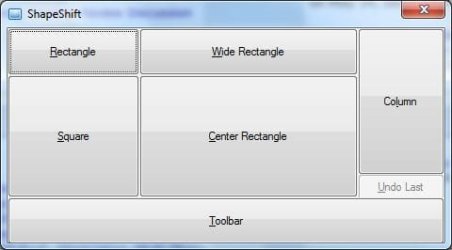
Shape Shift 1.0.7.0 is a Tray Hotkey to change the shape and size of the active window. You may also use it to move the active window in one dimension without it going out of the work area.

Download from this page:
Hotkeys

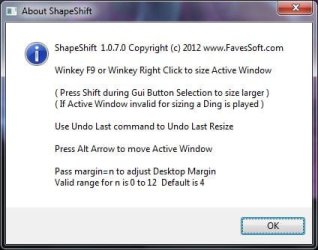
You should be able to use it just with the About Dialog info. But there's a Readme.txt anyway. :)

It's designed not to require saving settings. At present the only way to change the hotkeys is by changing the source.

The first screen shot is the Gui that opens when you hit the hotkey on a valid window(one that can be resized.. not Desktop, Taskbar, Dialog etc..)

The second screen shot is the About Dialog.

ShapeShift.jpg

AboutShapeShift.jpg

There are desktop grids to track windows and force them into desktop sections already. The idea of Shape Shift is just to make it easy to change the window to commonly used sizes. Note that when using Toolbar some windows have a minimum size. There's no way to get this info from the window that I know. When moving windows flush to top or side it doesn't matter. But flush to the bottom all I can do is make the calculation, then get the window position and size. If it extended below the work area, then I know it changed the resize to the minimum and I move it up so the bottom is flush.

As noted on my download pages, my window placement programs assume Taskbar is not set to AutoHide. If it is, Windows does not give a work area but only the screen res.

Anyway, anything you need to know should be in the readme. *Source code and custom icon is included in the zip file.


edit: updated to 1.0.9.0 fixed bug in command line param code.
 
Last edited:

My Computer

Computer Manufacturer/Model Number
HP Media Center
OS
Windows 7 32 bit
CPU
AMD 5200+ dual core
Memory
2 GB
Graphics Card(s)
NVidia GeForce 6150SE 128 MB
Monitor(s) Displays
CRT
Screen Resolution
1280x1024
Hard Drives
500 GB Sata internal :

SIIG USB 3.0 docking stations w/WD Caviar Black 6 Gb/s drives
Keyboard
PS/2
Mouse
PS/2 Wheel Mouse
Other Info
SIIG USB 3.0 PCIexpress card.
Awsome list and will try some of it, thank you for sharing.

Avast Free Antivirus, CCleaner, Defraggler, Firefox, FlashGet, Jing, Notepad2, PDFCreator, Recuva and 7-Zip are must install software for my computer.
 

My Computer

OS
Windows 7 Home Premium 32bit
Awsome list and will try some of it, thank you for sharing.

Avast Free Antivirus, CCleaner, Defraggler, Firefox, FlashGet, Jing, Notepad2, PDFCreator, Recuva and 7-Zip are must install software for my computer.
Hiyya bb If you want you can add Comodo Premium free internet suite - been using it on my tester for ages and on other machines I have had in
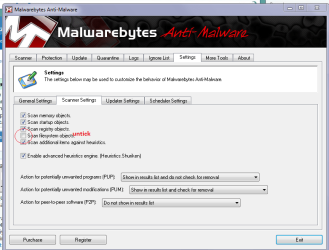
Free Internet Security, Download Internet Security Software Suite - Comodo - green downlaod button, amnd on pain of death I like EaseUS to do for cloning - free too and the simplest og GUI's Best free backup software. Hard drive backup and recovery, image and clone freeware - EaseUS Todo Backup Free and haven't got it in your list that I can see but Malwarebytes - free if you use it set the scan settings to the pic or else it takes forever. Malwarebytes Anti-Malware - CNET Download.com watch out for the little add on Google bar etc
Oh and few will from time to time tell you there are later versions always download and it's just the install process again - have fun!!:cool:
 

Attachments

  • MALWARE.PNG
    MALWARE.PNG
    134.8 KB · Views: 41

My Computer

Computer type
PC/Desktop
Computer Manufacturer/Model Number
Own build (new) Desk1 / Asus ROG Win 7 / Desk2 1st build
OS
Desk1 7 Home Prem / Desk2 10 Pro / Main lap Asus ROG 10 Pro 2 laptop Toshiba 7 Pro Asus P2520 7 & 10
CPU
Desk1 i5 3750K / Laptop i7 GTX 860M / Desk2 i5 2500
Motherboard
Desk1 Asus P877-V / Desk2 Gigabyte H67 UD3H / Laptop ?
Memory
Desk1 8GB (1866) / Desk2 16GB (1333) / Laptop 8Gb DDR3
Graphics Card(s)
Desk 1& 2NVidia GTX 650 & Laptops on board Intel
Sound Card
Desk 1 & 2 -XONAR DG Realtek High Def audio Laptop
Monitor(s) Displays
Desk 1 Benq HD 2450 / Desk2 Philips 24" / Laptop 17.5"
Screen Resolution
1920x1080 D1 & D2 & Laptop 1
Hard Drives
Desk1 Samsung 120GB 830 SSD
Asus ROG 256GB 850 Pro SSD
Desk2 Samsung 840 256 SSD
Toshiba 120GB EVO
PSU
Desk 1 Corsair HX 1050/ Laptop ? / Desk 2 Corsair HX 650
Case
Desk 1 Cooler HAF XM ? Toshiba laptop / Desk2 Coolermaster
Cooling
Fans on all Desk1 -2 Desk2 - all Coolermasters 5 Laptop ?
Keyboard
Desk 1 MS Sidewinder X6 Desk 2 MS Sidewinder X 4
Mouse
Desk 1&2 - Gigabyte MS 900 gamer - laptop - Logitec wireless
Internet Speed
ADSL2+
Other Info
One other Desktop (tester) and spare Toshba laptop both with SSD's
Running Kaspersky 2016 ISS on all machines config'd identically
Logitec audio stereo systems on each machine (x3)
Canon MG5250MFC
Router/modem TP-Link running WPA2SK
A-Squared Free is no loger free.

BBDS.
 

My Computer

OS
Windows 7 Home 64bit
Thank you BBDS. Removed from list. :)
 

My Computer

Computer type
PC/Desktop
Computer Manufacturer/Model Number
Self built custom
OS
64-bit Windows 11 Pro for Workstations
CPU
Intel i7-8700K OC'd to 5 GHz
Motherboard
ASUS ROG Maximus XI Formula Z390
Memory
64 GB (4x16GB) G.SKILL TridentZ RGB DDR4 3600 MHz
Graphics Card(s)
ASUS ROG-STRIX-GTX1080TI-O11G-GAMING
Sound Card
Integrated
Monitor(s) Displays
2 x Samsung Odyssey G7 27"
Screen Resolution
2560x1440
Hard Drives
1TB Samsung 990 PRO M.2,
4TB Samsung 990 PRO PRO M.2,
TerraMaster F8 SSD Plus NAS
PSU
Seasonic Prime Titanium 850W
Case
Thermaltake Core P3
Cooling
Corsair Hydro H115i
Keyboard
Logitech wireless K800
Mouse
Logitech MX Master 4
Internet Speed
2 Gb/s Download and 100 Mb/s Upload
Antivirus
Malwarebyte Anti-Malware Premium
Browser
Google Chrome
Other Info
Logitech Z625 speaker system,
Logitech BRIO 4K Pro webcam,
HP Color LaserJet Pro MFP M477fdn,
APC SMART-UPS RT 1000 XL - SURT1000XLI,
Galaxy S23 Plus phone
Check My Specs

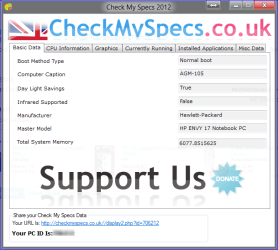
Although its very simple looks can turn off many hard core geeks ;), Check My Specs is an excellent little tool to get complete system specs.

CMS.png

The best part is Share My Specs; with one click your specs are online with a unique ID, ready to be shared for instance here at the Seven Forums when they are needed for problem solving.

I have told my friends and family using me as the free IT support to install this so even if remote connection is not possible when trying to help them I can check their currently running services and apps, installed apps, complete network information and everything else online.

Nice and easy to use, enough information for problem solving. I recommend.

Free download: http://www.checkmyspecs.co.uk/

Kari
 
Last edited:

My Computer

Computer type
Laptop
Computer Manufacturer/Model Number
HP ENVY 17-1150eg
OS
Windows 10 Pro x64 EN-GB
CPU
1.6 GHz Intel Core i7-720QM Processor
Memory
6 GB
Graphics Card(s)
ATI Mobility Radeon HD 5850 Graphics
Sound Card
Beats sound system with integrated subwoofer
Monitor(s) Displays
17" laptop display, 22" LED and 32" Full HD TV through HDMI
Screen Resolution
1600*900 (1), 1920*1080 (2&3)
Hard Drives
Internal: 2 x 500 GB SATA Hard Disk Drive 7200 rpm
External: 2TB for backups, 3TB USB3 network drive for media
Cooling
As Envy runs a bit warm, I have it on a Cooler Master pad
Keyboard
Logitech diNovo Media Desktop Laser (bluetooth)
Mouse
Logitech Performance Mouse MX
Internet Speed
50/10 Mbps VDSL
Antivirus
Windows Defender 4.3.9431.0
Browser
Maxthon 3.5.2., IE11
MoveIt 1.2.5.5

MoveIt 1.0.4.0 is yet another window mover/sizer Hotkey. I wrote this after Shape Shift. It's more for power users. It shares many hotkeys. Use of both apps at the same time is not a good idea. :)

What makes MoveIt more fun is the ability to size and position a window yourself, then assign that to one of the position keys. In other words, it comes with a set of default positions for each hotkey letter, but you can size and move any sizeable window and use the 'z' key to save the numbers to the .ini file. The custom sizing does not compensate for screen resolutions. It just writes and reads the raw numbers and sizes the window accordingly. It's best for people who always use the same screen resolution and work area.

Why use it? Ok, here's a scenario. I don't like to run editors maximized. But I do like them to be sized as a large rectangle near center screen, but not exactly. I like the bottom to be a bit closer to the Taskbar than vertical center would put it. So once I size and position my window how I like for editors, I hit the hotkey, then press the 'z' key. An input pops up asking me what position letter to custom save to. I pick 'c' for Center.

Now, once I have that, I can hotkey on any open editor(or other sizeable window,) press 'c' and it will snap to that size and position. It's very simple. But it lets you assign your own wndow positions and sizes just by using a window, such as Notepad or a browser window. Once you have it perfect, hotkey-z it and save it. No complicated grids, window drag monitors etc.. (although they are fine they are different in approach) just something extremely simple and easy to use.

It's free for you to use at your own risk. Single monitor support only though.

Navigate to this page and search on MoveIt:

Hotkeys


edit: Updated to v 1.0.6.0 Added h and v keys to center active window horizontally or vertically without sizing. Changed Custom Size feature to use percentages of the work area. If values read from .ini file are integers, meaning they were saved by 1.0.5.0 or earlier, they will be processed the same. Otherwise if the values are floating point, they'll be multiplied by the work area dimension to get the placement/size info. The idea is the window should snap close to the same relative position and size with different screen resolutions, provided the work areas are proportionate. (If you are letting the system set the work area then you shouldn't have to do anything special. Just change screen res. If you adjust the work area manually then remember to make an adjustment after changing the screen res.)

edit: Upadated to v 1.1.1.0 Added feature to hold down Alt while releasing mouse from an Explorer Window drag, to snap the window to the quadrant. See About Box and Readme.txt for details.

edit: Updated to v 1.1.6.0 Added a feature to Stagger open Explorer Windows. The currently open Explorer windows will be placed and sized according to the number open. For example if you have 4 open you get one in each screen quadrant. If 5, they are staggered from top left diagonally right and down.. more than 10, cascaded in 2 columns etc..

edit: Updated to v 1.1.8.6 Added Control Shift e hotkey to position open Explorer windows to various patterns depending on the number of windows open. The Explorer windows are sorted according to path/title first.

edit: Updated to 1.2.1.0 New features include Snap to Quadrant. Position without sizing to one of 9 positions. Arrow hotkey changed to Win-Alt-Arrow move in one dimension. Contol-Win-Arrow to move by a smaller increment. (Hotkeys changed to avoid conflict with common hotkeys.)

edit: Latest release 1.2.5.5 Some bug fixes. Added hotkey to close all Explorer Windows.

Latest AHK_L source included in zip file.

See About Box for list of hotkeys.

 
Last edited:

My Computer

Computer Manufacturer/Model Number
HP Media Center
OS
Windows 7 32 bit
CPU
AMD 5200+ dual core
Memory
2 GB
Graphics Card(s)
NVidia GeForce 6150SE 128 MB
Monitor(s) Displays
CRT
Screen Resolution
1280x1024
Hard Drives
500 GB Sata internal :

SIIG USB 3.0 docking stations w/WD Caviar Black 6 Gb/s drives
Keyboard
PS/2
Mouse
PS/2 Wheel Mouse
Other Info
SIIG USB 3.0 PCIexpress card.
This is a utility I've used. Autoruns is another startup monitor but also lists DLLs, image hijacks, boot execute images, Winsock Layered Service Providers, codecs, among others. You uncheck what you don't want running or delete it altogether. and can save the config to a file. It looks like Microsoft recently bought these guys which I didn't know. Link: Download Autoruns

Autorun.png
attachment.php


My Computer

Computer Manufacturer/Model Number
Acer Aspire 7560 Laptop
OS
Windows 7 Home Premium x64 SP1 Build 7601
CPU
AMD A6-3420 APU Quad Core 1.50GHz x4
Memory
System Physical Memory 4GB Using 2 of 4 slots
Graphics Card(s)
Radeon HD 6520G HD graphics
Sound Card
Realtek HD Audio
Monitor(s) Displays
Generic PnP Monitor
Screen Resolution
1600 x 900
Hard Drives
Hitachi ATA 750GB
This is a utility I've used. Autoruns is another startup monitor but also lists DLLs, image hijacks, boot execute images, Winsock Layered Service Providers, codecs, among others. You uncheck what you don't want running or delete it altogether. and can save the config to a file. It looks like Microsoft recently bought these guys which I didn't know. Link: Download Autoruns

Autorun.png
attachment.php


It's funny because I just ran into a small utility that makes shortcuts in the Start Menu for all the apps in the SysInternals Suite. It might be handy if you use the Start Menu as your primary launcher. It's a freebie:

Download Sysinternals Suite Installer 2012.5.14 Free - Creates start menu entries for Sysinternals Suite - Softpedia

edit: btw the author of the SysInternals addon provides a link on the same download page to download the entire SysInternals Suite in one .zip Might as well get 'em all. They are all tiny programs.
 
Last edited:

My Computer

Computer Manufacturer/Model Number
HP Media Center
OS
Windows 7 32 bit
CPU
AMD 5200+ dual core
Memory
2 GB
Graphics Card(s)
NVidia GeForce 6150SE 128 MB
Monitor(s) Displays
CRT
Screen Resolution
1280x1024
Hard Drives
500 GB Sata internal :

SIIG USB 3.0 docking stations w/WD Caviar Black 6 Gb/s drives
Keyboard
PS/2
Mouse
PS/2 Wheel Mouse
Other Info
SIIG USB 3.0 PCIexpress card.
This guy is really impressing!
 

My Computer

Computer Manufacturer/Model Number
DG41WV
OS
Windows 7 Ultimate 64 Bit
CPU
3.00 GHz
Motherboard
Don't know!
Memory
4096 mb
Graphics Card(s)
Very low :P
Sound Card
Not sure yet
Monitor(s) Displays
Dell E170S
Screen Resolution
1280 x 1024
Hard Drives
1 TB
850 GB
Keyboard
Bijoy Keyboard
Mouse
Wireless Optical Mouse
Internet Speed
256 KB/ps
A-Squared Free is no loger free.

BBDS.
Actually BB I thought A-Squares was now Emsisoft it's not free and some of the reviews are pretty poor.
 

My Computer

Computer type
PC/Desktop
Computer Manufacturer/Model Number
Own build (new) Desk1 / Asus ROG Win 7 / Desk2 1st build
OS
Desk1 7 Home Prem / Desk2 10 Pro / Main lap Asus ROG 10 Pro 2 laptop Toshiba 7 Pro Asus P2520 7 & 10
CPU
Desk1 i5 3750K / Laptop i7 GTX 860M / Desk2 i5 2500
Motherboard
Desk1 Asus P877-V / Desk2 Gigabyte H67 UD3H / Laptop ?
Memory
Desk1 8GB (1866) / Desk2 16GB (1333) / Laptop 8Gb DDR3
Graphics Card(s)
Desk 1& 2NVidia GTX 650 & Laptops on board Intel
Sound Card
Desk 1 & 2 -XONAR DG Realtek High Def audio Laptop
Monitor(s) Displays
Desk 1 Benq HD 2450 / Desk2 Philips 24" / Laptop 17.5"
Screen Resolution
1920x1080 D1 & D2 & Laptop 1
Hard Drives
Desk1 Samsung 120GB 830 SSD
Asus ROG 256GB 850 Pro SSD
Desk2 Samsung 840 256 SSD
Toshiba 120GB EVO
PSU
Desk 1 Corsair HX 1050/ Laptop ? / Desk 2 Corsair HX 650
Case
Desk 1 Cooler HAF XM ? Toshiba laptop / Desk2 Coolermaster
Cooling
Fans on all Desk1 -2 Desk2 - all Coolermasters 5 Laptop ?
Keyboard
Desk 1 MS Sidewinder X6 Desk 2 MS Sidewinder X 4
Mouse
Desk 1&2 - Gigabyte MS 900 gamer - laptop - Logitec wireless
Internet Speed
ADSL2+
Other Info
One other Desktop (tester) and spare Toshba laptop both with SSD's
Running Kaspersky 2016 ISS on all machines config'd identically
Logitec audio stereo systems on each machine (x3)
Canon MG5250MFC
Router/modem TP-Link running WPA2SK
This is a utility I've used. Autoruns is another startup monitor but also lists DLLs, image hijacks, boot execute images, Winsock Layered Service Providers, codecs, among others. You uncheck what you don't want running or delete it altogether. and can save the config to a file. It looks like Microsoft recently bought these guys which I didn't know. Link: Download Autoruns

Autorun.png
attachment.php


It's funny because I just ran into a small utility that makes shortcuts in the Start Menu for all the apps in the SysInternals Suite. It might be handy if you use the Start Menu as your primary launcher. It's a freebie:

Download Sysinternals Suite Installer 2012.5.14 Free - Creates start menu entries for Sysinternals Suite - Softpedia

edit: btw the author of the SysInternals addon provides a link on the same download page to download the entire SysInternals Suite in one .zip Might as well get 'em all. They are all tiny programs.
link gives a 404, miles :)
 

My Computer

Computer Manufacturer/Model Number
Hewlett packard/p6512uk
OS
Microsoft Windows 7 Home Premium 64-bit 7600
CPU
IIx4 amd athelon 635 processor
Motherboard
FOXCONN 2AA9
Memory
2x2gb
Graphics Card(s)
ati radeon HD 5450
Sound Card
(1) Realtek High Definition Audio (2) AMD High Definition
Monitor(s) Displays
samsung lcd tv 32"
Screen Resolution
1360x 768
Hard Drives
(1) WDC WD10 01FAES-60Z2A0 SATA Disk Device (2) Maxtor OneTouch USB Device (3) ST310003 33AS USB Device (4) WD My Book 1111 USB Device
PSU
?
Cooling
air!
Keyboard
wireless hp
Mouse
wireless Hp,optical
Internet Speed
1.10mb/s
Antivirus
MSE
Browser
Firefox
Link works for me, Julian ;)
 

My Computers

System One System Two

  • Computer type
    PC/Desktop
    Computer Manufacturer/Model Number
    ChillBlast - Custom to my design
    OS
    Windows 11 Pro x64 [Latest Release and Release Preview]
    CPU
    Ryzen 9 5950X, 3.8 - 5.2 MHz
    Motherboard
    Asus Prime X570-Pro
    Memory
    64GB [2 x 32GB] DDR4 3200MHz
    Graphics Card(s)
    4GB NVIDIA GEFORCE GTX 1650 Ti
    Sound Card
    On-board SPDIF to 5.1 System + HDMI [5.1 system]
    Monitor(s) Displays
    32" UHD 32 Bit HDR Monitor + 43" UHD 4K 32Bit HDR TV
    Screen Resolution
    2 x 3840 x 2160 @60Hz
    Hard Drives
    1TB M2 SSD OS, 500GB Fast Access SSD, 2 x 8TB Data + Various Externals from 1TB to 4TB, 10TB NAS
    PSU
    NZXT C750 80 PLUS Gold 750W Modular PSU
    Case
    Workstation Case [Matt Black]
    Cooling
    NZXT Kraken X63 280mm CPU Cooler +2x Quiet Case fans
    Keyboard
    Logitech Wireless MX Keys & K400 + others
    Mouse
    Logitech Wireless MX Master 3S
    Internet Speed
    920 MB Down 50 MB Up
    Antivirus
    BitDefender Total Security Pro
    Browser
    Chrome (always run latest Non-Beta)
    Other Info
    Also run ...
    Laptop - Quad 8GB - Windows 10 Pro x64
    Nexus 7 Android tablet x2
    Samsung 10.2" tablet
    Blackview TAB 8 4G Android Tablet c/w Keyboard
    Wacom Intuos Pro Medium Pen Pad
    Wacom Intuos Pro Small Pen Pad
    Wacom Expresskeys Remote
    Loopdeck+ Graphics Controller
    Shuttle Pro v2 Control
  • Computer type
    Laptop
    System Manufacturer/Model Number
    Dell XPS 17 10750H
    OS
    Windows 11 Pro x64 Latest RP
    CPU
    Intel I7 10750H 5.0GHz
    Motherboard
    Dell XPS
    Memory
    32GB [2x16GB] DDR4 2933 MHz
    Graphics Card(s)
    nVidia GTX1650Ti 4 GB GDDR6
    Sound Card
    Stock [Realtek] 4 Speaker
    Monitor(s) Displays
    17" IPS UHD+ Infinity Edge Touchscreen
    Screen Resolution
    3840 x 2400
    Hard Drives
    2TB M2 NVMe, 4TB External + various 500GB & 1TB External NVMe (also have access to spinner HDD from
    PSU
    Stock
    Case
    Stock XPS Aluminium & Carbon Fibre
    Cooling
    Stock - Active Fan Control
    Keyboard
    Backlit + Various Logitech
    Mouse
    Stock Track Pad + Logitech MX Trackball
    Internet Speed
    72 MB Down 18MB Up
    Browser
    Chrome
    Other Info
    Also run ...
    Laptop - Quad 8GB - Windows 10 Pro x64
    Nexus 7 Android tablet x2
    10.2" tablet
    Sony Z3 Android Smartphone
    Wacom Intuos Pro Medium Pen Pad
    Wacom Intuos Pro Small Pen Pad
    Wacom Expresskeys Remote
    Loopdeck+ Graphics Controller
    Shuttle Pro v2 Control Pad
    10TB NAS

My Computer

Computer type
PC/Desktop
Computer Manufacturer/Model Number
Own build (new) Desk1 / Asus ROG Win 7 / Desk2 1st build
OS
Desk1 7 Home Prem / Desk2 10 Pro / Main lap Asus ROG 10 Pro 2 laptop Toshiba 7 Pro Asus P2520 7 & 10
CPU
Desk1 i5 3750K / Laptop i7 GTX 860M / Desk2 i5 2500
Motherboard
Desk1 Asus P877-V / Desk2 Gigabyte H67 UD3H / Laptop ?
Memory
Desk1 8GB (1866) / Desk2 16GB (1333) / Laptop 8Gb DDR3
Graphics Card(s)
Desk 1& 2NVidia GTX 650 & Laptops on board Intel
Sound Card
Desk 1 & 2 -XONAR DG Realtek High Def audio Laptop
Monitor(s) Displays
Desk 1 Benq HD 2450 / Desk2 Philips 24" / Laptop 17.5"
Screen Resolution
1920x1080 D1 & D2 & Laptop 1
Hard Drives
Desk1 Samsung 120GB 830 SSD
Asus ROG 256GB 850 Pro SSD
Desk2 Samsung 840 256 SSD
Toshiba 120GB EVO
PSU
Desk 1 Corsair HX 1050/ Laptop ? / Desk 2 Corsair HX 650
Case
Desk 1 Cooler HAF XM ? Toshiba laptop / Desk2 Coolermaster
Cooling
Fans on all Desk1 -2 Desk2 - all Coolermasters 5 Laptop ?
Keyboard
Desk 1 MS Sidewinder X6 Desk 2 MS Sidewinder X 4
Mouse
Desk 1&2 - Gigabyte MS 900 gamer - laptop - Logitec wireless
Internet Speed
ADSL2+
Other Info
One other Desktop (tester) and spare Toshba laptop both with SSD's
Running Kaspersky 2016 ISS on all machines config'd identically
Logitec audio stereo systems on each machine (x3)
Canon MG5250MFC
Router/modem TP-Link running WPA2SK
Not sure if they belong here because they are reading material, but they are free!

Microsoft Press

Books designed for the different ways you learn. And across the range of Microsoft technologies. Welcome!

Free ebooks: Great content from Microsoft Press that won’t cost you a penny

KimSpilker 4 May 2012 1:00 AM 75

We try to provide a recap every once in a while about our free ebooks because they’re some of our most popular posts.

Many of our free ebooks are offered in three formats - PDF, Mobi (Kindle) and epub.

Source: https://blogs.msdn.com/b/microsoft_Free ebooks: Great content from Microsoft Press that won’t cost you a penny
 

My Computer

Computer type
PC/Desktop
Computer Manufacturer/Model Number
Gateway DX4831-01e (Mid-Tower Desktop)
OS
Originally Win 7 Hm Prem x64 Ver 6.1.7600 Build 7601-SP1 | Upgraded to Windows 10 December 14, 2019
CPU
Intel i3 530 2.93GHz, 2933MHz 2 Cores 4 Logical Processors
Motherboard
Gateway H57M01 133 megahertz
Memory
6GB of 1,333MHz DDR3 SDRAM
Graphics Card(s)
32MB Intel Graphics Media Accelerator HD IGChip
Sound Card
Realtek High Definition Audio
Monitor(s) Displays
Gateway HX2000 20inch TFT active matrix TN
Screen Resolution
1600 x 900 x 59 hertz
Hard Drives
WDC WD10EADS-00M2B0 [HDD] (1000.20 GB) -- drive 0,
HL-DT-ST DVDRAM GH41N [CD-ROM dr]
Four card readers, and Four USB 2.0
PSU
300watts.
Case
Mid-Tower Desktop
Cooling
Stock from Gateway
Keyboard
Natural Ergonomic Keyboard 4000, see Other Info
Mouse
Orig. Gateway wore out now using Insignia USB wired optical
Internet Speed
Vz FIOS 10ms png 57.64Mbps down 65.53Mbps up Speedtest.org
Antivirus
Zamana Anti-logger with Anti-malware, MSE, Windows Firewall,
Browser
IE11.0.9600.19399-Upd ver11.0.135, Firefox 68.0.1 x64
Other Info
System Specs by Belarc.

BIOS: American Megatrends Inc. P01-A0 11/17/2009

Replaced the MS 'Natural' Standard PS/2 Enhanced 101-102 Keyboard with a new Natural Ergonomic Keyboard 4000 on August 1st 2014.

Canon Pixma MG3222 Printer.

Updated to IE11 on 12102015 | Fios Quantum Router g1100

Additional AV: SpywareBlaster, manual Mbam, SAS
I know Process explorer has been listed but i would like recommend a great alternative to it called Process Hacker... it's a utility that can be run as is, no installation required!

http://processhacker.sourceforge.net/

I discovered this software while trying to minimize my DPC latency as much as possible on Windows 7 ; one of the steps was to try and suspend ACPI.sys in the system properties entry as an experiment.

Process Explorer would only give an access denied error when trying it, but Process Hacker does it superbly!

Also while we're on the subject of DPC latency, DPC Latency Checker shows you the overal latency of the system but only provides a global overview.

LatencyMon is a program that further isolates and narrows down the culprits that are adding latency to your system and allows you to effectively determine which device drivers/services are the cause.

http://www.resplendence.com/latencymon

Highly recommended!
 

My Computer

Computer Manufacturer/Model Number
DELL SXPS 1640
OS
Windows 7 x64 Professional SP1
CPU
Intel C2D T9550 2.66 GHz @ 2.793 GHz (Thanks ThrottleStop!!)
Motherboard
Intel PM45
Memory
8 GB DDR3
Graphics Card(s)
ATI MOBILITY RADEON 4670
Sound Card
CREATIVE XFI AUDIO NOTEBOOK
Monitor(s) Displays
16.1 WLED
Screen Resolution
1920x1080
Hard Drives
Seagate ST9500420AS 500GB (465GiBi) 7200 RPM Drive

External Drives:-
2 TB WD Essentials x 3
1 TB WD Mybook Gen 1
1 TB WD Mybook Gen 2
1 TB Seagate
1 TB Seagate
320 GB WD Scorpio Black (enclosed)
PSU
90W Dell Power Brick
Case
Dell Chassis
Cooling
Coolermaster Cooling Pad
Keyboard
Built-in backlighted Keyboard
Mouse
Logitech Wireless Mini Mouse
Internet Speed
4/0.5
I would like to recommend Nimbuzz, a great VoIP substitution for Skype, as well as a stable, classy, beautiful and simple alternative for Windows Live Messenger, Yahoo Messenger, Google Talk, and even Facebook chat. It is certainly one of the more appealing (recent) messenger apps I have discovered recently. It is available for both PC and Mac, and of course mobile phone/tablet platforms, and even as a web app that can be used in any browser!

Nimbuzz: Download Messenger| Free VoIP, Cheap PC to Mobile Phone Calls

The PC version lacks certain messenger features (such as video chat), and the developers plan to include them in future versions, but so far, the app works great!
Highly recommended if you can't use Windows Live Essentials 2009 anymore due to Microsoft forcing you to upgrade, and you don't appreciate the 2011 release.
 

My Computer

Computer type
Laptop
Computer Manufacturer/Model Number
Custom
OS
Windows 7 Home Premium x64
CPU
Intel Core i5 2500K
Motherboard
MSI MS-7750
Memory
8GB DDR3
Graphics Card(s)
nVidia GeForce GTX650 Ti BOOST
Sound Card
Realtek
Monitor(s) Displays
21' Philips
Screen Resolution
Full HD
Hard Drives
1TB
PSU
500W
Back
Top