FREE Great Programs for Windows 7 [2]

I'm a little surprised as how this program haven't yet made it to this thread considering how much of a long time people spend in here... :p

If you spend much time before a monitor and care your eyes and don't want your sleep patterns to be altered (believe me i have experienced it, not good), should definitely install this.

F.lux: software to make your life better

Redshift | jonls devblog (Inspired by F.lux, focuses mainly on linux distro, but got a CLI version for windows)..


May seem a little awkward at first, but soon you'll get used too (and your eyes will be grateful to you ;p ).
 

My Computer

Computer Manufacturer/Model Number
HCL
OS
Winbdows 7 ultimate x64 | Ubuntu 12.04 x64 LTS
CPU
Core 2 Duo e7400 @ 2.90GHz
Motherboard
Gigabyte G31M-ES2L
Memory
3GB DDR2
Graphics Card(s)
Asus Nvidia GTX 560Ti 1GB
Sound Card
On-board
Monitor(s) Displays
HCL eZeeBee 18.5" LCD
Screen Resolution
1366x768 @ 60Hz
Hard Drives
Western Digital 320GB
PSU
Corsair CX500 V2 500W
Cooling
Stock
Keyboard
Stock
Mouse
Stock
Internet Speed
15-25kBps D/L | 10kBps U/L | Hey Don't laugh
I'm a little surprised as how this program haven't yet made it to this thread considering how much of a long time people spend in here... :p

If you spend much time before a monitor and care your eyes and don't want your sleep patterns to be altered (believe me i have experienced it, not good), should definitely install this.

F.lux: software to make your life better

Had it for iOS, never knew there was a Windows/Linux version :)
 

My Computer

Computer type
PC/Desktop
Computer Manufacturer/Model Number
Novatech iRush Pro
OS
Windows 7 Ultimate SP1 - 64 Bit
CPU
Intel Core i5 2500k
Motherboard
Foxconn H67M-S/H67M-V/H67
Memory
2x4GB DDR3 1333Hz
Graphics Card(s)
Ati Radeon 6770
Sound Card
None
Monitor(s) Displays
Samsung S22B150
Screen Resolution
1920x1080
Hard Drives
2x500GB
PSU
500W
Cooling
Fan
Keyboard
HP KU0316
Mouse
Wireless Logitech M185
Internet Speed
20MB/s
Antivirus
Avast Free
Browser
Google Chrome
Other Info
Logitech M185 Mouse
KU-M316 Keyboard
I'm a little surprised as how this program haven't yet made it to this thread considering how much of a long time people spend in here... :p

If you spend much time before a monitor and care your eyes and don't want your sleep patterns to be altered (believe me i have experienced it, not good), should definitely install this.

F.lux: software to make your life better

Had it for iOS, never knew there was a Windows/Linux version :)

Well now you do.
I used f.lux's linux version yesterday but it didn't performed well. Got reset on its own to normal color temperature. But thank god Redshift works just flawlessly.
 

My Computer

Computer Manufacturer/Model Number
HCL
OS
Winbdows 7 ultimate x64 | Ubuntu 12.04 x64 LTS
CPU
Core 2 Duo e7400 @ 2.90GHz
Motherboard
Gigabyte G31M-ES2L
Memory
3GB DDR2
Graphics Card(s)
Asus Nvidia GTX 560Ti 1GB
Sound Card
On-board
Monitor(s) Displays
HCL eZeeBee 18.5" LCD
Screen Resolution
1366x768 @ 60Hz
Hard Drives
Western Digital 320GB
PSU
Corsair CX500 V2 500W
Cooling
Stock
Keyboard
Stock
Mouse
Stock
Internet Speed
15-25kBps D/L | 10kBps U/L | Hey Don't laugh
UrlPack 1.5.0.0

UrlPack 1.5.0.0 is free for you to use at your own risk. It may be downloaded here:

Hotkeys

Just search "Url Pack" for the link.

The idea is to create a set of URLs by dragging from the browser Address Bar or associated icon, onto the Desktop or the URLS folder. This allows you to set the browser to open to a blank page, rather than bogging down coming up with a multiple tab set that's been saved. UrlPack either uses file association and delays to open the URLs in tabs, or creates a command line with multiple URLs. See the Readme.txt "Run Silent" for details.

But, in a nutshell, once you have saved a pack, you hit the hotkey and the browser comes up with those URLs open in tabs. Try it and see if you like it. :)

All my software is free for you to use at your own risk. See Requirements at the top of all my download pages. Some utilities may only work correctly on 32 bit systems. But most it shouldn't matter. I only have English Language Windows for testing. So I cannot deal with Unicode/Code Page problems. Likewise I have a single monitor system. So multi-monitor support is not possible at the moment.


edit: update : 1.5.1.0 no longer uses .vbs script. Everything is run right out of the AHK_L script now. I recommend updating so it will work on machines without PowerShell installed.

edit: update : 1.5.2.0 Bug fix release. Browser path could be wrapped in double quotes, even if already quoted. Fixed.


edit: update : Url Pack 1.6.0.0 Added Tray Menu command Set URL Folder to change the default URL folder. This allows you to save multiple packs.
 
Last edited:

My Computer

Computer Manufacturer/Model Number
HP Media Center
OS
Windows 7 32 bit
CPU
AMD 5200+ dual core
Memory
2 GB
Graphics Card(s)
NVidia GeForce 6150SE 128 MB
Monitor(s) Displays
CRT
Screen Resolution
1280x1024
Hard Drives
500 GB Sata internal :

SIIG USB 3.0 docking stations w/WD Caviar Black 6 Gb/s drives
Keyboard
PS/2
Mouse
PS/2 Wheel Mouse
Other Info
SIIG USB 3.0 PCIexpress card.
Startup Delayer 3

I came across this useful program to manage your startup programs. It offers features to disable and to delay startup programs either by system load or by a manual time. Startup Delayer 3

Startup Delayer 3.png
 

My Computer

Computer type
Laptop
Computer Manufacturer/Model Number
Hewlett-Packard/G62-107SA Notebook
OS
Microsoft Windows 7 Home Premium 64-bit Service Pack 1
CPU
Intel(R) Core(TM) i3 CPU M 330 @ 2.13GHz
Motherboard
Hewlett-Packard 1425
Memory
8 GB DDR3
Graphics Card(s)
Intel(R) HD Graphics
Sound Card
Realtek High Definition Audio
Monitor(s) Displays
Builtin
Screen Resolution
1366 x 768 x 32 bits (4294967296 colors) @ 60 Hz
Hard Drives
250 GB SATA Hard Disk Drive 7200 rpm
2TB Seagate GoFlex USB 2 Drive
1TB Iomega Prestige USB 2 Drive
1.5TB Iomega Prestige USB 2 Drive (Samsung)
2TB WD MyBook Live NAS.
Mouse
Logitech Anywhere MX
Internet Speed
152 Mbs download 10 Mbs upload
Antivirus
Norton 360
Browser
Chrome
Today I once again checked the list after a long while. I found that Exact Audio Copy has still not made it into the list.

Exact Audio Copy is about the best free program out there to rip CDAs into the lossless FLAC format. In addition it can retrieve the track names from a database on the Net and also make great cue sheets.
 
Last edited:

My Computer

Computer Manufacturer/Model Number
Custom Built
OS
Windows 7 Pro with SP1 32bit
Motherboard
Intel D845GVS1 X86-based PC
Memory
2 gigs of RAM
Graphics Card(s)
Intel(R) 82845G/GL/GE/PE/GV Graphics Controller
Sound Card
Realtek AC'97 Audio
Monitor(s) Displays
Samsung SyncMaster 931BF Black 19" LCD Monitor
Screen Resolution
1280X960
Hard Drives
1. SAMSUNG SP0822N ATA Device ~ 80 GigaBytes

2. Seagate FreeAgent Go USB Device ~ 500 GigaBytes
Keyboard
COMPAQ Standard PS/2 Keyboard
Mouse
iBall Laser Precise Speedster
Internet Speed
4 mb/sec
Added. ;)
 

My Computer

Computer type
PC/Desktop
Computer Manufacturer/Model Number
Self built custom
OS
64-bit Windows 11 Pro for Workstations
CPU
Intel i7-8700K OC'd to 5 GHz
Motherboard
ASUS ROG Maximus XI Formula Z390
Memory
64 GB (4x16GB) G.SKILL TridentZ RGB DDR4 3600 MHz
Graphics Card(s)
ASUS ROG-STRIX-GTX1080TI-O11G-GAMING
Sound Card
Integrated
Monitor(s) Displays
2 x Samsung Odyssey G7 27"
Screen Resolution
2560x1440
Hard Drives
1TB Samsung 990 PRO M.2,
4TB Samsung 990 PRO PRO M.2,
TerraMaster F8 SSD Plus NAS
PSU
Seasonic Prime Titanium 850W
Case
Thermaltake Core P3
Cooling
Corsair Hydro H115i
Keyboard
Logitech wireless K800
Mouse
Logitech MX Master 4
Internet Speed
2 Gb/s Download and 100 Mb/s Upload
Antivirus
Malwarebyte Anti-Malware Premium
Browser
Google Chrome
Other Info
Logitech Z625 speaker system,
Logitech BRIO 4K Pro webcam,
HP Color LaserJet Pro MFP M477fdn,
APC SMART-UPS RT 1000 XL - SURT1000XLI,
Galaxy S23 Plus phone
Thanks a lot, Shawn.

Amarnath
 

My Computer

Computer Manufacturer/Model Number
Custom Built
OS
Windows 7 Pro with SP1 32bit
Motherboard
Intel D845GVS1 X86-based PC
Memory
2 gigs of RAM
Graphics Card(s)
Intel(R) 82845G/GL/GE/PE/GV Graphics Controller
Sound Card
Realtek AC'97 Audio
Monitor(s) Displays
Samsung SyncMaster 931BF Black 19" LCD Monitor
Screen Resolution
1280X960
Hard Drives
1. SAMSUNG SP0822N ATA Device ~ 80 GigaBytes

2. Seagate FreeAgent Go USB Device ~ 500 GigaBytes
Keyboard
COMPAQ Standard PS/2 Keyboard
Mouse
iBall Laser Precise Speedster
Internet Speed
4 mb/sec
USB Image Tool

I find this program a must for keeping image copies of my bootable USBs.

USB Image Tool lets you create backup images of your USB drive(s) or other USB storage devices, such as flash drives and music players. Simply select the device you want to back up and click a button to create and exact backup image of your drive, which can be used to restore or duplicate your drive if it is damaged or lost. your USB drive. You can also use the software to swap the content of your drive by simply loading it with a different backup image.
alex's coding playground » Download
 

My Computer

Computer type
PC/Desktop
Computer Manufacturer/Model Number
Own build
OS
Windows 7x64 Home Premium SP1
CPU
Intel i7 2600k
Motherboard
ASUS P8Z68 Deluxe
Memory
G.Skill Ripjaws (DDR3-1600) 2x4GB
Graphics Card(s)
Nvidia GeForce GTS 450; Intel HD Graphics 3000(GT2+)
Monitor(s) Displays
Dell Ultrasharp IPS panel U2311H, Samsung SyncMaster P2350
Screen Resolution
1920x1080
Hard Drives
Samsung 850 Pro SSD 256GB, Samsung SSD 840 120GB, Seagates 1TB Barracuda ST31000528AS x2
PSU
Seasonic M12II 520W
Case
Lian Li Lancool PC-K60
Cooling
Case: 1x120mm, 3x140mm CPU: Hyper 212+
Keyboard
Logitech MK520 (wireless)
Mouse
Logitech MK520
Internet Speed
6-7 Mbps
Antivirus
Norton Security Premium, Malwarebytes on 2 (MSE on 3rd PC)
Browser
FireFox
Other Info
Audio: Logitech Z523 2.1
Unassociate file types in Windows 7 & Windows Vista

This utility may come in useful:
Here is a utility that helps you unassociate a file type quickly in your Windows Vista or Windows 7 computer without the need to edit the registry manually. Windows 7 & Vista do not provide a GUI option to unassociate file types.

More information
Command Description Remove file association (User) Removes the user-specific association (via the Open With dialog) for the chosen file type. Note that this button will remain dimmed if there is no user-specific association for the file type. Delete file type Deletes the file type completely from the registry. Both the user-specific and global associations for the chosen file type is removed. Refresh list Refreshes the list box contents.
A Utility to Unassociate File Types in Windows 7 and Vista - The Winhelponline Blog
 

My Computer

Computer type
PC/Desktop
Computer Manufacturer/Model Number
Own build
OS
Windows 7x64 Home Premium SP1
CPU
Intel i7 2600k
Motherboard
ASUS P8Z68 Deluxe
Memory
G.Skill Ripjaws (DDR3-1600) 2x4GB
Graphics Card(s)
Nvidia GeForce GTS 450; Intel HD Graphics 3000(GT2+)
Monitor(s) Displays
Dell Ultrasharp IPS panel U2311H, Samsung SyncMaster P2350
Screen Resolution
1920x1080
Hard Drives
Samsung 850 Pro SSD 256GB, Samsung SSD 840 120GB, Seagates 1TB Barracuda ST31000528AS x2
PSU
Seasonic M12II 520W
Case
Lian Li Lancool PC-K60
Cooling
Case: 1x120mm, 3x140mm CPU: Hyper 212+
Keyboard
Logitech MK520 (wireless)
Mouse
Logitech MK520
Internet Speed
6-7 Mbps
Antivirus
Norton Security Premium, Malwarebytes on 2 (MSE on 3rd PC)
Browser
FireFox
Other Info
Audio: Logitech Z523 2.1

My Computer

Computer type
PC/Desktop
Computer Manufacturer/Model Number
Self built custom
OS
64-bit Windows 11 Pro for Workstations
CPU
Intel i7-8700K OC'd to 5 GHz
Motherboard
ASUS ROG Maximus XI Formula Z390
Memory
64 GB (4x16GB) G.SKILL TridentZ RGB DDR4 3600 MHz
Graphics Card(s)
ASUS ROG-STRIX-GTX1080TI-O11G-GAMING
Sound Card
Integrated
Monitor(s) Displays
2 x Samsung Odyssey G7 27"
Screen Resolution
2560x1440
Hard Drives
1TB Samsung 990 PRO M.2,
4TB Samsung 990 PRO PRO M.2,
TerraMaster F8 SSD Plus NAS
PSU
Seasonic Prime Titanium 850W
Case
Thermaltake Core P3
Cooling
Corsair Hydro H115i
Keyboard
Logitech wireless K800
Mouse
Logitech MX Master 4
Internet Speed
2 Gb/s Download and 100 Mb/s Upload
Antivirus
Malwarebyte Anti-Malware Premium
Browser
Google Chrome
Other Info
Logitech Z625 speaker system,
Logitech BRIO 4K Pro webcam,
HP Color LaserJet Pro MFP M477fdn,
APC SMART-UPS RT 1000 XL - SURT1000XLI,
Galaxy S23 Plus phone
It could also be useful also in the free program list - maybe with a reference to the tutorial.
 

My Computer

Computer type
PC/Desktop
Computer Manufacturer/Model Number
Own build
OS
Windows 7x64 Home Premium SP1
CPU
Intel i7 2600k
Motherboard
ASUS P8Z68 Deluxe
Memory
G.Skill Ripjaws (DDR3-1600) 2x4GB
Graphics Card(s)
Nvidia GeForce GTS 450; Intel HD Graphics 3000(GT2+)
Monitor(s) Displays
Dell Ultrasharp IPS panel U2311H, Samsung SyncMaster P2350
Screen Resolution
1920x1080
Hard Drives
Samsung 850 Pro SSD 256GB, Samsung SSD 840 120GB, Seagates 1TB Barracuda ST31000528AS x2
PSU
Seasonic M12II 520W
Case
Lian Li Lancool PC-K60
Cooling
Case: 1x120mm, 3x140mm CPU: Hyper 212+
Keyboard
Logitech MK520 (wireless)
Mouse
Logitech MK520
Internet Speed
6-7 Mbps
Antivirus
Norton Security Premium, Malwarebytes on 2 (MSE on 3rd PC)
Browser
FireFox
Other Info
Audio: Logitech Z523 2.1
I downloaded 4 of these programs! This list is great! Can't wait till you add more to it lol :D
 

My Computer

Computer Manufacturer/Model Number
HP
OS
Windows 7 Home Premium 64 bit at home and Windows 7 professional at school.
Memory
4gig
Graphics Card(s)
2: 2gig each
Monitor(s) Displays
1
Screen Resolution
1366/768
Internet Speed
40.6 Mps
Browser Bunch 1.4.2.0

Browser Bunch 1.0.0.0 is a launcher used with a file full of Urls. The file is specified on the command line. This can be done conveniently using SendTo Menu. Windows Seven Jump List is even better. Pin the program to Taskbar. Drag plain text files full of Urls onto the Taskbar Icon.

If the program is run with no params, it displays usage info.

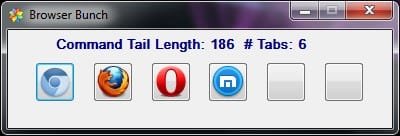
Here's a screen shot of the Gui Window that pops up allowing you to select your preferred browser for this group of Urls:

BrowserBunch.jpg

As you can see some of the buttons are blank(they are all blank on first run.) If you press a blank button a File Open Dialog will allow you to associate a browser exe with that button. Or you can cheat and just add the paths to your browsers to the .ini file.

The program also has an option to use a filter. Say as example I saved 500 IMDB search Urls to my Urlfile. But I only want to show those that have "wind" in the name like Windstruck or Gone With The Wind. I type wind in the InputBox and only those Urls will be added to the command tail.

As you can see in the screen shot, the label gives the stats on the length of the command tail, and the number of tabs that would open if you launch a browser. Just press Esc Key or click on the 'x' in the corner of the window to abort the launch.

It doesn't have any fancy mechanism to collect urls. But as I noted in the Readme.txt EditPadLite7 will handle the drop of the address bar text from most browsers. Worked with chrome, MaxThon and Firefox. Didn't like Opera. But select then copy and paste works with everything. :)

Edit: Please update to 1.2.0.0. It has several bug fixes. Also when no browser is assigned to the default button, it offers to assign the default browser. Saves you from hunting down the browser exe to start using the utility.

edit: update 1.3.0.0 added a /setup command line switch. Use it to assign multiple browsers to buttons all at once.

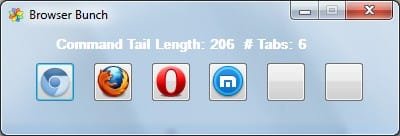
edit: update 1.4.0.0 added Glass on Vista and later OS.

BrowserBunchGlass.jpg

edit: Browser Bunch program is the same. But the zip includes a hotkey macro program BBSS.exe (browser bunch session save) to "automatically" collect the URLs from browser tabs in either Firefox or chrome. Use Firefox or chrome to open a set of tabs. Then hit the hotkey to save the tab set to a text file. Then you can use Browser Bunch to open that set with any supported browser. Much easier than dragging address bar icons one at a time or copy paste.

edit: 1.4.2.0 Now has .ini file option for each of the six browsers to set command line switches. Also includes a marcro program to capture the urls and optionally titles, from the open tabs for Chromium or Firefox.

Download page:

Faves Downloads
 
Last edited:

My Computer

Computer Manufacturer/Model Number
HP Media Center
OS
Windows 7 32 bit
CPU
AMD 5200+ dual core
Memory
2 GB
Graphics Card(s)
NVidia GeForce 6150SE 128 MB
Monitor(s) Displays
CRT
Screen Resolution
1280x1024
Hard Drives
500 GB Sata internal :

SIIG USB 3.0 docking stations w/WD Caviar Black 6 Gb/s drives
Keyboard
PS/2
Mouse
PS/2 Wheel Mouse
Other Info
SIIG USB 3.0 PCIexpress card.

My Computer

Computer Manufacturer/Model Number
Hewlett packard/p6512uk
OS
Microsoft Windows 7 Home Premium 64-bit 7600
CPU
IIx4 amd athelon 635 processor
Motherboard
FOXCONN 2AA9
Memory
2x2gb
Graphics Card(s)
ati radeon HD 5450
Sound Card
(1) Realtek High Definition Audio (2) AMD High Definition
Monitor(s) Displays
samsung lcd tv 32"
Screen Resolution
1360x 768
Hard Drives
(1) WDC WD10 01FAES-60Z2A0 SATA Disk Device (2) Maxtor OneTouch USB Device (3) ST310003 33AS USB Device (4) WD My Book 1111 USB Device
PSU
?
Cooling
air!
Keyboard
wireless hp
Mouse
wireless Hp,optical
Internet Speed
1.10mb/s
Antivirus
MSE
Browser
Firefox
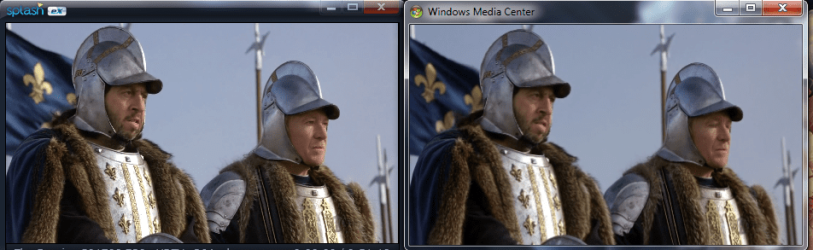
@Splash Lite - I was using that player when it first came out. I still have it installed. But they put me off by vowing never to include PGS subtitle support in the free version. VLC (if you can keep it from crashing) and WMP 12 both support PGS subs now. You have to buy Splash Pro to get PGS subs support. :(

Also they actually updated the software of the free version to remove some of the features. I don't like to download free downgrades. :(

Although I must admit it was the first player where I could move the slider on MKV files without a glitch. That's what attracted me to Splash Lite in the first place. But SPlayer does it just as well now. I can't write in Japanese or I'd lobby the author of SPlayer to add PGS subs. :)
 

My Computer

Computer Manufacturer/Model Number
HP Media Center
OS
Windows 7 32 bit
CPU
AMD 5200+ dual core
Memory
2 GB
Graphics Card(s)
NVidia GeForce 6150SE 128 MB
Monitor(s) Displays
CRT
Screen Resolution
1280x1024
Hard Drives
500 GB Sata internal :

SIIG USB 3.0 docking stations w/WD Caviar Black 6 Gb/s drives
Keyboard
PS/2
Mouse
PS/2 Wheel Mouse
Other Info
SIIG USB 3.0 PCIexpress card.
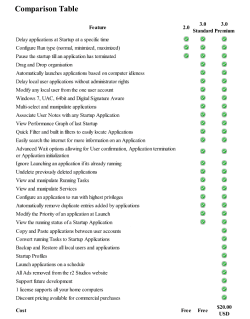
Looks like deceptive advertising to me - they say Splash Lite is "HD" capable, but the comparison chart shows it can't play AVCHD files or Blu-Ray disks. That's a deal-breaker for me.
 

My Computer

Computer type
PC/Desktop
Computer Manufacturer/Model Number
Custom built
OS
Win7-64
CPU
Intel i7-3770S
Motherboard
ASUS P8Z77-M
Memory
16GB
Graphics Card(s)
nVidia GT630
Sound Card
onboard
Monitor(s) Displays
dual
Screen Resolution
1920x1200 (primary) 1050x1680 (secondary)
Hard Drives
128GB SSD (boot)
64GB SSD (Temp/My Documents)
500GB (photos/videos)
1TB (rendered video, backups)
PSU
650W
Case
Thermaltake A30
Cooling
Thermaltake
Keyboard
Logitech Lighted
Mouse
Kensington Expert Mouse (trackball)
Internet Speed
FIOS 35/35
Antivirus
MS Security Essentials
Browser
Chrome (beta)
Is that file format or a decryption issue? If the latter you may be able to use it with one of those PassKey programs. It's been awhile since I used Splash Lite. I just remember it played mkv fine.
 

My Computer

Computer Manufacturer/Model Number
HP Media Center
OS
Windows 7 32 bit
CPU
AMD 5200+ dual core
Memory
2 GB
Graphics Card(s)
NVidia GeForce 6150SE 128 MB
Monitor(s) Displays
CRT
Screen Resolution
1280x1024
Hard Drives
500 GB Sata internal :

SIIG USB 3.0 docking stations w/WD Caviar Black 6 Gb/s drives
Keyboard
PS/2
Mouse
PS/2 Wheel Mouse
Other Info
SIIG USB 3.0 PCIexpress card.
Well I'm not sure what terminology to use, but the comparison chart says it will not play either AVCHD files or BD disks. My videos are all 1920x1080 MTS files from my camera, which are AVCHD format, and I edit these into Blu-Ray format ISO files which I then burn onto a BD-R/W disk. Consequently this software is of no use to me.
 

My Computer

Computer type
PC/Desktop
Computer Manufacturer/Model Number
Custom built
OS
Win7-64
CPU
Intel i7-3770S
Motherboard
ASUS P8Z77-M
Memory
16GB
Graphics Card(s)
nVidia GT630
Sound Card
onboard
Monitor(s) Displays
dual
Screen Resolution
1920x1200 (primary) 1050x1680 (secondary)
Hard Drives
128GB SSD (boot)
64GB SSD (Temp/My Documents)
500GB (photos/videos)
1TB (rendered video, backups)
PSU
650W
Case
Thermaltake A30
Cooling
Thermaltake
Keyboard
Logitech Lighted
Mouse
Kensington Expert Mouse (trackball)
Internet Speed
FIOS 35/35
Antivirus
MS Security Essentials
Browser
Chrome (beta)
That's surprising. I could have sword I used to play .m2ts files with it. But maybe they "downgraded" some features during one of their "updates" as I mentioned. Other than lack of PGS support I really like SPlayer portable. I still have VLC on my system. Don't know why really. It's pretty much unusable for me. Starts playing then disappears as soon as I mouse over it. Used to be a great player. It's a shame.
 

My Computer

Computer Manufacturer/Model Number
HP Media Center
OS
Windows 7 32 bit
CPU
AMD 5200+ dual core
Memory
2 GB
Graphics Card(s)
NVidia GeForce 6150SE 128 MB
Monitor(s) Displays
CRT
Screen Resolution
1280x1024
Hard Drives
500 GB Sata internal :

SIIG USB 3.0 docking stations w/WD Caviar Black 6 Gb/s drives
Keyboard
PS/2
Mouse
PS/2 Wheel Mouse
Other Info
SIIG USB 3.0 PCIexpress card.
Back
Top