Solved Free partition causing problems with USB Flash Drive

benxman

New member
Local time
8:01 AM
Messages
3
Location
Tulsa, OK
This does involve Kali Linux but I believe it DOES NOT specifically involve this distro. So, please ignore this fact unless it may involve this after all.

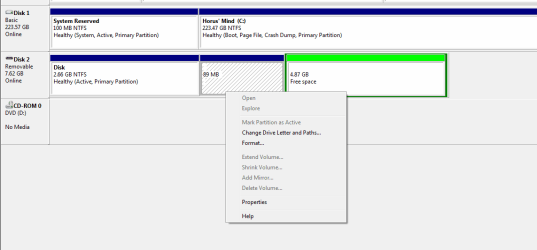
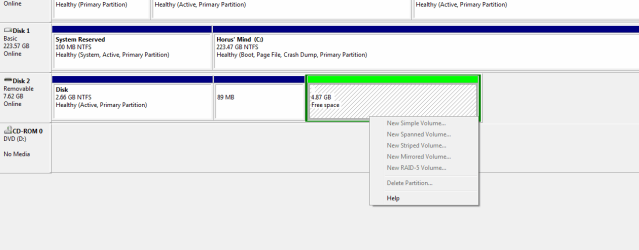
I have a USB drive that I had used for the setup of Kali Linux live boot. (Originally 8GB) Now, during the install process, I can't remember perfectly however, I started the install but it started to install on the drive instead of the HDD I had partitioned. I eventually was able to try it again and it was successful. However...

The reason I am posting it here is I have tried to format, extend, reassign, etc... this drive and nothing has worked. I have no idea why it is doing this and it's a pain considering I can only use 2.5GB now. So as you can see from the screenshots, I can't do anything really.

Any help would be appreciated!
 

Attachments

  • messed up partitions 1.png
    messed up partitions 1.png
    10.9 KB · Views: 2
  • messed up partitions 2.png
    messed up partitions 2.png
    11.4 KB · Views: 0
  • messed up partitions 3.png
    messed up partitions 3.png
    10.8 KB · Views: 0

My Computer

Computer type
PC/Desktop
Computer Manufacturer/Model Number
Custom Build
OS
Windows 7 Ultimate x64
CPU
AMD FX-8350 Black Edition Vishera 8-Core 4.0 GHz
Motherboard
ASUS 970 PRO GAMING/AURA
Memory
G.SKILL Ripjaws Z Series 32GB (4 x 8GB) 240-Pin DDR3
Graphics Card(s)
MSI Radeon R7 370 4GB
Monitor(s) Displays
HP vs15, Samsung Syncmaster 730B
Screen Resolution
1280x1024 & 1024x768
Hard Drives
Silicon Power S60 2.5" 240GB SATA III Internal Solid State Drive
PSU
Enermax Revolution X't 630W
Case
Complete custom "The Eye of Horus" by self
Cooling
Cooler Master V8 GTS
Keyboard
Gigaware standard
Mouse
MSI Interceptor DS B1
Internet Speed
4G LTE Mobile Hotspot (16GB limit)
Antivirus
Spybot Search and Destroy Technical Edition
Browser
Chrome
I assume you are referring to disk 2 in your screen shots.

What applications have you tried to reformat it?

Windows itself has it's own (possibly unfortunate) ideas about formatting USB flash drives.

I'd try a third party tool.

Such as fat32format.exe or GUIformat.exe or h2format.exe or HPUSBDisk.exe.
 

My Computer

Computer type
PC/Desktop
Computer Manufacturer/Model Number
Ignatz Special; 4 speed manual gearbox; factory air conditioning; one of one
OS
Windows 7 Home Premium SP1, 64-bit
CPU
Intel Skylake i5-6600K, not overclocked
Motherboard
AsRock Z170M Extreme 4, micro ATX
Memory
8 GB HyperX DDR4-2666 (2 x 4 GB)
Graphics Card(s)
none; graphics are integrated on CPU
Sound Card
onboard: Realtek ALC1150; external: USB Behringer UF0-202
Monitor(s) Displays
Dell S2340M 23 inch IPS
Screen Resolution
1600 x 900
Hard Drives
System: Crucial MX100 series SSD, 128 GB;
Data: Samsung Spinpoint 103SJ, 1 TB;
Backup: WD Caviar Green WD30EZRX-00D8PB0, 3 TB
PSU
Rosewill SilentNight 500 watt fanless, semi-modular
Case
Antec Solo II
Cooling
Noctua NH-U12S; Noctua F12 intake, Noctua S12A exhaust
Keyboard
Microsoft 200 6JH-00001 USB
Mouse
Dell or Microsoft optical wired; USB
Antivirus
Microsoft Security Essentials and Malwarebytes Premium
Browser
Pale Moon
Other Info
All fans PWM; speeds at idle: CPU circa 500 rpm; intake circa 600 rpm; exhaust circa 600 rpm; CPU temps 27 idle and 47 C load in a warm room (27 C/81 F) when running Intel Extreme Tuning Utility stress test.
I assume you are referring to disk 2 in your screen shots.

What applications have you tried to reformat it?

Windows itself has it's own (possibly unfortunate) ideas about formatting USB flash drives.

I'd try a third party tool.

Such as fat32format.exe or GUIformat.exe or h2format.exe or HPUSBDisk.exe.

Tried fat32format, h2format and then realized these programs are for FAT32 disks. This was originally formatted as an NTFS disk so I doubt they would have worked anyhow. I tried them just in case with no luck.

Didn't even try GUIformat as it's the exact same thing as fat32format but with a GUI. (so why did you suggest fat32format? :p )

As far as HPUSBDisk goes, I ran it without the quick format and it worked! Took a bit but it was worth it.

Thanks guys!
 

My Computer

Computer type
PC/Desktop
Computer Manufacturer/Model Number
Custom Build
OS
Windows 7 Ultimate x64
CPU
AMD FX-8350 Black Edition Vishera 8-Core 4.0 GHz
Motherboard
ASUS 970 PRO GAMING/AURA
Memory
G.SKILL Ripjaws Z Series 32GB (4 x 8GB) 240-Pin DDR3
Graphics Card(s)
MSI Radeon R7 370 4GB
Monitor(s) Displays
HP vs15, Samsung Syncmaster 730B
Screen Resolution
1280x1024 & 1024x768
Hard Drives
Silicon Power S60 2.5" 240GB SATA III Internal Solid State Drive
PSU
Enermax Revolution X't 630W
Case
Complete custom "The Eye of Horus" by self
Cooling
Cooler Master V8 GTS
Keyboard
Gigaware standard
Mouse
MSI Interceptor DS B1
Internet Speed
4G LTE Mobile Hotspot (16GB limit)
Antivirus
Spybot Search and Destroy Technical Edition
Browser
Chrome
Back
Top