Solved Free space suddenly vanishing

Kumaranil1918

New member
Member
VIP
Local time
1:14 PM
Messages
153
Location
Cuttack,Orissa
I had deleted some games from my C drive few months bac.. I had a free space of around 5 or 6gb of 24.6gb.. I restarted my system den after some time C drive was in red colour n i had only 1gb free space of 24.6gb i don kno were d free space went or wat occupied it?? I used ccleaner,disk cleaner but all in vain... I m posting my pblms lately bcoz i'm new to this forum n my pblms are solved here... Pls help me with dis also... Till now d c drive is in red colur only..:cry:
 

My Computer My Computer

Computer Manufacturer/Model Number
Compaq Presario CQ50-130US
OS
Windows 7 professional 32-bit
CPU
Intel(R) Pentium(R)Dual CPU [email protected] 2.00Ghz
Memory
2.00 GB
Monitor(s) Displays
Generic PnP Monitor
Screen Resolution
1280x800
Internet Speed
Lan
Download something like Windirstat or TreeSizeFree. Both can show you which folder is consuming all of the space.
 

My Computer My Computer

Computer Manufacturer/Model Number
Self-Built in July 2009
OS
Windows 7 Ultimate x64
CPU
Intel Q9550 2.83Ghz OC'd to 3.40Ghz
Motherboard
Gigabyte GA-EP45-UD3R rev. 1.1, F12 BIOS
Memory
8GB G.Skill PI DDR2-800, 4-4-4-12 timings
Graphics Card(s)
EVGA 1280MB Nvidia GeForce GTX570
Sound Card
Realtek ALC899A 8 channel onboard audio
Monitor(s) Displays
23" Acer x233H
Screen Resolution
1920x1080
Hard Drives
Intel X25-M 80GB Gen 2 SSD
Western Digital 1TB Caviar Black, 32MB cache. WD1001FALS
PSU
Corsair 620HX modular
Case
Antec P182
Cooling
stock
Keyboard
ABS M1 Mechanical
Mouse
Logitech G9 Laser Mouse
Internet Speed
15/2 cable modem
Other Info
Windows and Linux enthusiast. Logitech G35 Headset.
In my opinion you simply have too small C: drive (24.6 GB). Consider replacing it with bigger, otherwise you are going to be pretty much all the time on red.

Kari
 

My Computer My Computer

Computer type
Laptop
Computer Manufacturer/Model Number
HP ENVY 17-1150eg
OS
Windows 10 Pro x64 EN-GB
CPU
1.6 GHz Intel Core i7-720QM Processor
Memory
6 GB
Graphics Card(s)
ATI Mobility Radeon HD 5850 Graphics
Sound Card
Beats sound system with integrated subwoofer
Monitor(s) Displays
17" laptop display, 22" LED and 32" Full HD TV through HDMI
Screen Resolution
1600*900 (1), 1920*1080 (2&3)
Hard Drives
Internal: 2 x 500 GB SATA Hard Disk Drive 7200 rpm
External: 2TB for backups, 3TB USB3 network drive for media
Cooling
As Envy runs a bit warm, I have it on a Cooler Master pad
Keyboard
Logitech diNovo Media Desktop Laser (bluetooth)
Mouse
Logitech Performance Mouse MX
Internet Speed
50/10 Mbps VDSL
Antivirus
Windows Defender 4.3.9431.0
Browser
Maxthon 3.5.2., IE11
I'm guessing you either have a small SSD or created a tiny partition on a larger drive. If the first, you'll probably want to get a biger drive. If the second, you might want to rethink your partition sizes.
 

My Computer My Computer

OS
Windows 7 Ultimate x64 SP1
CPU
Intel Core i7-2600
Motherboard
Gigabyte GA-P67A-UD3P-B3
Memory
12 GB Patriot Extreme DDR3-1333
Graphics Card(s)
Nvidia GTX 470
Monitor(s) Displays
Dell UltraSharp 2209WA
Hard Drives
OCZ Agility3 240 GB, WD5001AALS, WD7501AALS
PSU
OCZ ModStream 700W
Case
CoolerMaster HAF 912 Advanced
Cooling
CoolerMaster Hyper 212 Plus
I would consider 25GB far too small for OS/programs.
Personally:
64GB min SSD (Many think this is plenty).
100GB on a 500+GB spinner

when I get around to buying an SSD I'll be going for 128GB (Crucial).
 

My Computer My Computer

Computer type
PC/Desktop
Computer Manufacturer/Model Number
Own build
OS
Windows 7x64 Home Premium SP1
CPU
Intel i7 2600k
Motherboard
ASUS P8Z68 Deluxe
Memory
G.Skill Ripjaws (DDR3-1600) 2x4GB
Graphics Card(s)
Nvidia GeForce GTS 450; Intel HD Graphics 3000(GT2+)
Monitor(s) Displays
Dell Ultrasharp IPS panel U2311H, Samsung SyncMaster P2350
Screen Resolution
1920x1080
Hard Drives
Samsung 850 Pro SSD 256GB, Samsung SSD 840 120GB, Seagates 1TB Barracuda ST31000528AS x2
PSU
Seasonic M12II 520W
Case
Lian Li Lancool PC-K60
Cooling
Case: 1x120mm, 3x140mm CPU: Hyper 212+
Keyboard
Logitech MK520 (wireless)
Mouse
Logitech MK520
Internet Speed
6-7 Mbps
Antivirus
Norton Security Premium, Malwarebytes on 2 (MSE on 3rd PC)
Browser
FireFox
Other Info
Audio: Logitech Z523 2.1
Check the shadowstorage. The cmd command is:

vssadmin list shadowstorage
 

My Computer My Computer

Computer Manufacturer/Model Number
HP, Dell, Gateway, Toshiba - 4 laptops and 2 desktops
OS
Vista, Windows7, Mint Mate, Zorin, Windows 8
CPU
from 1.6GHz Duo to i7
Monitor(s) Displays
2x HP w2207
Hard Drives
5x HDD, 7x SSD, 12x Externals
Keyboard
with trackball - no mices
Mouse
Trackball mice
Internet Speed
DSL 6000
Check the shadowstorage. The cmd command is:

vssadmin list shadowstorage
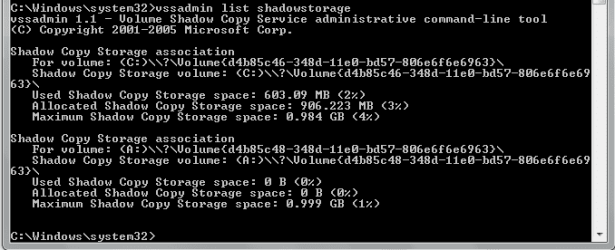
I hav uploaded its screenshot.. wat shall i do now??
 

Attachments

  • vssadmin list shadowstorage.PNG
    vssadmin list shadowstorage.PNG
    5.2 KB · Views: 42

My Computer My Computer

Computer Manufacturer/Model Number
Compaq Presario CQ50-130US
OS
Windows 7 professional 32-bit
CPU
Intel(R) Pentium(R)Dual CPU [email protected] 2.00Ghz
Memory
2.00 GB
Monitor(s) Displays
Generic PnP Monitor
Screen Resolution
1280x800
Internet Speed
Lan
Hmm, the shadowstorage is NOT the culprit. There is less than 1GB allocated. You can leave that alone.
 

My Computer My Computer

Computer Manufacturer/Model Number
HP, Dell, Gateway, Toshiba - 4 laptops and 2 desktops
OS
Vista, Windows7, Mint Mate, Zorin, Windows 8
CPU
from 1.6GHz Duo to i7
Monitor(s) Displays
2x HP w2207
Hard Drives
5x HDD, 7x SSD, 12x Externals
Keyboard
with trackball - no mices
Mouse
Trackball mice
Internet Speed
DSL 6000
what is shadow storage specifically? is it tied to backup and restore?
 

My Computer My Computer

Computer Manufacturer/Model Number
Toshiba Z830-S8301
OS
Windows 7 Ultimate SP1 x64
CPU
Intel Core i5 2557M
Motherboard
Intel QM67
Memory
6 Gb PC3-10600 DDR3
Graphics Card(s)
Intel 3000 HD
Monitor(s) Displays
13.3" Matt LCD Panel
Screen Resolution
1366 x 768
Hard Drives
128Gb Toshiba mSATA SSD
Cooling
Toshiba Airflow Technology
Keyboard
Chiclet
Mouse
Synaptics Touchpad
Other Info
1.08 Kg (2.38lb)

My Computer My Computer

Computer type
PC/Desktop
Computer Manufacturer/Model Number
Ignatz Special; 4 speed manual gearbox; factory air conditioning; one of one
OS
Windows 7 Home Premium SP1, 64-bit
CPU
Intel Skylake i5-6600K, not overclocked
Motherboard
AsRock Z170M Extreme 4, micro ATX
Memory
8 GB HyperX DDR4-2666 (2 x 4 GB)
Graphics Card(s)
none; graphics are integrated on CPU
Sound Card
onboard: Realtek ALC1150; external: USB Behringer UF0-202
Monitor(s) Displays
Dell S2340M 23 inch IPS
Screen Resolution
1600 x 900
Hard Drives
System: Crucial MX100 series SSD, 128 GB;
Data: Samsung Spinpoint 103SJ, 1 TB;
Backup: WD Caviar Green WD30EZRX-00D8PB0, 3 TB
PSU
Rosewill SilentNight 500 watt fanless, semi-modular
Case
Antec Solo II
Cooling
Noctua NH-U12S; Noctua F12 intake, Noctua S12A exhaust
Keyboard
Microsoft 200 6JH-00001 USB
Mouse
Dell or Microsoft optical wired; USB
Antivirus
Microsoft Security Essentials and Malwarebytes Premium
Browser
Pale Moon
Other Info
All fans PWM; speeds at idle: CPU circa 500 rpm; intake circa 600 rpm; exhaust circa 600 rpm; CPU temps 27 idle and 47 C load in a warm room (27 C/81 F) when running Intel Extreme Tuning Utility stress test.
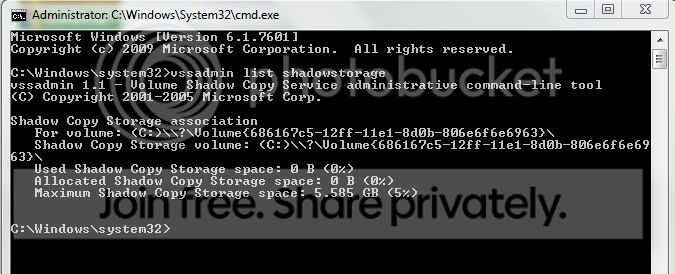
ah okay, well mines disables and i have 5Gb still allocated according to the command line, can i remove it and will that give me an additional 5gb on my drive or not? i disabled restore through the GUI and gained around 8gb back already iirc

cheers

Ben
 

My Computer My Computer

Computer Manufacturer/Model Number
Toshiba Z830-S8301
OS
Windows 7 Ultimate SP1 x64
CPU
Intel Core i5 2557M
Motherboard
Intel QM67
Memory
6 Gb PC3-10600 DDR3
Graphics Card(s)
Intel 3000 HD
Monitor(s) Displays
13.3" Matt LCD Panel
Screen Resolution
1366 x 768
Hard Drives
128Gb Toshiba mSATA SSD
Cooling
Toshiba Airflow Technology
Keyboard
Chiclet
Mouse
Synaptics Touchpad
Other Info
1.08 Kg (2.38lb)
If you disabled restore, it should all be gone. Where do you see the 5GBs.
 

My Computer My Computer

Computer Manufacturer/Model Number
HP, Dell, Gateway, Toshiba - 4 laptops and 2 desktops
OS
Vista, Windows7, Mint Mate, Zorin, Windows 8
CPU
from 1.6GHz Duo to i7
Monitor(s) Displays
2x HP w2207
Hard Drives
5x HDD, 7x SSD, 12x Externals
Keyboard
with trackball - no mices
Mouse
Trackball mice
Internet Speed
DSL 6000
i disabled restore

That's usually a very bad decision unless it's a short-term situation where you are really in a jam for space.

System Restore is a highly valuable part of Windows. I'd give it at least 3 to 5 GB unless I was suffering with a very small drive. Even then, I'd try to find another way to save space.
 

My Computer My Computer

Computer type
PC/Desktop
Computer Manufacturer/Model Number
Ignatz Special; 4 speed manual gearbox; factory air conditioning; one of one
OS
Windows 7 Home Premium SP1, 64-bit
CPU
Intel Skylake i5-6600K, not overclocked
Motherboard
AsRock Z170M Extreme 4, micro ATX
Memory
8 GB HyperX DDR4-2666 (2 x 4 GB)
Graphics Card(s)
none; graphics are integrated on CPU
Sound Card
onboard: Realtek ALC1150; external: USB Behringer UF0-202
Monitor(s) Displays
Dell S2340M 23 inch IPS
Screen Resolution
1600 x 900
Hard Drives
System: Crucial MX100 series SSD, 128 GB;
Data: Samsung Spinpoint 103SJ, 1 TB;
Backup: WD Caviar Green WD30EZRX-00D8PB0, 3 TB
PSU
Rosewill SilentNight 500 watt fanless, semi-modular
Case
Antec Solo II
Cooling
Noctua NH-U12S; Noctua F12 intake, Noctua S12A exhaust
Keyboard
Microsoft 200 6JH-00001 USB
Mouse
Dell or Microsoft optical wired; USB
Antivirus
Microsoft Security Essentials and Malwarebytes Premium
Browser
Pale Moon
Other Info
All fans PWM; speeds at idle: CPU circa 500 rpm; intake circa 600 rpm; exhaust circa 600 rpm; CPU temps 27 idle and 47 C load in a warm room (27 C/81 F) when running Intel Extreme Tuning Utility stress test.
In principle I would not disagree. But system restore is a very iffy function and often restore points vanish for no apparent reason.

For backup protection I really recommend to go with imaging (but not the windows imaging, that sucks). Restore points i keep only out of tradition hoping they stick around.
 

My Computer My Computer

Computer Manufacturer/Model Number
HP, Dell, Gateway, Toshiba - 4 laptops and 2 desktops
OS
Vista, Windows7, Mint Mate, Zorin, Windows 8
CPU
from 1.6GHz Duo to i7
Monitor(s) Displays
2x HP w2207
Hard Drives
5x HDD, 7x SSD, 12x Externals
Keyboard
with trackball - no mices
Mouse
Trackball mice
Internet Speed
DSL 6000
man 24 gb are you kidding me op!
get bigger drive,but wait till the prices go back to normal!
thailand flood is making hdd expensive
 

My Computer My Computer

Computer Manufacturer/Model Number
home build/gigabyte mobo
OS
windows 7 64 bit premium
CPU
q6600 2.4 overclocked to 3.2 ghz
Motherboard
gigabyte ga_73pvm.s2h rev 1.0
Memory
4 gb 800 mhz corsair
Graphics Card(s)
gtx 480 mbfg o/c
Sound Card
onboard realtek hd audio
Monitor(s) Displays
benq 24 inch (led)
Screen Resolution
1920x1080p
Hard Drives
barracuda 7200rpm 320gb
PSU
jeantech 900watts
Case
Novatech prowler midi tower v2 gaming case
Cooling
artic cooling 7 pro rev 2.0, 120mm front,rear and side
Keyboard
saitek eclipse 2
Mouse
mad catz mw2 laser mouse
Internet Speed
50mb virgin
Other Info
Adding a raptor hdd for gaming use only.
If you disabled restore, it should all be gone. Where do you see the 5GBs.

i see it here, its allocated but not actually in use, is that right?

ShadowStorage.jpg


i disabled restore

That's usually a very bad decision unless it's a short-term situation where you are really in a jam for space.

System Restore is a highly valuable part of Windows. I'd give it at least 3 to 5 GB unless I was suffering with a very small drive. Even then, I'd try to find another way to save space.

i have absolutely no use for restore at all, my system is stable and very minimalist. i backup once a week and take a system image after every major install/upgrade so its just wasted space that windows uses to slow down my PC :-)

cheers for the input people and sorry to the O/P for bit of a thread hi-jack but i spose any info on topic is useful!
 

My Computer My Computer

Computer Manufacturer/Model Number
Toshiba Z830-S8301
OS
Windows 7 Ultimate SP1 x64
CPU
Intel Core i5 2557M
Motherboard
Intel QM67
Memory
6 Gb PC3-10600 DDR3
Graphics Card(s)
Intel 3000 HD
Monitor(s) Displays
13.3" Matt LCD Panel
Screen Resolution
1366 x 768
Hard Drives
128Gb Toshiba mSATA SSD
Cooling
Toshiba Airflow Technology
Keyboard
Chiclet
Mouse
Synaptics Touchpad
Other Info
1.08 Kg (2.38lb)
see it here, its allocated but not actually in use, is that right?
That is OK. If you disabled restore, it will not use it. It is just keeping the setting in case you enable restore again.
 

My Computer My Computer

Computer Manufacturer/Model Number
HP, Dell, Gateway, Toshiba - 4 laptops and 2 desktops
OS
Vista, Windows7, Mint Mate, Zorin, Windows 8
CPU
from 1.6GHz Duo to i7
Monitor(s) Displays
2x HP w2207
Hard Drives
5x HDD, 7x SSD, 12x Externals
Keyboard
with trackball - no mices
Mouse
Trackball mice
Internet Speed
DSL 6000
cool, cheers :-) repped :-)
 

My Computer My Computer

Computer Manufacturer/Model Number
Toshiba Z830-S8301
OS
Windows 7 Ultimate SP1 x64
CPU
Intel Core i5 2557M
Motherboard
Intel QM67
Memory
6 Gb PC3-10600 DDR3
Graphics Card(s)
Intel 3000 HD
Monitor(s) Displays
13.3" Matt LCD Panel
Screen Resolution
1366 x 768
Hard Drives
128Gb Toshiba mSATA SSD
Cooling
Toshiba Airflow Technology
Keyboard
Chiclet
Mouse
Synaptics Touchpad
Other Info
1.08 Kg (2.38lb)
Wat shall i do now.. Pls suggestor help me...
 

My Computer My Computer

Computer Manufacturer/Model Number
Compaq Presario CQ50-130US
OS
Windows 7 professional 32-bit
CPU
Intel(R) Pentium(R)Dual CPU [email protected] 2.00Ghz
Memory
2.00 GB
Monitor(s) Displays
Generic PnP Monitor
Screen Resolution
1280x800
Internet Speed
Lan

My Computer My Computer

Computer type
PC/Desktop
Computer Manufacturer/Model Number
Ignatz Special; 4 speed manual gearbox; factory air conditioning; one of one
OS
Windows 7 Home Premium SP1, 64-bit
CPU
Intel Skylake i5-6600K, not overclocked
Motherboard
AsRock Z170M Extreme 4, micro ATX
Memory
8 GB HyperX DDR4-2666 (2 x 4 GB)
Graphics Card(s)
none; graphics are integrated on CPU
Sound Card
onboard: Realtek ALC1150; external: USB Behringer UF0-202
Monitor(s) Displays
Dell S2340M 23 inch IPS
Screen Resolution
1600 x 900
Hard Drives
System: Crucial MX100 series SSD, 128 GB;
Data: Samsung Spinpoint 103SJ, 1 TB;
Backup: WD Caviar Green WD30EZRX-00D8PB0, 3 TB
PSU
Rosewill SilentNight 500 watt fanless, semi-modular
Case
Antec Solo II
Cooling
Noctua NH-U12S; Noctua F12 intake, Noctua S12A exhaust
Keyboard
Microsoft 200 6JH-00001 USB
Mouse
Dell or Microsoft optical wired; USB
Antivirus
Microsoft Security Essentials and Malwarebytes Premium
Browser
Pale Moon
Other Info
All fans PWM; speeds at idle: CPU circa 500 rpm; intake circa 600 rpm; exhaust circa 600 rpm; CPU temps 27 idle and 47 C load in a warm room (27 C/81 F) when running Intel Extreme Tuning Utility stress test.
Back
Top