Solved Free space suddenly vanishing

That's usually a very bad decision unless it's a short-term situation where you are really in a jam for space.
Not always. I disable system restore right away on all of my systems, and all the ones I support. It has never worked for me when I've tried...only giving me false hope and wasting time that could be spent getting right to the issue and solving it. At one point, the major AV companies used to recommend disabling it completely because malware could hide there and reinfect systems. Maybe that has changed, but there's still no reason (for me) to leave system restore enabled.

Now, for the record, I do not tell others on here to disable it. I wouldn't try talking anyone out of using it. For my own personal experience, it's a complete waste of time and space....but the emphasis is on personal.
 

My Computer My Computer

OS
Windows 7 Ultimate x64 SP1
CPU
Intel Core i7-2600
Motherboard
Gigabyte GA-P67A-UD3P-B3
Memory
12 GB Patriot Extreme DDR3-1333
Graphics Card(s)
Nvidia GTX 470
Monitor(s) Displays
Dell UltraSharp 2209WA
Hard Drives
OCZ Agility3 240 GB, WD5001AALS, WD7501AALS
PSU
OCZ ModStream 700W
Case
CoolerMaster HAF 912 Advanced
Cooling
CoolerMaster Hyper 212 Plus
I have found the system restore function unreliable and don't use the function at all. I rely on system images.
 

My Computer My Computer

Computer type
PC/Desktop
Computer Manufacturer/Model Number
Own build
OS
Windows 7x64 Home Premium SP1
CPU
Intel i7 2600k
Motherboard
ASUS P8Z68 Deluxe
Memory
G.Skill Ripjaws (DDR3-1600) 2x4GB
Graphics Card(s)
Nvidia GeForce GTS 450; Intel HD Graphics 3000(GT2+)
Monitor(s) Displays
Dell Ultrasharp IPS panel U2311H, Samsung SyncMaster P2350
Screen Resolution
1920x1080
Hard Drives
Samsung 850 Pro SSD 256GB, Samsung SSD 840 120GB, Seagates 1TB Barracuda ST31000528AS x2
PSU
Seasonic M12II 520W
Case
Lian Li Lancool PC-K60
Cooling
Case: 1x120mm, 3x140mm CPU: Hyper 212+
Keyboard
Logitech MK520 (wireless)
Mouse
Logitech MK520
Internet Speed
6-7 Mbps
Antivirus
Norton Security Premium, Malwarebytes on 2 (MSE on 3rd PC)
Browser
FireFox
Other Info
Audio: Logitech Z523 2.1
I have found the system restore function unreliable and don't use the function at all. I rely on system images.
+1, absolutely true. I just tried a system restore on my wife's laptop. Vssadmin showed that I have 11 restore points. But the restore wizard shows only 2.
 

My Computer My Computer

Computer Manufacturer/Model Number
HP, Dell, Gateway, Toshiba - 4 laptops and 2 desktops
OS
Vista, Windows7, Mint Mate, Zorin, Windows 8
CPU
from 1.6GHz Duo to i7
Monitor(s) Displays
2x HP w2207
Hard Drives
5x HDD, 7x SSD, 12x Externals
Keyboard
with trackball - no mices
Mouse
Trackball mice
Internet Speed
DSL 6000
Hey guys!
I have exactly the same problem. Space on my C drive was low and I used to get the "low disc space" warning. I deleted some games, stuff I don't need and made about 10GB of free space. Day by day after, I instaled nothing, but had less and less space, and now I'm down to 500MB of free space!!! I have no idea what is going on...???
Btw, I have a 100GB C drive
 

My Computer My Computer

OS
Windows 7
Hey guys!
I have exactly the same problem. Space on my C drive was low and I used to get the "low disc space" warning. I deleted some games, stuff I don't need and made about 10GB of free space. Day by day after, I instaled nothing, but had less and less space, and now I'm down to 500MB of free space!!! I have no idea what is going on...???
Btw, I have a 100GB C drive
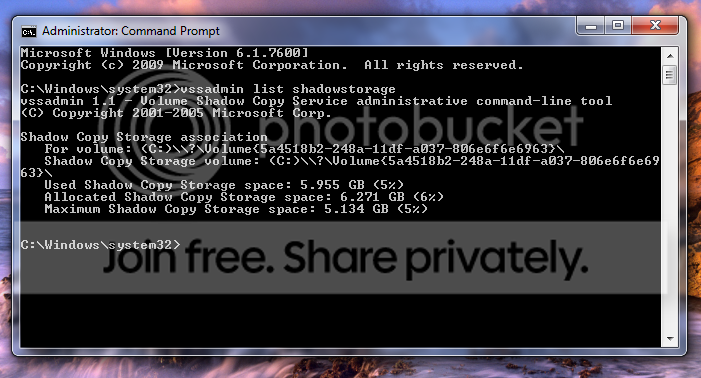
Did you check your shadowstorage. Run this cmd command

vssadmin list shadowstorage

Look for Allocated.
 

My Computer My Computer

Computer Manufacturer/Model Number
HP, Dell, Gateway, Toshiba - 4 laptops and 2 desktops
OS
Vista, Windows7, Mint Mate, Zorin, Windows 8
CPU
from 1.6GHz Duo to i7
Monitor(s) Displays
2x HP w2207
Hard Drives
5x HDD, 7x SSD, 12x Externals
Keyboard
with trackball - no mices
Mouse
Trackball mice
Internet Speed
DSL 6000
untitled.png


Here, so what do I do now?
 

My Computer My Computer

OS
Windows 7
Well, this is only 6GBs. I would keep that. There must be another culprit. Run WinDirStat. That will tell you where the rest of the space went. In the meantime you can run CCleaner to get rid of all those temporary files.
 
Last edited:

My Computer My Computer

Computer Manufacturer/Model Number
HP, Dell, Gateway, Toshiba - 4 laptops and 2 desktops
OS
Vista, Windows7, Mint Mate, Zorin, Windows 8
CPU
from 1.6GHz Duo to i7
Monitor(s) Displays
2x HP w2207
Hard Drives
5x HDD, 7x SSD, 12x Externals
Keyboard
with trackball - no mices
Mouse
Trackball mice
Internet Speed
DSL 6000
Ok, I'll do that, hope it helps. Thanks for such quick help!
 

My Computer My Computer

OS
Windows 7
This suddenly happened again i had around 4gb of free space in my C drive but 2day mng i noticed dat only 471mb of free space is left in my C drive.. Pls help me....
 

My Computer My Computer

Computer Manufacturer/Model Number
Compaq Presario CQ50-130US
OS
Windows 7 professional 32-bit
CPU
Intel(R) Pentium(R)Dual CPU [email protected] 2.00Ghz
Memory
2.00 GB
Monitor(s) Displays
Generic PnP Monitor
Screen Resolution
1280x800
Internet Speed
Lan
Tank u all for ur help & support in solving my problems.I reinstalled my windows 7 PE 32-bit on 14.04.12.
 

My Computer My Computer

Computer Manufacturer/Model Number
Compaq Presario CQ50-130US
OS
Windows 7 professional 32-bit
CPU
Intel(R) Pentium(R)Dual CPU [email protected] 2.00Ghz
Memory
2.00 GB
Monitor(s) Displays
Generic PnP Monitor
Screen Resolution
1280x800
Internet Speed
Lan
Back
Top